eBook - ePub
Focus & Filter
Professional Techniques for Mastering Digital Photography and Capturing the Perfect Shot
- 200 pages
- English
- ePUB (mobile friendly)
- Available on iOS & Android
eBook - ePub
Focus & Filter
Professional Techniques for Mastering Digital Photography and Capturing the Perfect Shot
About this book
Free yourself from Auto Mode with indispensable tricks and techniques for professional-quality photos with your DSLR or mirrorless camera.
Revealing insider secrets and easy-to-learn techniques for stunning photos, this book teaches you how to take beautiful images anywhere with DSLR or mirrorless cameras. Focus & Filter, a must-have guide by award-winning photographer Andrew Darlow, features fifty techniques, fifty Pro Assignments, and more than 250 color photographs that show you how to capture:
*Candid and formal portraits
*Safari-quality animal pictures
*Spectacular nighttime cityscapes
*Breathtaking fireworks photos
*Dramatic high-speed motion
*Mouthwatering food photos
*Glare-free shots through glass
Whether you're enjoying a hobby or building a career in photography, Focus & Filter includes all the technical advice you need to hone your skills, from choosing your equipment and setting up your studio to mastering camera settings, working in the field, and building rapport with your models.
Trusted by 375,005 students
Access to over 1.5 million titles for a fair monthly price.
Study more efficiently using our study tools.
Information
Subtopic
Digital MediaSECTION 1
Master Your DSLR
Specific Techniques for Getting the Most from Your Camera
Photography is truly magical. And I’m certainly not alone in thinking so. Millions of people around the world take photographs with a wide range of cameras, from cell phones to large-view cameras. In this section, I will present specific tips and techniques for understanding and using many of the creative tools that can be found on all DSLR and mirrorless cameras, as well as many advanced compact cameras.
DIGITAL CAMERA TYPES
Digital cameras are sold in four main configurations: digital single-lens reflex cameras (DSLRs), mirrorless interchangeable lens cameras (MILCs), compact fixed-lens mirrorless cameras and digital rangefinder cameras. Digital rangefinder cameras are also mirrorless, but have some distinct differences.
The main difference between DSLRs and the three mirrorless camera types mentioned is that every DSLR contains an optical viewfinder that works in tandem with a mirror that’s positioned at an angle inside the camera and behind the lens. This allows you to see through the lens while focusing and composing photographs. During an exposure, the mirror flips up and out of the way. There is also often a button you can press to see a depth-of-field preview, which gives you a preview of the sharpness in different parts of the scene.
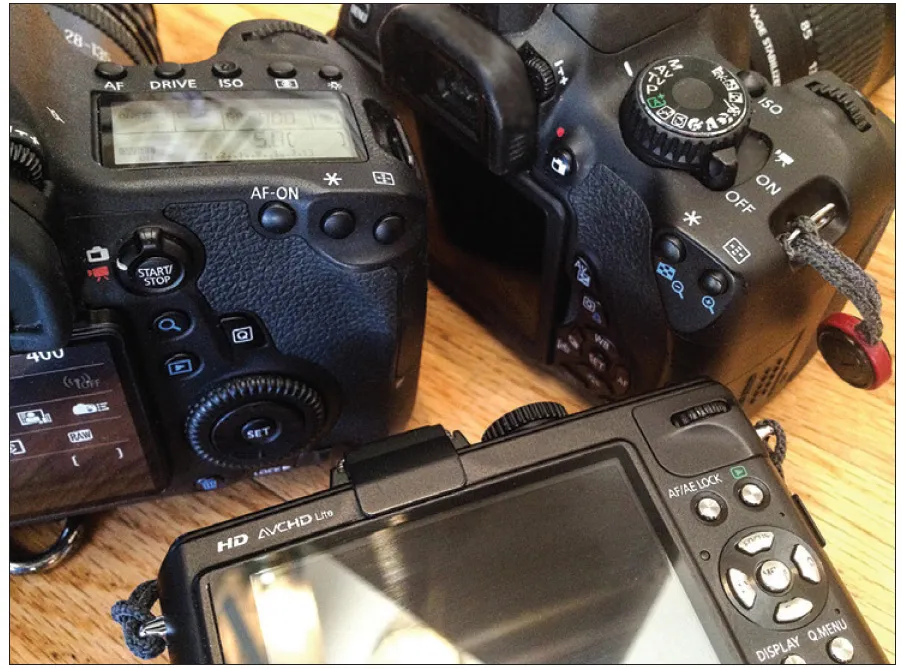
Fig. 0.1 A Canon EOS 6D (left), Canon Rebel T4i (right) and a Panasonic Lumix DMC-LX5 (bottom).
In the three mirrorless cameras types, there is, as you may have guessed, no mirror. Instead, in almost all cases, a video image created by the image on the camera’s sensor is sent in near real-time to an electronic viewfinder (EVF) located in the back top area of the camera, which allows the viewer to see an image prior to the shot being taken that approximates the final image (assuming no flash, or strobe, is being used).
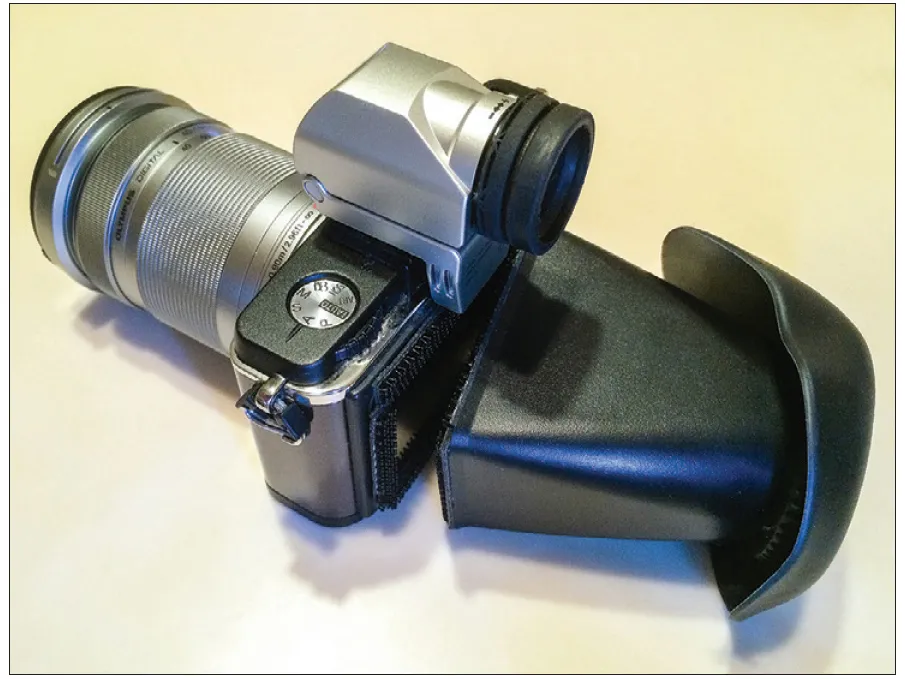
Fig. 0.2 An Olympus PEN E-P2 with an Olympus Electronic Viewfinder VF-2 and an LCD Loupe.
A fixed-lens camera means that you cannot change the camera’s lens, but you can often add screw-on accessories such as close-up lenses or telephoto lenses. Some mirrorless cameras have no viewfinder at all, like the Panasonic Lumix DMC-LX5 (fig. 0.1); you just rely on the camera’s LCD screen, much like you would with a smartphone. Some mirrorless cameras, like the Olympus PEN E-P2, shown in fig. 0.2 with an Olympus Electronic Viewfinder VF-2, offer optional viewfinders. One negative with that option is that the camera’s hot shoe (the slot on top of many cameras usually reserved for shoe-mount flash units) will generally be used for that, making it impossible to use a shoe-mount flash at the same time in that location.
Digital rangefinder cameras differ from DSLRs primarily due to the way you compose and focus the scene. You view the scene through an optical viewfinder and line up two images until they overlap. There are some advantages and disadvantages to digital rangefinders. The greatest advantage is that their lenses (especially wide to medium focal length lenses) tend to be smaller and lighter than DSLR lenses (especially full-frame lenses).

FLASH OPTIONS—Electronic flash is truly an incredible invention, and many cameras have built-in flash units. They do have some limitations, but with a bit of practice, you might be surprised at how they can affect the quality of your photographs. I cover this topic in Tip 33 and Tip 34.
The main negative with digital rangefinders is that the image you see in the optical viewfinder is almost never the same (as far as the coverage of the scene, or field of view) as compared with a DSLR or mirrorless camera with an EVF or live view capability. In fact, the image’s field of view can be extremely off with very wide lenses and telephoto lenses.
In some cases, digital rangefinder cameras can use live view as described above via the LCD or an accessory EVF. Pictured in fig. 0.3, Leica M is an example of a digital rangefinder camera that has live view functionality via the LCD or with an accessory EVF. You can find additional details on rangefinders and specific digital rangefinder cameras, at www.camera-wiki.org, “The Leica Mystique” article at www.blogarithms.com/2013/10/01/leica and www.thisweekinphoto.com/category/gear-episodes.
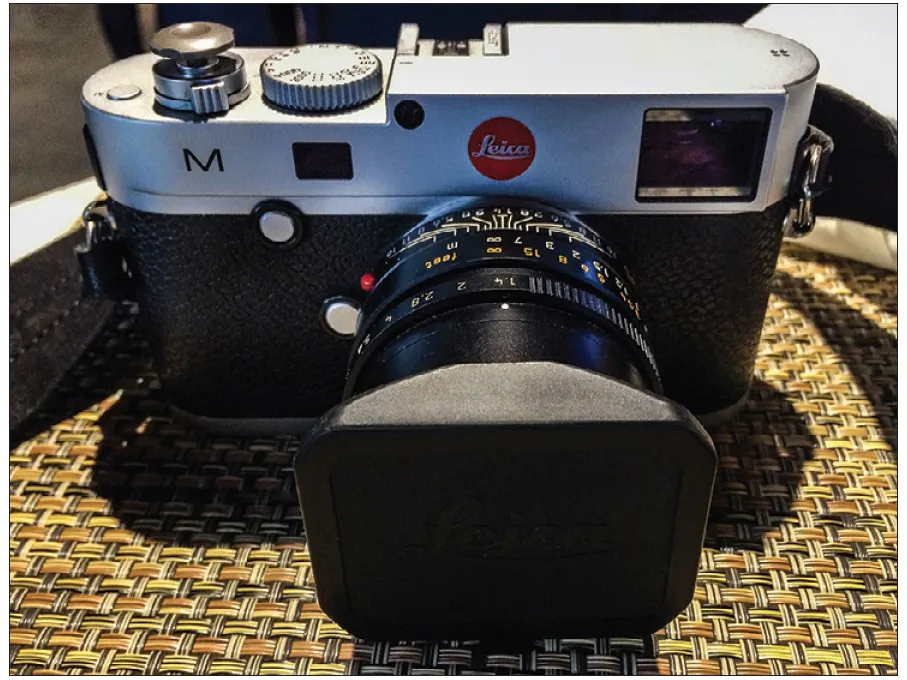
Fig. 0.3 Leica M is an example of a digital rangefinder.
A number of companies offer external EVFs and small monitors for DSLRs. These are especially popular with videographers, but they can be very useful for still photography (especially when bright sun makes it difficult to see your images on the LCD). Some DSLRs and compact mirrorless cameras also have touch-screen controls, which can be useful for changing camera settings, and especially for video (you can just touch the spot you want to focus on, as long as your camera/lens combination supports the ability to adjust focus in that manner). Touch-screen controls also usually allow image pinch, zoom and swipe for photo review, like on smartphones.
There is a lot of additional information available online that explains different digital camera types. Wikipedia.org is one good source and kenrockwell.com is another excellent option. A Google search for “digital camera types” will bring up these and other resources.
Reflective Light Meters and Gray T-Shirts
Virtually all modern digital cameras have a reflective light meter inside. All reflective light meters measure the light reflecting off the subjects in the scene, and they basically see the world as being covered with a big medium-gray T-shirt as a baseline with which to work. Once you know that, you can make appropriate adjustments in the exposure based on what’s really in front of you. If you’ve ever seen or used an incident light meter (they are common on Hollywood sets and fashion shoots), it works by measuring the actual light falling on it in the exact place where it is held, so it does not see the world as wearing a big gray T-shirt.
PRIMARY CAMERA MODES
Before I go into the main features for controlling exposure with the above camera types in the first few tips, picture yourself outside on a sunny day with a DSLR or mirrorless camera. Depending on the combination of aperture, shutter speed and ISO settings you use, you can create a photo that is completely white (overexposed), very dark (underexposed) or properly exposed (the image looks similar to the way your eyes perceive the scene). And even when your photo is properly exposed, there are many combinations of aperture, shutter speed and ISO that can create that image. It’s a bit like adding three numbers to get to 10. There are many different possible combinations to get to 10. In addition to DSLRs and mirrorless cameras, many other cameras today have advanced features, including Aperture Priority, Shutter Priority, Manual mode and/or Auto ISO. Tip 1 to Tip 4 tackle all of these features, with some assignments that should help you to start making photos instead of just taking them. You will also find suggestions to use one or more of these modes throughout the book depending on the topic I’m covering.
These modes can either be found on a camera dial (on larger, more advanced cameras) or via an internal menu (many smaller cameras).
APERTURE PRIORITY MODE—Discussed in Tip 1 (page 11) and Tip 2 (page 15), this setting allows you to select a specific aperture and the camera automatically adjusts the shutter speed (and sometimes the ISO, if your camera has an Auto ISO option, which I cover in Tip 4, page 22).
SHUTTER PRIORITY MODE—Discussed in Tip 3 (page 18), Shutter Priority is a feature that allows you to choose a specific shutter speed. The camera’s aperture is then set for you automatically based on what the camera meter thinks is the proper exposure.
MANUAL MODE—This mode, discussed in Tip 4 (page 22), allows you to set the aperture, shutter speed, ISO and other settings manually.
TIP 1
Mastering Aperture Priority
Knowing how to control your aperture (f-stop) instead of just letting your camera do it for y...
Table of contents
- COVER
- TITLE PAGE
- COPYRIGHT
- DEDICATION
- CONTENTS
- INTRODUCTION
- SECTION 1: MASTER YOUR DSLR
- SECTION 2: SHOPPING SMART
- SECTION 3: STUDIO MASTERY
- SECTION 4: SHOOTING IN THE FIELD
- CONCLUSION
- ACKNOWLEDGMENTS
- ABOUT THE AUTHOR
Frequently asked questions
Yes, you can cancel anytime from the Subscription tab in your account settings on the Perlego website. Your subscription will stay active until the end of your current billing period. Learn how to cancel your subscription
No, books cannot be downloaded as external files, such as PDFs, for use outside of Perlego. However, you can download books within the Perlego app for offline reading on mobile or tablet. Learn how to download books offline
Perlego offers two plans: Essential and Complete
- Essential is ideal for learners and professionals who enjoy exploring a wide range of subjects. Access the Essential Library with 800,000+ trusted titles and best-sellers across business, personal growth, and the humanities. Includes unlimited reading time and Standard Read Aloud voice.
- Complete: Perfect for advanced learners and researchers needing full, unrestricted access. Unlock 1.5M+ books across hundreds of subjects, including academic and specialized titles. The Complete Plan also includes advanced features like Premium Read Aloud and Research Assistant.
We are an online textbook subscription service, where you can get access to an entire online library for less than the price of a single book per month. With over 1.5 million books across 990+ topics, we’ve got you covered! Learn about our mission
Look out for the read-aloud symbol on your next book to see if you can listen to it. The read-aloud tool reads text aloud for you, highlighting the text as it is being read. You can pause it, speed it up and slow it down. Learn more about Read Aloud
Yes! You can use the Perlego app on both iOS and Android devices to read anytime, anywhere — even offline. Perfect for commutes or when you’re on the go.
Please note we cannot support devices running on iOS 13 and Android 7 or earlier. Learn more about using the app
Please note we cannot support devices running on iOS 13 and Android 7 or earlier. Learn more about using the app
Yes, you can access Focus & Filter by Andrew Darlow in PDF and/or ePUB format, as well as other popular books in Media & Performing Arts & Digital Media. We have over 1.5 million books available in our catalogue for you to explore.