Microsoft  Office 365 Administration Cookbook
eBook - ePub

Microsoft Office 365 Administration Cookbook

Enhance your Office 365 productivity with recipes to manage and optimize its apps and services

  1. 442 pages
  2. English
  3. ePUB (mobile friendly)
  4. Available on iOS & Android
eBook - ePub

Microsoft Office 365 Administration Cookbook

Enhance your Office 365 productivity with recipes to manage and optimize its apps and services

About this book

Make the most out of your investment in Office 365 apps and services with this Microsoft Office cookbook

Key Features

  • Learn how to manage and secure the entire Office 365 stack in addition to specific services
  • Delve into newer and frequently shifting areas such as Power Platform, Microsoft Teams, and Microsoft Search administration
  • Discover carefully selected techniques that cover a range of administrative tasks of varying difficulty levels

Book Description

Organizations across the world have switched to Office 365 to boost workplace productivity. However, to maximize investment in Office 365, you need to know how to efficiently administer Office 365 solutions.

Microsoft Office 365 Administration Cookbook is packed with recipes to guide you through common and not-so-common administrative tasks throughout Office 365. Whether you're administering a single app such as SharePoint or organization-wide Security & Compliance across Office 365, this cookbook offers a variety of recipes that you'll want to have to hand. The book begins by covering essential setup and administration tasks. You'll learn how to manage permissions for users and user groups along with automating routine admin tasks using PowerShell. You'll then progress through to managing core Office 365 services such as Exchange Online, OneDrive, SharePoint Online, and Azure Active Directory (AD). This book also features recipes that'll help you to manage newer services such as Microsoft Search, Power Platform, and Microsoft Teams. In the final chapters, you'll delve into monitoring, reporting, and securing your Office 365 services.

By the end of this book, you'll have learned about managing individual Office 365 services along with monitoring, securing, and optimizing your entire Office 365 deployment efficiently.

What you will learn

  • Get to grips with basic Office 365 setup and routine administration tasks
  • Manage Office 365 identities and groups efficiently and securely
  • Harness the capabilities of PowerShell to automate common administrative tasks
  • Configure and manage core Office 365 services such as Exchange Online, SharePoint, and OneDrive
  • Configure and administer fast-evolving services such as Microsoft Search, Power Platform, Microsoft Teams, and Azure AD
  • Get up and running with advanced threat protection features provided by the Microsoft 365 Security & Compliance Center
  • Protect your organization's sensitive data with Office 365 Data Loss Prevention
  • Monitor activities and behaviors across all Office 365 services

Who this book is for

This book is for newer Office 365 administrators and IT pros alike, and comes with recipes of varying difficulty levels along with step-by-step guidance. Whether you are new to Office 365 administration or just seeking new ideas, this cookbook contains recipes to enhance your organization's app and service management and productivity.
Trusted by 375,005 students

Access to over 1.5 million titles for a fair monthly price.

Study more efficiently using our study tools.

Information

Year
2020
Print ISBN
9781838551230
Edition
1
eBook ISBN
9781838557850

Chapter 1: Office 365 Setup and Basic Administration

Welcome to the Microsoft Office 365 Administration Cookbook. This book will share step-by-step instructions for completing basic to advanced administration tasks throughout the Office 365 ecosystem and is geared toward newer Office 365 administrators.
Many of the basic administration and tenant setup tasks are simple, but they require making decisions that are difficult to reverse or adjust later. In this first chapter, we'll cover important topics such as connecting a domain to your tenant, enabling PowerShell abilities, and migrating data to your new tenant. We'll also go over basic navigation and ongoing tasks administrators should commit to a routine.
We will cover the following recipes in this chapter:
  • Accessing the admin centers
  • Setting up the PowerShell environment
  • Viewing and filtering the roadmap
  • Discovering upcoming changes
  • Opening a service request
  • Monitoring service request status
  • Adding a domain
  • Changing the domain for users
  • Assigning a license to a user
  • Assigning a license to a group
  • Customizing navigation of the admin center
  • Personalizing your admin center home page

Technical requirements

This chapter requires users to have administrative privileges in Office 365. Those with a global administrator role will be able to perform every task in each recipe. Specific app and functional administrators will be able to do many of the recipes. Throughout the book, we'll cover recipes requiring certain admin roles. All of these can be assigned by a current global administrator via the Microsoft 365 admin center's Users blade if they're not already.
For the second recipe, Setting up the PowerShell environment, you will need to download the Microsoft Services Online Sign-in Assistant, but this is covered in the recipe. For all other recipes, no downloads/installations are required.

Accessing the admin centers

Admin centers provide an interface through which you'll configure global settings, restrictions, and allowances for each app and service in Office 365. In this recipe, you'll learn how to find the admin centers for all apps and services used for configuration, management, and reporting of Office 365 apps and services.

Getting ready

You must be a user assigned as a global administrator or have a specific app administrator role to be able to access the corresponding app's admin center.

How to do it…

  1. Go to the Microsoft 365 admin center at http://admin.microsoft.com.
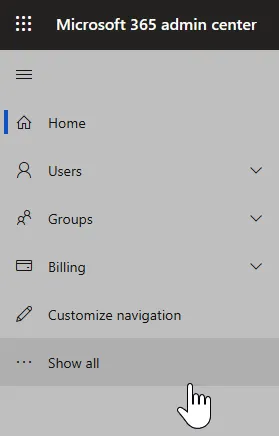
  2. Select Show all from the left navigation menu:
    Figure 1.1 – The left navigation pane of the Microsoft 365 admin center
    Figure 1.1 – The left navigation pane of the Microsoft 365 admin center
  3. Select the admin center you wish to access from those that appear by default, or select All admin centers to view a complete list. The All admin centers view is seen here:
Figure 1.2 – All admin centers available to a user displayed in the Microsoft 365 admin center

How it works…

By default, admin centers are "hidden" behind a Show all menu node in the Microsoft 365 Admin Center. Depending on your assigned role(s), you may be unable to access certain admin centers. In this recipe, you've discovered where they're listed and which of them are available to you.
Tip
Check out the last two recipes in this chapter, Customizing navigation of the admin center and Personalizing your admin center home page to make your admin experience simpler and more specific to your role.
Also, as you become more familiar with the various admin centers, you'll notice other Uniform Resource Locators (URLs) that will save you a couple of clicks, such as security.microsoft.com, compliance.microsoft.com, TenantName-admin.sharepoint.com, admin.powerplatform.microsoft.com, and so on.

See also

  • Learn more about specific admin roles and their abilities at https://docs.microsoft.com/en-us/microsoft-365/admin/add-users/about-admin-roles.

Setting up the PowerShell environment

PowerShell is an ever-growing scripting language that allows network and system admins to interact with Microsoft products in an elevated manner. Admins can use PowerShell to create new users, make changes to users, interact with MS-SQL tables, move and manipulate files, and much more. PowerShell cmdlets are single-purpose functions with specific rules and syntax, but there are hundreds of these cmdlets, giving admins a flexible and extensible toolset with which to customize, administer, and run their tenant.
As there are so many possible uses of PowerShell, Chapter 3, Administering Office 365 with PowerShell, is dedicated to the topic. However, every admin must start somewhere, and that is why the basic...

Table of contents

  1. Microsoft Office 365 Administration Cookbook
  2. Why subscribe?
  3. Preface
  4. Chapter 1: Office 365 Setup and Basic Administration
  5. Chapter 2: Office 365 Identity and Roles
  6. Chapter 3: Administering Office 365 with PowerShell
  7. Chapter 4: Managing Exchange Online
  8. Chapter 5: Setting Up and Configuring Microsoft Search
  9. Chapter 6: Administering OneDrive
  10. Chapter 7: Configuring the Power Platform
  11. Chapter 8: Administering SharePoint Online
  12. Chapter 9: Managing Microsoft Teams
  13. Chapter 10: Configuring and Managing Users in Azure Active Directory (Azure AD)
  14. Chapter 11: Understanding the Microsoft 365 Security & Compliance Center
  15. Chapter 12: Deploying Data Loss Prevention and eDiscovery
  16. Chapter 13: Monitoring Office 365 Apps and Services
  17. Chapter 14: Appendix – Office 365 Subscriptions and Licenses
  18. Other Books You May Enjoy

Frequently asked questions

Yes, you can cancel anytime from the Subscription tab in your account settings on the Perlego website. Your subscription will stay active until the end of your current billing period. Learn how to cancel your subscription
No, books cannot be downloaded as external files, such as PDFs, for use outside of Perlego. However, you can download books within the Perlego app for offline reading on mobile or tablet. Learn how to download books offline
Perlego offers two plans: Essential and Complete
  • Essential is ideal for learners and professionals who enjoy exploring a wide range of subjects. Access the Essential Library with 800,000+ trusted titles and best-sellers across business, personal growth, and the humanities. Includes unlimited reading time and Standard Read Aloud voice.
  • Complete: Perfect for advanced learners and researchers needing full, unrestricted access. Unlock 1.5M+ books across hundreds of subjects, including academic and specialized titles. The Complete Plan also includes advanced features like Premium Read Aloud and Research Assistant.
Both plans are available with monthly, semester, or annual billing cycles.
We are an online textbook subscription service, where you can get access to an entire online library for less than the price of a single book per month. With over 1.5 million books across 990+ topics, we’ve got you covered! Learn about our mission
Look out for the read-aloud symbol on your next book to see if you can listen to it. The read-aloud tool reads text aloud for you, highlighting the text as it is being read. You can pause it, speed it up and slow it down. Learn more about Read Aloud
Yes! You can use the Perlego app on both iOS and Android devices to read anytime, anywhere — even offline. Perfect for commutes or when you’re on the go.
Please note we cannot support devices running on iOS 13 and Android 7 or earlier. Learn more about using the app
Yes, you can access Microsoft Office 365 Administration Cookbook by Nate Chamberlain in PDF and/or ePUB format, as well as other popular books in Computer Science & Computer Science General. We have over 1.5 million books available in our catalogue for you to explore.