Build it with Python, the popular and batteries-included programming tool Key Features
Get familiar with the fundamentals of Python.
Understand the OOP paradigm and learn to write your custom object classes.
Explore tools and techniques to measure code execution for Performance Optimization.
Understand how Python is used in the main Cryptographic mechanisms.
Description "Python In-Depth" gives you a detailed presentation of the possibilities for solving everyday problems, even complex ones using Python. You will begin by setting up Python in your system and then learn about the fundamentals of Python so that you have a rock-solid foundation to build upon. You will explore the foundations of Python programming, such as the built-in data types, functions, objects and classes, files, etc. You will then explore the different programming paradigms such as OOP, Functional, and Concurrent, and find the best approach given a situation. You will also learn how to utilize an interchange format to exchange data and understand how to carry out performance optimization, effective debugging, and security, among other techniques. Towards the end, you will enjoy two chapters dedicated to two domains where Python usage is currently very strong: Data Science and Web Development. What will you learn
Learn how to improve your Python Code Quality.
Explore the techniques and frameworks for Python GUI Programming.
Solve Data Science and Machine Learning problems using Python.
Who this book is for This book is for anyone who is new to Software Development and wants to learn Python. Existing Python users can also use this book for a quick reference for the fundamentals and the features introduced in Python 3.7.
Trusted by 375,005 students
Access to over 1 million titles for a fair monthly price.
Python is a high-level programming language created by Guido van Rossum in the early 1990s. The Python software is open-source, with a huge community of users and contributors. The open-source project is organized and governed by the Python Software Foundation.
The design philosophy behind Python emphasizes code readability and a syntax that allows programmers to express concepts in fewer lines of code than might be needed in languages such as C++ or Java.
Unlike languages such as PHP (dominant in web programming) or R (used for statistics), Python is a general-purpose language. As we will see in this book, it is useful for any programming task, from GUI programming to web programming with everything else in between.
Python is extensible. There are Python libraries (we also call them modules) for everything you can think of: game programming, GUI interface programming, web servers and apps, data science, and many more.
Structure
In this chapter, we will cover:
Installation
Using the Python interpreter
A first look at Python
Overview of Python’s new features
Objective
The goal of this first chapter is both to give you a quick overview of the language and to help you get started writing code, from the software installation to understanding the first data types and making operations.
Installation
Depending on your case, you may find yourself with one of several options. Let’s go through the most common ones.
On Linux, using your package manager
On the popular Ubuntu for example, we can use apt-get install. If all is well, the following 3 commands will help perform the installation:
$ sudo add-apt-repository ppa:deadsnakes/ppa
$ sudo apt-get update
$ sudo apt-get install python3.7
Python 3.7 is not in the Universe repository, and you need to get it from a Personal Package Archive (PPA). Here we are using the deadsnakes PPA (https://launchpad.net/~deadsnakes/+archive/ubuntu/ppa).
On macOS, using Homebrew
Homebrew is a special package manager which makes it easier to install open source software packages on macOS. To install Homebrew, follow the instructions on the official website: https://brew.sh/
Once Homebrew is installed on your Mac, you can install Python 3.7 using the following command:
$ brew install python3.7
On Linux, using the pyenv tool
On Linux, there is the traditional way of installing software from source that can be used for Python too. That way, you install your own version of Python and you have control over it, as opposed to the default system-based version.
There is actually a better way, which provides flexibility and ease of use. It is called “pyenv” and it is a Python installation manager. If you want to be able to install and use different versions of Python on the same machine, pyenv is the way to go. So, it makes sense to start using it from the beginning, in particular on Linux.
You can easily install pyenv (https://github.com/pyenv/pyenv), using its installer (https://github.com/pyenv/pyenv-installer), to manage several installations of Python with the same tool.
Once pyenv is installed, to install Python version 3.7.0, run the following command:
$ pyenv install 3.7.0
You can then use the global command to set the default Python version on the machine, assuming there are several versions installed.
$ pyenv global 3.7.0
This is very practical. At any point in time, you are pointing to one of the Python installations managed by pyenv, and using it as the “default Python”. And you can switch to another installed version when you want.
You can learn more about pyenv by reading the article “Multiple Python Versions With Pyenv” that you can find in the stories collection on Medium here: https://medium.com/python-programming-at-work.
On Windows, using the official Windows installer
Download the latest Python release from the downloads / releases page of https://www.python.org/. We assume you will be installing the 64-bit version.
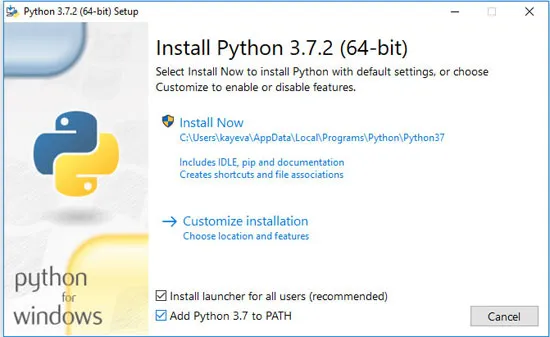
After the installer has been downloaded, launch the EXE file to begin the installation:
Figure 1.1: Python 3.7 Windows installer launch screen
Click Next to continue.
Note that it is advised to check the Add Python 3.7 to Path checkbox on the first installation wizard screen so that the Python installation path is added to the system’s PATH variables.
At the end of the installation process, it is also recommended to restart the computer for the system variables to be updated.
Using the Python interpreter
Whenever you want to experiment with Python code, you can launch the Python interpreter program. You start the interpreter, by running the python command on Linux or using your program launcher on Windows or macOS.
On Linux, in the simplest case, just run:
$ python
There may also be an alias called python3 that makes sure you are running Python 3 as opposed to Python 2.7 if that old version was already on the computer.
For Python 3.7, you get a prompt similar to the following:
Python 3.7.0 (default, Aug 28 2018, 11:14:26)
[GCC 7.3.0] on linux
Type “help”, “copyright”, “credits” or “license” for more information.
>>>
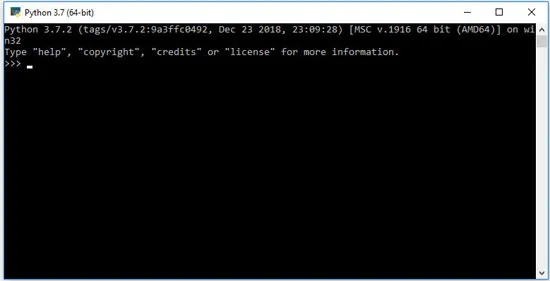
Similarly, on Windows, you get the prompt shown in the following screenshot:
Figure 1.2: Python interpreter shell window
If all went well so far, looking at the interpreter program’s prompt, you can confirm that you are running Python version 3.7.
You can write a Python instruction at the interpreter prompt, then hit Return to get it evaluated. For example, type the following instruction, using Python as you would use a calculato...
Table of contents
Cover Page
Title Page
Copyright Page
About the Authors
Acknowledgement
Preface
Errata
Table of Contents
1. Getting Started with Python
2. Program Flow and Error Handling
3. Functions, Modules, and Functional Programming
4. Useful Modules and Libraries
5. Object Orientation
6. Decorators and Iterators
7. Files and Data Persistence
8. Context Managers
9. Performance Optimization
10. Cryptography
11. Concurrent Execution
12. Logging and Debugging
13. Code Style and Quality Assurance
14. Code Packaging and Dependencies
15. GUI Programming
16. Web Development
17. Data Science
Frequently asked questions
Yes, you can cancel anytime from the Subscription tab in your account settings on the Perlego website. Your subscription will stay active until the end of your current billing period. Learn how to cancel your subscription
No, books cannot be downloaded as external files, such as PDFs, for use outside of Perlego. However, you can download books within the Perlego app for offline reading on mobile or tablet. Learn how to download books offline
Perlego offers two plans: Essential and Complete
Essential is ideal for learners and professionals who enjoy exploring a wide range of subjects. Access the Essential Library with 800,000+ trusted titles and best-sellers across business, personal growth, and the humanities. Includes unlimited reading time and Standard Read Aloud voice.
Complete: Perfect for advanced learners and researchers needing full, unrestricted access. Unlock 1.4M+ books across hundreds of subjects, including academic and specialized titles. The Complete Plan also includes advanced features like Premium Read Aloud and Research Assistant.
Both plans are available with monthly, semester, or annual billing cycles.
We are an online textbook subscription service, where you can get access to an entire online library for less than the price of a single book per month. With over 1 million books across 990+ topics, we’ve got you covered! Learn about our mission
Look out for the read-aloud symbol on your next book to see if you can listen to it. The read-aloud tool reads text aloud for you, highlighting the text as it is being read. You can pause it, speed it up and slow it down. Learn more about Read Aloud
Yes! You can use the Perlego app on both iOS and Android devices to read anytime, anywhere — even offline. Perfect for commutes or when you’re on the go. Please note we cannot support devices running on iOS 13 and Android 7 or earlier. Learn more about using the app
Yes, you can access Python In - Depth by Ahidjo Ayeva,Kamon Ayeva,Aiman Saeed,Ahidjo Ayeva in PDF and/or ePUB format, as well as other popular books in Computer Science & Programming in Python. We have over one million books available in our catalogue for you to explore.