'This book will take you through Viewpoint, TASM, and actually setting up workloads. They are some of the most difficult to understand of the Teradata technologies but also the most important. It is a step by step guide that will make these very challenging subjects easy to master. The step by step process, similar to a cookbook, ensures that readers will not be confused. You will see material that you thought was impossible to learn, and you will master it.
- 262 pages
- English
- ePUB (mobile friendly)
- Available on iOS & Android
eBook - ePub
Teradata Database Administration – TASM and Viewpoint
About this book
Trusted by 375,005 students
Access to over 1 million titles for a fair monthly price.
Study more efficiently using our study tools.
Information
Subtopic
Data WarehousingIndex
Computer ScienceChapter 1 - Viewpoint
“The most dangerous strategy is to jump a chasm in two leaps.”
Database Administration (DBA) on Teradata
- Data Dictionary tables and views
- System hierarchy and Space management
- Users, Databases, Access Rights, Roles, and Profiles
- Administrator and System Utilities
- Teradata Administrator, Viewpoint, DBSControl
- How to use the archive facility to do Archive, Restore, and Recovery procedures
- Protection Features
- Work with user community to help with adding new applications
The Teradata DBA has long been celebrated as one of the most important individuals in a Teradata data warehouse. An experienced DBA is a respected asset who is much needed in a large data warehouse. These professionals can make a huge difference in how smoothly systems run and are vital when problems arise.
Viewpoint
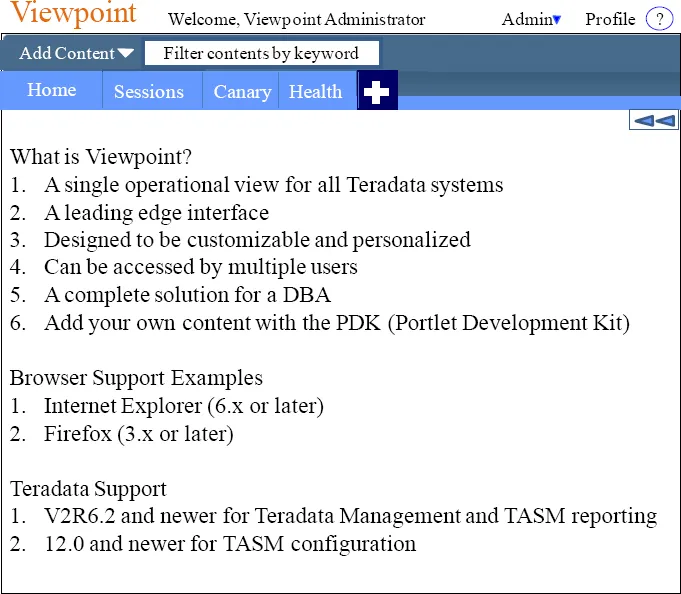
Logging into Viewpoint
Logging on to the Viewpoint portal begins your session and therefore you can now begin working with the Teradata Viewpoint portal.
- Open a browser.
- Enter the address for your Teradata Viewpoint portal.
- Log on to the Teradata Viewpoint portal.
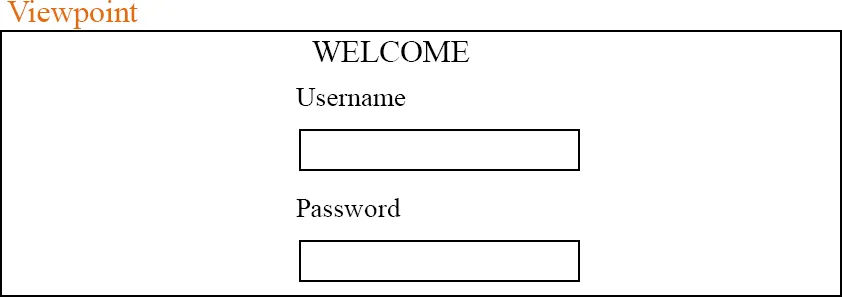
Put in your Username and Password to login to the Viewpoint Portal. You can set up your Viewpoint for auto-provisioning which means, if your system is set up to create a user profile automatically, the username and password you enter are authenticated against your Teradata username and password the first time you log on to Viewpoint.
The First Time you Login to Viewpoint
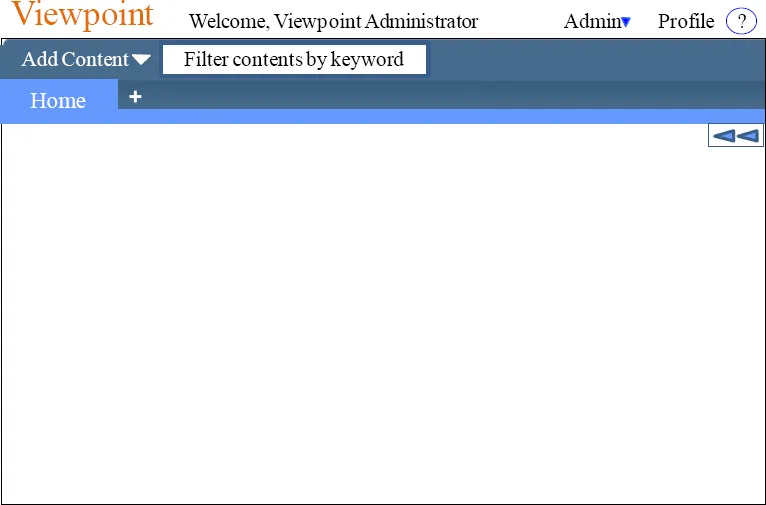
Above, is the screen you will see the first time you login to Viewpoint. There is almost nothing there but an Add Content menu and the Home tab. You will Add Content on the Home Page, or you will hit the + sign to add a new page.
The Add Content Menu for Monitoring
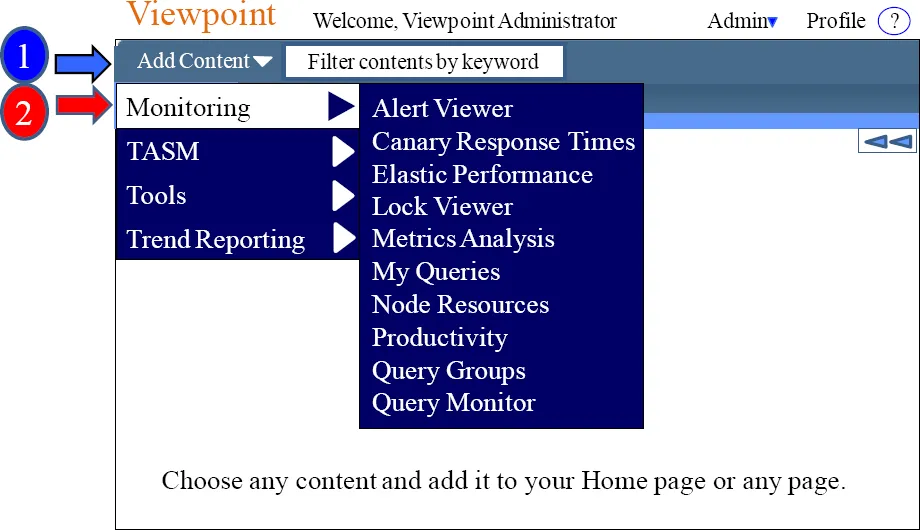
The drop down menu next to Add Content will provide a menu of content that you can select, and it will add that content to the desired page. The above shows the Monitoring content menu. You can Add Content on the Home Page or you will hit the + sign to add a new page where you can then Add Content. The Add Content menu allows you to place content on the pages and arrange them in a design customized for you.
The Add Content Menu for TASM
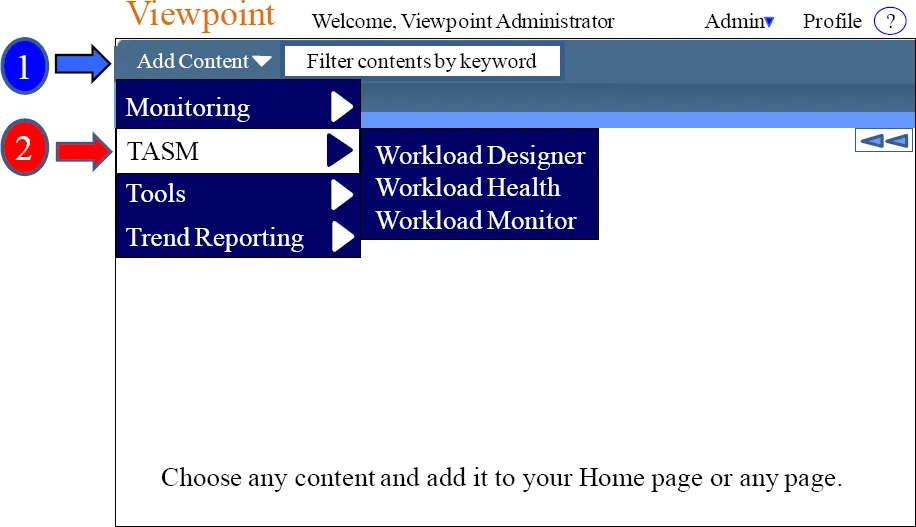
The drop down menu next to Add Content will provide a menu of content that you can select, and it will add that content to the desired page. The above shows the Monitoring content menu. You can Add Content on the Home Page, or you can add a new page where you can then Add Content. The Add Content menu allows you to place content on the pages and arrange them in a design customized for you.
The Add Content Menu for Tools
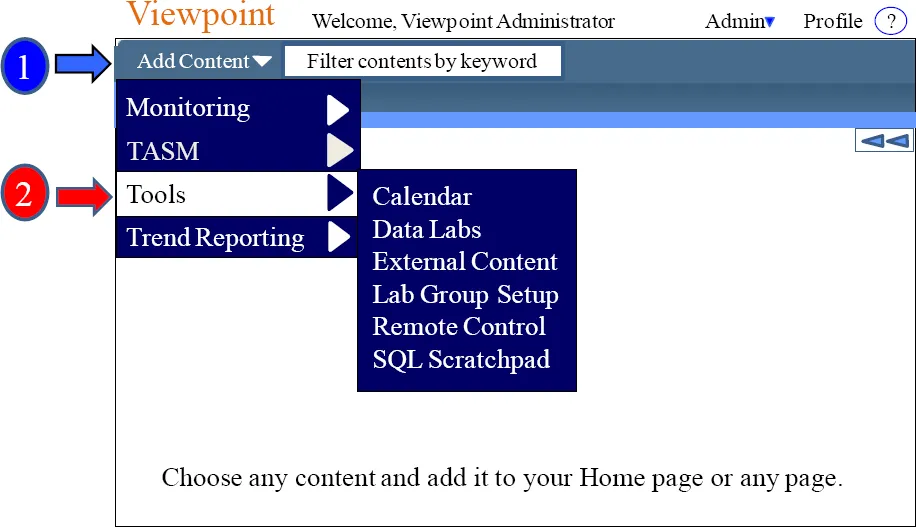
The drop down menu next to Add Content will provide a menu of content that you can select, and it will add that content to the desired page. The above shows the Tools content menu. You can Add Content on the Home Page or you will hit the + sign to add a new page where you can then Add Content. The Add Content menu allows you to place content on the pages and arrange them in a design customized for you.
The Add Content Menu for Trend Reporting
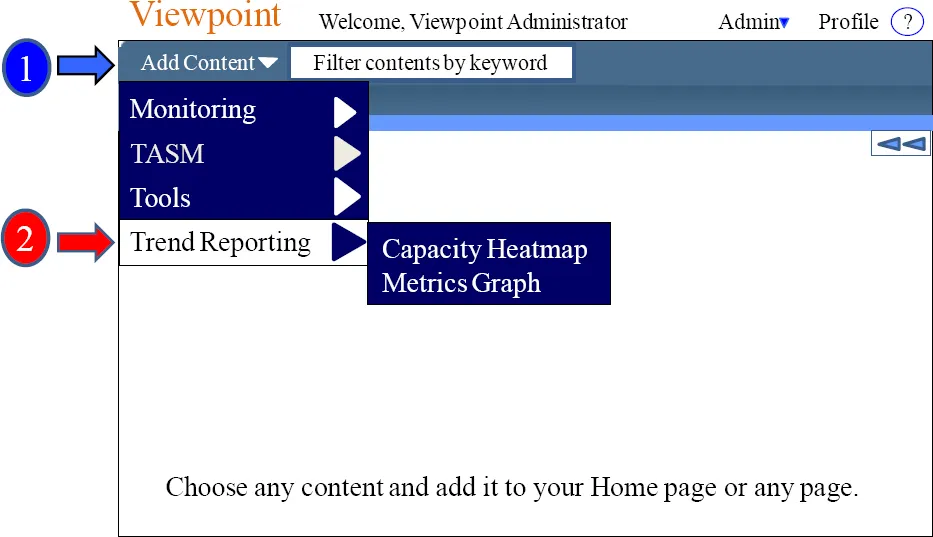
The drop down menu next to Add Content will provide a menu of content that you can select, and it will add that content to the desired page. The above shows the Trend Reporting content menu. You can Add Content on the Home Page or you will hit the + sign to add a new page where you can then Add Content. The Add Content menu allows you to place content on the pages and arrange them in a customized design.
Adding your first Content
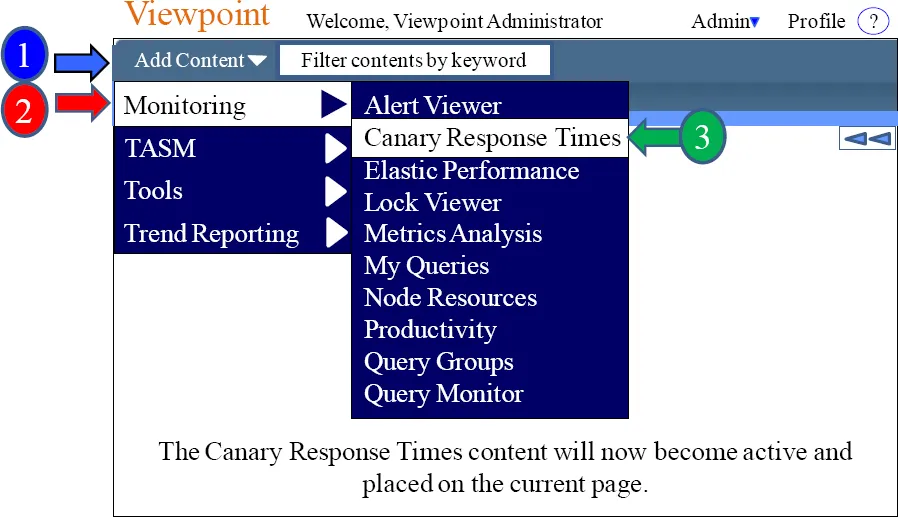
The drop down menu next to Add Content will provide a menu of content that you can select, and it will add that content to the desired page. The above shows the Monitoring content menu. In this example, we have chosen Canary Response Times, which means this will be placed on the page. Check out the next page and see what just happened!
How the Page looks after you add your first Content
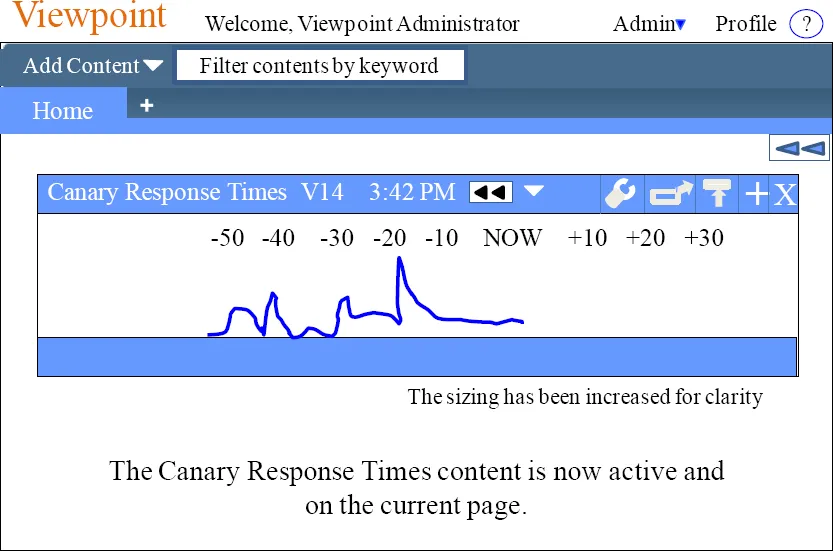
We just added the Canary Response Times content from the Add Content menu. Now, the content is active on our page. We can easily move the content where we want on the page. We can also move it to another page or delete it.
Adding Additional Pages
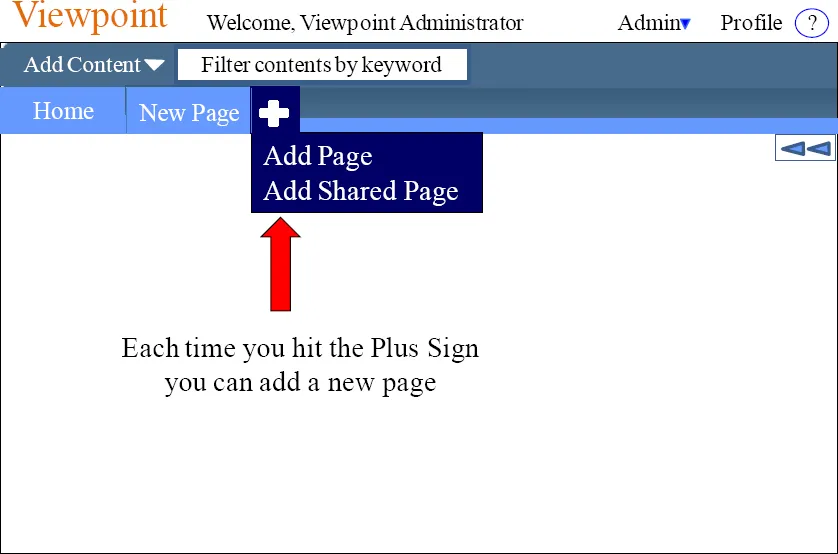
Viewpoint allows you to add pages and name the pages in the tab. Multiple tabs (pages) can have the same name. This allows you to organize Viewpoint in any way you want. This is your view point of the system, so customize the way you want....
Table of contents
- Cover Page
- Title Page
- Copyright Page
- About Tom Coffing
- About Carling Nolan
- Contents
- Chapter 1 - Viewpoint
- Chapter 2 - TASM
- Chapter 3 – Designing and Implementing Workloads
- Chapter 4 – Top SQL Commands Cheat Sheet
- Back Cover
Frequently asked questions
Yes, you can cancel anytime from the Subscription tab in your account settings on the Perlego website. Your subscription will stay active until the end of your current billing period. Learn how to cancel your subscription
No, books cannot be downloaded as external files, such as PDFs, for use outside of Perlego. However, you can download books within the Perlego app for offline reading on mobile or tablet. Learn how to download books offline
Perlego offers two plans: Essential and Complete
- Essential is ideal for learners and professionals who enjoy exploring a wide range of subjects. Access the Essential Library with 800,000+ trusted titles and best-sellers across business, personal growth, and the humanities. Includes unlimited reading time and Standard Read Aloud voice.
- Complete: Perfect for advanced learners and researchers needing full, unrestricted access. Unlock 1.4M+ books across hundreds of subjects, including academic and specialized titles. The Complete Plan also includes advanced features like Premium Read Aloud and Research Assistant.
We are an online textbook subscription service, where you can get access to an entire online library for less than the price of a single book per month. With over 1 million books across 990+ topics, we’ve got you covered! Learn about our mission
Look out for the read-aloud symbol on your next book to see if you can listen to it. The read-aloud tool reads text aloud for you, highlighting the text as it is being read. You can pause it, speed it up and slow it down. Learn more about Read Aloud
Yes! You can use the Perlego app on both iOS and Android devices to read anytime, anywhere — even offline. Perfect for commutes or when you’re on the go.
Please note we cannot support devices running on iOS 13 and Android 7 or earlier. Learn more about using the app
Please note we cannot support devices running on iOS 13 and Android 7 or earlier. Learn more about using the app
Yes, you can access Teradata Database Administration – TASM and Viewpoint by Tom Coffing,Carling Nolan in PDF and/or ePUB format, as well as other popular books in Computer Science & Data Warehousing. We have over one million books available in our catalogue for you to explore.