Oracle is one of the most popular database in the world. This incredible database is designed for on-premises systems and the cloud. Learning Oracle SQL is a great opportunity for you to access cutting edge technology. Tera-Tom Coffing and Leona Coffing have written a brilliant book that teaches readers the basics to advanced queries of Oracle SQL. This book is perfect for anyone who needs to write Oracle SQL. The book educates readers with over 600 pages of SQL examples and explanations, plus provides clever tricks and examples to provide an expert level of learning. The Authors Tera-Tom Coffing, who has written over 75 successful books on Data Warehousing and Leona Coffing, Chief Financial Officer (CFO) of Coffing Data Warehousing bring a combined 40 years of experience of data warehouse knowledge to create this must have book.
- 570 pages
- English
- ePUB (mobile friendly)
- Available on iOS & Android
eBook - ePub
Tera-Tom Genius Series - Oracle SQL
About this book
Trusted by 375,005 students
Access to over 1 million titles for a fair monthly price.
Study more efficiently using our study tools.
Information
Subtopic
Data WarehousingIndex
Computer ScienceChapter 1 – The Basics of SQL
“As I would not be a slave, so I would not be a master.”
- Abraham Lincoln
Introduction
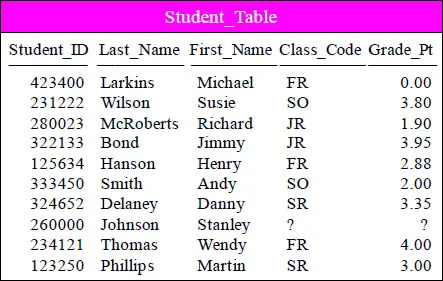
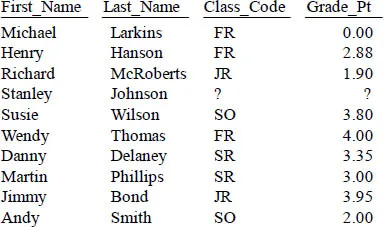
The Student_Table above will be used
in our early SQL Examples
This is a pictorial of the Student_Table which we will use to present some basic examples of SQL and get some hands-on experience with querying this table. This book attempts to show you the table, the query and the result set.
Setting Your Default SCHEMA
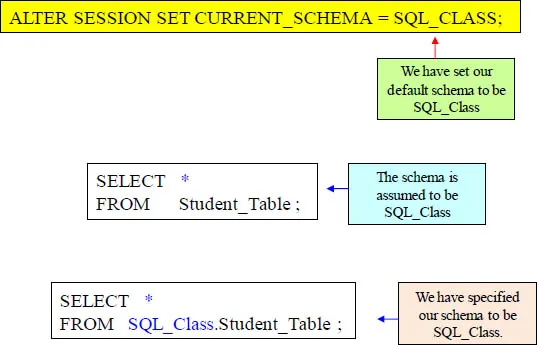
Oracle allows you do set your default database. Above, we have set our default database to SQL_Class. If we run a query without specifying the database, then Oracle will assume the database is SQL_Class. Oracle refers to this as a schema.
SELECT * (All Columns) in a Table
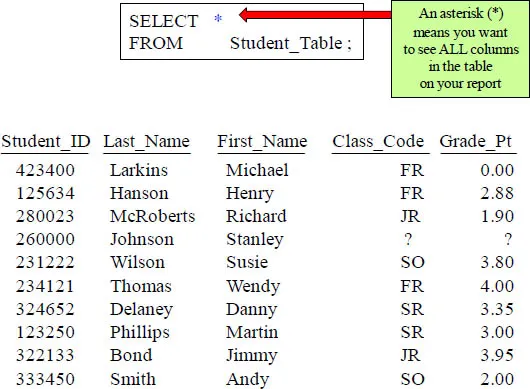
Mostly every SQL statement will consist of a SELECT and a FROM. You SELECT the columns you want to see on your report and an Asterisk (*) means you want to see all columns in the table on the returning answer set!
SELECT Specific Columns in a Table
SELECT First_Name
,Last_Name
,Class_Code
,Grade_Pt
FROM Student_Table ;
This is a great way to show the columns you are selecting from the Table_Name.
Commas in the Front or Back?
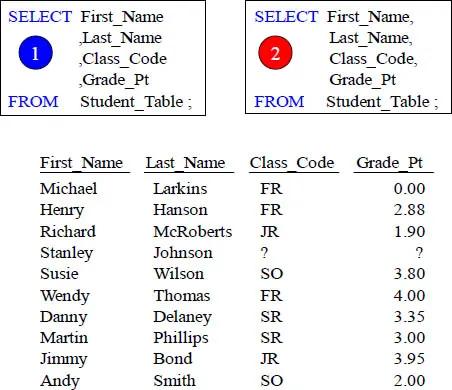
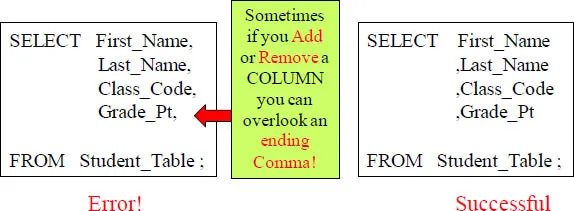
Why is the example on the left better even though they are functionally equivalent? Errors are easier to spot and comments won't cause errors.
Place your Commas in front for better Debugging Capabilities
"A life filled with love may have some thorns,
but a life empty of love will have no roses."
but a life empty of love will have no roses."
Anonymous
Having commas in front to separate column names makes it easier to debug. Remember our quote above, "A query filled with commas at the end just might fill you with thorns, but a query filled with commas in the front will allow you to always come up smelling like roses."
Sort the Data with the ORDER BY Keyword
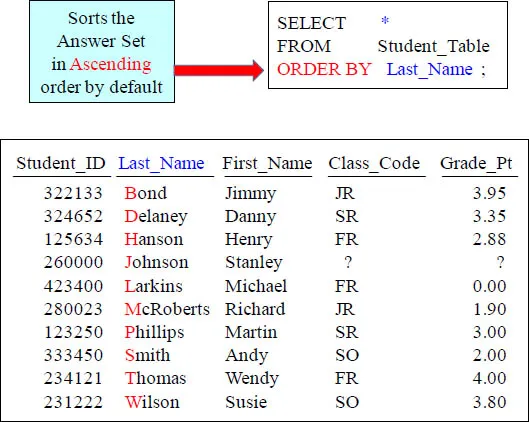
Rows typically come back to the report in random order. To order the result set, you must use an ORDER BY. When you order by a column, it will order in ASCENDING order. This is called the Major Sort!
ORDER BY Defaults to Ascending
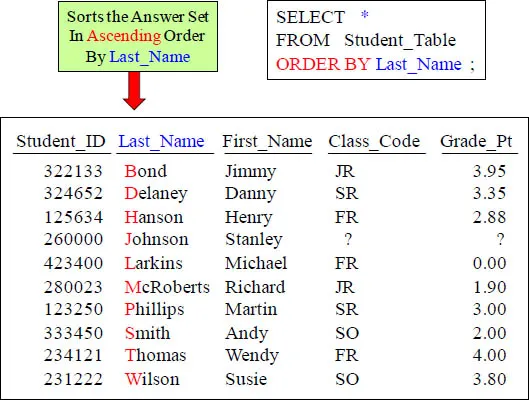
Rows typically come back to the report in random order, but we decided to use the ORDER BY statement. Now, the data comes back ordered by Last_Name.
Use the Name or the Number in your ORDER BY Statement
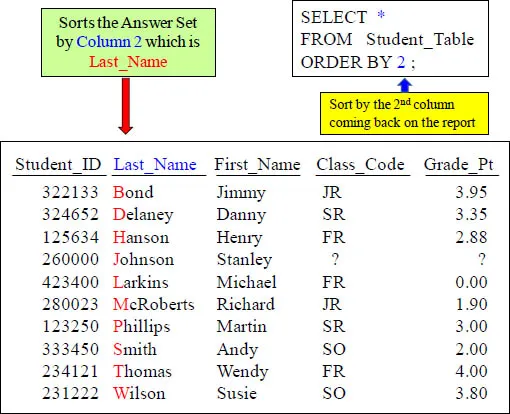
The ORDER BY can use a number to represent the sort column. The number 2 represents the second column on the report.
Two Examples of ORDER BY using Different Techniques
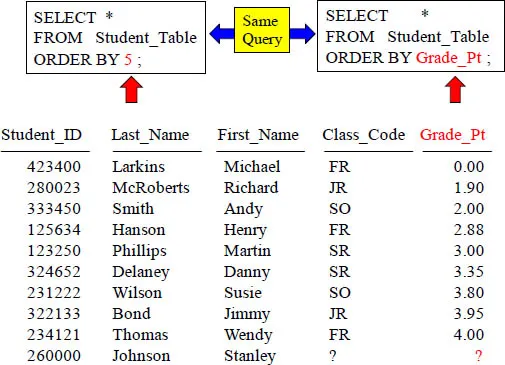
Notice that the answer set is sorted in ascending order based on the column Grade_Pt. Also, notice that Grade_Pt is the fifth column coming back on the report. That is why the SQL in both statements is ordering by Grade_Pt. Did yo...
Table of contents
- Cover
- The Tera-Tom Video Series
- The Tera-Tom Genius Series
- Tera-Tom- Author of over 50 Books
- The Best Query Tool Works on all Systems
- Trademarks and Copyrights
- About Tom Coffing
- About Leona Coffing
- Contents
- Chapter 1 – The Basics of SQL
- Chapter 2 – The WHERE Clause
- Chapter 3 – Aggregation
- Chapter 4 – Join Functions
- Chapter 5 – Date Functions
- Chapter 6 – OLAP Functions
- Chapter 7 – Temporary Tables
- Chapter 8 – Sub-query Functions
- Chapter 9 – Strings
- Chapter 10 – Interrogating the Data
- Chapter 11 – View Functions
- Chapter 12 – Set Operators Functions
- Chapter 13 – Table Create and Data Types
- Chapter 14 – Data Manipulation Language (DML)
- Chapter 15 – Statistical Aggregate Functions
Frequently asked questions
Yes, you can cancel anytime from the Subscription tab in your account settings on the Perlego website. Your subscription will stay active until the end of your current billing period. Learn how to cancel your subscription
No, books cannot be downloaded as external files, such as PDFs, for use outside of Perlego. However, you can download books within the Perlego app for offline reading on mobile or tablet. Learn how to download books offline
Perlego offers two plans: Essential and Complete
- Essential is ideal for learners and professionals who enjoy exploring a wide range of subjects. Access the Essential Library with 800,000+ trusted titles and best-sellers across business, personal growth, and the humanities. Includes unlimited reading time and Standard Read Aloud voice.
- Complete: Perfect for advanced learners and researchers needing full, unrestricted access. Unlock 1.4M+ books across hundreds of subjects, including academic and specialized titles. The Complete Plan also includes advanced features like Premium Read Aloud and Research Assistant.
We are an online textbook subscription service, where you can get access to an entire online library for less than the price of a single book per month. With over 1 million books across 990+ topics, we’ve got you covered! Learn about our mission
Look out for the read-aloud symbol on your next book to see if you can listen to it. The read-aloud tool reads text aloud for you, highlighting the text as it is being read. You can pause it, speed it up and slow it down. Learn more about Read Aloud
Yes! You can use the Perlego app on both iOS and Android devices to read anytime, anywhere — even offline. Perfect for commutes or when you’re on the go.
Please note we cannot support devices running on iOS 13 and Android 7 or earlier. Learn more about using the app
Please note we cannot support devices running on iOS 13 and Android 7 or earlier. Learn more about using the app
Yes, you can access Tera-Tom Genius Series - Oracle SQL by Tom Coffing,Leona Coffing in PDF and/or ePUB format, as well as other popular books in Computer Science & Data Warehousing. We have over one million books available in our catalogue for you to explore.