Chapter 1: Introduction to Microsoft 365
Understanding the fundamentals of a product is the most important thing for a successful deployment. Keeping your resources secure while leveraging other services within the Microsoft 365 product suite is what you will learn about in this chapter.
In this chapter, we'll go through the following topics:
- Microsoft 365 services
- Azure Virtual Desktop and Windows 365
- Windows 10 and Windows 11
An introduction to Microsoft 365
Microsoft 365 includes many services that you might use in your day job, whether as an IT professional or a non-technical user. The services help you to become more productive by simplifying tasks that would require a lot of work in on-premises environments. A great example would be the shift we've made from Exchange Server to Exchange Online.
What do the services achieve?
In this introductory section of the book, we will briefly explain the Microsoft 365 core services and features that are relevant to the subject of this book, just to get a good baseline understanding of the differences between the various services. You'll also learn about the purpose and benefits of each service.
Microsoft Endpoint Manager
Microsoft Endpoint Manager (MEM) is the consolidation of Microsoft Intune and Microsoft Endpoint Configuration Manager (MECM). It provides one holistic management experience while adding new functionality and intelligent actions without any complex migration or disruption of productivity.
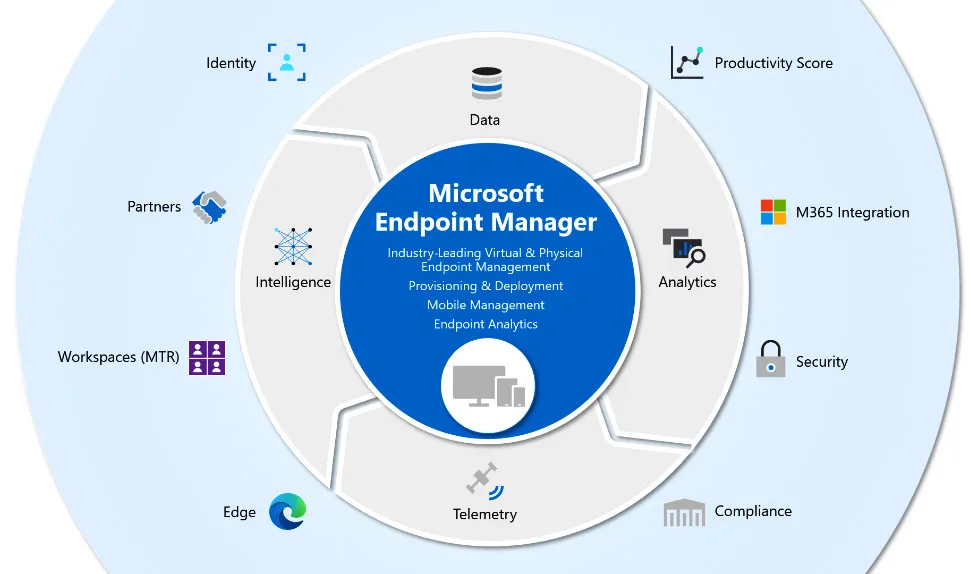
It provides a number of assets to aid your transition to modern management while also increasing customers' security and helping them move to the cloud. MEM now also includes management capabilities for different endpoints:
Figure 1.1 – MEM – service portfolio
MEM helps you manage physical and virtual desktops, laptops, tablets, and other mobile devices, including iOS, Android, and macOS devices.
MEM uses Azure Active Directory (Azure AD) as the primary identity and directory store. It replaces the traditional Active Directory, includes hybrid identity capabilities, and can also integrate with local management infrastructures such as Configuration Manager via Kerberos.
Intune is extremely helpful for devices that are beyond the management scope of Group Policy, such as mobile phones, devices that are not Active Directory Domain Services (AD DS) domain members, or Windows 10 devices that are joined to Azure AD:
Figure 1.2 – MEM – management console
With MEM, you can achieve the following:
- Let your organization's employees use their personal physical and virtual e ndpoint devices to access organizational data (commonly known as bring your own device (BYOD)).
- Manage organization-owned phones.
- Control access to Microsoft 365 from unmanaged devices, such as public kiosks and mobile devices.
- Help ensure that devices and apps that do connect to corporate data comply with security policies.
For example, when a user attempts to open one of their line-of-business (LOB) apps on their phone or Windows 10 endpoint, Microsoft 365 checks with Azure AD to authenticate the user and verify whether that user can access the data from that app on that device. The granting of access depends on the following:
- Conditional Access policies defined within Azure AD
- Whether the app on that device complies with app configuration and data protection policies (Intune will confirm this for Azure AD)
If the device and app are both compliant with all policies, Azure AD notifies Microsoft 365 that the data can be accessed.
Azure Virtual Desktop
Azure Virtual Desktop, or AVD for short, is a Microsoft-managed platform-as-a-service offering on top of the Microsoft Azure cloud. Unlike traditional virtual desktop infrastructure (VDI) deployments, all the infrastructure services, such as brokering, web access, load balancing, management, and monitoring, are all set up for you as part of a control plane offering.
Windows 365 Cloud PC
A new way of experiencing Windows, on any device – that's the best way to describe the new Microsoft cloud service Windows 365 Cloud PC. Microsoft's vision is to have people use Windows 365 the same way as they would manage a physical endpoint but with the flexibility of the cloud.
Windows 365 is everything you need if you are looking for a simple way of running your Windows desktops in the cloud. You can decrease the costs and complexity of your environment by deploying and managing virtual endpoints in MEM; no additional VDI expertise or resources are needed. More about this will be explained later in this chapter.
AVD and Windows 365 Cloud PC – shared responsibility model 1
As with many cloud services, there is a shared set of security responsibilities. You have control and flexibility, and with that comes responsibility. If you are adopting Windows 365 Cloud PC, it's important to understand that while some components come already secured for your environment, there are other areas where you will need to configure things to fit your organization's security needs:
Table 1.1 – Shared responsibility model 1
AVD and Windows 365 Cloud PC – shared responsibility model 2
The following table is an extension of the previous one, but it goes a bit deeper in terms of the differences in management experience:
Table 1.2 – Shared responsibility model 2
Windows 10 Enterprise
Windows 10 Enterprise is one of the primary components of your Microsoft 365 subscription. Windows 10 meets the needs of large and midsize organizations, providing users and organizations with the tools, services, and support to enhance their personal and organizational productivity.
Windows 10 also supports collaboration through Microsoft 365 apps, Microsoft Teams, Microsoft Whiteboard, and OneNote.
Windows 10 helps improve productivity by providing faster, safer ways to get work done across all your users' devices. Users can find apps, setti...