Mastering Drupal 8
eBook - ePub

Mastering Drupal 8

  1. 456 pages
  2. English
  3. ePUB (mobile friendly)
  4. Available on iOS & Android
eBook - ePub

Mastering Drupal 8

About this book

Mastering Drupal can lead to a mighty website - discover what Drupal 8 can really do with hidden techniques, best practices, and more!About This Book• The most up-to-date advanced practical guide on Drupal 8 with an in-depth look at all the advanced new features such as authoring, HTML markup, built-in web services, and more• If you are looking to dive deep into Drupal 8 and create industry-standard web apps, then this is the ideal book for you• All the code and examples are explained in great detail to help you in the development processWho This Book Is ForThis book is ideally suited to web developers, designers, and web administrators who want to dive deep into Drupal. Previous experience with Drupal is a must to unleash the full potential of this book.What You Will Learn• Discover how to better manage content using custom blocks and views• Display content in multiple ways, taking advantage of display modes• Create custom modules with YAML and Symfony 2• Easily translate content using the new multilingual capabilities• Use RESTful services and JavaScript frameworks to build headless websites• Manage Drupal configuration from one server to another easilyIn DetailDrupal is an open source content management system trusted by governments and organizations around the globe to run their websites. It brings with it extensive content authoring tools, reliable performance, and a proven track record of security. The community of more than 1, 000, 000 developers, designers, editors, and others have developed and maintained a wealth of modules, themes, and other add-ons to help you build a dynamic web experience.Drupal 8 is the latest release of the Drupal built on the Symfony2 framework. This is the largest change to the Drupal project in its history. The entire API of Drupal has been rebuilt using Symfony and everything from the administrative UI to themes to custom module development has been affected.This book will cover everything you need to plan and build a complete website using Drupal 8. It will provide a clear and concise walkthrough of the more than 200 new features and improvements introduced in Drupal core. In this book, you will learn advanced site building techniques, create and modify themes using Twig, create custom modules using the new Drupal API, explore the new REST and Multilingual functionality, import, and export Configuration, and learn how to migrate from earlier versions of Drupal.Style and approachThis book takes a practical approach with equal emphasis on examples and illustrative screenshots.

Tools to learn more effectively

Saving Books

Saving Books

Keyword Search

Keyword Search

Annotating Text

Annotating Text

Listen to it instead

Listen to it instead

Content Types, Taxonomy, and Comment Types

One of the more powerful capabilities of Drupal is the ability to create custom content types. Often referred to as a node, we can think of Content types as containers for holding content that has been defined with specific fields, such as a title and a body. However, we are not limited to only those two fields. We can pretty much add as many fields as needed based on how the content itself has been defined.
Something new to Drupal 8 is the Comment field, which can be added to content types, allowing users to comment on the content. Drupal provides this ability out of the box as part of the core with the ability to add Comment types that can have fields of their own. We will look at the default configuration and how to customize comments.
We can also add fields to tag, categorize, or classify content, known as Taxonomy. Categorizing content using various terms allows us to enhance content that can then be attached to content types as a term reference.
To help us master Content types, Comment types, and Taxonomy, we will look at the following:
  • Exploring content types
  • Managing fields
  • Creating custom content types
  • Adding fields
  • Taxonomy, vocabularies, and terms
  • Introduction to Comment types
  • Working with form and content display
  • Using Drupal Console to generate content

Assumptions

Mastering Drupal 8 assumes that you are already running a local AMP stack and are familiar with installing Drupal using the standard means of downloading, setting up a database, configuring a localhost, and completing the browser-based install. In Chapter 1, Developer Workflow, we walked through quickly installing Drupal using Composer, Drush, and Drupal Console. Before continuing, ensure that you have a working AMP stack and are comfortable working within the command-line interface using a Terminal window.

Exploring Content types

In most cases, our first glimpse of content types comes from the two default Content types that Drupal configures as part of the standard install: Article and Basic page.
We can navigate to Content types by directly entering /admin/structure/types or by using the Administration toolbar and clicking on Manage | Structure | Content types:
The Content types page lists all content types, including their name and description. From this page, we can add, edit, and manage content types along with their respective fields and displays. Currently, our Content types consist of Article and Basic page.
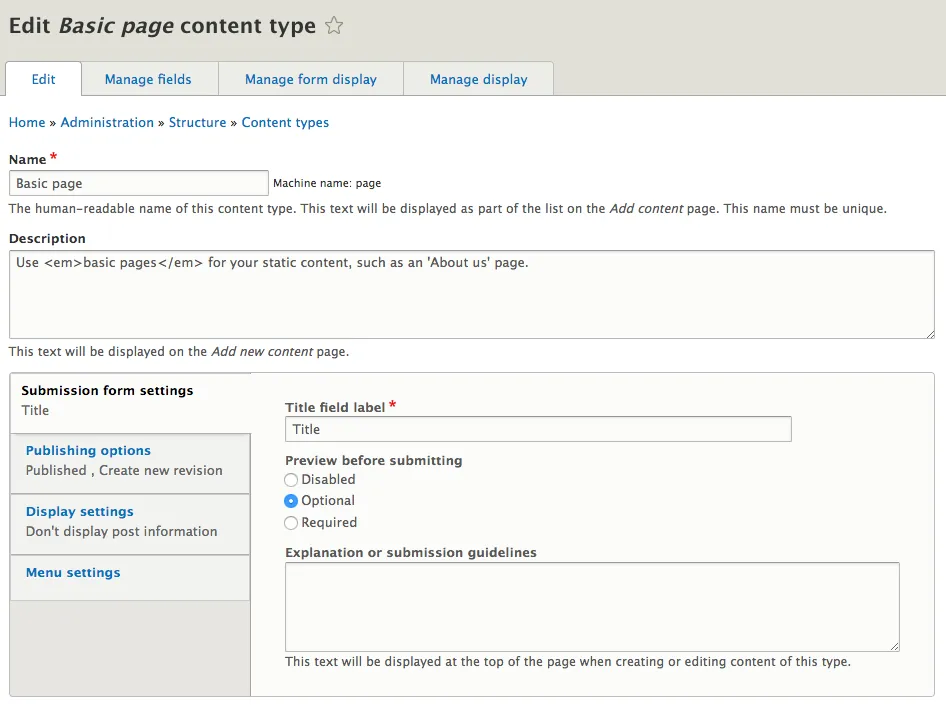
To get a better look at the makeup of a content type, we can view the Basic page content type by selecting the drop-down button and choosing Edit:
The Edit screen defines the configuration of a content type by providing a Name, a Description, and four subsections that handle various settings.

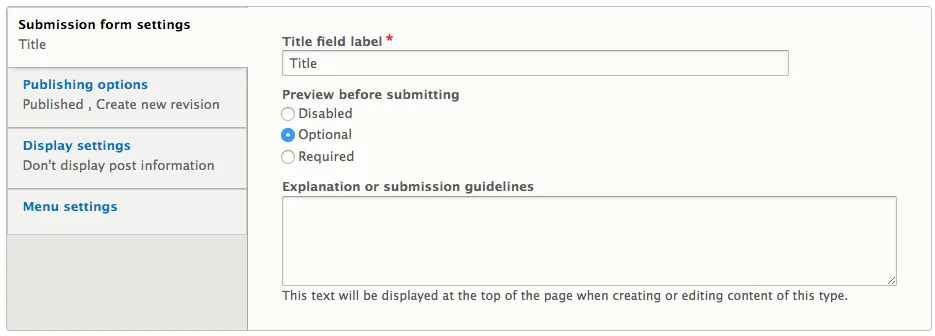
Submission form settings

Submission form settings allow us to define the Title field label, specify whether content can be previewed before saving new nodes, and specify any submission guidelines we want to provide to users:

Preview before submitting

The Preview before submitting option provides two functions:
  • Appearance of a Preview button when creating a new node
  • Ability to switch between various displays of the content
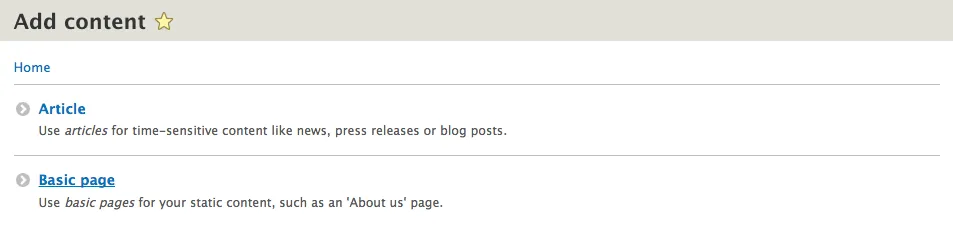
If we navigate to the Add content page by entering /node/add/page or by using the Admin toolbar and clicking on Manage | Content, selecting Add content and then Basic page, we can create our first Basic page and preview the content in it:
On the Create Basic page screen, we will need to enter the following information:
  • Title*: About Us
  • Body: Add some default Lorem Ipsum using http://www.lipsum.com/:
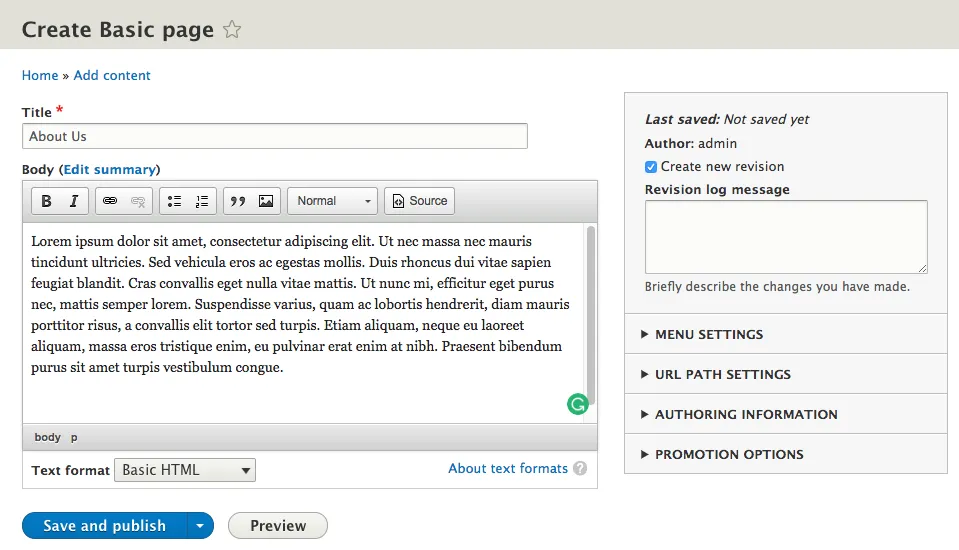
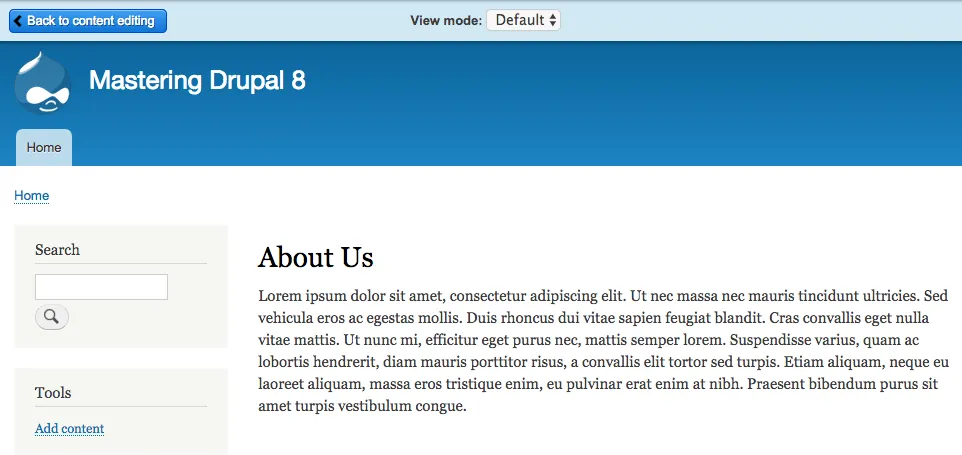
With our content added, we can select the Preview button to view our content with the ability to change the View mode of how the content is displayed:
The display modes enabled on each content type will determine what choices are available in the View mode dropdown. For our example, we can switch between the Default and Teaser displays. Once we are done previewing the con...

Table of contents

  1. Title Page
  2. Copyright
  3. Credits
  4. About the Author
  5. Acknowledgments
  6. About the Author
  7. About the Reviewer
  8. Customer Feedback
  9. www.PacktPub.com
  10. Preface
  11. Developer Workflow
  12. Site Configuration
  13. Managing Users, Roles, and Permissions
  14. Content Types, Taxonomy, and Comment Types
  15. Working with Blocks
  16. Content Authoring, HTML5, and Media
  17. Understanding Views
  18. Theming Essentials
  19. Working with Twig
  20. Extending Drupal
  21. Working with Forms and the Form API
  22. RESTful Services
  23. Multilingual Capabilities
  24. Configuration Management
  25. Site Migration
  26. Debugging and Profiling

Frequently asked questions

Yes, you can cancel anytime from the Subscription tab in your account settings on the Perlego website. Your subscription will stay active until the end of your current billing period. Learn how to cancel your subscription
No, books cannot be downloaded as external files, such as PDFs, for use outside of Perlego. However, you can download books within the Perlego app for offline reading on mobile or tablet. Learn how to download books offline
Perlego offers two plans: Essential and Complete
  • Essential is ideal for learners and professionals who enjoy exploring a wide range of subjects. Access the Essential Library with 800,000+ trusted titles and best-sellers across business, personal growth, and the humanities. Includes unlimited reading time and Standard Read Aloud voice.
  • Complete: Perfect for advanced learners and researchers needing full, unrestricted access. Unlock 1.4M+ books across hundreds of subjects, including academic and specialized titles. The Complete Plan also includes advanced features like Premium Read Aloud and Research Assistant.
Both plans are available with monthly, semester, or annual billing cycles.
We are an online textbook subscription service, where you can get access to an entire online library for less than the price of a single book per month. With over 1 million books across 990+ topics, we’ve got you covered! Learn about our mission
Look out for the read-aloud symbol on your next book to see if you can listen to it. The read-aloud tool reads text aloud for you, highlighting the text as it is being read. You can pause it, speed it up and slow it down. Learn more about Read Aloud
Yes! You can use the Perlego app on both iOS and Android devices to read anytime, anywhere — even offline. Perfect for commutes or when you’re on the go.
Please note we cannot support devices running on iOS 13 and Android 7 or earlier. Learn more about using the app
Yes, you can access Mastering Drupal 8 by Chaz Chumley, William Hurley in PDF and/or ePUB format, as well as other popular books in Computer Science & Content Management Systems. We have over one million books available in our catalogue for you to explore.