Unleash the data processing and analytics capability of Apache Spark with the language of choice: JavaAbout This Book• Perform big data processing with Spark—without having to learn Scala!• Use the Spark Java API to implement efficient enterprise-grade applications for data processing and analytics• Go beyond mainstream data processing by adding querying capability, Machine Learning, and graph processing using SparkWho This Book Is ForIf you are a Java developer interested in learning to use the popular Apache Spark framework, this book is the resource you need to get started. Apache Spark developers who are looking to build enterprise-grade applications in Java will also find this book very useful.What You Will Learn• Process data using different file formats such as XML, JSON, CSV, and plain and delimited text, using the Spark core Library.• Perform analytics on data from various data sources such as Kafka, and Flume using Spark Streaming Library• Learn SQL schema creation and the analysis of structured data using various SQL functions including Windowing functions in the Spark SQL Library• Explore Spark Mlib APIs while implementing Machine Learning techniques to solve real-world problems• Get to know Spark GraphX so you understand various graph-based analytics that can be performed with SparkIn DetailApache Spark is the buzzword in the big data industry right now, especially with the increasing need for real-time streaming and data processing. While Spark is built on Scala, the Spark Java API exposes all the Spark features available in the Scala version for Java developers. This book will show you how you can implement various functionalities of the Apache Spark framework in Java, without stepping out of your comfort zone.The book starts with an introduction to the Apache Spark 2.x ecosystem, followed by explaining how to install and configure Spark, and refreshes the Java concepts that will be useful to you when consuming Apache Spark's APIs. You will explore RDD and its associated common Action and Transformation Java APIs, set up a production-like clustered environment, and work with Spark SQL. Moving on, you will perform near-real-time processing with Spark streaming, Machine Learning analytics with Spark MLlib, and graph processing with GraphX, all using various Java packages.By the end of the book, you will have a solid foundation in implementing components in the Spark framework in Java to build fast, real-time applications.Style and approachThis practical guide teaches readers the fundamentals of the Apache Spark framework and how to implement components using the Java language. It is a unique blend of theory and practical examples, and is written in a way that will gradually build your knowledge of Apache Spark.
- 350 pages
- English
- ePUB (mobile friendly)
- Available on iOS & Android
eBook - ePub
Apache Spark 2.x for Java Developers
About this book
Trusted by 375,005 students
Access to over 1.5 million titles for a fair monthly price.
Study more efficiently using our study tools.
Information
Understanding the Spark Programming Model
This chapter will progress by explaining the word count problem in Apache Spark using Java and simultaneously setting up an IDE. Then we will progress towards explaining common RDD actions and transformations. We will also touch upon the inbuilt capability of Spark caching and the persistence of RDD for improving Spark job performance.
Hello Spark
In this section, we will create an Hello World program for Spark and will then get some understanding of the internals of Spark. The Hello World program in the big data world is also known as a Word Count program. Given the text data as input, we will calculate the frequency of each word or number of occurrences of each word in the text data, that is, how many times each word has appeared in the text. Consider that we have the following text data:
Where there is a will there is a way
The number of occurrences of each word in this data is:
| Word | Frequency |
| Where | 1 |
| There | 2 |
| Is | 2 |
| A | 2 |
| Will | 1 |
| Way | 1 |
Now we will solve this problem with Spark. So let's develop a Spark WordCount application.
Prerequisites
The following are the prerequisites for preparing the Spark application:
- IDE for Java applications: We will be using the Eclipse IDE to develop the Spark application. Users can use any IDE as per their choice. Also, the IDE should have the Maven plugin installed (the latest version of Eclipse such as Mars and Neon consists of inbuilt Maven plugins).
- Java 7 or above, but preferably Java 8.
- The Maven package.
The following are the steps to get started with the Maven project in Java IDE:
- The first step is to create a Maven project. In Eclipse, it can be created as File|New|Project.
- Then search for Maven, as shown in the following screenshot:

- Select Maven Project and click Next. On the next, screen select the checkbox next to Create a simple project (skip the archetype selection) and click Next. On the next screen, add the Group Id and Artifact Id values as follows and then click Finish:

- Eclipse will create a Maven project for you. Maven projects can also be created using the mvn command line tool as follows:
mvn archetype:generate -DgroupId=com.spark.examples -DartifactId=ApacheSparkForJavaDevelopers
Once the project is created using the mvn command line tool, it needs to be imported to the IDE.
- After creating a Maven project, expand the Maven project and edit pom.xml by adding the following dependency:
 <dependency>
 <groupId>org.apache.spark</groupId>
 <artifactId>spark-core_2.11</artifactId>
 <version>2.0.0</version>
</dependency>
- The following are the contents of the pom.xml file:
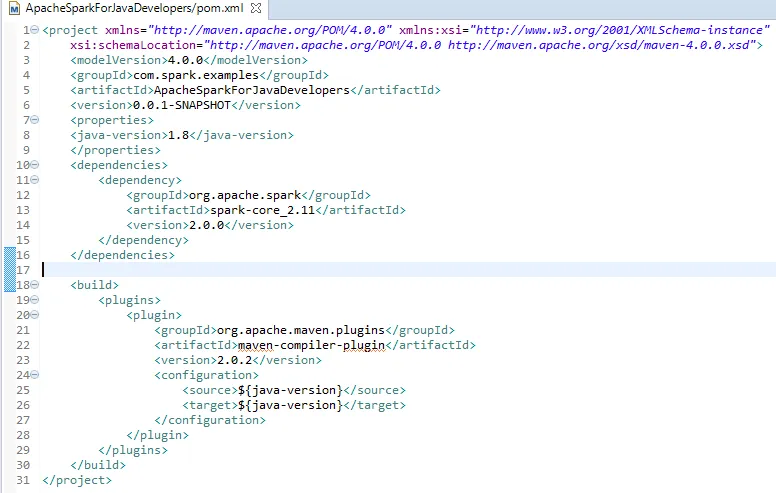
The following are some useful tips about compilation of the Maven project:
- The Maven compiler plugin is added, which helps to set the Java version for compiling the project. It is currently set to 1.8 so Java 8 features can be used. The Java version can be changed as per the requirement.
- Hadoop is not a prerequisite to be installed in your system to run Spark jobs. However, for certain scenarios one might get an error such as Failed to locate the winutils binary in the hadoop binary path as it searches for a binary file called winutils in the bin folder of HADOOP_HOME.
The following steps may be required to fix such an error:
- Download the winutils executable from any repository.
- Create a dummy directory where you place the downloaded executable winutils.exe. For example, : E:\SparkForJavaDev\Hadoop\bin.
- Add the environment variable HADOOP_HOME that points to E:\SparkForJavaDev\Hadoop using either of the options given here:
- Eclipse|Your class which can be run as a Java application (containing the static main method)|Right click on Run as Run Configurations|Environment Tab:

- Add the following line of code in the Java main class itself:
System.setProperty("hadoop.home.dir", "PATH_OF_ HADOOP_HOME"); The next step is to create our Java class for the Spark application. The following is the SparkWordCount application using Java 7:
 public class SparkWordCount { public static void main(String[] args) { SparkConf conf =new
 SparkConf().setMaster("local").setAppName("WordCount"); JavaSparkContext javaSparkContext = new JavaSparkContext(conf); JavaRDD<String> inputData =
 javaSparkContext.textFile("path_of_input_file"); JavaPairRDD<String, Integer> flattenPairs =
 inputData.flatMapToPair(new PairFlatMapFunction<String,
 String, Integer>() {
 @Override public Iterator<Tuple2<String, Integer>> call(String text) throws
 Exception {
 List<Tuple2<String,Integer>> tupleList =new ArrayList<>(); String[] textArray = text.split(" ");
 for (String word:textArray) {
 tupleList.add(new Tuple2<String, Integer>(word, 1)); } return tupleList.iterator(); } }); JavaPairRDD<String, Integer> wordCountRDD = flattenPairs.reduceByKey(new
 Function2<Integer, Integer, Integer>() {
 @Override
 public Integer call(Integer v1, Integer v2) throws Exception {
 return v1+v2;
 }
 }); wordCountRDD.saveAsTextFile("path_of_output_file"); } }
The following is the SparkWordCount application using Java 8:
 public class SparkWordCount { public static void main(String[] args) { SparkConf conf =new
 SparkConf().setMaster("local").setAppName("WordCount");
 JavaSparkContext javaSparkContext = new JavaSparkContext(conf);
 JavaRDD<String> inputData =
 javaSparkContext.textFile("path_of_input_file");
 JavaPairRDD<String, Integer> flattenPairs =
 inputData.flatMapToPair(text -> Arrays.asList(text.split("
 ")).stream().map(word ->new Tuple2<String,Integer>(word,1)).iterator());

 JavaPairRDD<String, Integer> wordCountRDD = flattenPairs.reduceByKey((v1,
 v2) -> v1+v2);
 wordCount...
Table of contents
- Title Page
- Copyright
- Credits
- Foreword
- About the Authors
- About the Reviewer
- www.PacktPub.com
- Customer Feedback
- Preface
- Introduction to Spark
- Revisiting Java
- Let Us Spark
- Understanding the Spark Programming Model
- Working with Data and Storage
- Spark on Cluster
- Spark Programming Model - Advanced
- Working with Spark SQL
- Near Real-Time Processing with Spark Streaming
- Machine Learning Analytics with Spark MLlib
- Learning Spark GraphX
Frequently asked questions
Yes, you can cancel anytime from the Subscription tab in your account settings on the Perlego website. Your subscription will stay active until the end of your current billing period. Learn how to cancel your subscription
No, books cannot be downloaded as external files, such as PDFs, for use outside of Perlego. However, you can download books within the Perlego app for offline reading on mobile or tablet. Learn how to download books offline
Perlego offers two plans: Essential and Complete
- Essential is ideal for learners and professionals who enjoy exploring a wide range of subjects. Access the Essential Library with 800,000+ trusted titles and best-sellers across business, personal growth, and the humanities. Includes unlimited reading time and Standard Read Aloud voice.
- Complete: Perfect for advanced learners and researchers needing full, unrestricted access. Unlock 1.5M+ books across hundreds of subjects, including academic and specialized titles. The Complete Plan also includes advanced features like Premium Read Aloud and Research Assistant.
We are an online textbook subscription service, where you can get access to an entire online library for less than the price of a single book per month. With over 1.5 million books across 990+ topics, we’ve got you covered! Learn about our mission
Look out for the read-aloud symbol on your next book to see if you can listen to it. The read-aloud tool reads text aloud for you, highlighting the text as it is being read. You can pause it, speed it up and slow it down. Learn more about Read Aloud
Yes! You can use the Perlego app on both iOS and Android devices to read anytime, anywhere — even offline. Perfect for commutes or when you’re on the go.
Please note we cannot support devices running on iOS 13 and Android 7 or earlier. Learn more about using the app
Please note we cannot support devices running on iOS 13 and Android 7 or earlier. Learn more about using the app
Yes, you can access Apache Spark 2.x for Java Developers by Sourav Gulati, Sumit Kumar in PDF and/or ePUB format, as well as other popular books in Computer Science & Data Mining. We have over 1.5 million books available in our catalogue for you to explore.