Build, Manage and Improve your infrastructure effortlessly.About This Book• An up-to-date and comprehensive resource on Terraform that lets you quickly and efficiently launch your infrastructure• Learn how to implement your infrastructure as code and make secure, effective changes to your infrastructure• Learn to build multi-cloud fault-tolerant systems and simplify the management and orchestration of even the largest scale and most complex cloud infrastructuresWho This Book Is ForThis book is for developers and operators who already have some exposure to working with infrastructure but want to improve their workflow and introduce infrastructure as a code practice. Knowledge of essential Amazon Web Services components (EC2, VPC, IAM) would help contextualize the examples provided. Basic understanding of Jenkins and Shell scripts will be helpful for the chapters on the production usage of Terraform.What You Will Learn• Understand what Infrastructure as Code (IaC) means and why it matters• Install, configure, and deploy Terraform• Take full control of your infrastructure in the form of code• Manage complete infrastructure, starting with a single server and scaling beyond any limits• Discover a great set of production-ready practices to manage infrastructure• Set up CI/CD pipelines to test and deliver Terraform stacks• Construct templates to simplify more complex provisioning tasksIn DetailTerraform is a tool used to efficiently build, configure, and improve the production infrastructure. It can manage the existing infrastructure as well as create custom in-house solutions.This book shows you when and how to implement infrastructure as a code practices with Terraform. It covers everything necessary to set up the complete management of infrastructure with Terraform, starting with the basics of using providers and resources. It is a comprehensive guide that begins with very small infrastructure templates and takes you all the way to managing complex systems, all using concrete examples that evolve over the course of the book. The book ends with the complete workflow of managing a production infrastructure as code—this is achieved with the help of version control and continuous integration. The readers will also learn how to combine multiple providers in a single template and manage different code bases with many complex modules. It focuses on how to set up continuous integration for the infrastructure code.The readers will be able to use Terraform to build, change, and combine infrastructure safely and efficiently.Style and approachThis book will help and guide you to implement Terraform in your infrastructure. The readers will start by working on very small infrastructure templates and then slowly move on to manage complex systems, all by using concrete examples that will evolve during the course of the book.
- 185 pages
- English
- ePUB (mobile friendly)
- Available on iOS & Android
eBook - ePub
Getting Started with Terraform - Second Edition
About this book
Trusted by 375,005 students
Access to over 1 million titles for a fair monthly price.
Study more efficiently using our study tools.
Information
Collaborative Infrastructure
By this chapter, you've learned how to create and manage your infrastructure with Terraform. However, all the topics we have discussed apply only to a single-person operations department. If you are the only one using Terraform in your team, then you have all the knowledge already. Eventually, operations teams will reduce in size, and what required a dozen system admins in the past will require only a couple of them, the ones that are experienced in both operations and software development. Even then, it's not a single person, but at least a couple : having just one infrastructure engineer in a company is an example of a single point of failure.
And when you have multiple colleagues working on Terraform templates, you have a whole new package of problems to solve. How do you store your templates? How do you organize and split them? Where do you store them? And where do you store the state file? How do you roll out changes to production? And how do you test these changes?
That's what this chapter is going to be about. We will start from the basic setup. You will learn a bit of version control with Git, in case you are not familiar with it. We will proceed to different strategies for organizing templates. You will learn how to avoid conflicts when working with the state file and different approaches and tools in order to store it. We will also take a deep dive into Continuous Integration pipelines for templates, taking the whole infrastructure as code approach to its maximum. By the end of this chapter, you will be completely ready to introduce Terraform to your organization.
Version control with Git 101
Feel free to skip this part if you are already familiar with version control and Git specifically.
Version Control System (VCS) simplifies work with constantly changing information, such as code. It allows us to store multiple versions of the same file, easily switch between them, and check who is responsible for which change. The most popular VCS today is Git, initially created to support Linux kernel development.
A VCS such as Git has many benefits:
- You have access to all versions of all files in the Git repository at any time; it's almost impossible to lose any part of a piece of code or a previous state of the code.
- Multiple developers can work on one project at the same time without interfering with each other's code and without fear of losing any changes made by colleagues. In Git, the possibilities of collaborative work are unlimited.
To create a repository, you've got to run git init in the project folder. To add files in it, first use git add file_name (or git add . to add all the files at once) and then git commit -m 'description_of_changes_made'. Any further changes in the files can also be done with git add and then you use commit. You can consider using commit to be the same thing as saving a version of the file.
Git has branches. You can work in a separate branch after creating it on the basis of the current one. By default, the main branch is the master. It is a best practice for big projects to develop a new feature in an individual branch, and when it's done, merge the changes into the main branch.
A git repository may have a remote copy. You can send commits there using git push repository_name branch_name and get them back with git pull repository_name branch_name.
This is how developers work on their computers and synchronize all the changes using a remote repository. In one picture, the simplified workflow looks as follows:
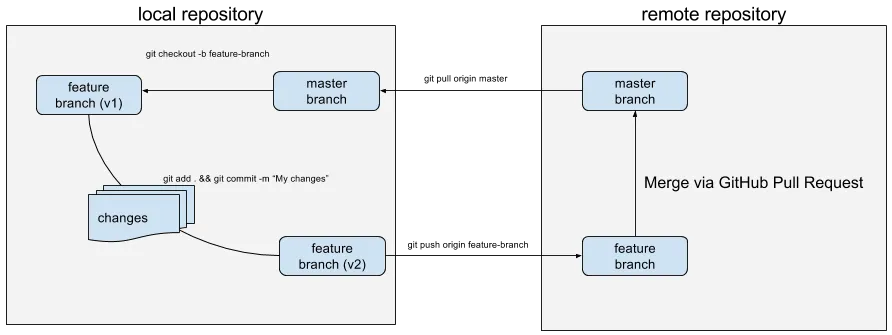
There are two repositories in sync in this image: the local repository and the remote repository. All work is done inside the local repository, as follows:
- The developer creates a new branch from a master branch.
- Commits changes to a new feature branch.
- Pushes this branch to the remote repository.
- After code review, this branch is merged into the master branch in the remote repository.
- Finally, changes to the master branch are pulled to the local repository's master branch, and the cycle starts again.
There are multiple services, available in the form of Software as a Service, as well as enterprise-hosted software, that dramatically simplify all Git-related operations. Services like this provide remote hosting of Git repositories, mechanisms to collaborate on changes, and hundreds of integrations with other tools.
Undoubtedly, the most famous service like this is GitHub, where lots of open source projects are stored and maintained, including all HashiCorp products. GitHub revolutionized the way people work on open source, but it has a strong competition today in the form of BitBucket (widely used in enterprise environments) and GitLab.
Moving templates to Git
Traditionally, code in technical books uses GitHub for a good reason: everyone knows it, and it's free for open source (or just public) repositories. We are going to use GitLab though. First, it's free for both public and private projects. Second, it has some features that GitHub lacks, and we will need them for this chapter: more on this later.
You could skip this section as well, but better if you don't. We will go through all the files that we have created in previous chapters and remove everything not needed.
This means that before proceeding further, you will need to get yourself an account at https://about.gitlab.com/ (you can use your GitHub account to log in to GitLab with just few clicks).
All code samples will still be available at https://github.com/ as well.
We will start by doing a revision (see what I did there?) of all the files we have so far. All the code written previously in the book will be publicly available on GitLab.
Go to your directory and run git init to initialize a new Git repository. Let's check what Git wants us to add to the repository:
$> git status On branch master Initial commit Untracked files: (use "git add <file>..." to include in what will be committed) .terraform/ base.json development.tfvars custom_data_source.rb graph.png id_rsa.pub modules/ playbook.yml rolling_update.rb specs/ template.tf terraform.tfstate terraform.tfstate.backup variables.tf nothing added to commit but untracked files present (use "git add" to track)
We decided to perform rolling updates with Auto Scaling groups, thus we don't need rolling_update.rb anymore. We've also switched to using only Puppet, which means playbook.yml needs to go too. Storing the graph image inside this repository is meaningless: throw it away as well. Also, remove the specs/ folder: we will revise our approach to test servers later. We won't use an external data source, which means that customer_data_source.rb is obsolete.
As you might remember, Terraform installs local modules by making symlink to the .terraform directory. It should not be inside the Git repository. We can make it invisible for Git by creating the .gitignore file with the following content:
.terraform/
This is what the list of files for your first commit needs to look like:
- .gitignore
- base.json
- development.tfvars
- id_rsa.pub
- modules/
- template.tf
- terraform.tfstate
- terraform.tfstate.backup
- variables.tf
After this small cleanup, we can commit our command as follows:
$> git add . $> git commit -m "Initial commit"
Now configure your remote repository and push it there:
$> git remote add origin [email protected]:Fodoj/packt-terraform-book.git $> git push origin master
You can get a link, such as [email protected], inside a GitLab web interface on the projects page. In the earlier example, Fodoj is the author's username and packt-terraform-book is the name of the repository.
Great! Now all the code we've written so far is version controlled! We can do changes to the template, run the terraform apply command, and commit it to the repository. Our colleagues can pull these changes and make their own changes as well. It's already so much better than what we had before.
Note that all the smaller steps will not be present in the commit history. You have to do them yourself if you really want to learn how to use Terraform.
You can download it from the following repository if you were too lazy to write it yourself during the previous chapters: https://gitlab.com/Fodoj/packt-terraform-book/tree/master
Protecting secrets in a Git repository
Terraform doesn't provide any built-in way of securing your state file. Neither is there a way to secure only some part of it or even provide encrypted data inside your templates. And it's a shame because, sooner or later, you will have to use some kind of secrets with your templates: passwords, API keys, and others. If you plan to store your state file in the git repository, it's important to protect it. The easiest solution is to encrypt the whole state file, store the encrypted version in the repository, and distribute the key for decr...
Table of contents
- Title Page
- Copyright
- Credits
- About the Author
- About the Reviewer
- www.PacktPub.com
- Customer Feedback
- Preface
- Infrastructure Automation
- Deploying First Server
- Resource Dependencies and Modules
- Storing and Supplying Configuration
- Connecting with Other Tools
- Scaling and Updating Infrastructure
- Collaborative Infrastructure
- Future of Terraform
Frequently asked questions
Yes, you can cancel anytime from the Subscription tab in your account settings on the Perlego website. Your subscription will stay active until the end of your current billing period. Learn how to cancel your subscription
No, books cannot be downloaded as external files, such as PDFs, for use outside of Perlego. However, you can download books within the Perlego app for offline reading on mobile or tablet. Learn how to download books offline
Perlego offers two plans: Essential and Complete
- Essential is ideal for learners and professionals who enjoy exploring a wide range of subjects. Access the Essential Library with 800,000+ trusted titles and best-sellers across business, personal growth, and the humanities. Includes unlimited reading time and Standard Read Aloud voice.
- Complete: Perfect for advanced learners and researchers needing full, unrestricted access. Unlock 1.4M+ books across hundreds of subjects, including academic and specialized titles. The Complete Plan also includes advanced features like Premium Read Aloud and Research Assistant.
We are an online textbook subscription service, where you can get access to an entire online library for less than the price of a single book per month. With over 1 million books across 990+ topics, we’ve got you covered! Learn about our mission
Look out for the read-aloud symbol on your next book to see if you can listen to it. The read-aloud tool reads text aloud for you, highlighting the text as it is being read. You can pause it, speed it up and slow it down. Learn more about Read Aloud
Yes! You can use the Perlego app on both iOS and Android devices to read anytime, anywhere — even offline. Perfect for commutes or when you’re on the go.
Please note we cannot support devices running on iOS 13 and Android 7 or earlier. Learn more about using the app
Please note we cannot support devices running on iOS 13 and Android 7 or earlier. Learn more about using the app
Yes, you can access Getting Started with Terraform - Second Edition by Kirill Shirinkin in PDF and/or ePUB format, as well as other popular books in Computer Science & Operating Systems. We have over one million books available in our catalogue for you to explore.