Master the management of IT Service using full potential of ServiceNow.About This Book• Leverage ServiceNow's capabilities to achieve improved service management and excellent results in your IT operations by following step-by-step, practical instructions• Build core administration, management, and maintenance skills with IT service management and IT operations management• Improve your workflow efficiency by designing and creating responsive and automated workflowsWho This Book Is ForThis course is for IT professionals, ServiceNow administrators, and developers who would like to gain greater control of ServiceNow and its architecture to design and create automated workflows. You should be familiar with JavaScript and basic computing technologies, but you can be new to ServiceNow.What You Will Learn• Acquire and configure your own free personal developer instance of ServiceNow• Read (and write!) clear, effective requirements for ServiceNow development• Avoid common pitfalls and missteps that could seriously impact future progress and upgradeability• Use the ServiceNow plugins to manage development• Build and publish custom applications for service management• Write efficient and effective client-side JavaScript• Find out how to authenticate and secure Web Services• Integrate and exchange data with people and systems• Create and secure your systems with proper access controlIn DetailServiceNow is a SaaS application that provides workflow form-based applications. It is an ideal platform for creating enterprise-level applications, giving requesters and fulfillers improved visibility and access to a process. ServiceNow-based applications often replace email by providing a better way to get work done.This course will show you how to put important ServiceNow features to work in the real world. We will introduce key concepts and examples on managing and automating IT services, and help you build a solid foundation towards this new approach. You will then learn more about the power of tasks, events, and notifications. We'll then focus on using web services and other mechanisms to integrate ServiceNow with other systems.Further on, you'll learn how to secure applications and data, and understand how ServiceNow performs logging and error reporting. At the end of this course, you will acquire immediately applicable skills to rectify everyday problems encountered on the ServiceNow platform.The course provides you with highly practical content explaining ServiceNow from the following Packt books: 1. Learning ServiceNow2. ServiceNow Cookbook3. Mastering ServiceNow, Second EditionStyle and approachThis pragmatic guide follows problem-solution based approach to help you configure the ServiceNow and eliminate the challenges faced when implementing and using ServiceNow. It enables you to configure and manage ServiceNow, and learn the fundamentals of the ServiceNow platform.
eBook - ePub
ServiceNow: Building Powerful Workflows
- 1,330 pages
- English
- ePUB (mobile friendly)
- Available on iOS & Android
eBook - ePub
ServiceNow: Building Powerful Workflows
About this book
Information
Module 1
Learning ServiceNow
IT Service management at your fingertips
The Interface
No matter what software system you're interested in learning about, understanding the interface is likely to be the first step toward success. ServiceNow is a very robust IT service management tool, and has an interface to match. Designed both to be easy to use, and to support a multitude of business processes and applications (both foreseen and unforeseen), it must be able to bend to the will of the business, and be putty in the hands of a capable developer.
In this chapter, you'll learn all the major components of the UI (user interface), and how to manipulate them to suit your business needs, and look good doing it. You'll also learn some time-saving tips, tricks, and UI shortcuts that have been built into the interface for power users to get around more quickly.
These UI shortcuts and other pro tips will be collected at the end of this book in a final chapter that'll be available online as a quick pocket-reference.
This chapter will cover the key components of the user interface, including:
- The content and ServiceNow frames
- The application navigator
- UI settings and personalization
- UI15 versus UI16 interface components and configuration
- Differences between the Geneva and Helsinki interfaces
- Pro tips for flying around the interface like a seasoned pro
We recommend that you follow along in your own development instance as you read through this section, to gain a more intimate familiarity with the interface.
Frames
ServiceNow is a cloud platform that runs inside your browser window. Within your browser, the ServiceNow interface is broken up into frames. Frames, in web parlance, are just separately divided sections of a page. This section will show you what the different frames are, what they generally contain, and the major UI elements within them.
In ServiceNow, there are two main frames: the ServiceNow frame, and the content frame. Both have different controls and display different information.
The ServiceNow frame consists of many UI elements spanning across both the top, and left side of the ServiceNow window in your browser:

Technically, the ServiceNow frame can be further broken up into two frames: The banner frame along the top edge of the interface, and the Application Navigator along the left side.
Banner frame
The banner frame runs along the top of every page in ServiceNow, save for a few exceptions. It's got room for some branding and a logo, but the more functional components for administrators and developers is on the right. There, you'll find:
- System settings cog
- Help and documentation button
- Conversations panel button
- Instance search button
- Profile/session dropdown
System Settings
In your developer instance, on the far-top-right, you will see a sort of cog or sprocket. This is generally recognized as a universal Settings menu icon. Clicking on that icon reveals the System Settings menu:

This menu is broken down into several sections:
- General
- Theme
- Lists
- Forms
- Notifications
- Developer (Admins only)
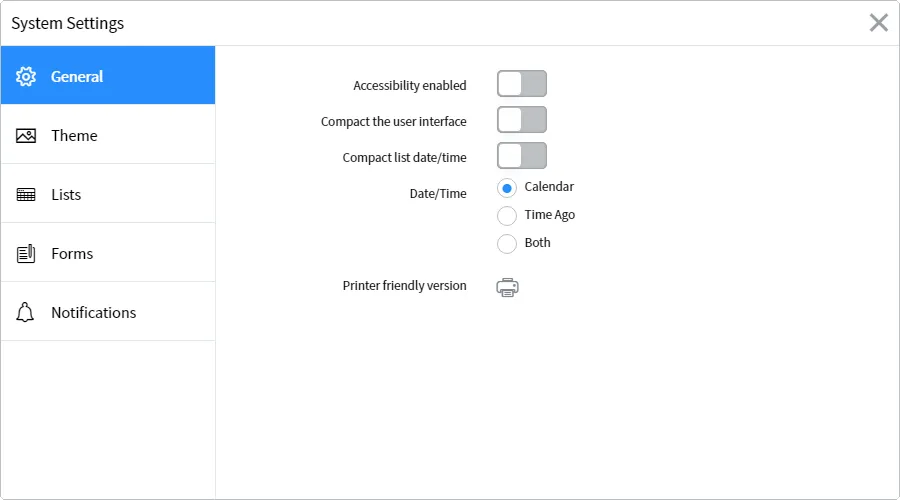
The settings in this menu generally apply only to the current user who's signed in, so you can freely toggle and modify these settings without worrying about breaking anything.
In the General tab (as seen in the preceding figure) of the System Settings UI, you'll find toggles to control accessibility options, compact the user interface, select how date/time fields are shown, select your time-zone, and even an option to display a printer-friendly version of the page you're on. In Geneva (the prior version of ServiceNow, with Helsinki being the version primarily used for the examples in this book), you'll also see an option to Wrap Longer Text in List Columns and Compact list date/time:

On the Theme tab in the preceding figure, you'll find several pre-made ServiceNow themes with names like System and Blues. One of the first things that a company often does when deploying ServiceNow, is to create a custom-branded theme. We'll go over how to do that in a later section, and you'll be able to see your custom themes there:

The Lists tab (not available in Geneva) contains the option to wrap longer text in list columns (which was under the General tab in Geneva), as well as options to enable striped table rows (which alternates rows in a table between contrasting shades of gray, making it easier to follow with the eye from left to right) and modern cell styles. All options in the Lists tab except Wrap longer text in list columns require the List V3 plugin to be enabled before they'll show up, as they only apply to List V3.
If you've installed a fresh ServiceNow instance using Helsinki or a later version, the List V3 plugin will be enabled by default. However, if you've upgraded from Geneva or an earlier version, to Helsinki, you'll be on List V2 by default, and List V3 will need to be enabled. This, and any other plugins, can be enabled from System Definition | P...
Table of contents
- Title Page
- Copyright
- Credits
- Preface
- Module 1
- The Interface
- Lists and Forms
- UI Customization
- Understanding Data and Relationships
- Tasks and Workflows
- UI and Data Policies
- User Administration and Security
- Introduction to Scripting
- The Server-side Glide API
- The Client-side Glide API
- Server-side Scripting
- Client-side Scripting
- Debugging
- Pro Tips
- Module 2
- Getting Started with Service-Now
- Performing Core Configuration and Management Tasks
- Building Data-Driven Application
- Configuring Alerts and Notifications
- Building and Configuring Reports
- Creating and Configuring Workflow Activities
- Auditing and Diagnosing Service-Now
- Module 3
- ServiceNow Foundations
- Developing Custom Applications
- Server-Side Control
- Client-Side Interaction
- Getting Things Done with Tasks
- Events, Notifications, and Reporting
- Exchanging Data – Import Sets, Web Services, and other Integrations
- Securing Applications and Data
- Diagnosing ServiceNow – Knowing What Is Going On
- Packaging with Applications, Update Sets, and Upgrades
- Making ServiceNow Beautiful with Service Portal and Custom Interfaces
- Bibliography
Trusted by 375,005 students
Access to over 1.5 million titles for a fair monthly price.
Study more efficiently using our study tools.
Frequently asked questions
Yes, you can cancel anytime from the Subscription tab in your account settings on the Perlego website. Your subscription will stay active until the end of your current billing period. Learn how to cancel your subscription
No, books cannot be downloaded as external files, such as PDFs, for use outside of Perlego. However, you can download books within the Perlego app for offline reading on mobile or tablet. Learn how to download books offline
Perlego offers two plans: Essential and Complete
- Essential is ideal for learners and professionals who enjoy exploring a wide range of subjects. Access the Essential Library with 800,000+ trusted titles and best-sellers across business, personal growth, and the humanities. Includes unlimited reading time and Standard Read Aloud voice.
- Complete: Perfect for advanced learners and researchers needing full, unrestricted access. Unlock 1.5M+ books across hundreds of subjects, including academic and specialized titles. The Complete Plan also includes advanced features like Premium Read Aloud and Research Assistant.
We are an online textbook subscription service, where you can get access to an entire online library for less than the price of a single book per month. With over 1.5 million books across 990+ topics, we’ve got you covered! Learn about our mission
Look out for the read-aloud symbol on your next book to see if you can listen to it. The read-aloud tool reads text aloud for you, highlighting the text as it is being read. You can pause it, speed it up and slow it down. Learn more about Read Aloud
Yes! You can use the Perlego app on both iOS and Android devices to read anytime, anywhere — even offline. Perfect for commutes or when you’re on the go.
Please note we cannot support devices running on iOS 13 and Android 7 or earlier. Learn more about using the app
Please note we cannot support devices running on iOS 13 and Android 7 or earlier. Learn more about using the app
Yes, you can access ServiceNow: Building Powerful Workflows by Tim Woodruff, Ashish Rudra Srivastava, Martin Wood in PDF and/or ePUB format, as well as other popular books in Computer Science & Entreprise Applications. We have over 1.5 million books available in our catalogue for you to explore.