Learning AWS IoT
eBook - ePub

Learning AWS IoT

  1. 278 pages
  2. English
  3. ePUB (mobile friendly)
  4. Available on iOS & Android
eBook - ePub

Learning AWS IoT

About this book

Learn to use AWS IoT services to build your connected applications with the help of this comprehensive guide.

Key Features

  • Gets you started with AWS IoT and its functionalities
  • Learn different modules of AWS IoT with practical use cases.
  • Learn to secure your IoT communication

Book Description

The Internet of Things market increased a lot in the past few years and IoT development and its adoption have showed an upward trend. Analysis and predictions say that Enterprise IoT platforms are the future of IoT. AWS IoT is currently leading the market with its wide range of device support SDKs and versatile management console.

This book initially introduces you to the IoT platforms, and how it makes our IoT development easy. It then covers the complete AWS IoT Suite and how it can be used to develop secure communication between internet-connected things such as sensors, actuators, embedded devices, smart applications, and so on. The book also covers the various modules of AWS: AWS Greengrass, AWS device SDKs, AWS IoT Platform, AWS Button, AWS Management consoles, AWS-related CLI, and API references, all with practical use cases.

Near the end, the book supplies security-related best practices to make bi-directional communication more secure. When you've finished this book, you'll be up-and-running with the AWS IoT Suite, and building IoT projects.

What you will learn

  • Implement AWS IoT on IoT projects
  • Learn the technical capabilities of AWS IoT and IoT devices
  • Create IoT-based AWS IoT projects
  • Choose IoT devices and AWS IoT platforms to use based on the kind of project you need to build
  • Deploy AWS Greengrass and AWS Lambda
  • Develop program for AWS IoT Button
  • Visualize IoT AWS data
  • Build predictive analytics using AWS IoT and AWS Machine Learning

Who this book is for

This book is for anyone who wants to get started with the AWS IoT Suite and implement it with practical use cases. This book acts as an extensive guide, on completion of which you will be in a position to start building IoT projects using AWS IoT platform and using cloud services for your projects.

Frequently asked questions

Yes, you can cancel anytime from the Subscription tab in your account settings on the Perlego website. Your subscription will stay active until the end of your current billing period. Learn how to cancel your subscription.
No, books cannot be downloaded as external files, such as PDFs, for use outside of Perlego. However, you can download books within the Perlego app for offline reading on mobile or tablet. Learn more here.
Perlego offers two plans: Essential and Complete
  • Essential is ideal for learners and professionals who enjoy exploring a wide range of subjects. Access the Essential Library with 800,000+ trusted titles and best-sellers across business, personal growth, and the humanities. Includes unlimited reading time and Standard Read Aloud voice.
  • Complete: Perfect for advanced learners and researchers needing full, unrestricted access. Unlock 1.4M+ books across hundreds of subjects, including academic and specialized titles. The Complete Plan also includes advanced features like Premium Read Aloud and Research Assistant.
Both plans are available with monthly, semester, or annual billing cycles.
We are an online textbook subscription service, where you can get access to an entire online library for less than the price of a single book per month. With over 1 million books across 1000+ topics, we’ve got you covered! Learn more here.
Look out for the read-aloud symbol on your next book to see if you can listen to it. The read-aloud tool reads text aloud for you, highlighting the text as it is being read. You can pause it, speed it up and slow it down. Learn more here.
Yes! You can use the Perlego app on both iOS or Android devices to read anytime, anywhere — even offline. Perfect for commutes or when you’re on the go.
Please note we cannot support devices running on iOS 13 and Android 7 or earlier. Learn more about using the app.
Yes, you can access Learning AWS IoT by Agus Kurniawan in PDF and/or ePUB format, as well as other popular books in Computer Science & Cloud Computing. We have over one million books available in our catalogue for you to explore.

Information

Building Predictive Analytics for AWS IoT

Machine learning is one of the potential technologies that has multiple benefits when applied to our business cases. In this chapter, you will learn various Amazon AWS services related to machine learning. Some demos will be explored using machine learning services from Amazon.
The following is a list of topics covered in this chapter:
  • Introducing AWS Machine Learning services
  • Making your sensor speak
  • Integrating Amazon Echo into your IoT projects
  • Making image and video analysis
  • Making predictive analytics for IoT data

Introducing AWS Machine Learning services

Machine learning is one of the subjects in computer science that describes how to teach computers to obtain the ability to learn without hardcoding in a program. More specifically, machine learning enables computers to learn from experiences such as data, information, and training results from experts.
All AWS Machine Learning services can be found at https://aws.amazon.com/machine-learning/. At the time of writing this book, AWS Machine Learning services are available in any region. Make sure that you change AWS region in order to enable AWS Machine Learning services:
In this chapter, we will explore some AWS Machine Learning services that are related to IoT topics.

Making your sensor speak

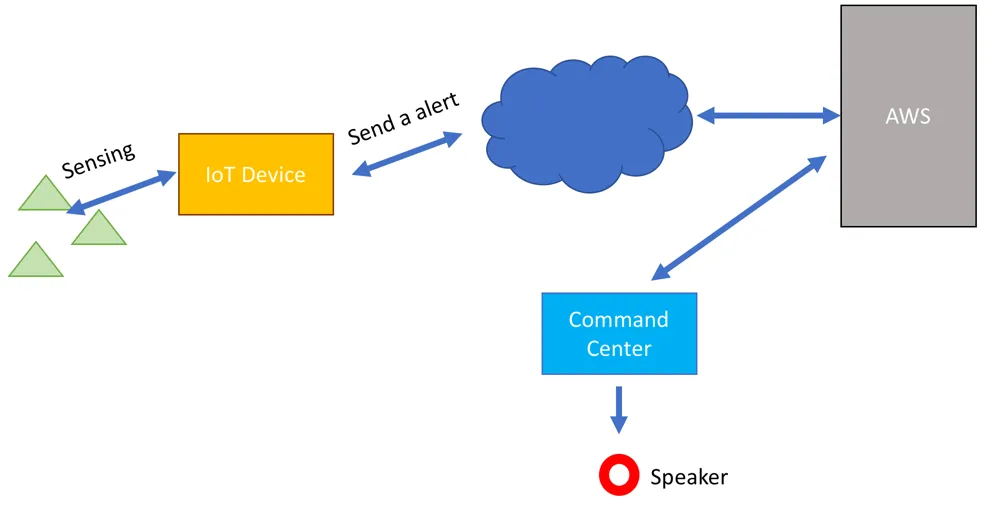
Suppose that you have deployed sensors at various locations. Those sensors perform monitoring to detect a specific purpose. When a sensor finds a thing that its looking for, a sensor device will send an alert to a command center. Some people probably stand by on that location. When an alert comes, the system can make a sound through a speaker.
Message-to-sound or text-to-speech is a field of speech technology that leverages machine learning. A system can convert text or message to human speech. In general, the scenario can be described in the following figure:
From the preceding figure, IoT device can perform sensing and send data to AWS. IoT device can send an alert message to AWS to inform to the command center. AWS can convert text message to sound message. Once a command center receives a sound message, it performs to generate sound through a speaker.
Amazon AWS provides a service that applies speech technology, named Amazon Polly. You will learn how to work with Amazon Polly and then access it from a program in the next sections.

Introducing Amazon Polly

Amazon Polly is one of the AWS services that enables your application such as IoT program to talk using lifelike speech. You can find this service at https://aws.amazon.com/polly/. You can see it in the following screenshot:
If you have an active Amazon account, you can access Amazon Polly at http://console.aws.amazon.com/polly/ through a browser. Currently, Amazon Polly provides two features—Text-to-Speech and Lexicons. You can test these features on the browser.
In order to test the Text-to-Speech feature, click on the Plain text tab and fill a text or message. Then, select the Voice model that you prefer. Once done, click on the Listen to speech button to listen to speech from the text/message:
In the next section, we will develop a program to access AWS Polly from Node.js.

Developing a program for Amazon Polly

In the previous section, we have access to the text-to-speech feature from Amazon Polly. In this section, we try to access it from a program. This is useful when you apply Polly on IoT devices such as Raspberry Pi:
  1. To access Amazon Polly, we need to prepare the account with privilege access for AWS Polly. First, you can access the AWS IAM dashboard on http://console.aws.amazon.com/iam/. Then, create a new user if you don't have it yet.
  1. Now you can configure your user to give permission to access Amazon Polly. Open your IAM user that is shown in the following screenshot. Then, click on the Add permissions button. Find AmazonPollyFullAccess policy and add it into your IAM user:
  1. Next, you shoul...

Table of contents

  1. Title Page
  2. Copyright and Credits
  3. Packt Upsell
  4. Contributors
  5. Preface
  6. Getting Started with AWS IoT
  7. Connecting IoT Devices to AWS IoT Platform
  8. Optimizing IoT Computing Using AWS Greengrass
  9. Building Local AWS Lambda with AWS Greengrass
  10. Expanding IoT Capabilities with AWS IoT Button
  11. Visualizing AWS IoT Data
  12. Building Predictive Analytics for AWS IoT
  13. Securing AWS IoT
  14. Other Books You May Enjoy