In this chapter, we will start our journey toward using the preferred IoT publish-subscribe lightweight messaging protocol in diverse IoT solutions, combined with mobile apps and web applications. We will learn how MQTT and its lightweight messaging system work.
We will understand the MQTT puzzle: clients, servers (formerly known as brokers), and connections. We will learn the procedures to install an MQTT 3.1.1 Mosquitto server in Linux, macOS, and Windows. We will learn special considerations for running a Mosquitto server in the cloud (Azure, AWS, and other cloud providers). We will gain an understanding of the following:
Imagine that we have dozens of different devices that must exchange data between themselves. These devices have to request data from other devices, and the devices that receive the requests must respond with that data. The devices that request the data must process the data received from the devices that responded with the required data.
The devices are Internet of Things (IoT) boards that have dozens of sensors wired to them. We have the following IoT boards with different processing powers:
- Raspberry Pi 3 Model B+
- Qualcomm DragonBoard 410c
- Udoo Neo
- BeagleBone Black
- Phytec phyBoard-i.MX7-Zeta
- e-con Systems eSOMiMX6-micro
- MinnowBoard Turbot Quad-Core
Each of these boards has to be able to send and receive data. In addition, we want a web application to be able to send and receive data. We want to send and receive data in near-real time over the internet, and we might face some network problems: our wireless networks are somewhat unreliable and we have some high-latency environments. Some devices have low power, many of them are powered by batteries, and their resources are scarce. In addition, we must be careful with the network bandwidth usage because some of the devices use metered connections.
A metered connection is a network connection where we have a limited amount of data usage per month. If we go over this amount of data, we get billed extra.
We can use HTTP requests and build a publish-subscribe model to exchange data between different devices. However, there is a protocol that has been specifically designed to be lighter than the HTTP 1.1 and HTTP/2 protocols. The MQ Telemetry Transport (MQTT) is better suited for a scenario in which many devices have to exchange data between themselves in near-real time over the internet and we need to consume the least network bandwidth possible. This protocol works better than HTTP 1.1 and HTTP/2 when unreliable networks are involved and connectivity is intermittent.
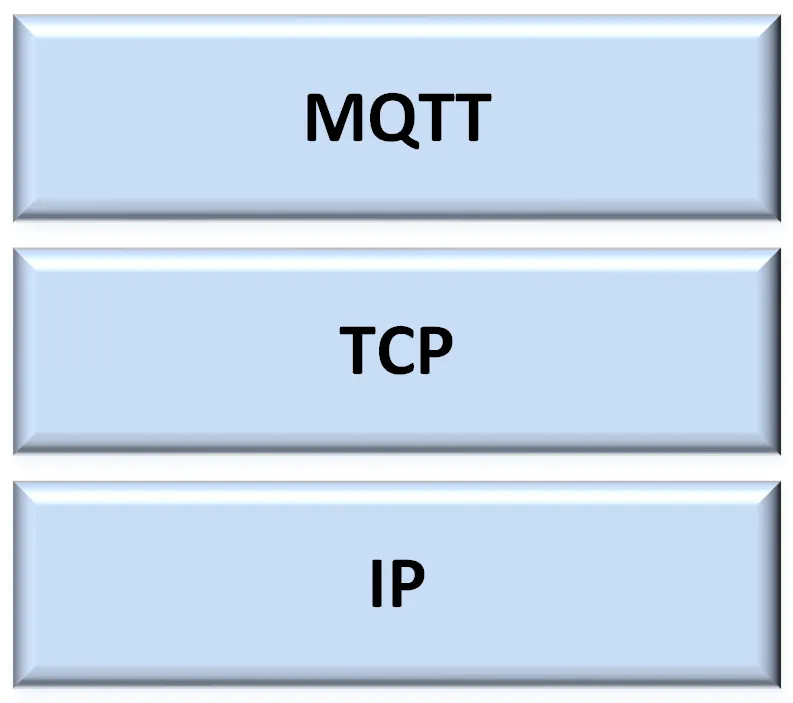
The MQTT protocol is a machine-to-machine (M2M) and IoT connectivity protocol. MQTT is a lightweight messaging protocol that works with a server-based publish-subscribe mechanism and runs on top of TCP/IP (Transmission Control Protocol/Internet Protocol). The following diagram shows the MQTT protocol on top of the TCP/IP stack:
The most popular versions of MQTT are 3.1.1 and 3.1. In this book, we will work with MQTT 3.1.1. Whenever we reference MQTT, we are talking about MQTT 3.1.1, the newest version of the protocol. The MQTT 3.1.1 specification has been standardized by the OASIS consortium. In addition, MQTT 3.1.1 became an ISO standard (ISO/IEC 20922) in 2016.
MQTT is lighter than the HTTP 1.1 and HTTP/2 protocols, and therefore it is a very interesting option whenever we have to send and receive data in near-real time with a publish-subscribe model, while requiring the lowest possible footprint. MQTT is very popular in IoT, M2M, and embedded projects, but it is also gaining presence in web applications and mobile apps that require assured messaging and an efficient message distribution. As a summary, MQTT is suitable for the following application domains in which data exchange is required:
- Asset tracking and management
- Automotive telematics
- Chemical detection
- Environment and traffic monitoring
- Field force automation
- Fire and gas testing
- Home automation
- In-Vehicle Infotainment (IVI)
- Medical
- Messaging
- Point of Sale (POS) kiosks
- Railway
- Radio-Frequency Identification (RFID)
- Supervisory Control and Data Acquisition (SCADA)
- Slot machines
As a summary, MQTT was designed to be suitable to support the following typical challenges in IoT, M2M, embedded, and mobile applications:
- Be lightweight to make it possible to transmit high volumes of data without huge overheads
- Distribute minimal packets of data in huge volumes
- Support an event-oriented paradigm with the asynchronous, bidirectional, low-latency push delivery of messages
- Easily emit data from one client to many clients
- Make it possible to listen for events whenever they happen (event-oriented architecture)
- Support always-connected and sometimes-connected models
- Publish information over unreliable networks and provide reliable deliveries over fragile connections
- Work very well with battery-powered devices or require low power consumption
- Provide responsiveness to make it possible to achieve near-real-time delivery of information
- Offer security and privacy for all the data
- Be able to provide the necessary scalability to distribute data to hundreds of thousands of clients
![]()
Before we dive deep into MQTT, we must understand the publish-subscribe pattern, also known as the pub-sub pattern. In the publish-subscribe pattern, a client that publishes a message is decoupled from the other client or clients that receive the message. The clients don't know about the existence of the other clients. A client can publish messages of a specific type and only the clients that are interested in that specific type of message will receive the published messages.
The publish-subscribe pattern requires a server, also known as a broker. All the clients establish a connection with the server. A client that sends a message through the server is known as the publisher. The server filters the incoming messages and distributes them to the clients that are interested in that type of received messages. Clients that register to the server as interested in specific types of messages are known as subscribers. Hence, both publishers and subscribers establish a connection with the server.
It is easy to understand how things work with a simple diagram. The following diagram shows one publisher and two subscribers connected to a server:
A Raspberry Pi 3 Model B+ board with an altitude sensor wired to it is a publisher that establishes a connection with the server. A BeagleBone Black board and a Udoo Neo board are two subscribers that establish a connection with the server.
The BeagleBone Black board indicates to the server that it wants to subscribe to all messages that belong to the sensors/drone01/altitude topic. The Udoo Neo board indicates the same to the server. Hence, both boards are subscribed to the sensors/drone01/altitude topic.
A topic is a named logical channel, and it is also referred to as a channel or subject. The server will send subscribers only messages published to topics to which they are subscribed.
The Raspberry Pi 3 Model B+ board publishes a message with 100 feet as the payload and sensors/drone01/altitude as the topic. This board, that is, the publisher, sends the publish request to the server.
The data for a message is known as the payload. A message includes the topic to which it belongs and the payload.
The server distributes the message to the two clients that are subscribed to the sensors/drone01/altitude topic: the BeagleBone Black and the Udoo Neo boards.
Publishers and subscribers are decoupled in space because they don't know each other. Publishers and subscribers don't have to run at the same time. The publisher can publish a message and the subscriber can receive it later. In addition, the publish operation isn't synchronized with the receive operation.
A publisher requests the server to publish a message, and the different clients that have subscribed to the appropriate topic can receive the...