Building Applications with Spring 5 and Kotlin
Build scalable and reactive applications with Spring combined with the productivity of Kotlin
- 310 pages
- English
- ePUB (mobile friendly)
- Available on iOS & Android
Building Applications with Spring 5 and Kotlin
Build scalable and reactive applications with Spring combined with the productivity of Kotlin
About this book
Learn to build a full-fledged application in Spring and Kotlin taking a reactive, microservice-based approach for scalability and robustness in the cloudAbout This Book• Build a full-fledged application in Spring and Kotlin• Architect your application to take a microservice-based approach in the cloud• Integrate your application with a variety of Spring componentsWho This Book Is ForDevelopers comfortable using Spring who have basic knowledge of Kotlin and want to take their development skills to the next level and build enterprise-grade applications will benefit from this book.What You Will Learn• Explore Spring 5 concepts with Kotlin• Learn both dependency injections and complex configurations• Utilize Spring Data, Spring Cloud, and Spring Security in your applications• Create efficient reactive systems with Project Reactor• Write unit tests for your Spring/Kotlin applications• Deploy applications on cloud platforms like AWSIn DetailKotlin is being used widely by developers because of its light weight, built-in null safety, and functional and reactive programming aspects. Kotlin shares the same pragmatic, innovative and opinionated mindset as Spring, so they work well together. Spring when combined with Kotlin helps you to reach a new level of productivity. This combination has helped developers to create Functional Applications using both the tools together. This book will teach you how to take advantage of these developments and build robust, scalable and reactive applications with ease.In this book, you will begin with an introduction to Spring and its setup with Kotlin. You will then dive into assessing the design considerations of your application. Then you will learn to use Spring (with Spring Boot) along with Kotlin to build a robust backend in a microservice architecture with a REST based collaboration, and leverage Project Reactor in your application. You'll then learn how to integrate Spring Data and Spring Cloud to manage configurations for database interaction and cloud deployment. You'll also learn to use Spring Security to beef up security of your application before testing it with the JUnit framework and then deploying it on a cloud platform like AWS.Style and approachEverything you learn will be demonstrated on real-world Spring project. In each chapter we will cover some of Spring features and apply it on our project. We will guide you from the project initialization till the project deployment.
Trusted by 375,005 students
Access to over 1 million titles for a fair monthly price.
Study more efficiently using our study tools.
Information
Project Deployment
- What will be deployed?
- Deployment options
- Deploying to the Cloud (AWS)
What will be deployed?
spring.application.name= journaler server.port= 80 logging.level.root=INFO logging.level.com.journaler.api=DEBUG logging.level.org.springframework.jdbc=ERROR endpoints.health.enabled=true endpoints.trace.enabled=true endpoints.info.enabled=true endpoints.metrics.enabled=true spring.datasource.url=jdbc:mysql://localhost/journaler_api?useSSL=false&useUnicode=true&characterEncoding=utf-8 spring.datasource.username=root spring.datasource.password=localInstance2017 spring.datasource.tomcat.test-on-borrow=true spring.datasource.tomcat.validation-interval=30000 spring.datasource.tomcat.validation-query=SELECT 1 spring.datasource.tomcat.remove-abandoned=true spring.datasource.tomcat.remove-abandoned-timeout=10000 spring.datasource.tomcat.log-abandoned=true spring.datasource.tomcat.max-age=1800000 spring.datasource.tomcat.log-validation-errors=true spring.datasource.tomcat.max-active=50 spring.datasource.tomcat.max-idle=10 spring.jpa.hibernate.ddl-auto=update


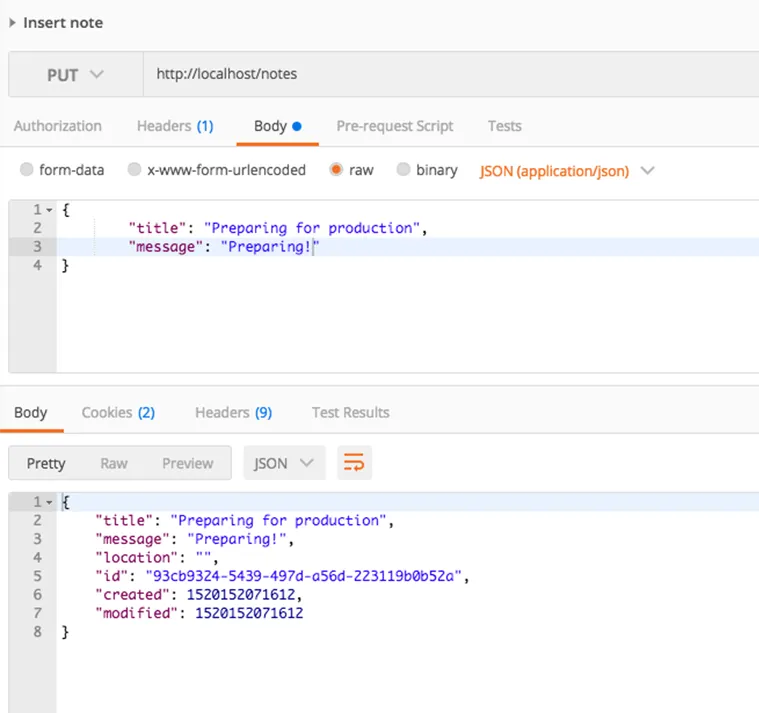
command, as shown in the following screenshot:



Deployment options
Table of contents
- Title Page
- Copyright and Credits
- Packt Upsell
- Contributors
- Preface
- Starting Up
- Starting with Spring
- Building Your First Spring RESTful Service with Kotlin
- Working with Spring Data JPA and MySQL
- Securing Applications with Spring Security
- Spring Cloud
- Using Project Reactor
- Development Practices
- Testing
- Project Deployment
- Other Books You May Enjoy
Frequently asked questions
- Essential is ideal for learners and professionals who enjoy exploring a wide range of subjects. Access the Essential Library with 800,000+ trusted titles and best-sellers across business, personal growth, and the humanities. Includes unlimited reading time and Standard Read Aloud voice.
- Complete: Perfect for advanced learners and researchers needing full, unrestricted access. Unlock 1.4M+ books across hundreds of subjects, including academic and specialized titles. The Complete Plan also includes advanced features like Premium Read Aloud and Research Assistant.
Please note we cannot support devices running on iOS 13 and Android 7 or earlier. Learn more about using the app