There's no doubt that online security is more important today than it's ever been before. One can hardly avoid the almost daily stories about new vulnerabilities, information leaks, and data theft or extortion. Once upon a time, security concerns were one of the major objections to moving company data to the cloud. However, incidents at companies such as Equifax, Facebook, and Twitter continue to prove that a large IT infrastructure and in-house security team are no guarantee against modern threats. Although Microsoft is certainly not immune, it is reasonable to acknowledge that when it comes to data security, they can apply more resources, manpower, and experience than typical small-to-midsized organizations and many larger ones.
Office 365 has many features that extend this protection. Although these used to be scattered across the entire platform, Microsoft has done much work recently to bring them together under the central Office 365 Security & Compliance umbrella.
In this chapter, we'll describe the following security-related topics:
- Purposes of Security & Compliance
- Alerts
- Permissions
- Classifications
- Data loss prevention
- Threat management
- Search and investigation
- Reports
- Service assurance
- Security score card
- Using PowerShell with Security & Compliance
It would be impossible to review every available screen and click in Security & Compliance in just one chapter; one could easily imagine an entire book on cloud security. Instead, we'll do our best to review the essential concepts you need to know as a system administrator that will help you work with IT security professionals to realize what's possible and get the most out of what's included in Office 365.
This chapter is also much less abstract and more one-on-one than some of our others. That's because, removed from context and real-life consequences, the topic of security can become quite dry and even dull. If we truly want to help improve our cybersecurity efforts, then it's best not to put the audience to sleep. Wherever possible, we'll be using real-world examples to illustrate key concepts.
As experts who've been involved in internet security in one way or another for over 20 years now, we've collected a lot of stories over the years. These anecdotes can be both informative and entertaining, but it would be difficult to credibly share these experiences without somehow also disclosing their origin, often to the great embarrassment of nearly everyone involved. In all cases, while the information we will share is true, the names have been changed to protect the innocent and, sometimes, the guilty. The names are fake—and sometimes even silly—but the stories are quite real.
![]()
In the early days, security features were spread out across the many products in the Office 365 family. Some were in Exchange, whereas others were in SharePoint. Microsoft created the Security & Compliance center to establish a centralized location where administrators can work with these individual features and have a comprehensive view of cloud security.
When Security & Compliance was first launched, there wasn't much meat on its bones. A lot has changed since then; if you checked it out a while ago, please give it another look. Over the past couple of years, Security & Compliance in Office 365 has undergone rapid expansion and change. It wouldn't be surprising to find features that are not covered in this chapter, or to find that things aren't exactly as we describe here. We'll do our best to describe things as they are today, with an eye toward how they might change in the future.
To access Security & Compliance, you must either have the global administrator role or the security administrator role. Without one of these roles, the Security & Compliance tiles/links won't even appear. However, this alone won't be enough to access all its features. (See the Permissions section later for more details.)
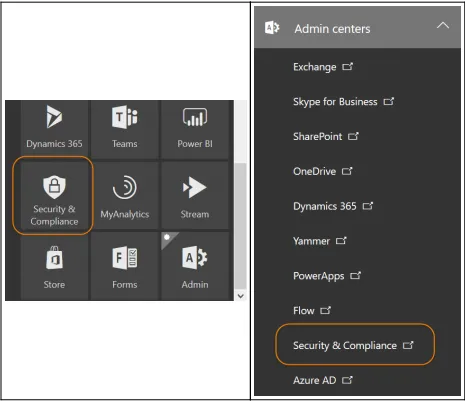
You'll find it in your Office 365 apps, alongside other applications, such as Word, Excel, and the admin portal. More than likely, it will be quite far down the list. You can also find it under Admin centers in the left-hand navigation of the Office 365 admin portal, in case, you wanted to click twice instead of just once:
Security & Compliance navigation
Save time and visit Security & Compliance directly at https://protection.office.com.
Either of these will take you to the Security & Compliance home page, which serves as a jumping off point for many unique features and tools. Different subsections are shown along the left-hand navigation using familiar icons, similarly to the admin portal. Page content is displayed as tiles, which may change from time to time and can be customized to your preferences:
Security & Compliance dashboard
You might be tempted to just jump into the various tools in Security & Compliance, roll up your sleeves, and get messy. Your enthusiasm is laudable, but most likely followed by throwing up your hands and shouting, "It doesn't work!" Most likely, the problem is just that you haven't yet been given permissions to access Security & Compliance features yet. For this reason, we'll talk about Permissions first, even though it won't appear in this order on the site itself.
![]()
Permissions to Security & Compliance are handled through role-based access control (RBAC). If you're used to having your way around Office 365 because you're the global administrator, you may find this very annoying. Exchange admins will be familiar with RBAC because it plays a large role in mailbox permissions, especially if you've ever needed to migrate from an on-premises Exchange server to Office 365. Likewise, those who have experimented with eDiscovery, identity and access protection, or privileged identity management will find the roles for Security & Compliance are largely the same.
There are eight key roles used in Security & Compliance. Of course, Microsoft provides detailed descriptions of these. We'll sum them up more concisely, proceeding in the order that (arbitrarily) made the most sense to us:
- Default roles:
- Organization Management: This automatically includes global administrators. It can control Security & ...