This chapter will provide an introduction to containers, dockerizing the services built in the previous chapter, writing the Dockerfile and orchestrating the containers using docker-compose, and providing orchestration examples in Kubernetes.
In the previous chapter, we learned about microservice architecture and its advantages and challenges. One of the major challenges in the microservice-distributed application is the deployment of several microservices across multiple machines (VMs). How will they share common resources of VMs? In production, deploying and managing a system composed of many independent services is an operational complexity.
In microservice architecture, you create and deploy services independently, and you have to re-test your services after deployment on the same VMs. A microservice wouldn't impact on the other microservices, but you could never really guarantee that because the service is independent of the other services, it is using common resources of VMs.
In the favor of microservice architecture, containerized deployment is the topping on the pizza. The microservice is already autonomous by its functional service, but the containerization makes microservices more autonomous by self-containing the underlying infrastructure. So, containerization is making the microservices cloud-neutral.
In this chapter, we will introduce the containerized deployment of microservices and concepts of virtual machine images. Readers will get an understanding of building Docker images for microservices, which are developed with Spring Boot and Spring Cloud. We will also explore how to deploy Docker images in production-like environments, and how to manage and maintain these Docker images.
By the end of this chapter, you will have a better understanding of containerization and how to containerize a microservice developed with Spring Boot and Spring Cloud.
This chapter will cover the following points:
- Introducing containers in the microservice architecture
- Getting started with Docker
- Dockerizing any Spring Boot application
- Writing Dockerfile
- Using docker-compose
- Writing the docker-compose file
- Orchestration using docker-compose
- Introducing Kubernetes
- Orchestration using Kubernetes
Let's look at these topics in detail.
![]()
The microservice architecture is another approach to developing a distributed application. This approach is suitable for the agility, scale, and reliability requirements of modern cloud applications. As we know, a microservice application is decomposed into separate components independently to work together to achieve the whole system.
In microservice architecture, you can scale out independently on the specific functionality rather than unnecessarily scaling out other areas of the application. So, you can scale the resources, such as processing power or network bandwidth, for a specific microservice. But what about sharing infrastructures with another microservice? In this chapter, we will discuss this challenge. Containerization comes into the picture to solve the problem of sharing infrastructure between microservices and allowing microservices to be more autonomous.
Containerization allows you to run your microservices in a completely isolated environment. So, according to the containerization approach, a container is an artifact in which a microservice and its versioned set of dependencies, plus its environment configuration, are abstracted as deployment manifest files. The container contains all infrastructure-related dependencies, environment variables, and configurations. It is packaged together as a container image. And this image is tested as a unit and deployed to a host operating system.
Containerization is nothing but it is a different approach to development and deployment of the microservices. The container is an isolated and runnable instance of an image. That image contains everything required to run an application. In the container, an application can run without using the resources of another container or host machine. You also have full control over a container to create, delete, move, start, and stop this container using a CLI, such as the Docker client. Containers can be connected to each other using a network. A container acts like a separate, independent, and isolated physical or virtual machine.
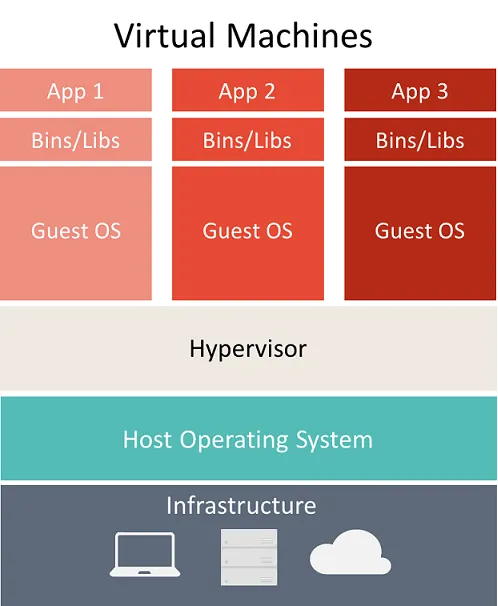
Although a container looks like a physical or virtual machine, the containers use the technology and concepts very differently from virtual machines. Although a container runs an operating system, it has a file system, and it can be accessed over a network, just like a virtual machine. Let's see the following diagram on virtual machine:
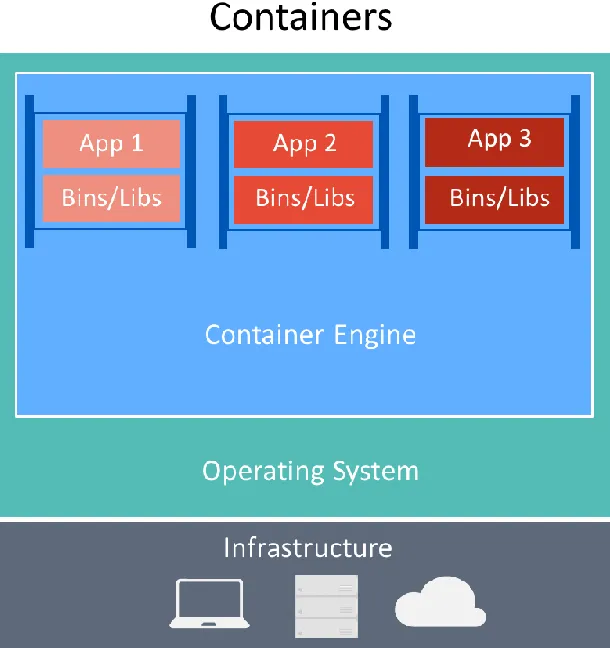
As you can see in the preceding diagram, Virtual Machines include the application, the required dependencies, and a full guest operating system. Hypervisor is a computer software that shares and manages hardware. Let's see the following diagram about Containers:
As you can see in the preceding diagram, Containers include the application and its required dependencies. Unlike virtual machines, Containers share the Operating System and underlying Infrastructure with other containers. These are running as an isolated process on the host operating system. Because Containers share resources, they require fewer resources than virtual machines.
![]()
Let's see the following differences between virtual machines and containers:
| Virtual machines | Containers |
| Virtual machines include the applications, the required dependencies, and a full guest operating system | Containers include the applications and the required dependencies, and share operating systems and underlying infrastructure |
| Each virtual machine has its own guest operating system; because of this, it requires more resources | Because containers share resources, they require fewer resource, the minimal kernel of the operating system present for each container |
| The hypervisor manages VMs, environments | The container engine manages containers |
| You have to add specific resources for scaling | You can scale out containers by creating another container of an image |
| Fewer virtual machines can be created for the same hardware and resources | More containers can be created for the same hardware and resources |
| Virtual machines are virtualizing the underlying hardware | Containers are virtualizing the underlying operating system |
| A VM can take up several GB depending on guest OS | Containers don't require that many GB, because they share resources, they merely use dozens of MB |
| Virtual machines are generally more suitable for monolithic applications with high-security concerns | Containers are generally more suitable for microservice-based applications, or other cloud-native applications, where security is not the major concern |
As we have seen in the previous table, VMs and containers cannot replace each other. So, we can choose according to application requirements and application architecture.
![]()
The following are the advantages of a container-oriented development and deployment approach:
- A container-oriented approach eliminates the challenges that arise from inconsistent environment setups.
- You can do fast application scale-up by instancing new containers as required.
- Requires minimal usage of kernels on the operating system.
- You can create the number of containers for a microservice, depending on application requirements.
- You can easily...