Designing AWS Environments
eBook - ePub

Designing AWS Environments

Architect large-scale cloud infrastructures with AWS

  1. 174 pages
  2. English
  3. ePUB (mobile friendly)
  4. Available on iOS & Android
eBook - ePub

Designing AWS Environments

Architect large-scale cloud infrastructures with AWS

About this book

Design and create robust and resilient distributed solutions with AWS

Key Features

  • Design and secure virtual private network environments on the AWS cloud
  • Deploy appropriate instance types and sizes based on performance and cost requirements
  • Gain proficiency and confidence when designing virtual cloud environments

Book Description

Amazon Web Services (AWS) provides trusted, cloud-based solutions to help you meet your business needs. Running your solutions in the AWS Cloud can help you get your applications up and running faster while providing the security to meet your compliance requirements.

This book begins by familiarizing you with the key capabilities to architect and host applications, websites, and services on AWS. We explain the available options for AWS free tier with virtual instances and demonstrate how you can launch and connect them. Using practical examples, you'll be able to design and deploy networking and hosting solutions for large deployments. Finally, the book focuses on security and important elements of scalability and high availability using AWS VPC, Elastic Load Balancing, and Auto scaling. By the end of this book, you will have handson experience of working with AWS instances, VPC, Elastic Load Balancing, and Auto scalingrelated tasks on Amazon Web Services.

What you will learn

  • Establish how to launch EC2 instances and log in
  • Work with Linux and Windows instances
  • Understand Amazon VPC networking creation with and without a wizard
  • Design, create, and secure a Virtual Private Cloud
  • Autoscale instances based on the increase and decrease in traffic
  • Deploy applications in a highly available and fault-tolerant manner
  • Load balance the requests with Elastic Load Balancing
  • Make your applications highly available through load balancing, multi-AZ deployments, and auto scaling

Who this book is for

This book is for new and aspiring individuals who are preparing or gearing up for a solutions architect role. You'll also find this useful if you're an IT professional such as beginners, cloud architects, and cloud solution providers, or DevOps engineer who is preparing to design and deploy large solutions on AWS. No experience with AWS is required.
Frequently asked questions

Yes, you can cancel anytime from the Subscription tab in your account settings on the Perlego website. Your subscription will stay active until the end of your current billing period. Learn how to cancel your subscription.
No, books cannot be downloaded as external files, such as PDFs, for use outside of Perlego. However, you can download books within the Perlego app for offline reading on mobile or tablet. Learn more here.
Perlego offers two plans: Essential and Complete
  • Essential is ideal for learners and professionals who enjoy exploring a wide range of subjects. Access the Essential Library with 800,000+ trusted titles and best-sellers across business, personal growth, and the humanities. Includes unlimited reading time and Standard Read Aloud voice.
  • Complete: Perfect for advanced learners and researchers needing full, unrestricted access. Unlock 1.4M+ books across hundreds of subjects, including academic and specialized titles. The Complete Plan also includes advanced features like Premium Read Aloud and Research Assistant.
Both plans are available with monthly, semester, or annual billing cycles.
We are an online textbook subscription service, where you can get access to an entire online library for less than the price of a single book per month. With over 1 million books across 1000+ topics, we’ve got you covered! Learn more here.
Look out for the read-aloud symbol on your next book to see if you can listen to it. The read-aloud tool reads text aloud for you, highlighting the text as it is being read. You can pause it, speed it up and slow it down. Learn more here.
Yes! You can use the Perlego app on both iOS or Android devices to read anytime, anywhere — even offline. Perfect for commutes or when you’re on the go.
Please note we cannot support devices running on iOS 13 and Android 7 or earlier. Learn more about using the app.
Yes, you can access Designing AWS Environments by Mitesh Soni, Wayde Gilchrist in PDF and/or ePUB format, as well as other popular books in Computer Science & Cloud Computing. We have over one million books available in our catalogue for you to explore.

Information

Creating a VPC

In Chapter 4, Networking on AWS, we discussed networking on AWS, which laid the foundation for being able to create our own VPCs. We discussed IP addressing, subnets, and route tables. In this chapter, we will learn several methods to build, secure, and connect to a VPC. First, we're going to look at classic EC2s, which are instances that are launched outside of a VPC. Then, we'll talk about the VPC that AWS already creates for you, the default VPC. Next, we'll demonstrate creating a VPC, using the VPC Wizard, and then creating one from scratch. After that, we'll talk about several ways to connect to the instances in your VPC, and then we'll make your VPCs more secure by introducing network access control lists and Bastion instances.
Finally, we'll discuss making your architectures highly available by leveraging multiple availability zones, load balancing, and auto scaling.
The main topics that we will cover are as follows:
  • VPC EC2s versus classic EC2s
  • The default VPC
  • Creating a VPC
  • Connecting to a VPC
  • Securing your VPC
  • High availability

Getting started with VPCs

In this section, we will begin with a little history lesson by talking about classic EC2s, and comparing them with EC2s that are launched in a VPC.

Classic EC2s

EC2s were first introduced by AWS back in 2006. Back then, there was only one big public network in which to launch your instances. Every instance was automatically assigned a public and private IP address, controlled by AWS. If you stopped your instance for any reason, AWS took back your IPs, and when you started it up again, you got new ones.
Since every instance had a public IP address, they were all essentially public. So you had to rely on security groups to restrict access to your databases and other instances that you wanted to keep private, and the security groups only allowed you to specify inbound rules. All outbound traffic was always allowed. In 2009, AWS launched VPCs and encouraged customers to launch instances in these virtual private networks, instead of in the big public network. EC2s that are not launched in a VPC, are today called classic EC2s. These include RDS instances, which also had to be launched in the public network. In 2013 AWS declared that all accounts created after December 4th 2013, would have to launch their instances in VPCs. However, AWS accounts created before that date are grandfathered, and can still launch classic EC2 and RDS instances today.

EC2s in a VPC

If you, or one of your customers, have one of these older AWS accounts, migrating the classic instances to a VPC is highly recommended. Some of the advantages are the ability to specify your own private IP address ranges, and keep the private IPs associated, when you stop and start your instances. You can choose not to get a public IP address, and also put your instance in a private subnet with no route to the internet. This is a powerful extra layer of security, in addition to security groups.
Security groups in a VPC allow you to create rules for outbound as well as inbound traffic, and by dividing your VPC into subnets, you can control traffic in to and out of your subnet with NACLs and custom route tables.

The default VPC

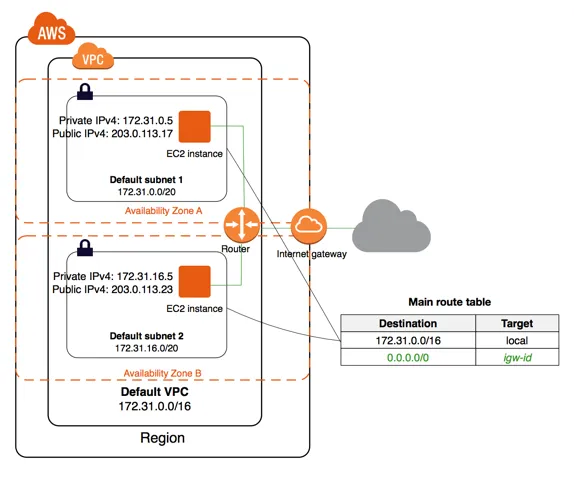
VPCs cannot span regions, so AWS creates a default VPC in each region.
AWS Account supports EC2 instances in a VPC only. The default VPC is available in the Amazon VPC. If you delete the default VPC, then you cannot restore it. You need to contact AWS Support.
Click on Services | Go to Networking & Content Delivery section | Click on VPC | Click on VPC Dashboard:
Figure reference :http://docs.aws.amazon.com/AmazonVPC/latest/UserGuide/default-vpc.html
The default VPC contains following:
  • VPC with a size /16 IPv4 CIDR block (172.31.0.0/16); this means 65,536 private IPv4 addresses
  • Default subnet /20 in each Availability Zone; it means 4,096 addresses per subnet
  • One internet gateway
  • A main route table for default VPC
  • Default security group associated with your default VPC
  • Default network access control list (ACL)
Verify the VPC ID, State, IPv4 CIDR, Route Table, A...

Table of contents

  1. Title Page
  2. Copyright and Credits
  3. Packt Upsell
  4. Contributors
  5. Preface
  6. Installation and Setup
  7. Launching an EC2 Instance
  8. Logging in to EC2 Instances
  9. Networking on AWS
  10. Creating a VPC
  11. Other Books You May Enjoy