Hands-On Cloud Solutions with Azure
eBook - ePub

Hands-On Cloud Solutions with Azure

Architecting, developing, and deploying the Azure way

  1. 224 pages
  2. English
  3. ePUB (mobile friendly)
  4. Available on iOS & Android
eBook - ePub

Hands-On Cloud Solutions with Azure

Architecting, developing, and deploying the Azure way

About this book

Design effective Azure architecture and transform your IT business solutions

Key Features

  • Develop a resilient and robust cloud environment
  • Deploy and manage cost-effective and highly available solutions on your public cloud
  • Design and implement enterprise-level cloud solutions

Book Description

Azure provides cloud-based solutions to support your business demands. Building and running solutions on Azure will help your business maximize the return on investment and minimize the total cost of ownership.

Hands-On Cloud Solutions with Azure focuses on addressing the architectural decisions that usually arise when you design or migrate a solution to Microsoft Azure. You will start by designing the building blocks of infrastructure solution on Azure, such as Azure compute, storage, and networking, followed by exploring the database options it offers. You will get to grips with designing scalable web and mobile solutions and understand where to host your Active Directory and Identity Solution. Moving on, you'll learn how to extend DevOps to Azure.

You will also beneft from some exciting services that enable extremely smooth operations and streamlined DevOps between on-premises and cloud. The book will help you to design a secure environment for your solution, on both the Cloud and hybrid. Toward the end, you'll see how to manage and monitor cloud and hybrid solutions.

By the end of this book, you will be armed with all the tools and knowledge you need to properly plan and design your solutions on Azure, whether it's for a brand new project or migration project.

What you will learn

  • Get started with Azure by understanding tenants, subs, and resource groups
  • Decide whether to "lift and shift" or migrate apps
  • Plan and architect solutions in Azure
  • Build ARM templates for Azure resources
  • Develop and deploy solutions in Azure
  • Understand how to monitor and support your application with Azure
  • Make your life easier with Azure best practices and tips

Who this book is for

If you're an IT consultant, developer, or solutions architect looking to design effective solutions for your organization, this book is for you. Some knowledge of cloud computing will assist with understanding the key concepts covered in this book.

Frequently asked questions

Yes, you can cancel anytime from the Subscription tab in your account settings on the Perlego website. Your subscription will stay active until the end of your current billing period. Learn how to cancel your subscription.
No, books cannot be downloaded as external files, such as PDFs, for use outside of Perlego. However, you can download books within the Perlego app for offline reading on mobile or tablet. Learn more here.
Perlego offers two plans: Essential and Complete
  • Essential is ideal for learners and professionals who enjoy exploring a wide range of subjects. Access the Essential Library with 800,000+ trusted titles and best-sellers across business, personal growth, and the humanities. Includes unlimited reading time and Standard Read Aloud voice.
  • Complete: Perfect for advanced learners and researchers needing full, unrestricted access. Unlock 1.4M+ books across hundreds of subjects, including academic and specialized titles. The Complete Plan also includes advanced features like Premium Read Aloud and Research Assistant.
Both plans are available with monthly, semester, or annual billing cycles.
We are an online textbook subscription service, where you can get access to an entire online library for less than the price of a single book per month. With over 1 million books across 1000+ topics, we’ve got you covered! Learn more here.
Look out for the read-aloud symbol on your next book to see if you can listen to it. The read-aloud tool reads text aloud for you, highlighting the text as it is being read. You can pause it, speed it up and slow it down. Learn more here.
Yes! You can use the Perlego app on both iOS or Android devices to read anytime, anywhere — even offline. Perfect for commutes or when you’re on the go.
Please note we cannot support devices running on iOS 13 and Android 7 or earlier. Learn more about using the app.
Yes, you can access Hands-On Cloud Solutions with Azure by Greg Leonardo in PDF and/or ePUB format, as well as other popular books in Informatica & Elaborazione di dati su cloud. We have over one million books available in our catalogue for you to explore.

Information

Building Solutions in Azure

Now that we have taken a look at how to approach migrating your existing application to Azure, it is time to discuss how to approach building new applications in Azure. This starts with an understanding of the resources involved and when/how to leverage IaaS, SaaS, and PaaS in your solutions. We will also cover when you need to pivot your design when the project changes, and how these effects change the underlying approach to the resources being used.
In this chapter, we will cover the following topics:
  • How to pick the right resource to develop solutions in Azure
  • How to architect solutions in the Azure closed ecosystem
  • Things you need to trust when writing applications in Azure

Technical requirements

The requirements for this chapter are as follows:
  • Azure Architecture Guide: https://docs.microsoft.com/en-us/azure/architecture/guide/
  • Azure Naming Convention Guide: https://docs.microsoft.com/en-us/azure/architecture/best-practices/naming-conventions
  • DTU Calculator: http://dtucalculator.azurewebsites.net/

Let me Azure you of something!

As we briefly discussed in Chapter 1, Getting Started with Azure, your architecture begins with the subscriptions structure and an overall naming convention. The reason I bring this up is that these go hand in hand from a fundamental perspective. I have learned that there are two paths you can take with respect to your Azure configuration: the corporate path and the consultant path. The corporate path is for organizations that develop their own solutions, and all work is strictly for the organization alone. The consultant path is for those that do work for others and themselves. The reason this becomes important to point out is that this not only affects the structure of your subscriptions, but how the optional parts of the naming convention work.
Now, I like to take a simplistic approach to building things in Azure and when I am architecting solutions in Azure.
Let's take a look at what I mean. When you are building out a subscription model and a naming convention for an organization, you should take a simple approach. One mistake I have found that most people make is that they approach it from an old-school point of view, meaning that they create subscriptions and subsequently their naming conventions in a complicated n-tier or functional perspective, which creates a highly complicated support model. When you are working within an organization, you need to consider what your interaction with Azure will be the same as using Wildcard certificates or Express Route. This is because there are quite a few things in Azure that don’t span subscriptions or can span with some help.
However, this creates more complications. There are two schools of thought on organization setups: one is breaking up subscriptions based on departments, and the other is by environments. Some organizations try to blend these concepts together, which can further complicate your Azure environment. I believe a simpler approach to these is beneficial to most organizations, but some would say that resource limits could be hit. However, they can increase either through time (Microsoft increasing the limits) or through support from Microsoft increasing limits via a support ticket. The simplistic environmental approach I take is prod and non-prod. I do this so that I can get Dev/Test pricing for my non-prod environments. I then use resource groups as my application lifecycle containers. I do this for cost saving, as when I use Express Route, I only have to manage VNet peering. This doesn't solve Wildcard Cert issues or other sharing problems, but it simplifies the support for them. Now, for many large organizations, it may make sense to break up subscriptions and your naming convention to include departments as well as prod and non-prod environments.
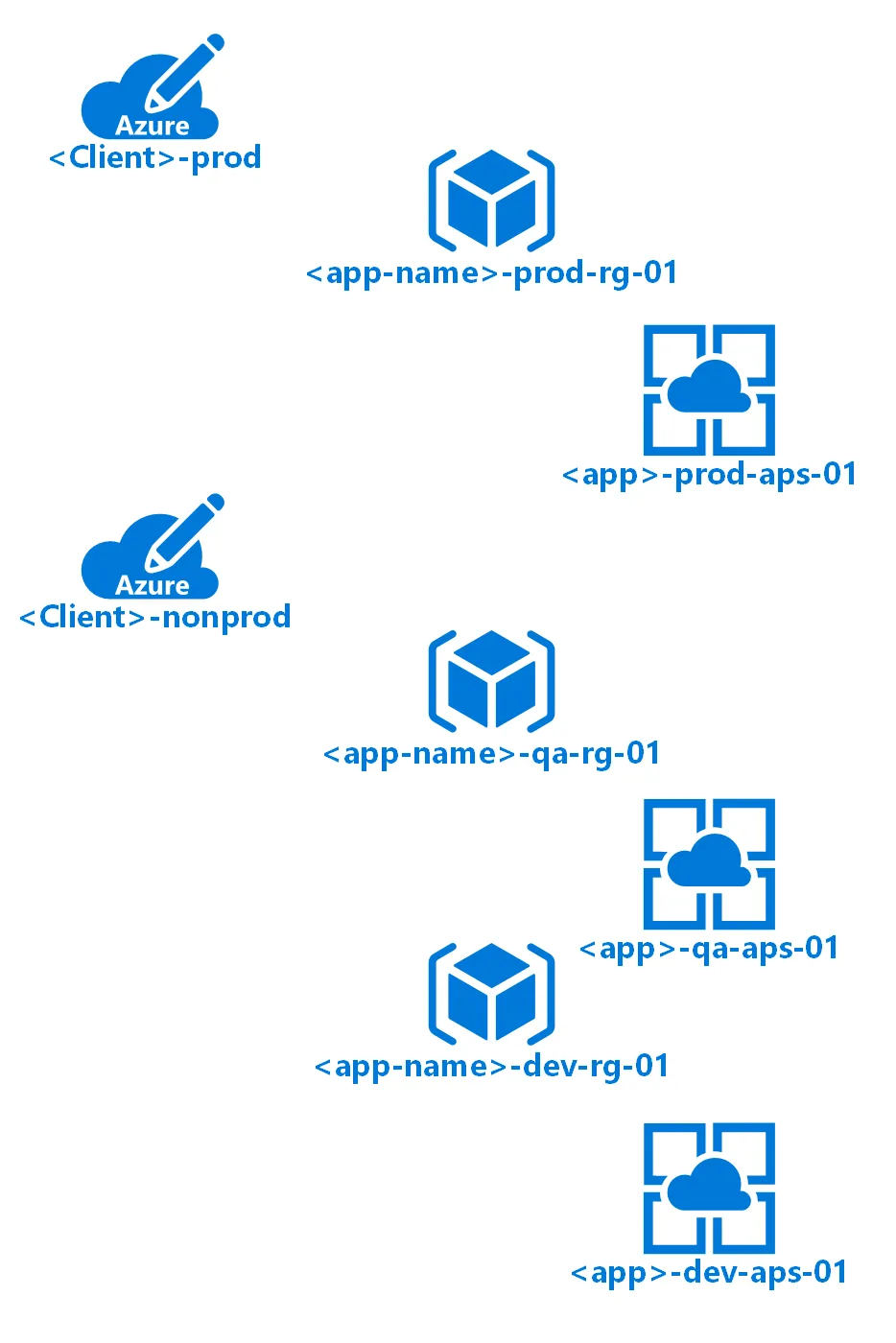
Let’s take a quick look at a simplified view of resource naming based on the naming convention recommendations by Microsoft that can be found at https://docs.microsoft.com/en-us/azure/architecture/best-practices/naming-conventions:
Simplified resource naming
For larger organizations, this would change slightly, but the increase in subscriptions will increase sharing support. Let’s see what this looks like. This will create a subscription by department, as well as a prod and non-prod subscription. As you can see, this will complicate your overall Azure, but may be needed for defining boundaries within a large organization:
Simplified department resource naming
The naming convention can really be leveraged any way that makes sense to you. I chose this way because it helps in using the search bar to find resources quickly and easily.
Developing a good naming convention is always a good practice within an organization, but develop one that fits you and use the recommendations as guidance during that journey, as this isn’t easily changeable in the future without redeploying and migrating.
Now, the change when looking at this from a consultant point of view is to put your clients in their own subscription, which you will mostly do from a prod and non-prod perspective. This is important to remember because subscriptions can be transferred to another tenant, or in some cases, you will create a tenant for them and follow the organizational model. Let's see what these changes will look like:
Client simplified resource naming
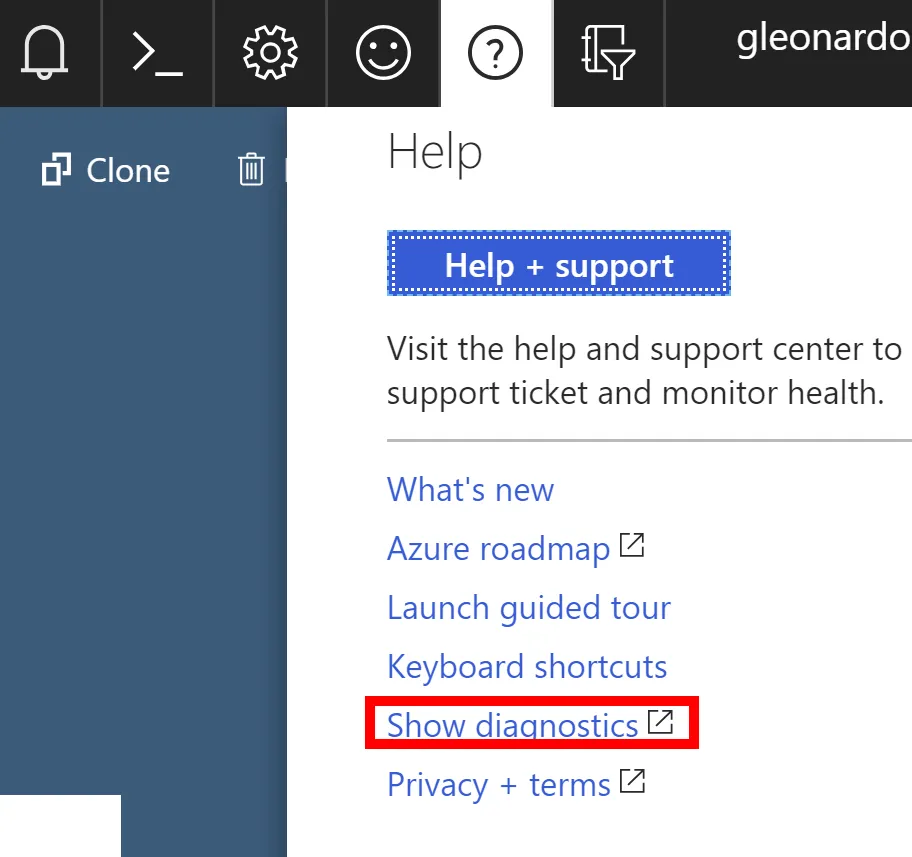
Now that we have discussed the importance of naming, I would like to point some other important things, such as using Tags to identify resources that can be searched or grouped. You can also leverage them to track the finance of a resource or group of resources. I leverage tags to group resources and expose the cost burn on dashboards. These things are architectural in nature but important to know, in order to get specific information from both the portal and PowerShell. First, you want to know how you get tenant information, as well as the subscriptions you have access to. This information is by tenant, which means you will need to switch to the tenant before the information will be available. Once you log in to the Azure portal (https://portal.azure.com), you will see your name and an icon in the upper-right-hand part of the portal. You click on the Help (?) icon and you will see a link for Show diagnostics. This will open your tenant JSON file with all of your information, as you can see in the following screenshot:
Show diagnostics
Once you click on this link, it will save your tenant JSON file and allow you to open it. I am familiar with this, as I refer to this file a lot in my Azure work. You can also get your TenantID from your AAD property blade, as well as the Directory ID property. You can also get it from using the following command to log in to Azure:
Always run your PowerShell Console or IDE in administrator mode so that you don't run into permission issues. You can do this by right-clicking on the icon and choosing Run as Administrator.
Login-azaccount
This is the result you should see:
...

Table of contents

  1. Title Page
  2. Copyright and Credits
  3. Packt Upsell
  4. Contributors
  5. Preface
  6. Getting Started with Azure
  7. Moving Existing Apps to Azure
  8. Building Solutions in Azure
  9. Understanding the Infrastructure behind Solutions Built in Azure
  10. Developing Solutions the Right Way in Azure
  11. Deploying Solutions to Azure
  12. Putting It All Together
  13. Best Practices to Make Your Life Easier in Azure
  14. Assessments
  15. Other Books You May Enjoy