Computer Science

Buses CPU
In computer science, the term "buses CPU" refers to the system bus that connects the CPU to other components of the computer, such as memory and input/output devices. It serves as a communication pathway for data and instructions to be exchanged between the CPU and these other components. The buses CPU plays a crucial role in the overall functioning and performance of the computer system.
Written by Perlego with AI-assistance
Related key terms
1 of 5
10 Key excerpts on "Buses CPU"
 eBook - PDF
- Palmer, Greg Tomsho(Authors)
- 2016(Publication Date)
- Cengage Learning EMEA(Publisher)
• System bus — The system bus is a series of lanes that are used to communicate between the CPU and other major parts of the computer, such as RAM and input/output (I/O) devices. There are actually three types of buses: the control bus, address bus, and data bus. The control bus carries status signals between the CPU and other devices. Status signals inform the CPU that a device needs attention; for example, when an input device has data ready, the CPU must execute the device driver code to read the data from the device. The address bus carries address signals to indicate where data should 3 Basic CPU Architecture 115 Copyright 2017 Cengage Learning. All Rights Reserved. May not be copied, scanned, or duplicated, in whole or in part. WCN 02-300 be read from or written to in the system ’ s memory. The data bus carries the actual data that is being read from or written to system memory. While modern CPUs are much more complex than the simple block diagram in Figure 3-1, most CPUs follow the basic design and contain the elements described. CPUs can be classified by several hardware elements, the most important of which are: • Design type • Speed • Cache • Address bus • Data bus • Control bus • CPU scheduling Each of these elements is considered in the following sections. Design Type Two general CPU designs are used in today ’ s computers: Complex Instruction Set Computing (CISC) and Reduced Instruction Set Computing (RISC) . The main difference between the two is the number of different instructions the chip can process and the complexity of the instruc-tions. When a program executes on a computer, the CPU reads instruction after instruction from the program to perform the tasks specified in the program. When the CPU has read such an instruction, it carries out the associated operations. The CPU can process as many as 20 million complex operations per second on the low end, and several billion on the high end. eBook - PDF
- Greg Tomsho(Author)
- 2020(Publication Date)
- Cengage Learning EMEA(Publisher)
Due to electronic rights, some third party content may be suppressed from the eBook and/or eChapter(s). Editorial review has deemed that any suppressed content does not materially affect the overall learning experience. Cengage Learning reserves the right to remove additional content at any time if subsequent rights restrictions require it. • Memory/cache controller—The cache controller intercepts accesses to memory for data or code and checks if the requested data is in cache first. If the requested data is in cache, the request is fulfilled; otherwise, the request is passed on to the memory controller to access main memory. Data accessed in main memory is usually then placed in cache, so subsequent accesses to the data are pulled from cache. • System bus—The system bus is a series of lanes that are used to communicate between the CPU and other major parts of the computer, such as RAM and input/ output (I/O) devices. There are actually three types of buses: the control bus, address bus, and data bus. The control bus carries status signals between the CPU and other devices. Interrupt signals inform the CPU that a device needs attention; for example, when an input device has data ready, the CPU must execute the device driver code to read the data from the device. The address bus carries address signals to indicate where data should be read from or written to in the system’s memory. The data bus carries the actual data that is being read from or written to system memory. Figure 3-2 Basic architecture of a CPU System bus: Control bus Address bus Data bus To RAM and I/O devices Arithmetic logic unit (ALU) CPU Control unit (CU) Registers Memory/cache controller MODULE 3 The Central Processing Unit (CPU) 115 Copyright 2021 Cengage Learning. All Rights Reserved. May not be copied, scanned, or duplicated, in whole or in part. Due to electronic rights, some third party content may be suppressed from the eBook and/or eChapter(s). eBook - PDF
Computer Architecture
Fundamentals and Principles of Computer Design, Second Edition
- Joseph D. Dumas II(Author)
- 2016(Publication Date)
- CRC Press(Publisher)
chapter three Basics of the central processing unit The central processing unit (CPU) is the brain of any computer system based on the von Neumann (Princeton) or Harvard architectures intro-duced in Chapter 1. Parallel machines have many such brains, but normally each of them is based on the same principles used to design the CPU in a uniprocessor (single CPU) system. A typical CPU has three major parts: the arithmetic/logic unit (ALU), which performs calculations; internal reg-isters, which provide temporary storage for data to be used in calculations; and the control unit, which directs and sequences all operations of the ALU and registers as well as the rest of the machine. (A block diagram of a simple CPU is shown in Figure 3.1.) The control unit that is responsible for carrying out the sequential execution of the stored program in memory is the hallmark of the von Neumann–type machine, using the registers and the arithmetic and logical circuits (together known as the datapath ) to do the work. The design of the control unit and datapath have a major impact on the performance of the processor and its suitability for various types of applications. CPU design is a critical component of overall system design. In this chapter, we look at important basic aspects of the design of a typical general-purpose processor; in the following chapter, we will go beyond the basics and look at modern techniques for improving CPU performance. 3.1 The instruction set One of the most important features of any machine’s architectural design, yet one of the least appreciated by many computing professionals, is its instruction set architecture (ISA). The ISA determines how all software must be structured at the machine level.
- David Groth, Ron Gilster, Megan Miller(Authors)
- 2015(Publication Date)
- Wiley(Publisher)
There are software utili- ties that you can download or purchase that you can use to monitor tem- peratures while the PC is running. You can also purchase circuit boards that monitor internal temperature and will shut the computer off if it reaches high temperatures. For critical network servers, heat sensors can potentially save a lot of money in repair costs. 4.2 CPU Features and Technologies Technically speaking, a CPU is an integrated circuit that contains millions of tran- sistors interconnected by small aluminum wires. The CPU’s processing capabilities control and direct the activities of the PC by interacting with the other electronic components on the motherboard, such as the main memory, bus structures, cache memory, and device interfaces. Although CPUs today share some of the same basic technical operations with the earliest CPUs, CPU technologies have vastly improved over the last decade. When comparing and selecting CPUs, you need to understand some of the modern technologies used with today’s processors. 4.2.1 CPU Basic Operations The role of the CPU is to control and direct all the activities of the computer using both external and internal buses. The CPU is a processor chip consisting of an array of millions of transistors, semi-conductor devices that at their most basic level act as switches for electronic signals. Essentially, through vast combi- nations of switches turning on and off, and sending intricate routines of 1s and 0s, the CPU is able to perform complex calculations and operations on data. The CPU’s function is to take and process instructions. An example of a simple instruction is adding two numbers in a calculator program. Instructions, whether originating from software or an input/output device, are loaded into RAM and then sent over the system bus to the CPU. Components of a CPU include: ▲ The control unit: The CPU circuitry that coordinates the rest of the CPU’s actions and interactions 1. eBook - PDF
Computers as Components
Principles of Embedded Computing System Design
- Marilyn Wolf(Author)
- 2008(Publication Date)
- Morgan Kaufmann(Publisher)
The choice of the CPU is one of the most important, but it cannot be made without considering the software that will execute on the machine. ■ Bus The choice of a bus is closely tied to that of a CPU, since the bus is an integral part of the microprocessor. But in applications that make intensive use of the bus due to I/O or other data traffic,the bus may be more of a limiting 178 CHAPTER 4 Bus-Based Computer Systems factor than the CPU. Attention must be paid to the required data bandwidths to be sure that the bus can handle the traffic. ■ Memory Once again,the question is not whether the system will have mem-ory but the characteristics of that memory.The most obvious characteristic is total size,which depends on both the required data volume and the size of the program instructions. The ratio of ROM to RAM and selection of DRAM versus SRAM can have a significant influence on the cost of the system. The speed of the memory will play a large part in determining system performance. ■ Input and output devices The user’s view of the input and output mech-anisms may not correspond to the devices connected to the microprocessor. For example,a set of switches and knobs on a front panel may all be controlled by a single microcontroller, which is in turn connected to the main CPU. For a given function, there may be several different devices of varying sophistica-tion and cost that can do the job. The difficulty of using a particular device, such as the amount of glue logic required to interface it, may also play a role in final device selection. You may not think of programs as having architectures, but well-designed programs do have structure that represents an architecture. A fundamental task in software architecture design is partitioning —breaking the functionality into pieces in a way that makes it easy to implement, test, and modify. Most embedded systems will do more than one thing—for example, processing streams of data and handling the user interface. eBook - PDF
- Aharon Yadin(Author)
- 2016(Publication Date)
- Chapman and Hall/CRC(Publisher)
For that reason, the bus speed and bandwidth are very important. In addition, due to the close proximity of the processor and memory, the length of the processor-memory bus is usually very small. This short distance is an additional factor in enhancing performance. In the modern speeds, the length the electrons are moving starts to be a relevant timing factor. * A motherboard, sometimes called the mainboard , is a printed circuit board that is used for holding most of the system components. As such, it has a socket for connecting the central processing unit (CPU), sockets for memory, various con-nectors for peripheral devices’ controllers, and expansion capabilities as well as the required communications. Processor Memory Display controller Keyboard controller Printer controller Disk controller Display Keyboard Printer Disk FIGURE 7.9 Architecture of the first PCs. 264 ◾ Computer Systems Architecture • An input and output (I/O) bus, which is usually a standard off-the-shelf bus. This is used in order to increase the potential I/O devices that can be connected to the system. This bus is usually longer than the processor-memory bus in order to pro-vide the space for connecting the various devices, especially considering that some of these devices are physically large and cannot be very close. In addition, the I/O bus supports not only a variety of devices but also devices that work at different speeds. In some cases, the differences in speed are several orders of magnitude. The I/O bus usu-ally connects to the processor-memory bus or to the system bus if it exists. In modern systems, the I/O bus is implemented as a hierarchy of buses (as will be explained later in this chapter). • A system bus, which can be a standard or a proprietary bus that is located on the motherboard. In some implementations, there is no system bus, and then the I/O bus and the processor-memory bus are connected.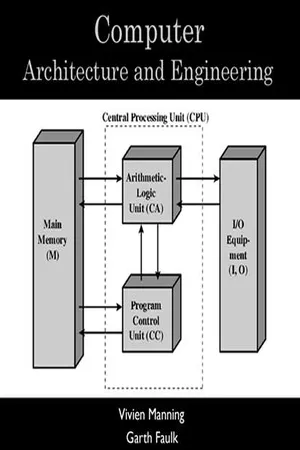 No longer available |Learn more
- (Author)
- 2014(Publication Date)
- College Publishing House(Publisher)
________________________ WORLD TECHNOLOGIES ________________________ Chapter 3 Central Processing Unit Die of an Intel 80486DX2 microprocessor (actual size: 12×6.75 mm) in its packaging. The central processing unit ( CPU ) is the portion of a computer system that carries out the instructions of a computer program, and is the primary element carrying out the computer's functions. The central processing unit carries out each instruction of the program in sequence, to perform the basic arithmetical, logical, and input/output operations of the system. This term has been in use in the computer industry at least since the early 1960s. The form, design and implementation of CPUs have changed dramatically since the earliest examples, but their fundamental operation remains much the same. ________________________ WORLD TECHNOLOGIES ________________________ Early CPUs were custom-designed as a part of a larger, sometimes one-of-a-kind, computer. However, this costly method of designing custom CPUs for a particular application has largely given way to the development of mass-produced processors that are made for one or many purposes. This standardization trend generally began in the era of discrete transistor mainframes and minicomputers and has rapidly accelerated with the popularization of the integrated circuit (IC). The IC has allowed increasingly complex CPUs to be designed and manufactured to tolerances on the order of nanometers. Both the miniaturization and standardization of CPUs have increased the presence of these digital devices in modern life far beyond the limited application of dedicated computing machines. Modern microprocessors appear in everything from automobiles to cell phones and children's toys. History EDVAC, one of the first electronic stored program computers No longer available |Learn more
- (Author)
- 2014(Publication Date)
- College Publishing House(Publisher)
________________________ WORLD TECHNOLOGIES ________________________ Chapter 1 Central Processing Unit Die of an Intel 80486DX2 microprocessor (actual size: 12×6.75 mm) in its packaging The central processing unit ( CPU ) is the portion of a computer system that carries out the instructions of a computer program, and is the primary element carrying out the computer's functions. The central processing unit carries out each instruction of the program in sequence, to perform the basic arithmetical, logical, and input/output operations of the system. This term has been in use in the computer industry at least since the early 1960s. The form, design and implementation of CPUs have changed dramatically since the earliest examples, but their fundamental operation remains much the same. ________________________ WORLD TECHNOLOGIES ________________________ Early CPUs were custom-designed as a part of a larger, sometimes one-of-a-kind, computer. However, this costly method of designing custom CPUs for a particular application has largely given way to the development of mass-produced processors that are made for one or many purposes. This standardization trend generally began in the era of discrete transistor mainframes and minicomputers and has rapidly accelerated with the popularization of the integrated circuit (IC). The IC has allowed increasingly complex CPUs to be designed and manufactured to tolerances on the order of nanometers. Both the miniaturization and standardization of CPUs have increased the presence of these digital devices in modern life far beyond the limited application of dedicated computing machines. Modern microprocessors appear in everything from automobiles to cell phones and children's toys. History EDVAC, one of the first electronic stored program computers No longer available |Learn more
- (Author)
- 2014(Publication Date)
- Learning Press(Publisher)
________________________ WORLD TECHNOLOGIES ________________________ Chapter 1 Central Processing Unit Die of an Intel 80486DX2 microprocessor (actual size: 12×6.75 mm) in its packaging. The central processing unit ( CPU ) is the portion of a computer system that carries out the instructions of a computer program, and is the primary element carrying out the computer's functions. The central processing unit carries out each instruction of the program in sequence, to perform the basic arithmetical, logical, and input/output operations of the system. This term has been in use in the computer industry at least since the early 1960s. The form, design and implementation of CPUs have changed dramatically since the earliest examples, but their fundamental operation remains much the same. ________________________ WORLD TECHNOLOGIES ________________________ Early CPUs were custom-designed as a part of a larger, sometimes one-of-a-kind, com-puter. However, this costly method of designing custom CPUs for a particular application has largely given way to the development of mass-produced processors that are made for one or many purposes. This standardization trend generally began in the era of discrete transistor mainframes and minicomputers and has rapidly accelerated with the popu-larization of the integrated circuit (IC). The IC has allowed increasingly complex CPUs to be designed and manufactured to tolerances on the order of nanometers. Both the miniaturization and standardization of CPUs have increased the presence of these digital devices in modern life far beyond the limited application of dedicated computing mac-hines. Modern microprocessors appear in everything from automobiles to cell phones and children's toys. History EDVAC, one of the first electronic stored program computers. eBook - PDF
- Michael Tooley(Author)
- 2016(Publication Date)
- Butterworth-Heinemann(Publisher)
1 Microcomputer systems In computer servicing, as with many fields of endeavour, there is a popularly held misconception that success can be guaranteed provided one has all the necessary test equipment. The skill and perception of the individual concerned is of greater importance but, to be effective, this needs to be coupled with a thorough understanding of the principles and practice of both microprocessors and microcomputer systems. This chapter aims, therefore, to provide the reader with an elementary understanding of personal computers at both a systems and a circuit level. Wherever possible, commonly used integrated circuit devices and techniques are described and representative examples of circuitry have been included where appropriate. The basic system The essential components of any microcomputer system are: (a) a central processing unit (CPU), which generally takes the form of a single LSI device, the microprocessor; (b) a memory, which invariably comprises both read/write and read only devices (RAM and ROM respectively); and (c) interface circuits for system input and output (I/O), which facilitate the connection of such peripheral devices as keyboards, joysticks, light pens, printers, and raster scan displays. These components are linked together using a multiple-wire connecting system known as a 'bus'. Three distinct buses are present, as follows: (a) an address bus, used primarily to specify memory locations; (b) a data bus, on which data is transferred between devices; and (c) a control bus, which provides timing and control signals throughout the system. The basic configuration of a microcomputer system is shown in Figure 1.1. The clock generator is responsible for providing an accurate and highly stable timing signal. This generator is generally external to the microprocessor itself. A control signal of particular note is the 'interrupt'. Essentially, this is a request from an external device that requires the attention of the microprocessor.
Index pages curate the most relevant extracts from our library of academic textbooks. They’ve been created using an in-house natural language model (NLM), each adding context and meaning to key research topics.

