![]()
Part I
Building Your Presentation
In This Part
Chapter 1 A First Look at PowerPoint
Chapter 2 Creating and Saving Presentation Files
Chapter 3 Creating Slides and Text Boxes
Chapter 4 Working with Layouts, Themes, and Masters
Chapter 5 Formatting Text
Chapter 6 Formatting Paragraphs and Text Boxes
Chapter 7 Correcting and Improving Text
Chapter 8 Creating and Formatting Tables
![]()
Chapter 1
A First Look at PowerPoint
In This Chapter
Who uses PowerPoint and why?
What's new in PowerPoint 2013?
Learning your way around PowerPoint
Changing the view
Zooming in and out
Displaying and hiding screen elements
Working with window controls
Using the help system and getting updates
PowerPoint 2013 is a member of the Microsoft Office 2013 suite of programs. A suite is a group of programs designed by a single manufacturer to work well together. Like its siblings — Word (the word processor), Excel (the spreadsheet), Outlook (the personal organizer and e-mail manager), and Access (the database) — PowerPoint has a well-defined role. It creates materials for presentations.
A presentation is any kind of interaction between a speaker and audience, but it usually involves one or more of the following: computer-displayed slides, noncomputerized visual aids (such as transparencies or 35mm slides), hard-copy handouts, and/or speaker's notes. PowerPoint can create all of these types of visual aids, plus many other types that you'll learn about as you go along.
Because PowerPoint is so tightly integrated with the other Microsoft Office 2013 components, you can easily share information among them. For example, if you have created a graph in Excel, you can use it on a PowerPoint slide. It goes the other way too. You can, for example, take the outline from your PowerPoint presentation and copy it into Word, where you can dress it up with Word's powerful document formatting commands. Virtually any piece of data in any Office program can be linked to any other Office program, so you never have to worry about your data being in the wrong format. PowerPoint also accepts data from almost any other Windows-based application and can import a variety of graphics, audio, and video formats.
In this chapter you'll get a big-picture introduction to PowerPoint 2013, and then we'll fire up the program and poke around a bit to help you get familiar with the interface. You'll find out how to use the tabs and panes and how to get help and updates from Microsoft.
Who Uses PowerPoint and Why?
PowerPoint is a popular tool for people who give presentations as part of their jobs and also for their support staff. With PowerPoint, you can create visual aids that help get the message across to an audience, whatever that message may be and whatever the format in which it is presented. Although the traditional kind of presentation is a live speech presented at a podium, advances in technology have made it possible to give several other kinds of presentations, and PowerPoint has kept pace nicely. The following list outlines the most common PowerPoint formats:
- Podium. For live presentations, PowerPoint helps the lecturer emphasize key points through the use of computer-based shows (from a notebook or tablet PC, for example) or overhead transparencies.
- Kiosk shows. These are self-running presentations that provide information in an unattended location. You have probably seen such presentations listing meeting times and rooms in hotel lobbies and as sales presentations at trade show booths.
- CDs and DVDs. You can package a PowerPoint presentation on a CD or DVD and distribute it with a press release, a marketing push, or a direct mail campaign. The presentation can be in PowerPoint format, or it can be converted to some other format, such as PDF or a video clip.
- Internet formats. You can use PowerPoint to create a show that you can present live over a network or the Internet, while each participant watches from their own computer. You can even store a self-running or interactive presentation on a website in a variety of formats and make it available for the public to download and run on a PC.
When you start your first PowerPoint presentation, you may not be sure which delivery method you will use. However, it's best to decide the presentation format before you invest too much work in your materials because the audience's needs are different for each medium.
Need help structuring a presentation or planning for its delivery? See Appendix A, “What Makes a Great Presentation?”
Most people associate PowerPoint with sales presentations, but PowerPoint is useful for people in many other lines of work as well. The following sections present a sampling of how real people just like you are using PowerPoint in their daily jobs.
Sales
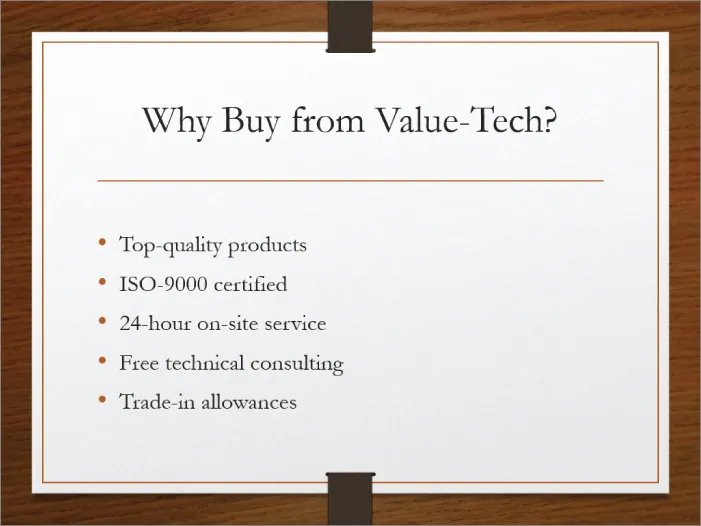
More people use PowerPoint for selling goods and services than for any other reason. Armed with a laptop computer and a PowerPoint presentation, a salesperson can make a good impression on a client anywhere in the world. Figure 1.1 shows a slide from a sample sales presentation.
These are just some of the sales tools you can create with PowerPoint:
- Live presentations in front of clients with the salesperson present and running the show. This is the traditional kind of sales pitch that most people are familiar with.
- Self-running presentations that flip through the slides at specified intervals so that passersby can read them or ignore them as they wish. Thes...