PART I
Getting started
Questions answered in this part
Chapter 1: eBay basics
• What is the difference between the eBay website and eBay apps?
• How do I register on eBay?
• How can I create a good and safe user ID and password?
• How do I update my registration information?
• How do I contact eBay customer support?
There are three ways you can access eBay: via the website, through your mobile phone (such as an iPhone) or via the Apple tablet, iPad. Each platform differs slightly from the others. Throughout this book the variations in the process between web and mobile will be explained.
Introducing eBay’s website addresses
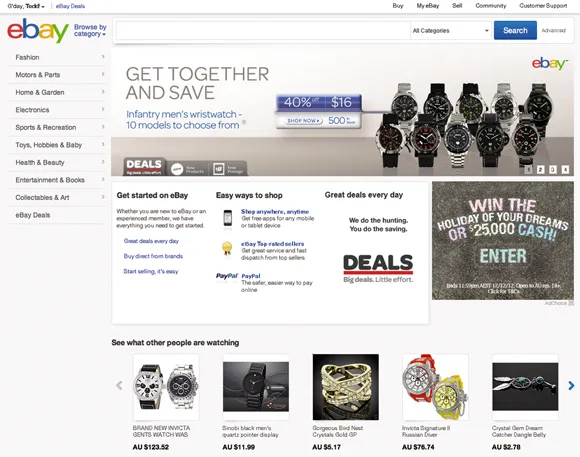
To go to eBay’s Australian website, type www.ebay.com.au into your internet browser. The first page you see is known as the homepage (see figure 1.1). You can navigate your way to most areas of the site from the homepage. Click on the eBay logo at the top left of any page to return to the homepage at any time.
You can also conduct an internet search for the word ‘eBay’ using a search engine such as Google. Different eBay sites around the world have different website addresses, or URLs. In the UK, for example, the address is www.ebay.co.uk, and in the US it is www.ebay.com. A list of all eBay’s international sites is available at the bottom of the homepage. If you’re on the Australian eBay site, all listings will automatically be converted into Australian dollars, and you will see a comprehensive list of products from around the world that are available to you here in Australia. Going to an international eBay site will show you still more products; we’ll cover this later in part II.
eBay for mobile phones
You can access eBay via an internet-enabled mobile phone either by logging onto eBay’s mobile web address (
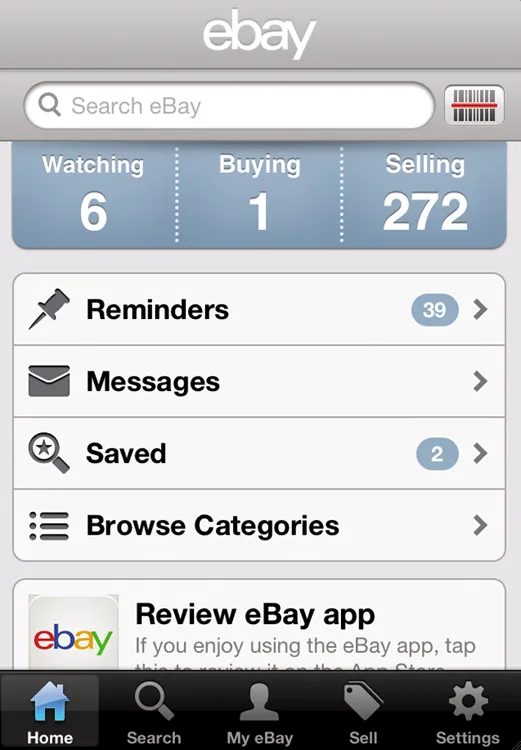
hp.mobileweb.ebay.com.au/home) or via one of eBay’s mobile phone applications (apps). This allows you to access eBay any time of the day and from anywhere your phone receives service. eBay’s apps are free to download and provide a better user experience than the mobile web version. You can download the apps for iPhone (see figure 1.2), Android, Windows Phone 7 and Blackberry by searching for ‘eBay’ at your phone provider’s app store. All the apps operate in similar ways, but in this book I show you how the apps for iPhone work.
Figure 1.1: the new eBay homepage
Figure 1.2: the eBay iPhone app
A really useful page on eBay to help identify which app is right for you can be found at http://pages.ebay.com.au/help/account/mobile.html. eBay currently has apps for:
• eBay (overall shopping)
• deals (find the latest products at the biggest discounts on the site)
• fashion (eBay US only)
• motors (eBay US only).
eBay for iPad
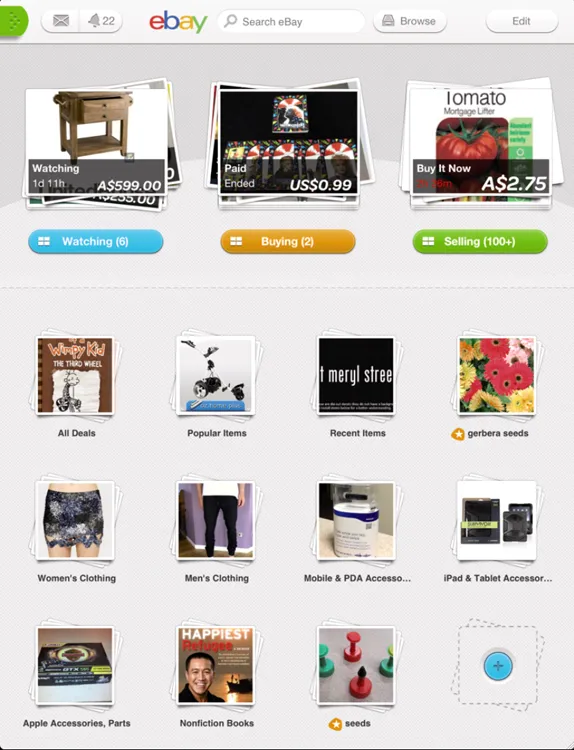
If you own an Apple iPad tablet, you can download an iPad app for using eBay (see figure 1.3). This is arguably the most effective and user-friendly way to buy and casually sell on eBay and is well worth checking out. The interface has been specifically designed for use on the iPad. The iPad app is free to download from the Apple App Store.
Figure 1.3: the eBay iPad app
Among many great features of the eBay iPad app are:
• seamless scrolling
• high-resolution product images
• a homepage that can be customised to suit your own tastes
• the ability to buy and sell from one eBay app (take photos with your iPad to list items on eBay faster — refer to part III for more information).
Customising your eBay homescreen on iPad
On the iPad app, click Edit at top right to fully customise the way your eBay homescreen appears. You can drag items to rearrange where they appear on the page, or delete some features altogether. Once you’re done creating your ideal interface, click Save. This is just one of the many benefits of using the iPad app to access eBay. It puts you in control of your own experience and you can update it any time you like.
How to register on eBay
More than 90 million people around the world use eBay each year. Many more people visit an eBay site to look for products or conduct research before purchasing. You do not need to be a member of eBay to search for products, but you do need to be registered before you can purchase an item, sell an item, communicate with other members or complete searches of completed items (that is, to see what has and hasn’t sold previously and for what prices). If you haven’t already become an eBay member, it’s a good idea to do so as it’s free and the process takes only a minute or so to complete. Registering now will save you having to do so later before you purchase your first items. Once you’re registered, and logged onto the site, your eBay experience will begin to be tailored to your personal tastes, making your whole experience more relevant and rewarding.
Choosing your user ID and password
Choosing the right user ID and password can help protect you through all of your future buying and selling on the site. Don’t pick an ID that is the same as your email address or you may be spammed by unsolicited email. Make sure your password is nothing like your user ID and would be difficult for others to guess. Use a combination of letters (upper and lower case) and numbers, and change your password regularly — at least every three months. Taking these steps will help ensure that your eBay account isn’t hacked into. Finally, your eBay and PayPal passwords should be different (more information on PayPal in part II).
Let’s complete eBay’s registration form together so you won’t have to d...