Raspberry Pi is a UK Non Profit with the goal of creating a new generation of computer programmers. Observing how the UK Tech Industry was kickstarted by the availability in the 1980s of relatively cheap, very programmable computers such as the ZX81, the Commodore and the BBC Micro, the Raspberry Pi Foundation designed a £15/$25 computer which encourages the user to play and to learn. Although intended for schools, it has also been adopted by hackers and geeks, and a whole ecosystem of software and hardware is being built around the Pi. With a million boards now sold, the goal of the Foundation is well underway.
• Learn how to use your Raspberry Pi to enable and disable a slot car set.
• See how to make your own illuminated joystick pad.
• Discover how to use an external text file as a question bank.
• Understand the interactions between the software and hardware.
This project isa rather different twist on the multiple-choice quiz theme. Not only does it have a novel way of inputting answers, but it also has a rather novel way of keeping the score.
The idea is that you are going to hack into a slot car game and allow the Raspberry Pi to control when the game can be played. Then players can drive their cars for three seconds at a time, if they are the first to answer a question correctly. If they get the question wrong, their opponent gets the time. The game continues until one player crosses the finishing line after completing a set number of laps. The questions come from a plain text file and can be added to, or the subject of them changed. They are multiple-choice questions with four possible answers, and players indicate their answer by moving a special joystick button. The successful player’s joystick button will light up green, whereas the other player’s button will light up red.
Obtaining a Slot Car Racer
So how are you going to implement this game? First you need a slot car racing game. These come in all sorts of shapes and sizes, from sleek Formula One racing cars to heavy trucks and even grannies on Zimmer frames. In essence they are very similar: It’s a race between two players. Mostly they are set up so that if you go too fast at the corners, the vehicle will come off the track, so it is not just a matter of running the cars at top speed all the time. Normally the track is some form of figure eight, so the track length can be made the same for both players. Sometimes the two vehicles cross at the same level, giving opportunities for crashes, and other times the tracks go over and under each other. Although there are very expensive racing games, some can be had cheaply in thrift shops or second-hand stores.
Hacking Your Slot Car Racer
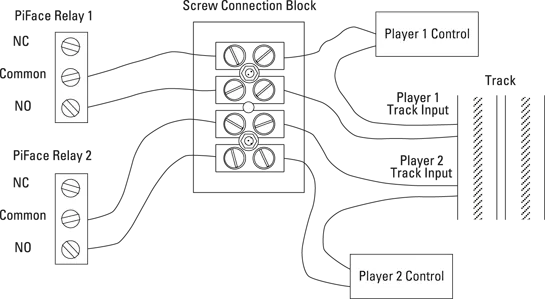
You need to hack into your slot car racer, and, as there are lots of different types of them, I can’t be too prescriptive about what you need to do. However, from the electrical point of view, it is basically all the same. What you are going to do is to wire a PiFace relay in series with each hand controller. This will involve cutting one of the two wires coming from the controller, and connecting each end of your cut wire into the NO and common relay connections. NO stands for normally open – this connection is only connected to the common line when the relay is energised; when the relay is not energised, that is the normal state – no electrical connection is made. Figure 1-1 shows how you can do this using a screw connection block. These are the type you use for electrical wiring around the house. They come in various sizes, and the size you want is the smallest, which is often marked something like 3 Amps. A sharp hobby knife can slice the two wires apart, and then you can cut one of them; it doesn’t matter which one. You should cut back the insulation and then, following the diagram, attach each end to two of the connector blocks. Take the other end and run wires off to the PiFace board. Do the same for the other controller. When you want to play with your slot car game normally you simply replace the long wires trailing back to the PiFace board with a simple link. Do this close to the track connections so that you have the maximum length of wire on the hand controllers.
Figure 1-1: Hacking into your slot car racing game.
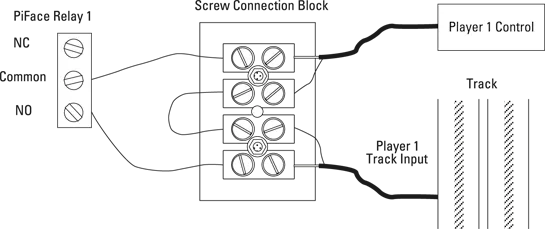
Sometimes the wires coming from the hand controller are all bundled into one cable, so it is impossible to cut just one wire. If this is the case, you will have to cut both of them and join the other wire back up again. This sort of thing is shown in Figure 1-2. In this case the wire consists of an inner conductor and an outer braided wire sheath. Strip back the outer sheath and make sure that no thin strands of wire are shorting out to the other wire. Use insulation tape or heat shrink sleeving to insulate the sheath. Then wire it up as shown in Figure 1-2. Note that this diagram is for one controller; you will have to duplicate this for the other player’s controller.
Figure 1-2: Hacking into your slot car racing game if you can’t cut just a single wire.
Testing Your Slot Car Racer Hack
Now you need to test the slot car hack. Power up your slot car racing game as normal and run the program in Listing 1-1.
Listing 1-1 Slot Car Racer Hack Test
#!/usr/bin/env python
"""
Slot Racer Hack tester on the PiFace board
"""
import piface.pfio as pfio # piface library
pfio.init() # initialise pfio
def main():
lastInput =0
print "Slot Racer Hack test press the two input
switches"
print "on the PiFace board to change who is racing"
print "ctrl - C to quit"
while True :
buttons = pfio.read_input()
if (buttons &am...
Table of contents
Cover
Title Page
Table of Contents
Introduction
Chapter 1: Computer-Controlled Slot Car Racing
Chapter 2: Facebook-Enabled Roto-Sketch
Chapter 3: The Pendulum Pi, a Harmonograph
Appendix A: Getting Your Raspberry Pi Up and Running
Appendix B: Introductory Software Project: The Insult Generator
Trusted by 375,005 students
Access to over 1.5 million titles for a fair monthly price.
Study more efficiently using our study tools.
Frequently asked questions
Yes, you can cancel anytime from the Subscription tab in your account settings on the Perlego website. Your subscription will stay active until the end of your current billing period. Learn how to cancel your subscription
No, books cannot be downloaded as external files, such as PDFs, for use outside of Perlego. However, you can download books within the Perlego app for offline reading on mobile or tablet. Learn how to download books offline
We are an online textbook subscription service, where you can get access to an entire online library for less than the price of a single book per month. With over 1.5 million books across 990+ topics, we’ve got you covered! Learn about our mission
Look out for the read-aloud symbol on your next book to see if you can listen to it. The read-aloud tool reads text aloud for you, highlighting the text as it is being read. You can pause it, speed it up and slow it down. Learn more about Read Aloud
Yes! You can use the Perlego app on both iOS and Android devices to read anytime, anywhere — even offline. Perfect for commutes or when you’re on the go. Please note we cannot support devices running on iOS 13 and Android 7 or earlier. Learn more about using the app
Yes, you can access Raspberry Pi Hardware Projects 2 by Andrew Robinson,Mike Cook in PDF and/or ePUB format, as well as other popular books in Computer Science & Hardware. We have over 1.5 million books available in our catalogue for you to explore.