![]()
1
Introduction to System Simulation Techniques and Applications
1.1 Overview of System Simulation Techniques
Systems are the integrated wholes composed of interrelated and interacting entities; these could be engineering systems or non-engineering systems. Engineering systems are the whole composed of interacting components such that certain system objectives can be achieved. For instance, motor drive systems are composed of an actuating component, a power transfer component and a signal measurement component, so as to control the motor speed or position, among other objectives.
The field of non-engineering systems is much wider. From universe to micro world, any integrated whole can also be regarded as a system, since there are interrelated and interacting relationships.
In order to quantitatively study the behavior of a system, the internal characteristics and interacting relationship should be extracted, to construct a model of the system. System models can be classified as physical models and mathematical models. Following the rapid development and utilization of computer technology, the application of mathematical models is more and more popular.
A mathematical model of a system is a mathematical expression describing the dynamical behavior of the system. They can be used to describe the relationship of quantities in the system and they are the basis of system analysis and design. From the viewpoint of the type of mathematical model, systems can be classified as continuous-time systems, discrete-time systems, discrete event systems and hybrid systems. Systems can also be classified as subclasses of linear, nonlinear, time invariant, time varying, lumped parameters, distributed parameters, deterministic and stochastic systems.
System simulation is a subject within which the system behavior can be studied on the basis of the mathematical models of the actual systems. Usually computer simulation of the systems is the main topic of the subject, including the topics of systems, modeling, simulation algorithms, computer programming, display of simulation results, and validation of simulation results.
Of all the topics listed above, simulation algorithms and computer programming are the most important topics, and determine whether the original problems can be solved. The modeling and simulation result display and validation can be solved easily with MATLAB, and Simulink, the most authoritative and practical computer language. Using MATLAB and Simulink is the innovative characteristic of the whole book. In Section 1.2, a brief introduction to the historical development and future expectation of computer mathematical software and simulation languages will be given. In Section 1.3, development of MATLAB/Simulink programming is presented, and practical examples are explored, such that the reader can start to experience the powerful facilities of MATLAB. In Section 1.4, the main contents and the characteristic behavior of systems are presented.
1.2 Development of Simulation Software
Historically, computer simulation techniques went through the following stages of development: In the 1940s, analog simulation was the major way of simulation. Digital simulation began in 1950s, and in the 1960s, the first simulation languages and packages began to emerge. In the 1980s, development of object oriented simulation techniques was the leading trend. With the popularity and wide availability of digital computers, in the past 30 years, a great many professional computer simulation languages and tools have appeared, such as CSMP, ACSL, SIMNON, MATLAB/Simulink, MatrixX/System Build and CSMP-C. Because MATLAB/Simulink has become more and more popular and powerful, most of the above-mentioned simulation packages are no longer available. MATLAB/Simulink has became the de facto standard computer language and tool for system simulation.
1.2.1 Development of Earlier Mathematics Packages
The rapid development of digital computers and programming languages powered research into numerical computation. In the early stages of the development of scientific computation, a lot of famous packages emerged such as the LINPACK package [1] – linear algebraic equation solver, the eigenvalue-based package EISPACK [2, 3], the NAG package [4] developed by the Numerical Algorithm Group in Oxford, and the subroutines provided in the well-established book Numerical Recipes [5]. These packages were very popular and had a very good reputation among the users worldwide.
The well-established EISPACK and LINPACK packages are mainly used to solve eigenvalue problems and singular value decomposition based linear algebra algorithms. These packages were all written in Fortran.
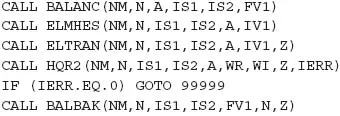
For instance, to find all the eigenvalues of a real square matrix A of size N, and the eigenvalues are represented by WR and WI, for real and imaginary parts, and the eigenvector matrix is represented by Z, the following subroutine calls are suggested in the EISPACK package
Before the above subroutine calls, you should write a piece of code to assign the matrix to the program. Then with the above statements, the main program can be written. After the compiling and linking process, the executable file can be generated. The results can finally be obtained with the executable file.
A large number of numerical subroutines are provided in the NAG package and in the book, Numerical Recipes [5]. The NAG package is even more professional since many more subroutines are provided. In Numerical Recipes, a large number of high-quality subroutines, written in C, Pascal and Fortran, are provided; these subroutines can be used directly by researchers and engineers. There are more than 200 effective and reliable subroutines, and the subroutines are trusted by researchers worldwide.
Readers with a knowledge of Fortran and C programming might already know that, in those two programming languages, the scientific computation of matrices and graphics are rather complicated. For instance, to solve a linear algebraic equation, the elements in the matrices should be assigned first. Then a subroutine has to be written to implement the solution algorithms, such as the Gaussian elimination algorithm, and finally the result has to be output. If the subroutine written or selected is not reliable, misleading conclusions may be reached. Normally such a low-level subroutine can consist of over 100 statements. A small programming error can result in wrong conclusions.
Writing programs with packages has the following disadvantages
- Inconvenience. If the user is not familiar with the package being used, it might be very difficult to write programs with it, and it is always error-prone. If the slightest error is made in the program, erroneous results and misleading conclusions can be obtained.
- Trivial procedures are involved. A main program has to be written, and compiling and linking to the program should be made to generate executable files. A lot of effort is needed to debug the program and to validate the program.
- Too many executables. To solve a specific problem, a dedicated program has to be prepared. An executable file must be generated for this specific problem. The code reuse is not good, where a lot of similar problems may have to be solved.
- Not suitable for data transfer between independent programs. Each program can solve one particular problem. It might be difficult to transfer data from one standalone program to another. And it might not be suitable for solving one common problem by several standalone programs.
- Difficult to allocate the array size. In many mathematical computation problems the most important variables can be matrices. In most packages, the dimensions of the matrices might be set very low; for instance, in the package for control systems analysis and design in [6], the dimension is normally set to 10. It cannot be used to solve very high order systems.
Also, most earlier packages were written in Fortran. The plotting facilities of standard Fortran are not very good. Some other packages such as GINO-F [7] have to be used instead. However, on some platforms this package may not be available.
Apart from the above-mentioned shortcomings there is yet another difficult problem. A program written in Fortran or C cannot be easily transported to other platforms, since the source code on different platforms may not be compatible. For instance, a program written for Microsoft Windows cannot be executed at all on Linux without changes. Modifications must be made to the source code, and the source code has to be recompiled to generate executables. This is a rather difficult task, especially when plotting facilities are part of the source code.
Despite this, the development of mathematical packages is still going on. The most advanced numerical algorithms are implemented in mathematical packages, and more effective, more accurate and faster mathematical packages are still being produced. For instance, in the field of numerical linear algebra, the brand new LAPACK is becoming the leading mathematical package [8]. However, the objective of the new packages is no longer to support the average user; they are provided as low-level support to mathematical languages. In new versions of MATLAB, the base packages LINPACK and EISPACK have been abandoned, and LAPACK is used instead to provide support for linear algebra computation.
1.2.2 Development of Simulation Software and Languages
It can be seen from the limitations of these software packages that it might be rather complicated to complete simulation tasks with them. It is not wise to restart everything from low-level programming, and ab...