Book IV
Client-Side Programming with JavaScript
Visit
www.dummies.com/extras/html5css3aio for more on JavaScript Libraries.
Contents at a Glance
Chapter 1: Getting Started with JavaScript
Chapter 2: Talking to the Page
Chapter 3: Decisions and Debugging
Chapter 4: Functions, Arrays, and Objects
Chapter 5: Getting Valid Input
Chapter 6: Drawing on the Canvas
Chapter 7: Animation with the Canvas
Chapter 1
Getting Started with JavaScript
In This Chapter
Adding JavaScript code to your pages Setting up your environment for JavaScript Inputting and outputting with modal dialogs Using concatenation to build text data Using string methods and properties Using conversion functions Web pages are defined by the HTML code and fleshed out by CSS. But to make them move and breathe, sing, and dance, you need to add a programming language or two. If you thought building web pages was cool, you're going to love what you can do with a little programming. Programming is what makes pages interact with the user. Interactivity is the “new” in “new media” (if you ask me, anyway). Learn to program, and your pages come alive.
Sometimes people are nervous about programming. It seems difficult and mysterious, and only super-geeks do it. That's a bunch of nonsense. Programming is no more difficult than HTML and CSS. It's a natural extension, and you're going to like it.
In this chapter, you discover how to add code to your web pages. You use a language called JavaScript, which is already built into most web browsers. You don't need to buy any special software, compilers, or special tools because you build JavaScript just like HTML and CSS — in an ordinary text editor or a specialty editor such as Aptana.
Working in JavaScript
JavaScript is a programming language first developed by Netscape Communications. It is now standard on nearly every browser. You should know a few things about JavaScript right away:
- It's a real programming language. Don't let anybody tell you otherwise. Sure, JavaScript doesn't have all the same features as a monster, such as C++ or VB.NET, but it still has all the hallmarks of a complete programming language.
- It's not Java. Sun Microsystems developed a language called Java, which is also sometimes used in web programming. Despite the similar names, Java and JavaScript are completely different languages. The original plan was for JavaScript to be a simpler language for controlling more complex Java applets, but that never really panned out.
Don't go telling people you're programming in Java. Java people love to act all superior and condescending when JavaScript programmers make this mistake. If you're not sure, ask a question on my web page. I can help you with either language.
- It's a scripting language. As programming languages go, JavaScript's pretty friendly. It's not quite as strict or wordy as some other languages. It also doesn't require any special steps (such as compilation), so it's pretty easy to use. These things make JavaScript a great first language.
Choosing a JavaScript editor
Even though JavaScript is a programming language, it is still basically text. Because it's normally embedded in a web page, you can work in the same text editor you're using for HTML and CSS. I'm a big fan of Komodo because the same general features you've been enjoying in HTML and CSS are even more important when you're writing code in a more formal programming language:
- Syntax highlighting: Like it does with HTML and CSS, Komodo automatically adjusts code colors to help you see what's going on in your program. As you see in the later sidebar “Concatenation and your editor,” this adjustment can be a big benefit when things get complicated.
- Code completion: When you type the name of an object, Komodo provides you with a list of possible completions. This shortcut can be really helpful because you don't have to memorize all the details of the various functions and commands.
- Pop-up help: As you enter a function that Komodo recognizes, it automatically pops up a help menu explaining what the function does and what parameters could be placed there.
Picking your test browser
In addition to your editor, you should think again about your browser when you're testing JavaScript code. All the major browsers support JavaScript, and the support for JavaScript is relatively similar across the browsers (at least for the stuff in this chapter). However, browsers aren't equal when it comes to testing your code.
Things will go wrong when you write JavaScript code, and the browser is responsible for telling you what went wrong. Chrome is by far the favorite browser for JavaScript programmers today because it has extremely powerful editing tools. The Firebug plug-in adds many of the same features to other browsers, but it's probably best to start with Chrome because everything you need is already built-in. See Chapter 3 of this mini-book for much more on debugging JavaScript code.
Writing Your First JavaScript Program
The foundation of any JavaScript program is a standard web page like the ones featured in the first three minibooks.
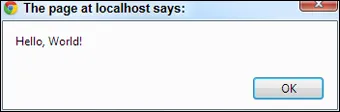
To create your first JavaScript program, you need to add JavaScript code to your pages. Figure 1-1 shows the classic first program in any language.