Professional Visual Studio 2013
eBook - ePub

Professional Visual Studio 2013

  1. English
  2. ePUB (mobile friendly)
  3. Available on iOS & Android
eBook - ePub

Professional Visual Studio 2013

About this book

Comprehensive guide to Visual Studio 2013

Visual Studio is your essential tool for Windows programming. Visual Studio 2013 features important updates to the user interface and to productivity. In Professional Visual Studio 2013, author, Microsoft Certified Trainer, and Microsoft Visual C# MVP Bruce Johnson brings three decades of industry experience to guide you through the update, and he doesn't just gloss over the basics. With his unique IDE-centric approach, he steers into the nooks and crannies to help you use Visual Studio 2013 to its maximum potential.

  • Choose from more theme options, check out the new icons, and make your settings portable
  • Step up your workflow with hover colors, auto brace completion, peek, and CodeLens
  • Code ASP.NET faster than ever with new shortcuts
  • Get acquainted with the new SharePoint 2013 environment
  • Find your way around the new XAML editor for Windows Store apps

Visual Studio 2013 includes better support for advanced debugging techniques, vast improvements to the visual database tools, and new support for UI testing for Windows Store apps. This update is the key to smoother, quicker programming, and Professional Visual Studio 2013 is your map to everything inside.

Trusted by 375,005 students

Access to over 1 million titles for a fair monthly price.

Study more efficiently using our study tools.

Information

Part I
Integrated Development Environment

Chapter 1
A Quick Tour

  • Installing and getting started with Visual Studio 2013
  • Creating and running your first application
  • Debugging and deploying an application
Ever since software has been developed, there has been a need for tools to help write, compile, debug, and deploy applications. Microsoft Visual Studio 2013 is the next iteration in the continual evolution of a best-of-breed integrated development environment (IDE).
This chapter introduces the Visual Studio 2013 user experience and shows you how to work with the various menus, toolbars, and windows. It serves as a quick tour of the IDE, and as such it doesn’t go into detail about what settings can be changed or how to go about customizing the layout because these topics are explored in the following chapters.

GETTING STARTED

With each iteration of the Visual Studio product, the installation process has been incrementally improved, meaning that you can get up and running with Visual Studio 2013 with minimal fuss. This section walks you through the installation process and getting started with the IDE.

Installing Visual Studio 2013

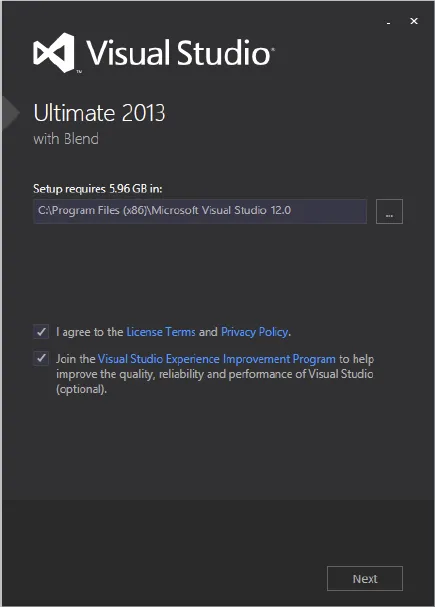
When you launch Visual Studio 2013 setup, you’ll see the dialog in Figure 1-1, which enables you to specify the location for the installation. After you have read the licensing information (in great detail, of course), you can click the check box to accept the terms and move to the next screen in the installation sequence. You’ll also notice an option to join the Visual Studio Experience Improvement Program. If you do so, anonymous information about how you use the product will be sent to Microsoft occasionally. And just so you have a sense of how that information is used, realize that many of the user interface changes that you’re about to see were determined based on this feedback. So get involved, because your use (or lack of use) of Visual Studio helps make future versions better.
image
FIGURE 1-1
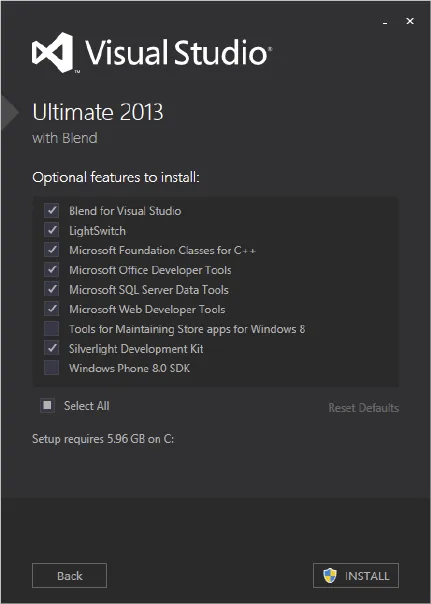
Visual Studio 2013 naturally has a number of mandatory features. Because these features are built in, the installation process doesn’t bother mentioning them. However, you can select from a number of optional features, as shown in Figure 1-2. Choose the features you believe you need (keeping in mind that you can always add or remove them later) and click Install to begin the process.
image
FIGURE 1-2
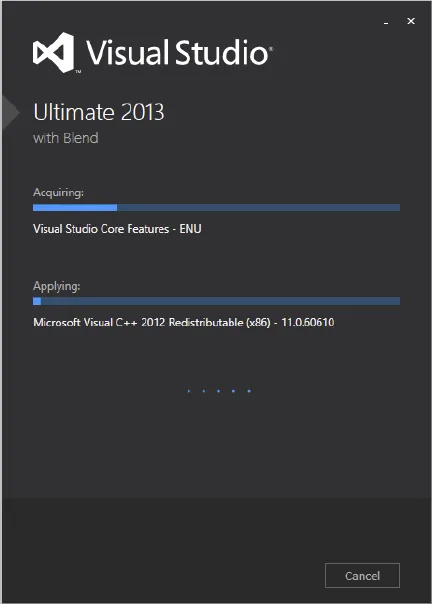
At this point, you’ll see the progress dialog, as shown in Figure 1-3. Depending on which components you already have installed on your computer, you may be prompted to restart your computer midway through or at the end of the installation process. When all the components have been successfully installed, a Setup Summary dialog indicates that there were no problems with the installation process.
image
FIGURE 1-3

Running Visual Studio 2013

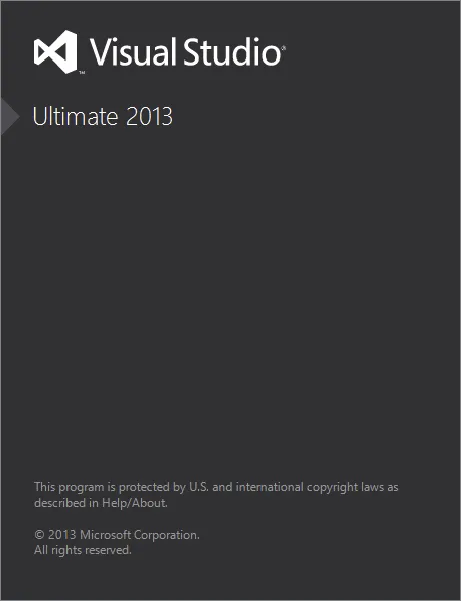
When you launch Visual Studio, the Microsoft Visual Studio 2013 splash screen appears. Like a lot of splash screens, it provides information about the version of the product, as shown in Figure 1-4.
image
FIGURE 1-4
NOTE An interesting fact about the splash screen is that although a large portion of Visual Studio uses Windows Presentation Foundation (WPF) to display its content, the splash screen in Visual Studio 2013 is done in native code so that it displays as soon as possible after you start Visual Studio.
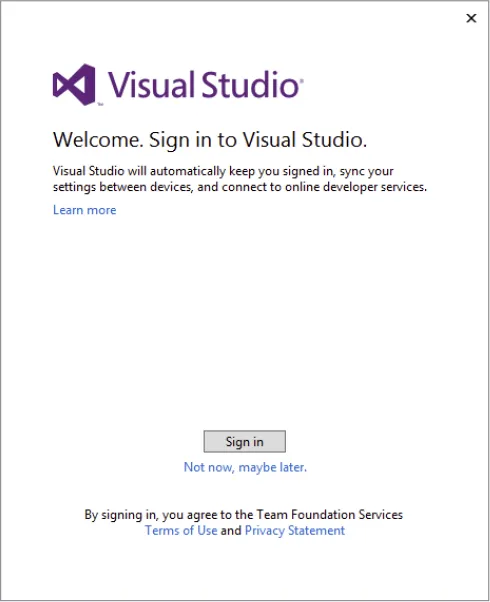
The first time you run Visual Studio 2013, you’ll be given the opportunity to sign in, as shown in Figure 1-5.
image
FIGURE 1-5
This behavior is different from every previous version of Visual Studio, and it moves the tool to be more in line with other productivity applications, such as Microsoft Word and Excel. There is no requirement for you to log in. If you look below the Sign In button in Figure 1-5, there is a Not Now, Maybe Later link. Clicking on that link skips a number of steps (you still need to select the default environment settings) and lets you get to Visual Studio quickly.

Is Visual Studio Really Cloud Enabled?

The quick answer is “Yes.” A more accurate answer is “Yes, if you want it to be.” Part of the research work behind creating this feature involved Microsoft gaining an understanding of how developers identified themselves to various online functions. In general, most developers have two or more Microsoft accounts that they use when they develop. There is a primary identity, which typically maps to the credentials used by the person while working. Then there are additional identities used to access external functions, such as Team Foundation Server, or to publish apps onto the various Microsoft stores.
To mimic how developers work with these multiple online identities, Microsoft introduces a hierarchical rel...

Table of contents

  1. Cover
  2. Contents
  3. Part I: Integrated Development Environment
  4. Part II: Getting Started
  5. Part III: Digging Deeper
  6. Part IV: Rich Client Applications
  7. Part V: Web Applications
  8. Part VI: Data
  9. Part VII: Application Services
  10. Part VIII: Configuration and Resources
  11. Part IX: Debugging
  12. Part X: Build and Deployment
  13. Part XI: Customizing and Extending Visual Studio
  14. Part XII: Visual Studio Ultimate
  15. Introduction
  16. Advertisement
  17. End User License Agreement

Frequently asked questions

Yes, you can cancel anytime from the Subscription tab in your account settings on the Perlego website. Your subscription will stay active until the end of your current billing period. Learn how to cancel your subscription
No, books cannot be downloaded as external files, such as PDFs, for use outside of Perlego. However, you can download books within the Perlego app for offline reading on mobile or tablet. Learn how to download books offline
Perlego offers two plans: Essential and Complete
  • Essential is ideal for learners and professionals who enjoy exploring a wide range of subjects. Access the Essential Library with 800,000+ trusted titles and best-sellers across business, personal growth, and the humanities. Includes unlimited reading time and Standard Read Aloud voice.
  • Complete: Perfect for advanced learners and researchers needing full, unrestricted access. Unlock 1.4M+ books across hundreds of subjects, including academic and specialized titles. The Complete Plan also includes advanced features like Premium Read Aloud and Research Assistant.
Both plans are available with monthly, semester, or annual billing cycles.
We are an online textbook subscription service, where you can get access to an entire online library for less than the price of a single book per month. With over 1 million books across 990+ topics, we’ve got you covered! Learn about our mission
Look out for the read-aloud symbol on your next book to see if you can listen to it. The read-aloud tool reads text aloud for you, highlighting the text as it is being read. You can pause it, speed it up and slow it down. Learn more about Read Aloud
Yes! You can use the Perlego app on both iOS and Android devices to read anytime, anywhere — even offline. Perfect for commutes or when you’re on the go.
Please note we cannot support devices running on iOS 13 and Android 7 or earlier. Learn more about using the app
Yes, you can access Professional Visual Studio 2013 by Bruce Johnson in PDF and/or ePUB format, as well as other popular books in Ciencia de la computación & Programación de Microsoft. We have over one million books available in our catalogue for you to explore.