![]()
Chapter 1
What Is Hybrid IT?
IN THIS CHAPTER:
- Understanding the cloud service models
- Examining key cloud trends
- Learning why you should and shouldn’t adopt a cloud solution
Forget for one moment all of the rhetoric you hear today from analysts and researchers about the growth and increased adoption of this thing they call the cloud. Focus instead on you: the individual, the business owner, CIO, IT director, IT professional, or consultant. In particular, focus on some of the challenges you face today. Chances are good you are responsible for the health of your business’s IT environment (either directly or indirectly). Maybe you are even accountable for the performance or achievement of the earnings your business is expected to produce. Chances are you are constantly trying to balance day-to-day operational activities with projects or special initiatives.
THE THING THEY CALL THE “CLOUD”
So in your situation, the question you must ask yourself is this: “Will leveraging cloud solutions really assist my organization in achieving its business plans and objectives?” Although it seems obvious, that answer (interestingly enough) is a resounding no. There is no shortage of traditional solutions that provide capabilities to help your organization achieve its business goals. In fact, these solutions have been doing just that for quite some time now. Just because cloud solutions are the new hype, it doesn’t leave all existing (or traditional) solutions irrelevant.
That said, it’s important to consider what will happen if you don’t take advantage of some of these cloud solutions and your competitors do. Will they find new levels of efficiency in their organization or streamline their operational processes to a point where they now have an advantage over your organization in terms of agility, control, and execution? The answer here is a resounding YES. The benefits that cloud solutions bring to an organization are very apparent. The impact and provided benefits in terms of resilience and reliability (due to the expertise and economies of scale achieved by service providers) and potentially shifted cost structures will easily outweigh the cost\capability battle when compared to similar functions provided by your traditional (on-premises) technologies and solutions.
So, what is all this excitement about the cloud anyway? In this chapter we’ll try to share some insight as to why so many organizations are looking to cloud solutions to transform their organizations. First, however, we want to make sure that we are all talking about the same thing. A plethora of solutions and offerings in the market claim to be cloud-centric, or something within that realm, so we will first explore the anatomy of a cloud to help you differentiate between solutions that actually provide cloud capabilities and those that do not.
CLOUD SERVICE MODELS
In this section, we want to explain the three following cloud service models:
- Infrastructure-as-a-Service (IaaS)
- Platform-as-a-Service (PaaS)
- Software-as-a-Service (SaaS)
We’ll begin with the analogy that everyone can understand and relate to — transportation. If you are like most, two of your main requirements of transportation are as follows:
- It must be available to you whenever you need it.
- It must take you from point A to point B.
So, with those requirements in mind, you drove to the dealership and bought a new car. Congratulations! Now, assuming you know how to drive, you can drive it anywhere, anytime, and for as long as you can, as long as you stop for rest and refueling your gas tank.
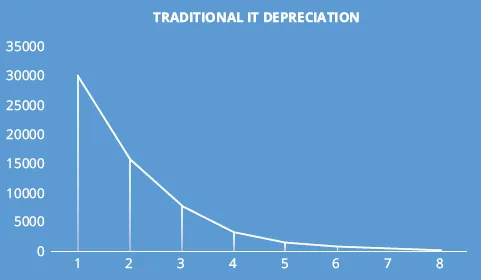
At the same time, you must take care of your car so that it stays usable and operational. And if you think of your personal vehicle as the investment you have made for many years to come, you are wrong. The very minute that you drive a new car off a dealer’s lot, it loses value. On average, cars depreciate about $3,000 annually. So does the hardware you bought for your datacenter.
Here comes the first comparison. Think of the traditional IT and the hardware (servers, network switches, hubs, etc.) as if it were your own car you bought, you drive, and you take care of (maintenance, service checks, etc.). If you draw the parallel line, you could quickly appreciate the common pattern of having full control over where it goes and when, and the depreciation of value over the time (see Figure 1-1).
Infrastructure-as-a-Service — The Leasing Option
Now, consider the car leasing option. There are a few striking key differentiators from the previous model — your own car (a.k.a. traditional IT datacenter). Those differences can be outlined as:
- You pay monthly fees during the entire lease period, which sum in total to 50-60 percent of the new car’s manufacture price tag.
- You can still drive whenever you want and wherever you wish, but with imposed mileage limits (for example: a lease contracts may have 36 K miles maximum per 36 months of lease).
- There’s also a limitation of cars/models types that are available for lease.
- You still have to take care of your leased car as if it were your own (service maintenance, refueling, changing the tires, etc.), but because you don’t own it you can’t modify it in any way.
And that’s exactly, or almost exactly, what you are going to get when you “lease” the Infrastructure-as-a-Service (IaaS) from the public cloud provider (the “dealership”). This is equivalent to leasing a virtual server on which the tenant can install their own operating system and administer the server themselves. Like when you lease a car, in the case of leasing VMs from your public cloud service provider you will observe the following “+” and “-” that may affect your business decision on when to choose what cloud service model:
Pros:
- You can use pre-installed VMs containing some of the most common software packages installed and ready for you to configure per your business needs. Windows Azure IaaS includes a standardized VM Image Gallery for consistent workload deployment and hosting. The VMs you can find in this gallery are available for “pick-up” to serve as the starting point (in many cases it puts you on the accelerated path) for your IaaS deployment environment. Note that only Microsoft Windows Azure IaaS cloud services offers the Image Gallery at this moment. No other cloud vendors currently have that. Think about the pre-installed navigation and sound systems in your leased car.
- You pay only for the time you use your VM in IaaS. Note that the Azure VMs must be shut down (turned off) in order for billing charges to stop. More on Azure VMs later.
- Can easily scale-up and scale-down whenever you need it to.
Cons:
- Have the limited choice of what guest OSs are currently supported by cloud vendors. For example, you can’t bring your own VM containing Windows Server 2003 32-bit OS.
- Have limitation on the VM formats supported by a cloud provider’s IaaS platform. For instance, Microsoft doesn’t support VMWare VM images on their Windows Azure IaaS, while Amazon only supports its own proprietary VM format forcing customers to convert their original on-premises VM formats into Amazon’s format.
- Have restrictions imposed on you by a cloud provider on what software licenses you can bring to the public cloud. For example, Oracle DB isn’t supported on Windows Azure IaaS VMs due to the licensing restrictions imposed by Oracle.
So far so good, right? Now it’s time to look at the other two popular public cloud hosting models: Platform-as-a-Service (PaaS) and Software-as-a-Service (SaaS).
Platform-as-a-Service — The Rental Option
PaaS is analogous to another transportation option: a rental car. In this case, you need to go from point A to point B for the T duration (in most cases from 1 to 7 days, sometimes longer). Does it make sense for you to go and buy a new car? No, and we proved it with our car depreciation analysis. Does it make sense to lease a car for a short period of time, say, in some place you came for vacationing or for a business? Absolutely not! First of all, no one will lease you a car for such a short period of time, and secondly — and most importantly — you wouldn’t want to pay heavy costs associated with a leased car (down payment, residual depreciation fees, dealership, and car delivery fees). It’s not worth it.
Thankfully, rental car agencies allow you, for a nominal fee, to use a rental car per day, to drive wherever you want and whenever you want without worrying about the car maintenance, tires, and sometimes even filling the gas tank. It’s all included in the rental price. “It’s all included” is the key phrase. Because, when you draw the parallel line from the car analogy back to the public cloud, you can see that PaaS has most of the features owned or leased to you by a cloud vendor included in its hosting model. In other words, when you “rent” a piece of cloud — that is, deploy your application to the PaaS flavor of the public cloud — you will observe the following:
Pros:
- Pay as you go, or pre-pay for the specific period of time/consumption.
- Use the cloud only when you need it.
- Have no need to worry about infrastructure maintenance, OS, and security upgrades, patches, networking, load balancing.
- Can easily scale-up and scale-down whenever you need it to.
Cons:
- Have the limited choice in what you can rent (read: “deploy”).
- Have restrictions imposed on you by a cloud provider on what you can bring to the public cloud and in what capacity.
By now, you should have if not a completely clear picture, at least a partially cloudy picture of how an IaaS cloud model is different from a PaaS cloud model. Both models have their own Pros and Cons and the absolute right to co-exist and/or be your preferable choice for your business cloud solution.
Now, let’s review the third cloud hosting model, SaaS, while comparing it to the other two you have just finished reading about.
Software-as-a-Service — The Public Transportation Option
Finally, what transportation options do you have when you don’t know how to operate the vehicle or simply don’t want to? You choose public transportation. To use public transportation you buy a ticket, day pass, monthly pass, or Oyster card (if you’re in London), and use it every time you get onboard the train, bus, subway, or airplane.
It still can take you from point A to point B, but cannot take you to point C if the bus’s route doesn’t go there. At the same time you don’t have to know how to drive the bus, and of course, you have no maintenance headaches, need to fill the gas, or requirement to be always alert when operating the vehicle. Once again, drawing the parallel line from transportation analogy back to the public cloud, you can see the same pattern realized in the Software-as-a-Service (SaaS) public cloud deployment model. As you have tradeoffs when you use public transportation, running the software package such as Office, Mail Exchange, SharePoint, CRM, etc., on someone’s else cloud without investing in infrastructure hardware, software licenses, and operational maintenance cost has its obvious perks as well as some disadvantages:
Pros:
- You pay on a per-user basis.
- No software licenses are required.
- You can easily scale-up and scale-down whenever you need to.
- No skills to run and operate third-party software are required.
- The system is always highly available.
- SLAs are guaranteed.
Cons:
- SaaS is typically a multi-tenant, shareable environment, where you share physical resources with others tenants (customers). Theoretically, if someone messes up the physical ecosystem you happen to share, you and your customers are impacted as well.
- There is a limited list of SaaS packages available today.
- You can always make some limited configuration changes in the product you “rent” as part of your SaaS subscription, but rarely can you customize or tailor to your own business needs.
By now, you should have made the obvious connection in the parallel patterns we tried to draw here through the transportation analogy, and we hope you can see the differences as well as the pros and cons of each public cloud hosting model. We believe that drawing parallel lines between the cloud service models and the various options you have when choosing a specific type of transport whether it is your own vehicle, a lease car, rental car, or public transportation, would help you better understand the common traits and differences that exist between these three cloud service models....