![]()
Chapter 1
Introduction to SNB
The main activity of most physics classes is to teach students how to solve physics problems. Mathematics is a tool we use to solve those problems. Many of the difficulties students have in physics classes are rooted in the mathematics. They can’t see the forest of physics for all the mathematical trees. Scientific Notebook (SNB) is a powerful yet easy-to-use computer algebra system that can help alleviate this problem. SNB is inexpensive and easy enough to be accessible to most undergraduates yet powerful enough to be useful in solving interesting physics problems.
The goal of this book is to teach students how to use SNB to solve physics problems. Once you have learned how (and it won’t take all that long), you will use SNB as its name implies – as a notebook in which you set up a science or math problem, write and solve an equation, analyze and discuss the results. Of course a regular notebook will never help you do the math, but SNB will. Soon you will be able to think and write at the computer, in much the same way you use a paper and pencil now, with the power of a computer algebra system at your disposal.
Why SNB?
Scientific Notebook is powerful software that combines word processing and mathematics in standard notation with the power of symbolic computation. You enter the mathematical expressions in a form that is familiar to you and SNB evaluates it. This is the key to SNB. All the mathematics are in standard notation in a form that is familiar to you. There is no arcane syntax to learn.
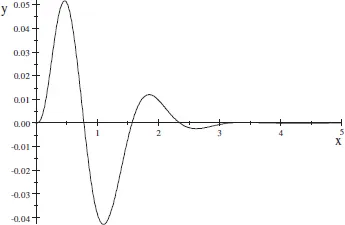
Consider a quick analysis of the function y = x2e-3x sin 4x. What is the area under the curve? Where is the function zero? What does the function look like? You may know how to find the answers, but you might have trouble doing the necessary mathematics. With SNB, one click gives the exact answer and a second click gives an approximate numerical answer.
With one click, SNB will find the first zero of the function.
As you might have guessed, this function equals zero at x = 0.
You can see the other zeros with a plot of the function. It would be simple to graph this function by hand, but tedious and time consuming. To see a 2-dimensional plot of this function with SNB, we can again click a single button.
Later in this chapter you’ll learn how to find the other zeros.
Once we created the expressions, which was very easy to do, all it took was a few mouse clicks to answer our three questions. The entire process took about a minute. With SNB’s help, you will be able to spend more time thinking about physics and less time worrying about mathematics. However, keep in mind that SNB can only help you solve physics problems, it can not solve them for you.
This chapter presents a brief introduction to SNB, emphasizing features you will use in your physics class. It explains how to perform basic tasks such as entering and editing mathematics and text, solving equations and how to compute and plot mathematics. You can even use SNB to open and save documents available on the Internet. Keep in mind the main advantage of S...