- English
- ePUB (mobile friendly)
- Available on iOS & Android
eBook - ePub
About this book
The first book to reveal the vulnerabilities and security issues that exist in the sites that have been built with Drupal?and how to prevent them from continuing Drupal is an open source framework and content management system that allows users to create and organize content, customize presentation, automate tasks, and manage site visitors and contributors. Authored by a Drupal expert, this is the first book to reveal the vulnerabilities and security issues that exist in the sites that have been built with Drupal?and how to prevent them from continuing. The main goal of this guide is to explain how to write code that avoids an attack in the Drupal environment, while also addressing how to proceed if vulnerability has been spotted and then regain control of security.
Information
Part I
Anatomy of Vulnerabilities
In This Part
Chapter 1: That Horrible Sinking Feeling
Chapter 2: Security Principles and Vulnerabilities outside Drupal
Chapter 1
That Horrible Sinking Feeling
Insight into web application security and why you should care about it
I remember it quite clearly. I woke up, stumbled to the coffeemaker to start a brew, went back to my computer to look for updates on the phpBB message board to chat with some friends, and was panicked by what I saw: My home page had been replaced by a message from the “SantyWorm” that looked something like Figure 1.1.
Figure 1.1 Imagine if your website were replaced with this.
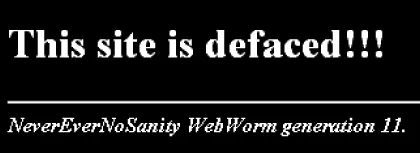
My heart began to race, and I worried about what might have happened and how I might fix it. I poked around the administrator pages of the site, but every way that I tried to fix it was met with the “hax0rs lab” message mocking me. Then, defeated, I slumped over in my chair, hung my head, and exhaled deeply. All I wanted was a forum to talk with my friends. I'd never considered that I would need to update that software from time to time. I was naïve.
Avoiding That Sinking Feeling
If you've had that experience, you know it's not a good one. The best-case scenario is the one that I was in—I had a recent backup of both the files and the database. I used a web-server-level password to lock out access from everyone but me, deleted everything, restored the backup, upgraded my site to the latest version of phpBB, and then let visitors back into the site. The worst-case scenario—well that's hard to imagine.
What is the worst-case scenario if your site gets attacked and the security is broken? Perhaps the usernames, passwords, and emails get stolen from the site, which could then ultimately allow the attacker to log in to your bank and take your money. Perhaps your site becomes a spam relay or a download source for malware, infecting thousands of computers. Or perhaps your site guards valuable proprietary information about your company, which the attacker can copy without your knowledge. As Kevin Mitnick wrote in his book The Art of Deception (Wiley Publishing, 2003), “When you steal money or goods, somebody will notice it's gone. When you steal information, most of the time no one will notice because the information is still in their possession.”
My goal with this book is to reach out to people who are naïve about how to keep a Drupal site secure. Perhaps you're not as inexperienced as I was—why did I think that I wouldn't need to update the software!—but there is a lot of information you will need to know to keep your Drupal site secure. To some extent you can simply follow the security updates closely, and that's all you need to know. Then you would rely on the other users of Drupal to make sure the software is secure. But…should you trust them?
It's Up to You
Sadly, the reality is that you cannot simply rely on other Drupal users to keep the code safe. A surprising number of websites are configured insecurely. A similarly surprising number of contributed or custom modules and themes contain logical or programmatic vulnerabilities. You must pay attention if you are going to keep your site safe.
When you have finished reading this book, you will know what steps you should take to protect a basic Drupal site, how to review a module to find weaknesses and how to fix them, and what extra steps you can take to protect your site if you need additional protection.
What Is Web Application Security?
I don't want to get totally philosophical on you, but I do spend some time with some deep thinkers up in Boulder. There are several aspects that most people include in the concept of website security. Generally, a site is secure if it is safe from danger or loss. For this book I'll define site security as follows: A site is secure if private data is kept private, the site cannot be forced offline or into a degraded mode by a remote visitor, the site resources are used only for their intended purposes, and the site content can be edited only by appropriate users.
Keeping your site secure by that definition should be simple, and yet there are dozens of methods to violate a part of the rule of security, and hundreds of examples of vulnerabilities within the Drupal project have been revealed over the last few years. So what can we do?
Security Is a Balance
You may already be feeling overwhelmed. To be perfectly safe requires so much work—how can anyone do it? The fact is that a typical site shouldn't implement every security recommendation in this book. Running a site is always a balance between what is practical, reasonable, and necessary.
Most security best practices have trade-offs from somewhere else. Sure, it would make your site instantly safer to use an SSL certificate for every visitor to every page, but that adds additional load on the server and additional cost to you. Or if you use a self-signed certificate, it adds additional work for your site visitors in order for it to work.
As the site administrator you must understand potential security weaknesses, your users, the priorities for your site, and your budget, and you must balance them all. Hopefully you already know your budget and the priorities for your site. Your users will probably let you know if a new security process annoys them too much. It's my job to explain the weaknesses and solutions so you can decide whether to implement them. On the other hand, many of the recommendations are absolutes. There simply is no reason to leave an SQL injection vulnerability in your site.
Common Ways Drupal Gets Cracked
This section is a review of some of the most common vulnerabilities found in Drupal.
The Drupal API provides protection against most of these common security vulnerabilities, but in order for that protection to work, themers and module developers must actually use that API. Unfortunately it is often the case that new developers to Drupal are unaware of how to properly use the API.
Vulnerabilities within the code of a site are the biggest category of weaknesses. However, as you'll see in Chapter 2, they are only one kind of potential weakness in your site.
This chapter introduces the Vulnerable module. Drupal's functionality can be extended with the use of modules. Modules are a common source of security weaknesses on sites. You can download the Vulnerable module from http://crackingdrupal.com/content/drupal-vulnerable-module.
Note
This URL is formatted with the full http:// on the front of it because you are expected to actually visit it. Either example.com or the short-hand notation for a URL that shows just the information after the Drupal root is used throughout the rest of the book for URLs that are important less for their content than how the data is used in the URL. For example, the URL for the login page in an example can be expressed either as http://example.com/user or simply /user.
The purpose of the Vulnerable module is to provide easy-to-understand examples of the different vulnerabilities covered in this book and how to fix them. These examples are fake, but the vulnerabilities they represent are real, and you only have to look at past security announcements to see real-world examples of the flaws. This module is useful as an example for the book and for your own study, but it should never be installed on a real site.
Note
The entire set of vulnerabilities attackers use is enormous and growing all the time. Covering all of them would be a waste of your time. Instead, this book covers just the most common and most important vulnerabilities so that you can focus on what really matters.
Authentication, Authorization, and Sessions
The three interrelated concepts of authentication, authorization, and sessions govern users and permissions. Together, they form a key part of a site's attack surface, because vulnerability here allows the attacker to pretend to be another user on the site or do something that's not allowed. In a system like Drupal, where the administration interface is merged with the regular interface, this area is even more critical. Finding a weakness here may allow an attacker to assume the role of an administrative user or view private content.
Note
The attack surface of a site is like a map of the ways to crack into the site. Certain parts of the attack surface are more likely to yield valuable results.
Authentication: Prove Your Identity
When you go to a bank and withdraw money from your account, the bank has security processes to make sure that you are really the person who has the permission to take this action. If you use an ATM, your ATM card and PIN act as proof of your identity. If you go to an agent of the bank, your driver's license or passport may be your proof. Similarly, different websites use various mechanisms to prove your identity.
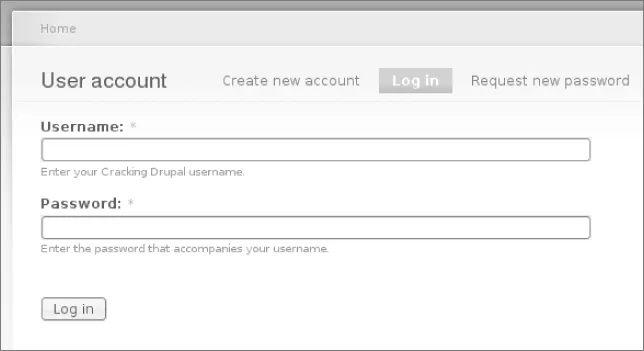
By default Drupal uses the common username and password combination to authenticate users (see Figure 1.2). Numerous other contributed modules can be used to enable alternate authentication mechanisms.
Figure 1.2 The login form.
Weaknesses in Authentication
There are several potential weaknesses related to authentication. The two biggest are that users may choose a weak password and that on most sites passwords are sent in plain text over communication methods that can be intercepted—notably, unencrypted HTTP over unencrypted WiFi. Weak passwords are vulnerable to a dictionary or brute force attack in which a script attempts to log in to a site using common passwords and eventually uses every possible combination of characters until it successfully logs in.
A less-common but still important concept is that of insufficient authentication (Figure 1.3). Authentication is insufficient if, for the kinds of transactions to be carried out, the proof of identity of the user is not strong enough to provide sufficient certainty for the site. The sample Vulnerable module has a feature that allows anyone to log in as any user simply by providing the user ID of whatever user she wishes to be. Especially in Drupal where user IDs are sequential integers and where the user ID 1 is all-powerful, this is probably a bad idea outside of an extremely controlled environment (such as a development computer that is never connected to a network). But it could be that the default username/p...
Table of contents
- Cover
- Titlepage
- Copyright
- Dedication
- About the Author
- Credits
- Acknowledgments
- Introduction
- Part I: Anatomy of Vulnerabilities
- Part II: Protecting against Vulnerabilities
- Part III: Protecting against Vulnerabilities
- Part IV: Appendixes
- Index
Trusted by 375,005 students
Access to over 1.5 million titles for a fair monthly price.
Study more efficiently using our study tools.
Frequently asked questions
Yes, you can cancel anytime from the Subscription tab in your account settings on the Perlego website. Your subscription will stay active until the end of your current billing period. Learn how to cancel your subscription
No, books cannot be downloaded as external files, such as PDFs, for use outside of Perlego. However, you can download books within the Perlego app for offline reading on mobile or tablet. Learn how to download books offline
Perlego offers two plans: Essential and Complete
- Essential is ideal for learners and professionals who enjoy exploring a wide range of subjects. Access the Essential Library with 800,000+ trusted titles and best-sellers across business, personal growth, and the humanities. Includes unlimited reading time and Standard Read Aloud voice.
- Complete: Perfect for advanced learners and researchers needing full, unrestricted access. Unlock 1.5M+ books across hundreds of subjects, including academic and specialized titles. The Complete Plan also includes advanced features like Premium Read Aloud and Research Assistant.
We are an online textbook subscription service, where you can get access to an entire online library for less than the price of a single book per month. With over 1.5 million books across 990+ topics, we’ve got you covered! Learn about our mission
Look out for the read-aloud symbol on your next book to see if you can listen to it. The read-aloud tool reads text aloud for you, highlighting the text as it is being read. You can pause it, speed it up and slow it down. Learn more about Read Aloud
Yes! You can use the Perlego app on both iOS and Android devices to read anytime, anywhere — even offline. Perfect for commutes or when you’re on the go.
Please note we cannot support devices running on iOS 13 and Android 7 or earlier. Learn more about using the app
Please note we cannot support devices running on iOS 13 and Android 7 or earlier. Learn more about using the app
Yes, you can access Cracking Drupal by Greg Knaddison in PDF and/or ePUB format, as well as other popular books in Computer Science & Programming Languages. We have over 1.5 million books available in our catalogue for you to explore.