Part I
Getting to Know Windows 7
Chapter 1
Getting Comfortable with the Windows 7 Desktop
Get ready to . . .
Get a New Computer with Windows 7
Turn On Your Computer
Check Out the Windows 7 Desktop
Try Out the Mouse
Go with the Start Button
Get Familiar with the Taskbar
Get Help When You Need It
Close Windows 7
Microsoft Windows 7 is a special type of program or software — tools for getting things done with a computer — called an operating system, which is the master control of a computer. Windows 7 gives a computer essential functions that enable you to run other programs and work with documents, photos, and music.
Whether you already have a computer or you intend to buy a new computer with Windows 7 installed, this chapter takes you into Windows 7 for the first time, from turning the computer on, looking around, to turning it off again.
Get familiar with common terms and concepts, such as the desktop, which you see soon after you start. Use the Start menu to start programs. Take advantage of the taskbar to see what’s going on. You work with these parts of Windows 7 every time you use your computer.
In the process of exploring the major features of Windows 7 for the first time, come to grips with the mouse, your pet for prodding Windows 7 into action. The mouse and its buttons enable you to point and click your way to happiness. From time to time, I emphasize when the keyboard provides a good alternative to the using the mouse.
Get a New Computer with Windows 7
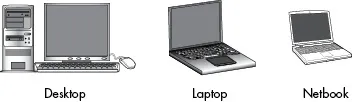
Although this is not the book to tell you everything there is to know about buying a new computer, I do have a few suggestions for you as you shop. The first consideration is what style or size of computer do you want? Choose from these types of computers (see Figure 1-1):
Figure 1-1
A desktop computer is usually shoebox sized or larger. Often, a desktop computer is a vertical tower that sits under a desk or table. This desktop box usually accepts numerous hardware upgrades internally, but not everyone wants to open the box and insert new hardware. A desktop has a separate screen (also called a display or monitor) that displays what the computer is doing, a keyboard for typing, plus a mouse for doing things onscreen. (More on these components shortly.)
A laptop computer is not only smaller than most desktop computers, it is portable. Even if you never intend to leave the house with your computer, you may enjoy taking the computer from one room to another. A desktop computer requires you to connect a few different parts during setup. A laptop computer is ready to go when you get it.
A netbook is a small laptop computer that may be less powerful than a more expensive laptop. A netbook is a great beginner’s computer because netbooks are much cheaper than other machines ($250 to $400). The small size of a netbook may suit you perfectly, but look closely at the size of any laptop or netbook. Is the computer too big to carry comfortably? Will your hands fit the keyboard?
In the rest of the book, when I use the words computer or machine, I mean any style of computer. I use the words desktop or laptop (including netbook) to emphasize differences between those machines, as needed.
For more information on buying a computer, see Computer For Seniors For Dummies, by Nancy C. Muir. When you buy a new computer, check the ad or the box or talk with a salesperson to find out whether that computer comes with Microsoft Windows 7 installed. Ask which edition you’re buying. The various editions of Windows 7 have different features and capabilities. You are most likely to see one of these editions:
Starter Edition: Many of the Windows 7 visual effects are missing from the Starter Edition, and so are some of the useful accessories discussed in Chapter 5. This edition may be too stripped down to give you the real benefits of using Windows 7.
Home Premium Edition: This is a good choice for most computer users and is likely to be the version already installed if you are buying a new PC. It has media options, such as music and video. Home Premium supports all the slick visual effects of Windows 7. Some people dismiss these visual effects as eye-candy, but these effects, such as semi-transparent objects onscreen and rich colors, are part of the fun of using Windows 7.
Ultimate Edition: This version has everything Windows 7 can provide. (The name says as much.) Ultimate may in...