In this part . . .
Making sense of all the controls on your D90 isn’t something you can do in an afternoon — heck, in a week, or maybe even a month. But that doesn’t mean that you can’t take great pictures today. By using your camera’s point-and-shoot automatic modes, you can capture terrific images with very little effort. All you do is compose the scene, and the camera takes care of almost everything else.
This part shows you how to take best advantage of your camera’s automatic features and also addresses some basic setup steps, such as adjusting the viewfinder to your eyesight and getting familiar with the camera menus, buttons, and dials. In addition, chapters in this part explain how to obtain the very best picture quality, whether you shoot in an automatic or manual mode, and how to use your camera’s picture-playback and Live View features.
1
Getting the Lay of the Land
In This Chapter
Attaching and using an SLR lens
Adjusting the viewfinder to your eyesight
Working with memory cards
Getting acquainted with your camera
Selecting from menus
Displaying onscreen help
Customizing basic operations
I still remember the day that I bought my first SLR film camera. I was excited to finally move up from my one-button point-and-shoot camera, but I was a little anxious, too. My new pride and joy sported several unfamiliar buttons and dials, and the explanations in the camera manual clearly were written for someone with an engineering degree. And then there was the whole business of attaching the lens to the camera, an entirely new task for me. I saved up my pennies a long time for that camera — what if my inexperience caused me to damage the thing before I even shot my first pictures?
You may be feeling similarly insecure if your Nikon D90 is your first SLR, although some of the buttons on the camera back may look familiar if you’ve previously used a digital point-and-shoot camera. If your D90 is both your first SLR and first digital camera, you may be doubly intimidated.
Trust me, though, that your camera isn’t nearly as complicated as its exterior makes it appear. With a little practice and the help of this chapter, which introduces you to each external control, you’ll quickly become as comfortable with your camera’s buttons and dials as you are with the ones on your car’s dashboard. This chapter also guides you through the process of mounting and using an SLR lens, working with digital memory cards, navigating your camera’s menus, and customizing basic camera operations.
Getting Comfortable with Your Lens
One of the biggest differences between a point-and-shoot camera and an SLR (single-lens reflex) camera is the lens. With an SLR, you can swap out lenses to suit different photographic needs, going from an extreme close-up lens to a super-long telephoto, for example. In addition, an SLR lens has a movable focusing ring that gives you the option of focusing manually instead of relying on the camera’s autofocus mechanism.
Of course, those added capabilities mean that you need a little background information to take full advantage of your lens. To that end, the next four sections explain the process of attaching, removing, and using this critical part of your camera.
Attaching a lens
Whatever lens you choose, follow these steps to attach it to the camera body:
1. Remove the cap that covers the lens mount on the front of the camera.
2. Remove the cap that covers the back of the lens.
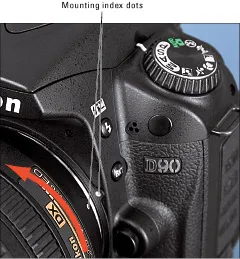
3. Hold the lens in front of the camera so that the little white dot on the lens aligns with the matching dot on the camera body.
Official photography lingo uses the term mounting index instead of little white dot. Either way, you can see the markings in question in Figure 1-1.
Note that the figure (and others in this chapter) shows you the D90 with its so-called “kit lens” — the 18–105mm Vibration Reduction (VR) zoom lens that Nikon sells as a unit with the body. If you buy a lens from a manufacturer other than Nikon, your dot may be red or some other color, so check the lens instruction manual.
4. Keeping the dots aligned, position the lens on the camera’s lens mount as shown in Figure 1-1.
When you do so, grip the lens by its back collar, not the movable, forward end of the lens barrel.
Figure 1-1: When attaching the lens, align the index markers as shown here.
5. Turn the lens in a counter-clockwise direction until the lens clicks into place.
To put it another way, turn the lens toward the side of the camera that sports the shutter button, as indicated by the red arrow in the figure.
6. On a lens that has an aperture ring, set and lock the ring so the aperture is set at the highest f-stop number.
Check your lens manual to find out whether your lens sports an aperture ring and how to adjust it. (The D90 kit lens doesn’t.) To find out more about apertures and f-stops, see Chapter 5.
Always attach (or switch) lenses in a clean environment to reduce the risk of getting dust, dirt, and other contaminants inside the camera or lens. Changing lenses on a sandy beach, for example, isn’t a good idea. For added safety, point the camera body slightly down when performing this maneuver; doing so helps prevent any flotsam in the air from being drawn into the camera by gravity.
Removing a lens
To detach a lens from the camera body, take these steps:
1. Locate the lens-release button, labeled in Figure 1-2.
2. Grip the rear collar of the lens.
In other words, hold on to the stationary part of the lens that’s closest to the camera body and n...