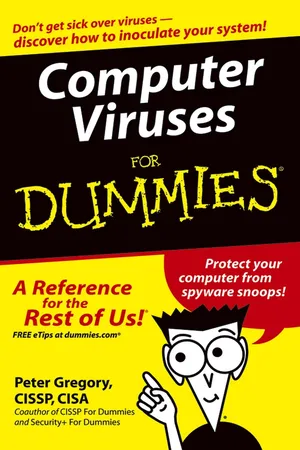
Computer Viruses For Dummies
eBook - ePub

Computer Viruses For Dummies

  1. English
  2. ePUB (mobile friendly)
  3. Available on iOS & Android
eBook - ePub

Computer Viruses For Dummies

About this book

Computer viruses—just the thought of your trusty PC catching one is probably enough to make you sick. Thanks to the cyber-sickies who persist in coming up with new strains, there's a major new cyberattack nearly every day. Viruses sneak in, usually through e-mail.

Fortunately, there are ways to inoculate and protect your computer. Computer Viruses For Dummies helps you:

  • Understand the risks and analyze your PC's current condition
  • Select, install, and configure antivirus software
  • Scan your computer and e-mail
  • Rid your computer of viruses it's already caught
  • Update antivirus software and install security patches
  • Use firewalls and spyware blockers
  • Protect handheld PDAs from viruses
  • Adopt safe computing practices, especially with e-mail and when you're surfing the Net

Written by Peter H. Gregory, coauthor of CISSP For Dummies and Security + For Dummies, Computer Viruses For Dummies goes beyond viruses to explain other nasty computer infections like Trojan horses, HiJackers, worms, phishing scams, spyware, and hoaxes. It also profiles major antivirus software to help you choose the best program(s) for your needs.

Remember, if you don't protect your computer, not only do you risk having your computer infiltrated and your data contaminated, you risk unknowingly transmitting a virus, worm, or other foul computer germ to everybody in your address book! This guide will help you properly immunize your PC with antivirus software now and install updates and security patches that are like booster shots to keep your software protected against new viruses.
Frequently asked questions

Yes, you can cancel anytime from the Subscription tab in your account settings on the Perlego website. Your subscription will stay active until the end of your current billing period. Learn how to cancel your subscription.
No, books cannot be downloaded as external files, such as PDFs, for use outside of Perlego. However, you can download books within the Perlego app for offline reading on mobile or tablet. Learn more here.
Perlego offers two plans: Essential and Complete
  • Essential is ideal for learners and professionals who enjoy exploring a wide range of subjects. Access the Essential Library with 800,000+ trusted titles and best-sellers across business, personal growth, and the humanities. Includes unlimited reading time and Standard Read Aloud voice.
  • Complete: Perfect for advanced learners and researchers needing full, unrestricted access. Unlock 1.4M+ books across hundreds of subjects, including academic and specialized titles. The Complete Plan also includes advanced features like Premium Read Aloud and Research Assistant.
Both plans are available with monthly, semester, or annual billing cycles.
We are an online textbook subscription service, where you can get access to an entire online library for less than the price of a single book per month. With over 1 million books across 1000+ topics, we’ve got you covered! Learn more here.
Look out for the read-aloud symbol on your next book to see if you can listen to it. The read-aloud tool reads text aloud for you, highlighting the text as it is being read. You can pause it, speed it up and slow it down. Learn more here.
Yes! You can use the Perlego app on both iOS or Android devices to read anytime, anywhere — even offline. Perfect for commutes or when you’re on the go.
Please note we cannot support devices running on iOS 13 and Android 7 or earlier. Learn more about using the app.
Yes, you can access Computer Viruses For Dummies by Peter H. Gregory in PDF and/or ePUB format, as well as other popular books in Computer Science & Cyber Security. We have over one million books available in our catalogue for you to explore.

Information

Part I

Evaluating Your Virus Situation

image
In this part . . .
**IN a DROPCAP**
Many factors contribute to the likelihood that your computer will get infected with a virus. Your handling of e-mail messages from people you don’t know is one of the biggest factors, as is the general health of your antivirus software.
Does your computer have a virus — right now? Wouldn’t you like to know?! Some symptoms may indicate a virus, but other symptoms probably don’t. By performing a simple procedure, you can determine this reliably. If you have a virus, a couple more steps and ZAP, it’s gone. And with relative ease, you can eliminate any spyware on your computer, too.
Many computing habits are associated with a far lower risk of getting infected by computer viruses and other similar trouble. Among them are keeping your antivirus software up to date and periodically installing security patches.
The first important task to virus-free computing is to check whether your computer has antivirus software, and if so, whether it’s in good condition or not. There are a number of ways to tell whether antivirus software is present, and whether its basic components are functioning correctly.
Chapter 1

Understanding Virus Risks

In This Chapter

bullet
Figuring out whether you’re at risk
bullet
Making good security decisions
T here’s an old saying: “Just because you’re not paranoid doesn’t mean that everyone isn’t out to get you.” This saying is proven by the people who write computer viruses — they are out to get you! And, in fact, a little paranoia may go a long way in protecting your computer.
In this chapter, I provide you with the factors that may increase your personal level of useful paranoia — in other words, the factors that can influence you to lower your personal risk level. Why? Because, get this, some people are more apt to catch computer viruses than others, and it’s largely based upon some basic factors such as the version of Windows they’re using, as well as their Internet and e-mail habits. In the computer world as well as in the biological world, good hygiene goes a long way in preventing infection in the first place — and prevention is far easier to deal with than curing an infection after it happens.

Assessing the Threat to Your Computer

Three primary factors contribute to your risk of catching viruses:
bullet
The version of the Windows operating system you are using
bullet
Whether you have installed security patches on your computer
bullet
How many people use the computer
But also important are your Internet browsing habits:
bullet
Do you visit many different Web sites?
bullet
Do you visit sites that try to mess with your computer’s settings (and how would you know — and prevent — that)?
bullet
Do you have a tendency to open e-mail attachments from people you don’t know?
bullet
Do you visit Web sites cited in e-mail messages from strangers?
All these factors have a direct bearing on whether you are prone to catching viruses.
Finally, the manner in which your computer is connected to the Internet determines your susceptibility to viruses. If you have a high-speed, “always-on” Internet connection, then virus writers are actively trying to find you (or already have!). Dial-up connections are somewhat less risky — but not risk-free.

Which operating system are you using?

Microsoft’s earlier versions of Windows had very little in the way of security — they conformed to Microsoft’s earlier (and flawed) premise that everyone in corporations and everyone on the Internet is nice and can be trusted and that no one will do anything bad. Microsoft, by the way, has been humbled by the experience and, as a result, the newer versions of Windows are far more secure than their predecessors.

Windows 95 and Windows 98

Collectively known as Windows 9x, these earlier versions of Windows lack the basic security components found in modern operating systems. Their primary fault is that they don’t separate the function of the operating system from the person who uses it. You, the computer’s user, have complete control over every aspect of the computer. Even back in the ’90s that wasn’t too safe; if you catch a virus, the virus has the same range of control over your computer as you do.
Microsoft no longer supports Windows 95. This means that, if any security vulnerability is discovered in Windows 95, Microsoft will not issue bulletins, advice, or security patches to fix it. Not an enviable position for any user to be in.
In 2003, Microsoft announced that it would soon end support for Windows 98. But when thousands of corporate and individual computer users stormed the Microsoft castle in Redmond, Washington, armed with torches, spears, axes, and old dot-matrix printers, Microsoft relented and postponed the Windows 98 “end of life.”
But for users of Windows 98, the message is clear: Your days of support from Microsoft are growing short.

Windows ME

Officially called Windows Millennium Edition or Windows ME (and playfully referred to in some circles as the Windows Miserable Edition), this is just Windows 98 with some additional features thrown in and some stability improvements. The stability improvements come at the price of higher hardware requirements, however, and Windows ME suffers from the same basic security issues as its predecessors, namely that viruses can run roughshod throughout the unprotected operating system.

Windows 2000

At long last, Microsoft had taken the kernel (insides) of Windows NT and grafted on the Windows 98 user interface (the stuff that you see on-screen when you use it), and after exhausting the world’s supply of duct tape and baling wire, made it work.
Windows 2000 is a very decent operating system. It contains most of the security features that corporate customers and consumers had been requesting for a long time. Primary is the notion of “logging on” to the computer. In Windows 2000 and newer versions of Windows, if you can’t log on to the computer, you can’t use it. Contrast that to Windows 9x — if you can make the computer run, you can use it and do anything you want to it.

Windows XP

Windows XP contains many refinements over Windows 2000 and is even more secure. For the most part, Windows XP is an improved version of Windows 2000 and includes additional features and functions.
I’ve heard some say that Windows XP is just Windows 2000 with the soft, friendly interface. If you haven’t seen Windows XP, it’s like Windows 2000 with brighter colors and smooth, rounded corners.

Do you install security patches?

Microsoft regularly releases security patches — fixes to their software — that close security holes that could lead to virus infections. Many of these patches are deemed “critical,” and a good number of them have been exploited by those chip-on-their-shoulder Internet thugs who have nothing better to do than to spread misery to as many people as possible.
Microsoft has provided a number of ways that you can use to find out about and install security patches, including Windows Update, Automatic Update, and e-mail notifications of new patches.
If you do install the critical patches that Microsoft releases, then you’re in far better shape than if you have no security patches at all. Having no security patches is almost as bad as having no antivirus software: You’re up the creek with a sitting duck.
I don’t want you to feel bad if you’re among (what I suspect is) the majority of computer users — those who have never installed security patches. Had I chosen a different career path without much chance to get familiar with computers, the thought of installing security patches would seem about as intimidating as working on my home’s electrical wiring or working on a late-model automobile with all its complex wiring and safety systems. But that’s what this book is for: to help get you past the reluctance.

How many people use the computer?

Are you the only person who uses your computer? Or are several colleagues, family members, or (gasp!) total strangers using your computer, like so many people sharing a germ-infested bathroom water cup?
The greater the number of people using a computer, the greater the chances are that something bad will happen. How do I know this? When several people share a complex machine like a PC, t...

Table of contents

  1. Title
  2. Contents
  3. Introduction
  4. Part I : Evaluating Your Virus Situation
  5. Chapter 1: Understanding Virus Risks
  6. Chapter 2: Does My Computer Have a Virus?
  7. Chapter 3: Does Your Computer Have Antivirus Software?
  8. Part II : Deploying Your Antivirus Defenses
  9. Chapter 4: Obtaining and Installing Antivirus Software
  10. Chapter 5: Configuring Antivirus Software
  11. Chapter 6: Scanning Your Computer and E-Mail
  12. Chapter 7: Ridding Your Computer of Viruses
  13. Part III : Maintaining Your Vigilance
  14. Chapter 8: Updating Antivirus Software and Signatures
  15. Chapter 9: Installing Security Patches
  16. Chapter 10: Using Firewalls and Spyware Blockers
  17. Chapter 11: Protecting PDAs from Viruses
  18. Chapter 12: Incorporating Safe Computing Practices
  19. Part IV : Looking at Viruses under the Microscope
  20. Chapter 13: Viruses and the Losers Who Write Them
  21. Chapter 14: Trojan Horses, Worms, Spam, and Hoaxes
  22. Chapter 15: How Viruses Function and Propagate
  23. Part V : The Part of Tens
  24. Chapter 16: Almost Ten Myths about Computer Viruses
  25. Chapter 17: Ten Antivirus Programs
  26. Cheat Sheet
  27. End User License Agreement