Part I
Setting the Stage for Project
In this part . . .
Part I explains the types of input you have to give Project to make the best use of its capabilities. You get a briefing on using Project views, using calendar and scheduling settings to build Project plans, creating task outlines, and then specifying the timing and relationships that organize your project’s tasks.
Chapter 1
Project Management: What It Is, and Why You Should Care
In This Chapter
Discovering how traditional project management makes the move to software
Understanding what elements of a project are managed in Project
Understanding the project manager’s role
Exploring the role of the Internet in project management
Using a template to start a new project
Saving a project file
Finding help in Project
Welcome to the world of computerized project management with Microsoft Project. If you’ve never used project management software, you’re entering a brave, new world. It’s like walking from the office of 25 years ago — with no fax, voicemail, or e-mail — into the office of today with its wealth of high-tech devices.
Everything you used to do with handwritten to-do lists, word processors, and spreadsheets all magically comes together in Project. However, this transition won’t come in a moment, and you need a basic understanding of what project management software can do to get you up to speed. If you’ve used previous versions of Project, this little overview can help you refresh your memory as well as ease you into a few of the new features of Project 2010.
So, even if you’re a seasoned project manager, take a minute to review this chapter. It provides the foundation for how you’ll work with Project from here on.
The ABCs of Project Management
You probably handle projects day in and day out. Some are obvious, because your boss named them so that any fool would know that they’re projects: the Acme Drilling Project or the Network Expansion IT Project, for example. Others are less obvious, such as that speech thing you have to do on Saturday for your professional association or washing the dog.
If you need to organize a company holiday party, it’s a project. If you were handed a three-year Earth-exploration initiative to find oil in Iowa, coordinate subcontractors and government permits, and work with a team of 300 people, that’s definitely a project. Yes, even that speech you have to present is a project because it has certain characteristics.
Understanding what your projects, large or small, have in common is the basis of understanding what Project can do for you. All projects have
An overall goal and unique deliverables
A project manager
Individual tasks to be performed between a specific starting point and ending point
Timing for those tasks to be completed (such as three hours, three days, or three months)
Timing relationships between those tasks (for example, you can’t put a new manufacturing process in place until you train people in how to use the process)
Resources (people, equipment, facilities, and supplies, for example) to accomplish the work
A budget (the costs associated with those people, equipment, facilities, and supplies)
Project management is simply the process of managing all the elements of a project, whether that project is large or small.
The three Ts: Tasks, timing, and dependencies (well, two Ts and a D)
As Lewis Carroll said, “If you don’t know where you’re going, any road will get you there.” So, first things first: You have to understand the goal of your project so that you can begin to build the tasks that have to be performed to get you there.
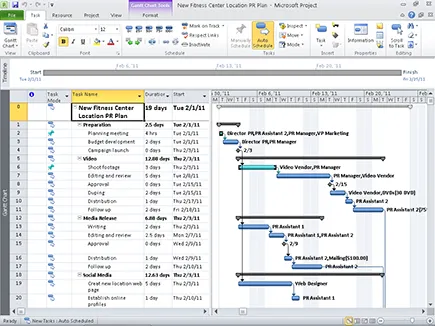
A task is simply one of those items you used to scribble on your handwritten to-do lists, such as Write final report or Apply for permits. Tasks are typically organized into phases (appropriate stages) in Project, arranged in an outline-like structure, as you can see in the project shown in Figure 1-1. Because timing is essential in any project, Project helps you set up and view the timing relationships among tasks.
Figure 1-1: You’ll probably spend most of your time in Project in outline-like Gantt Chart view.
Becoming a task master
A task can be as broad or as detailed as you like. For example, you can create a single task to research your competition, or you can create a project phase that consists of a summary task and subtasks below it. For example, the summary task may be Competitive Research, with the subtasks Researching Online Business Databases, Assembling Company Annual Reports, and Reviewing Competitive Product Lines.
Adding tasks to a Project file doesn’t cost you a thing (except a nanobit of memory), so a project can have as many tasks and as many phases as you like. You simply use the outlining structure in Project to indent various levels of tasks. The more deeply indented in an outline a task is, the more detailed the task. One handy thing about this outlining structure is that you can roll up all the timing and cost data from the subtasks within your phases into summary-level tasks. Three sequential subtasks that take a day each to complete and cost you $200 apiece result in a summary task that spans three days and costs $600. You can view your project at various levels of detail or get automatic tallies of timing and costs if you prefer to simply view the summary level of tasks.
For more about defining and creating tasks, check out Chapter 4. All in the timing
They say that timing is every...