
- English
- ePUB (mobile friendly)
- Available on iOS & Android
eBook - ePub
Professional ASP.NET 4 in C# and VB
About this book
This book introduces you to the features and capabilities that ASP.NET 4 offers, and explains the foundation that ASP.NET provides. It covers each major new feature included in ASP.NET 4 in detail. Retaining the unique C# and VB dual language coverage, this edition retains many great features from previous versions, including both printed and downloadable VB and C# code examples. Other expert coverage include IIS and the provider model, site navigation, design, debugging, modules and handlers, Silverlight, CSS, Ajax and the Ajax Control Toolkit, jQuery, and MVC.
Information
1
Application and Page Frameworks
WHAT’S IN THIS CHAPTER?
- Choosing application location and page structure options
- Working with page directives, page events, and application folders
- Choosing compilation options
The evolution of ASP.NET continues! The progression from Active Server Pages 3.0 to ASP.NET 1.0 was revolutionary, to say the least. And now the revolution continues with the latest release of ASP.NET — version 4. The original introduction of ASP.NET 1.0 fundamentally changed the Web programming model. ASP.NET 4 is just as revolutionary in the way it will increase your productivity. As of late, the primary goal of ASP.NET is to enable you to build powerful, secure, dynamic applications using the least possible amount of code. Although this book covers the new features provided by ASP.NET 4, it also covers all the offerings of ASP.NET technology.
If you are new to ASP.NET and building your first set of applications in ASP.NET 4, you may be amazed by the vast amount of wonderful server controls it provides. You may marvel at how it enables you to work with data more effectively using a series of data providers. You may be impressed at how easily you can build in security and personalization.
The outstanding capabilities of ASP.NET 4 do not end there, however. This chapter looks at many exciting options that facilitate working with ASP.NET pages and applications. One of the first steps you, the developer, should take when starting a project is to become familiar with the foundation you are building on and the options available for customizing that foundation.
APPLICATION LOCATION OPTIONS
With ASP.NET 4, you have the option — using Visual Studio 2010 — to create an application with a virtual directory mapped to IIS or a standalone application outside the confines of IIS. Whereas, the early Visual Studio .NET 2002/2003 IDEs forced developers to use IIS for all Web applications, Visual Studio 2008/2010 (and Visual Web Developer 2008/2010 Express Edition, for that matter) includes a built-in Web server that you can use for development, much like the one used in the past with the ASP.NET Web Matrix.

This built-in Web server was previously presented to developers as a code sample called Cassini. In fact, the code for this mini Web server is freely downloadable from the ASP.NET team Web site found at www.asp.net.
The following section shows you how to use the built-in Web server that comes with Visual Studio 2010.
Built-in Web Server
By default, Visual Studio 2010 builds applications without the use of IIS. You can see this when you select File ⇒ New ⇒ Web Site in the IDE. By default, the location provided for your application is in C:\Users\BillEvjen\Documents\Visual Studio 10\WebSites if you are using Windows 7 (shown in Figure 1-1). It is not C:\Inetpub\wwwroot\ as it would have been in Visual Studio .NET 2002/2003. By default, any site that you build and host inside C:\Users\BillEvjen\Documents\Visual Studio 10\WebSites (or any other folder you create) uses the built-in Web server that is part of Visual Studio 2010. If you use the built-in Web server from Visual Studio 2010, you are not locked into the WebSites folder; you can create any folder you want in your system.
FIGURE 1-1
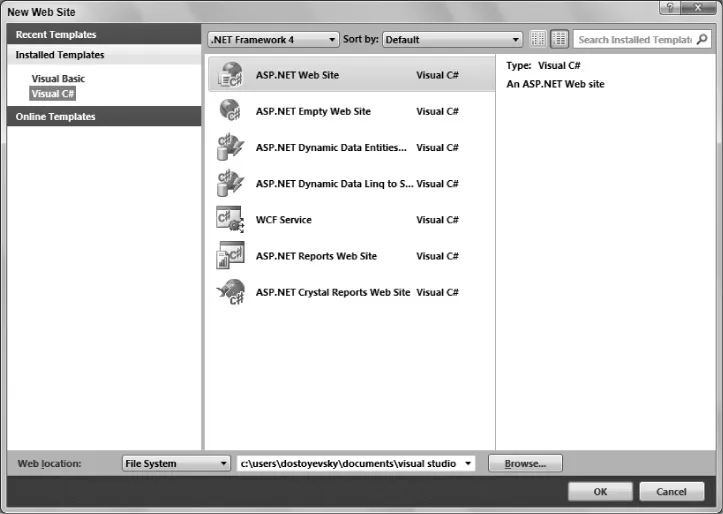
To change from this default, you have a handful of options. Click the Browse button in the New Web Site dialog. The Choose Location dialog opens, shown in Figure 1-2.
FIGURE 1-2
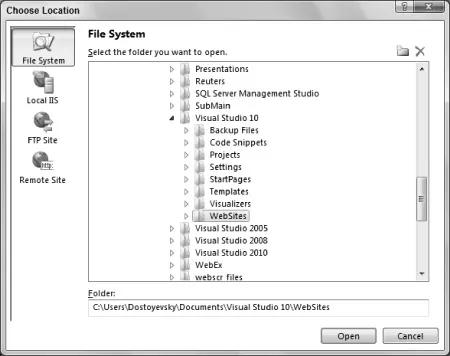
If you continue to use the built-in Web server that Visual Studio 2010 provides, you can choose a new location for your Web application from this dialog. To choose a new location, select a new folder and save your .aspx pages and any other associated files to this directory. When using Visual Studio 2010, you can run your application completely from this location. This way of working with the ASP.NET pages you create is ideal if you do not have access to a Web server because it enables you to build applications that do not reside on a machine with IIS. This means that you can even develop ASP.NET applications on operating systems such as Windows 7 Home Edition.
IIS
From the Choose Location dialog, you can also change where your application is saved and which type of Web server your application employs. To use IIS (as you probably did when you used Visual Studio .NET 2002/2003), select the Local IIS button in the dialog. This changes the results in the text area to show you a list of all the virtual application roots on your machine. You are required to run Visual Studio as an administrator user if you want to see your local IIS instance.
To create a new virtual root for your application, highlight Default Web Site. Two accessible buttons appear at the top of the dialog box (see Figure 1-3). When you look from left to right, the first button in the upper-right corner of the dialog box is for creating a new Web application — or a virtual root. This button is shown as a globe inside a box. The second...
Table of contents
- Cover
- Title
- Copyright
- Dedication
- Credits
- About the Author
- About the Technical Editors
- Acknowledgments
- Introduction
- Chapter 1: Application and Page Frameworks
- Chapter 2: ASP.NET Server Controls and Client-Side Scripts
- Chapter 3: ASP.NET Web Server Controls
- Chapter 4: Validation Server Controls
- Chapter 5: Working with Master Pages
- Chapter 6: Themes and Skins
- Chapter 7: Data Binding
- Chapter 8: Data Management with ADO.NET
- Chapter 9: Querying with LINQ
- Chapter 10: Working with XML and LINQ to XML
- Chapter 11: Introduction to the Provider Model
- Chapter 12: Extending the Provider Model
- Chapter 13: Site Navigation
- Chapter 14: Personalization
- Chapter 15: Membership and Role Management
- Chapter 16: Portal Frameworks and Web Parts
- Chapter 17: HTML and CSS Design with ASP.NET
- Chapter 18: ASP.NET AJAX
- Chapter 19: ASP.NET AJAX Control Toolkit
- Chapter 20: Security
- Chapter 21: State Management
- Chapter 22: Caching
- Chapter 23: Debugging and Error Handling
- Chapter 24: File I/O and Streams
- Chapter 25: User and Server Controls
- Chapter 26: Modules and Handlers
- Chapter 27: ASP.NET MVC
- Chapter 28: Using Business Objects
- Chapter 29: ADO.NET Entity Framework
- Chapter 30: ASP.NET Dynamic Data
- Chapter 31: Working with Services
- Chapter 32: Building Global Applications
- Chapter 33: Configuration
- Chapter 34: Instrumentation
- Chapter 35: Administration and Management
- Chapter 36: Packaging and Deploying ASP.NET Applications
- Appendix A: Migrating Older ASP.NET Projects
- Appendix B: ASP.NET Ultimate Tools
- Appendix C: Silverlight 3 and ASP.NET
- Appendix D: Dynamic Types and Languages
- Appendix E: ASP.NET Online Resources
- Index
Trusted by 375,005 students
Access to over 1.5 million titles for a fair monthly price.
Study more efficiently using our study tools.
Frequently asked questions
Yes, you can cancel anytime from the Subscription tab in your account settings on the Perlego website. Your subscription will stay active until the end of your current billing period. Learn how to cancel your subscription
No, books cannot be downloaded as external files, such as PDFs, for use outside of Perlego. However, you can download books within the Perlego app for offline reading on mobile or tablet. Learn how to download books offline
Perlego offers two plans: Essential and Complete
- Essential is ideal for learners and professionals who enjoy exploring a wide range of subjects. Access the Essential Library with 800,000+ trusted titles and best-sellers across business, personal growth, and the humanities. Includes unlimited reading time and Standard Read Aloud voice.
- Complete: Perfect for advanced learners and researchers needing full, unrestricted access. Unlock 1.5M+ books across hundreds of subjects, including academic and specialized titles. The Complete Plan also includes advanced features like Premium Read Aloud and Research Assistant.
We are an online textbook subscription service, where you can get access to an entire online library for less than the price of a single book per month. With over 1.5 million books across 990+ topics, we’ve got you covered! Learn about our mission
Look out for the read-aloud symbol on your next book to see if you can listen to it. The read-aloud tool reads text aloud for you, highlighting the text as it is being read. You can pause it, speed it up and slow it down. Learn more about Read Aloud
Yes! You can use the Perlego app on both iOS and Android devices to read anytime, anywhere — even offline. Perfect for commutes or when you’re on the go.
Please note we cannot support devices running on iOS 13 and Android 7 or earlier. Learn more about using the app
Please note we cannot support devices running on iOS 13 and Android 7 or earlier. Learn more about using the app
Yes, you can access Professional ASP.NET 4 in C# and VB by Bill Evjen,Scott Hanselman,Devin Rader in PDF and/or ePUB format, as well as other popular books in Informatica & Linguaggi di programmazione. We have over 1.5 million books available in our catalogue for you to explore.