eBook - ePub
Using Wikis for Online Collaboration
The Power of the Read-Write Web
- English
- ePUB (mobile friendly)
- Available on iOS & Android
eBook - ePub
About this book
How can online instructors and course designers' instruction harness the popular Web 2.0 tool, the wiki, for successful collaboration and learning outcomes? This book focuses on using wikis in the active learning processes that are the hallmark of collaborative learning and constructivism. It provides both the pedagogical background and practical guidelines, tools, and processes for accomplishing these goals with special emphasis on wikis and other collaborative design tools. This book supports the effective design and delivery of online courses through the integration of collaborative writing and design activities.
Information
chapter ONE
Getting Ready to Wiki
For many years, interactivity on the Web was limited to clicking, browsing, reading, and searching through Web sites and online databases. Web users were passive consumers of online information. However, the original vision and promise of the Web, according to Tim Berners-Lee, developer of the World Wide Web, was the possibility of its providing collaborative online spaces where “we can all meet and read and write” (Carvin, 2005, p. 1). Today, the Web facilitates a new age of participation that is closer to Berners-Lee’s original intent, inviting users to participate, co-create, edit, and collaborate, rather than merely consume (Lamb, 2004). We have moved from a read-only Web (Web 1.0) to the read-write Web (Web 2.0).
Web 2.0 tools, such as blogs, wikis, social networking software, media sharing, and others, have been instrumental in shifting the Web to its new identity as a collaborative work space, or digital commons, where “we can all meet to read and write.” The digital commons is having an impact in online classrooms, as educators begin to take advantage of free services and the variety of online collaborative tools available. Online educators now have an expanded tool set to support student-centered instruction and collaborative learning. Online students are no longer restricted to passive browsing, page reading, message posting, and other individual learning activities. In the digital commons, online students have the capacity to become collaborative partners in the knowledge-building process.
OPPORTUNITIES FOR ONLINE LEARNING
The timing couldn’t be more perfect. Learners in the twenty-first century have been Web consumers for much of their lives, and are now demanding online instruction that supports participation and interaction. They want learning experiences that are social and that will connect them with their peers. They expect activities and content to be relevant to the real world (Beldarrain, 2006). Today’s learners expect more than online lectures or one-way communications. Activities that promote interaction and collaboration with their peers are becoming an integral part of how students learn. As a result, many educators are moving away from instructor-centered methods of teaching to more contextual learning and real-world problem-solving techniques. The new Web provides the tools and technologies that can support educators in creating a rich, collaborative learning atmosphere in their online classrooms (Lightner, Bober, & Willi, 2007).
Although some first-generation Web tools such as e-mail, chat, and threaded discussion have allowed for effective online course communication, it has often been a challenge to collaborate using these tools (Palloff & Pratt, 2005). Web 2.0 applications have greater potential for building online collaborative learning communities. Wikis, in particular, are showing great promise for enhancing online learning. Within a wiki, learners possessing little or no knowledge of HTML can collaboratively use, create, and modify Web content. The learning curve for using wikis is generally low, and learning groups given assignments with a solid purpose and clear structure have a high capacity for quickly engaging in knowledge construction, critical thinking, and contextual learning. Although wikis do not replace first-generation communication tools, they extend the online classroom beyond its current limits and boundaries. Online educators are taking notice, and the number adopting wikis grows exponentially every day (Godwin-Jones, 2003).
Before jumping on the wiki bandwagon, educators need to consider the implications these tools will have for both learning and the curriculum. It is important to consider how the available tools differ and how they can be incorporated into the classroom. Educators also need to be familiar with the wiki concept in order to make informed choices when selecting a particular wiki service or software tool. In this chapter, we address the advantages and disadvantages of wiki technology and pose critical questions to consider before you make the leap to integrating wikis into your online course.
WHAT IS A WIKI?
A wiki is an online collaborative writing tool. As defined earlier, a wiki is a “collaborative web space where anyone can add content and anyone can edit content that has already been published” (Richardson, 2006, p. 8). Wikis are designed to help groups collaborate, share, and build online content, and are especially useful for distance learners who are separated by time and place. Wikis present an approach to group writing and editing that is more efficient than forwarding e-mail attachments with tracked changes, a method that supports only one editor at a time and can create issues with students having multiple and conflicting versions of the same document. Wiki documents are available for editing and commenting to all members at all times. No one has to wait for a current file to be forwarded to them. It is easy to track each person’s contributions and to maintain a record of all changes and edits (Waters, 2007). Anyone with access, permission, and a Web browser can contribute to a wiki. Members of a wiki can both add new pages and edit existing pages. Many wikis also offer extended editing capabilities and features that enable file sharing, commenting, and embedded discussion.
Although the concept of wikis has been around for many years, the first true wiki, called WikiWikiWeb, was created by Ward Cunningham in 1995 (Tapscott & Williams, 2006). Cunningham used the word wiki, derived from the Hawaiian word for “quick,” to mean a collection of Web pages that can be edited by anyone. Cunningham was inspired by early hypertext programs like HyperCard, but it wasn’t until the development of the World Wide Web that he was able to create the first wiki.
Perhaps the most well-known wiki is Wikipedia (www.wikipedia.org). Wikipedia is a free online encyclopedia with completely open content: nearly every article can be edited by anyone. Since its introduction in 2001, Wikipedia has grown to be the most popular general reference work on the Web. Although there is controversy over the accuracy of its content, there is no doubt of the collaborative nature of Wikipedia. In recent years, the founders of Wikipedia have partnered with other organizations to create the Wikimedia Foundation (wikimediafoundation.org/wiki/Home), a nonprofit organization designed to create multiple open-content sites created using wikis, and to provide those sites to the public free of charge. One of these projects is Wikiversity (www.wikiversity.org), which allows users to create, edit, and share resources across multiple disciplines for use in online learning.
Wikis Versus Other Asynchronous Communication Tools
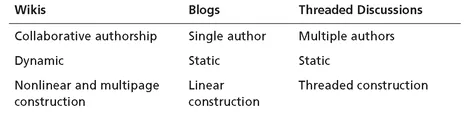
Wikis are similar to other types of online communication tools, such as blogs and threaded discussions, in that these are all asynchronous forms of communication. In asynchronous communication, contributions are made not in real time but at different times. The similarities end there, however. Blogs, for example, are generally posted by a single author and may or may not invite user comments, yet wikis are specifically designed for multiple authors and group collaboration. Blog messages are posted with a linear construction, displayed chronologically, and typically present no opportunities for other users to edit previous posts. Threaded discussions also support the posting of messages from multiple contributors and, like wikis, can be designed as a means of sharing ideas, providing feedback, and generating conversation around a particular topic. Threaded discussion postings are static, however, and users can only elaborate on existing messages. Wiki pages, conversely, are dynamic and allow participants to add to, change, and even delete someone else’s contribution.
Wikis Versus Blogs
A blog, short for Weblog, allows users to create a personal Web site and is an easy tool to implement in online learning. Blogs are well suited to such online activities as reflection, creative expression, and journaling. Most blogs are personal or journalistic. Like wikis, blogs have the potential to expand beyond the boundaries of the online classroom in ways that allow learners to collaborate with learners, experts, practitioners, and other members of a global audience (Godwin-Jones, 2003). There are clear distinctions, however, between these two tools. Blog postings are made in a chronological sequence, with the most recent entries typically displayed at the top of the page. Wikis are organized more dynamically than blogs, with the grouping of information determined by new entries, hyperlinked concepts, and collaboratively determined structures. Further, a blog is typically managed by a single person, who has primary responsibility for the content and structure of the site. Wiki ownership is distributed and shared among all of its contributing members. Finally, and most importantly, blog postings typically cannot be modified, whereas wiki contributions are open for editing.
Wikis Versus Threaded Discussions
Threaded discussion is a mainstay of online course communications. In a threaded discussion, users access a public discussion topic or thread, post messages, and reply to the messages of others. All users who have access to the thread can read the messages. Wikis, similar to discussion forums, provide students with opportunities to elaborate on topics in an asynchronous manner. Both tools have a transparent structure that is visible to all users (Chase, 2007). As is also the case with blogs, however, once messages are posted to a threaded discussion, they typically cannot be edited, except by the original author or discussion administrator. This creates a critical difference between threaded discussions and wikis. Whereas threaded discussion supports elaboration of individual concepts and ideas, wikis allow for students’ concepts and ideas to be integrated with those of the rest of the class through collaborative editing (Farabaugh, 2007). Instead of limiting users to adding to another student’s contribution, the wiki opens the door to brainstorming, group problem solving, critical evaluation, synthesis, idea refinement, and group consensus.
Wikis have the potential to be more suitable than blogs or threaded discussions for supporting online collaboration, especially among learning teams with a specific, shared goal (“Educator’s Guide,” 2006). In online courses, blogs and discussion boards are best used as communication tools, while the wiki serves as the learning team’s collaborative work space. The overall purpose of a wiki is to support the team’s needs for building a shared understanding of a topic, goal, or objective; to support team processes such as planning, research, and problem solving; and to create team outcomes through a shared document or set of documents. Exhibit 1.1 summarizes the differences between wikis, blogs, and threaded discussions.
Exhibit 1.1 Comparison of Asynchronous Communication Tools
To Wiki or Not to Wiki . . . ?
As an online instructor, you can choose from many online tools to support your class activities. Keep in mind, however, that your choices do not have to be exclusive. Using a wiki does not mean you have to abandon blogs, threaded discussions, or other useful tools. You can use a wiki in combination with these tools, matching the strengths and features of each with the requirements of the activity at hand.
Wikis are best suited for collaborative activities, especially those that are dynamic and nonlinear in construction and will result in a shared product or outcome. You could choose a wiki for a noncollaborative activity, such as a private journal, but a blog would be more suitable for this type of personal reporting. A threaded discussion could allow for open discussion and limited collaboration, but a wiki would provide more flexibility for students who must work together to develop a group project. The following are examples of activities that lend themselves well to collaboration in a shared wiki:
• Your learners are building an archive of resources on a particular topic.
• Your learners are exploring different sides of an issue by means of a debate.
• Your learners need to work together to create a unified project, such as a collaborative research paper or media design project.
Although it is possible to build an entire online course within a wiki, it is not recommended. It can be much more powerful to combine the collaborative nature of the wiki with other online course tools. For example, if you adopt a wiki to support a collaborative activity, such as an online debate, learners could construct and edit the two sides of the debate in the wiki, share opinions and summarize issues that were addressed in the debate in a threaded discussion topic, and vote on which side “won” the debate in an interactive survey or poll. You could also provide additional links to course materials or outside resources.
TYPES OF WIKIS
Once you have decided to use a wiki, where do you find the one that will work best with your online course? Wikis are available through a wide variety of services and open-source software tools, and generally fall into three categories, each with its own set of strengths and limitations:
• Free wiki services
• Fee-based wiki services
• Self-hosted wikis
Free Wiki Services
Free wiki services are available at no cost through a wiki provider, such as Google Docs (http://docs.google.com) or WetPaint (www.wetpaint.com). Wiki pages are hosted and accessed from the wiki service’s Web servers and require no local software installation. They are usually very easy to set up and admini...
Table of contents
- Title Page
- Copyright Page
- Table of Exhibits
- Table of Figures
- PREFACE
- ABOUT THE AUTHORS
- chapter ONE - Getting Ready to Wiki
- chapter TWO - Designing Wiki Projects for Collaborative Learning
- chapter THREE - Wiki Projects for Knowledge Construction
- chapter FOUR - Wiki Projects for Critical Thinking
- chapter FIVE - Wiki Projects for Contextual Application
- chapter SIX - Wikis Today and Tomorrow
- ADDITIONAL RESOURCES
- REFERENCES
- INDEX
Trusted by 375,005 students
Access to over 1.5 million titles for a fair monthly price.
Study more efficiently using our study tools.
Frequently asked questions
Yes, you can cancel anytime from the Subscription tab in your account settings on the Perlego website. Your subscription will stay active until the end of your current billing period. Learn how to cancel your subscription
No, books cannot be downloaded as external files, such as PDFs, for use outside of Perlego. However, you can download books within the Perlego app for offline reading on mobile or tablet. Learn how to download books offline
We are an online textbook subscription service, where you can get access to an entire online library for less than the price of a single book per month. With over 1.5 million books across 990+ topics, we’ve got you covered! Learn about our mission
Look out for the read-aloud symbol on your next book to see if you can listen to it. The read-aloud tool reads text aloud for you, highlighting the text as it is being read. You can pause it, speed it up and slow it down. Learn more about Read Aloud
Yes! You can use the Perlego app on both iOS and Android devices to read anytime, anywhere — even offline. Perfect for commutes or when you’re on the go.
Please note we cannot support devices running on iOS 13 and Android 7 or earlier. Learn more about using the app
Please note we cannot support devices running on iOS 13 and Android 7 or earlier. Learn more about using the app
Yes, you can access Using Wikis for Online Collaboration by James A. West,Margaret L. West in PDF and/or ePUB format, as well as other popular books in Education & Inclusive Education. We have over 1.5 million books available in our catalogue for you to explore.