DO-IT-YOURSELF
Here's the fun and easy way to start building circuits for your projects
Have you ever wanted to build your own electronic device? Put together a thermostat or an in-line fuse, or repair a microphone cable? This is the book for you! Inside you'll find the tools and techniques you need to build circuits, with illustrated, step-by-step directions to help accomplish tasks and complete projects.
As you accomplish the tasks throughout the book, you'll construct many projects while learning the key circuitbuilding principles and techniques. Find out about measuring and testing, maintenance and troubleshooting, cables, connectors, how to test your stuff, and more.
Stuff You Need to Know
*
The tools you need and how to use them
*
How to make sense of schematics and printed circuit boards
*
Basic techniques for creating any circuit
*
How to make and repair cables and connectors
*
Testing and maintenance procedures
- English
- ePUB (mobile friendly)
- Available on iOS & Android
eBook - ePub
Circuitbuilding Do-It-Yourself For Dummies
About this book
Information
Chapter 1
The Toolbox
Tasks Performed in This Chapter

To build anything, large or small, using the right tools makes a huge improvement in the quality of the finished product. The right tools will also speed up the process of building, minimize wasted materials, and reduce operator fatigue and stress. Sounds pretty important to have the right tools, doesn’t it? You’re right! This chapter shows you which, out of the zillions of tools, are the ones to use for building electronic circuits.
Basic Tools for Building Circuits
You’ll be pleasantly surprised to find that you don’t need a giant set of fancy tools to do excellent work! In fact, you may have most of them already and a couple of additional acquisitions are all that’s needed.
Mechanically speaking, you’ll need squeezers, cutters, turners, pokers, holders, and hole makers. That’s pretty simple, isn’t it? Of course, there is an incredible variety of available tools. I’ll list the basic items you really need, ways to upgrade them, and some optional tools that are handy but not necessities. Then you go shopping!

The selection of tools listed in this section has been made with electronics in mind, not robot assembly, plumbing installation, or home wiring. Tools for those jobs are often inappropriate for the smaller scale of electronics. Conversely, electronic tools are often overmatched for beefier work. There is no one-size-fits-all tool selection!
Safety and visibility
Before you head off to the hardware store with a big list, be sure that right at the top you include some basic safety equipment — goggles (or safety glasses), workspace ventilation (for soldering smoke or solvent fumes), and first aid. Electronics may sound tame, but the first time you snip a wire and hear the sharp end “ping” off your safety glasses or take them off and find a small solder “splat” right in front of your eye, you’ll be glad you had them on!
It sounds trite, but you really do need to be able to see what you’re doing! There are two paths to seeing your electronics clearly; lighting and magnification. Your workspace simply has to be brightly lit, preferably from more than one angle to minimize shadows. Inexpensive swing-arm laps with floodlight bulbs are good choices because they can be moved to put light where you need it.
Head-mounted magnifiers are inexpensive and lightweight. The Carson MV-23 dual-power magnifier (www.carsonoptical.com/Magnifiers/Hands%20Free) is widely available and provides both x2 and x3 magnification. Swing-arm magnifiers, such as the Alvin ML100 (www.alvinco.com), can be positioned in front of your face and provide additional illumination, too. Magnifiers are often found at craft and sewing stores for considerably less cost than at office or technical-supply stores.
Pliers and tweezers
In the “squeezer” category are pliers and tweezers. The largest electronic thing you are likely to have to grab with pliers is a half-inch nut; the smallest will be tiny set screws. Pliers and tweezers that fit things in that range are good to have in your toolkit. Figure 1-1 shows a few examples of the pliers and tweezers that I use a lot.
The most common type of pliers are slip-joint pliers (8”) which have jaws that can be adjusted to grip large or small things. A small pair of locking pliers (6”) (optional) — also known as Vise-Grips™, come in very handy when working with connectors and can be used as an impromptu clamp or vise.
Needle-nose pliers (a generic term that covers many different styles of pliers) with serrated jaws are a necessity. You’ll need a heavy pair of combination long-nose pliers (8”–9”, with or without a side cutter) for bending and holding. Smaller needle-nose pliers (5”–6”) will be used for positioning and holding delicate components. Additional pliers with extra-fine jaws (or bent-nose pliers) are nice to have in the toolbox, but not required.
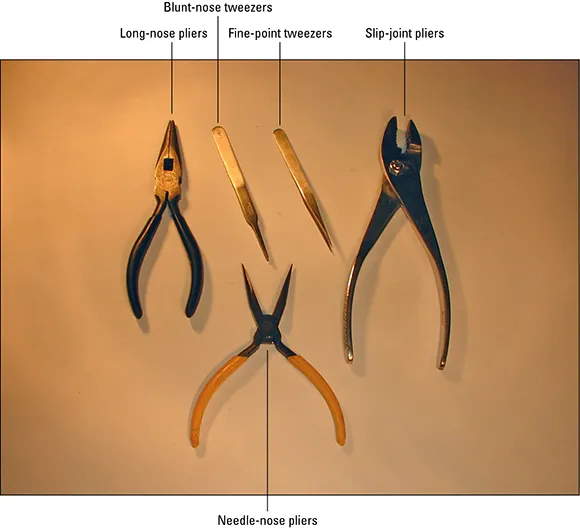
Figure 1-1: This set of pliers and tweezers will grab anything you’re likely to encounter in electronics.
Tweezers are absolutely necessary when working with surface-mount devices (see Chapter 4) and small mechanical assemblies. They should be made of stainless steel; you’ll need a pair with a blunt nose and a pair with pointed tips. Do not use regular bathroom or cosmetic tweezers — they’re not really designed for electronics jobs.
Cutters and knives
Two pairs of wire cutters will suffice. For heavy wire, coaxial, and data cable, you’ll need a pair of heavy-duty diagonal cutters (6”) like those in Figure 1-2. Get a pair with comfortable handles so that when you squeeze really hard you won’t...
Table of contents
- Cover
- Table of Contents
- Title Page
- Introduction
- Chapter 1: The Toolbox
- Chapter 2: Basic Techniques
- Chapter 3: Using a Solderless Breadboard
- Chapter 4: Building a Printed Circuit Board
- Chapter 5: Building a Prototype
- Chapter 6: Building from a Published Schematic
- Chapter 7: Terminals and Connectors
- Chapter 8: Wiring for Wireless Radio
- Chapter 9: Mastering Power
- Chapter 10: Audio and Sensitive Connections
- Chapter 11: Meet the Test Equipment
- Chapter 12: Measurements That Test Your Circuits and Projects
- Chapter 13: Who Let the Smoke Out?
- Chapter 14: Maintaining Your Cool (Stuff)
- Chapter 15: Getting a Charge Out of Batteries
- Chapter 16: Electronics in Motion
- Chapter 17: Getting Rid of Interference and Noise
- Chapter 18: Ten Circuitbuilding Secrets
- Chapter 19: Ten Circuit First-Aid Techniques and Supplies
- Appendix A: Circuitbuilding Resources
Trusted by 375,005 students
Access to over 1.5 million titles for a fair monthly price.
Study more efficiently using our study tools.
Frequently asked questions
Yes, you can cancel anytime from the Subscription tab in your account settings on the Perlego website. Your subscription will stay active until the end of your current billing period. Learn how to cancel your subscription
No, books cannot be downloaded as external files, such as PDFs, for use outside of Perlego. However, you can download books within the Perlego app for offline reading on mobile or tablet. Learn how to download books offline
Perlego offers two plans: Essential and Complete
- Essential is ideal for learners and professionals who enjoy exploring a wide range of subjects. Access the Essential Library with 800,000+ trusted titles and best-sellers across business, personal growth, and the humanities. Includes unlimited reading time and Standard Read Aloud voice.
- Complete: Perfect for advanced learners and researchers needing full, unrestricted access. Unlock 1.5M+ books across hundreds of subjects, including academic and specialized titles. The Complete Plan also includes advanced features like Premium Read Aloud and Research Assistant.
We are an online textbook subscription service, where you can get access to an entire online library for less than the price of a single book per month. With over 1.5 million books across 990+ topics, we’ve got you covered! Learn about our mission
Look out for the read-aloud symbol on your next book to see if you can listen to it. The read-aloud tool reads text aloud for you, highlighting the text as it is being read. You can pause it, speed it up and slow it down. Learn more about Read Aloud
Yes! You can use the Perlego app on both iOS and Android devices to read anytime, anywhere — even offline. Perfect for commutes or when you’re on the go.
Please note we cannot support devices running on iOS 13 and Android 7 or earlier. Learn more about using the app
Please note we cannot support devices running on iOS 13 and Android 7 or earlier. Learn more about using the app
Yes, you can access Circuitbuilding Do-It-Yourself For Dummies by H. Ward Silver in PDF and/or ePUB format, as well as other popular books in Technology & Engineering & Electrical Engineering & Telecommunications. We have over 1.5 million books available in our catalogue for you to explore.