Excel Data Analysis
eBook - ePub

Excel Data Analysis

Your visual blueprint for creating and analyzing data, charts and PivotTables

  1. English
  2. ePUB (mobile friendly)
  3. Available on iOS & Android
eBook - ePub

Excel Data Analysis

Your visual blueprint for creating and analyzing data, charts and PivotTables

About this book

Advanced techniques for Excel power users

Crunch and analyze Excel data the way the professionals do with this clean, uncluttered, visual guide to advanced Excel techniques. Using numerous screenshots and easy-to-follow numbered steps, this book clearly shows you how to perform professional-level modeling, charting, data access, data slicing, and other functions. You'll find super techniques for getting the most out of Excel's statistical and financial functions, Excel PivotTables and PivotCharts, Excel Solver, and more.

  • Provides a clear look at power-using Excel, the world's leading spreadsheet application from Microsoft, and part of the new Microsoft Office 2010 suite
  • Expands your Excel knowledge and helps you use Excel data more efficiently
  • Demonstrates how to retrieve data from databases;; cut, slice, and pivot data using PivotTables; model data and chart data; and use advanced formulas
  • Explores all features and functions in friendly, two-color pages packed with screenshots, numbered steps, and other visual graphics that clearly show you how to accomplish tasks
  • Includes practical examples, tips, and advice to help you get the most out of Excel's features and functions

Learn Excel at the highest levels with this practical guide.

Frequently asked questions

Yes, you can cancel anytime from the Subscription tab in your account settings on the Perlego website. Your subscription will stay active until the end of your current billing period. Learn how to cancel your subscription.
No, books cannot be downloaded as external files, such as PDFs, for use outside of Perlego. However, you can download books within the Perlego app for offline reading on mobile or tablet. Learn more here.
Perlego offers two plans: Essential and Complete
  • Essential is ideal for learners and professionals who enjoy exploring a wide range of subjects. Access the Essential Library with 800,000+ trusted titles and best-sellers across business, personal growth, and the humanities. Includes unlimited reading time and Standard Read Aloud voice.
  • Complete: Perfect for advanced learners and researchers needing full, unrestricted access. Unlock 1.4M+ books across hundreds of subjects, including academic and specialized titles. The Complete Plan also includes advanced features like Premium Read Aloud and Research Assistant.
Both plans are available with monthly, semester, or annual billing cycles.
We are an online textbook subscription service, where you can get access to an entire online library for less than the price of a single book per month. With over 1 million books across 1000+ topics, we’ve got you covered! Learn more here.
Look out for the read-aloud symbol on your next book to see if you can listen to it. The read-aloud tool reads text aloud for you, highlighting the text as it is being read. You can pause it, speed it up and slow it down. Learn more here.
Yes! You can use the Perlego app on both iOS or Android devices to read anytime, anywhere — even offline. Perfect for commutes or when you’re on the go.
Please note we cannot support devices running on iOS 13 and Android 7 or earlier. Learn more about using the app.
Yes, you can access Excel Data Analysis by Denise Etheridge in PDF and/or ePUB format, as well as other popular books in Computer Science & Desktop Applications. We have over one million books available in our catalogue for you to explore.

Information

Chapter 1: Getting Started
Introducing Data Analysis with Excel
This book is about using Microsoft Excel to analyze your data. Microsoft Excel is an electronic worksheet you can use to perform mathematical, financial, and statistical calculations; create charts; analyze your data with a PivotTable; maintain lists; and much more. Excel can help you locate data, find trends in your data, and present your data to others.
Each Excel file is a workbook. Each workbook can have multiple worksheets. Worksheets are made up of rows and columns of cells you can use to enter information.
The most powerful feature in Excel is its ability to calculate. When you enter a formula into Excel, Excel can automatically calculate the result, and when you make changes to your worksheet, Excel can automatically recalculate.
You can also use Excel to create charts. A chart is a graphical representation of your data. When using Excel, you can choose from several types of charts, including Column, Line, Pie, Bar, Area, and Scatter. Charts can make your data easier to read, easier to understand, and easier to compare.
A PivotTable is an interactive table you can use to analyze data. A PivotTable gives you an easy way to summarize and view large amounts of data. Using a PivotTable, you can rotate rows and columns of data so you can see different views of your data easily. You can use Excel to create PivotTables.
Excel provides a way for you to create and maintain lists. A list is a series of rows and columns. Each column has a label — for example, name, address, telephone number. Each row under a column has information pertaining to the column label. You can sort, filter, and analyze your lists in Excel.
Introducing Data Analysis with Excel
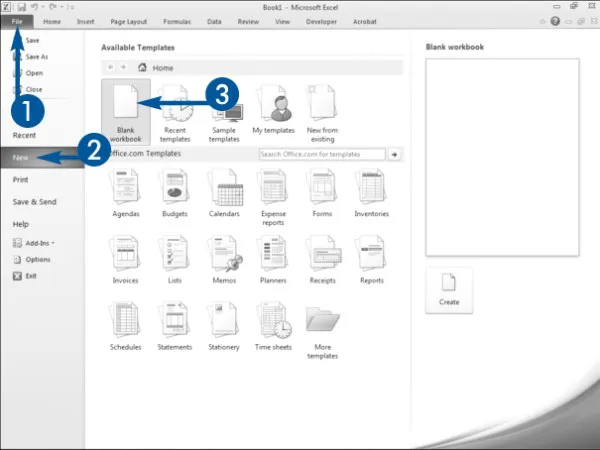
Open a New Workbook
591604-fg0101.eps
001
Click the File tab.
A menu appears.
002
Click New.
003
Double-click Blank workbook.
591604-fg0102.eps
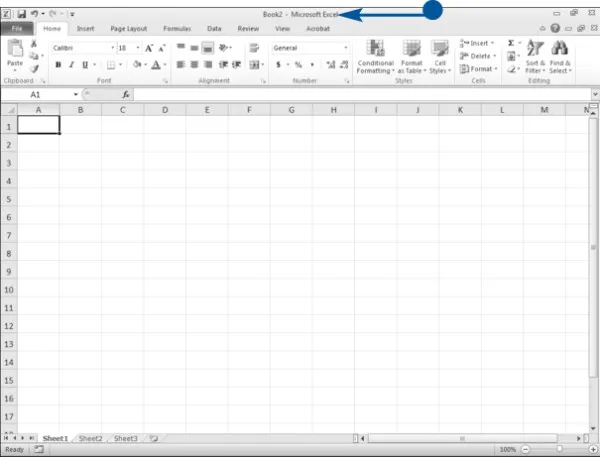
Excel opens a new workbook.
Tour the Excel Window
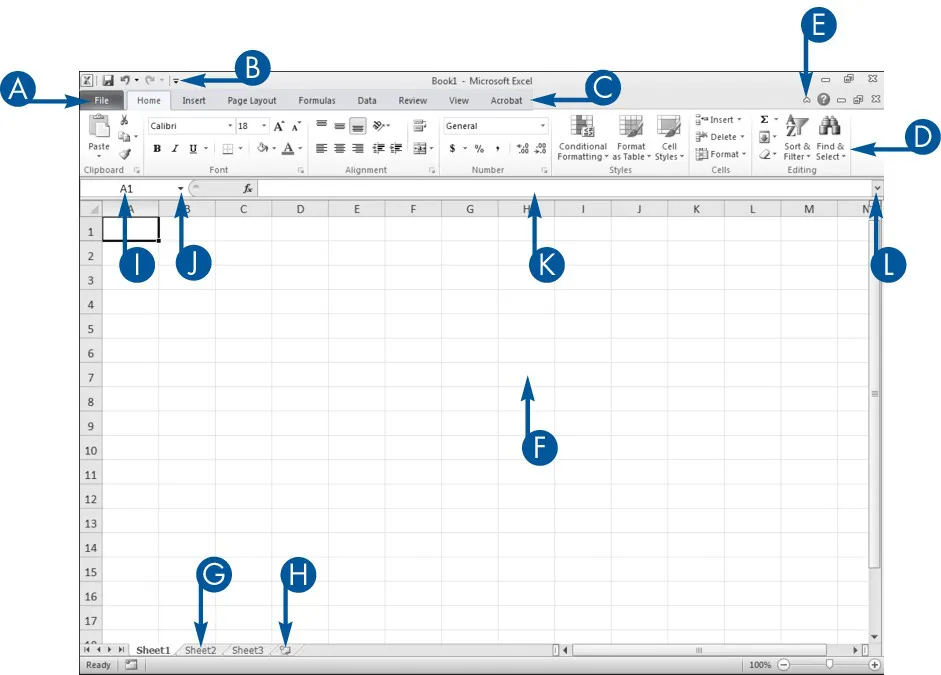
When you open an Excel workbook, Excel presents the Excel window. You use the window to create Excel documents. Your window should be similar to the one in the illustration. It may not be exactly the same because Excel renders windows based on the size of your screen, the resolution to which your screen is set, and the other screen display options.
View of the Excel Window
591604-un0101.eps
A
FILE TAB
Click the File tab to open, save, print, prepare, send, publish, and close files.
B
QUICK ACCESS TOOLBAR
Place commands you use often on the Quick Access Toolbar.
C
TABS
Click a tab to view Ribbon options.
D
RIBBON
Click the buttons in the Ribbon to execute Excel commands.
E
Minimize the Ribbon
Click the chevron to Hide the Ribbon so that only tabs show.
F
CELL
Enter data into cells.
G
SHEETS
Enter data into eac...

Table of contents

  1. Cover
  2. Table of Contents
  3. Title Page
  4. Chapter 1: Getting Started
  5. Chapter 2: Formatting a Worksheet
  6. Chapter 3: Structuring Your Workbook
  7. Chapter 4: Creating Formulas
  8. Chapter 5: Using Functions
  9. Chapter 6: Using Financial Functions
  10. Chapter 7: Using Statistical Functions And Tools
  11. Chapter 8: Organizing Worksheet Data
  12. Chapter 9: Working with PivotTables
  13. Chapter 10: Charting Data
  14. Chapter 11: Working with External Data
  15. Chapter 12: Using Data Analysis Tools and Techniques
  16. Chapter 13: Sharing Your Workbook with Others
  17. Chapter 14: Automating with Macros
  18. Chapter 15: Illustrating Your Worksheets
  19. Chapter 16: Illustrating Your Ideas
  20. Chapter 17: Customizing Excel
  21. Appendix A: Using Excel Keyboard Shortcuts