Part I: Getting Started
In This Part
Chapter 1
Introducing Cocoa
Chapter 2
Think Cocoa!
Chapter 3
Introducing the Cocoa and OS Documentation
Chapter 4
Getting Started with Xcode
Chapter 5
Introducing Classes and Objects in Objective-C
Chapter 6
Getting Started With Classes and Messages in Application Design
Chapter 7
Introducing Interface Builder
Chapter 8
Building an Application with Interface Builder
Chapter 1: Introducing Cocoa
In This Chapter
Introducing Cocoa
Understanding Cocoa's history
Profiting from Cocoa
Introducing Xcode and the Apple developer programs
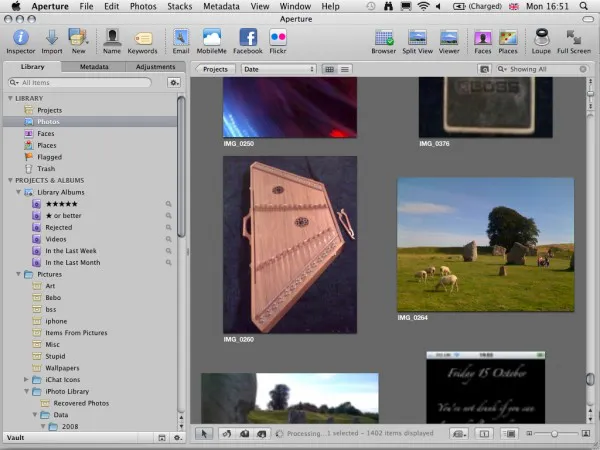
Apple's Cocoa technology is one of computing's success stories. When OS X 10.0 was released in 2001, it immediately revolutionized the look and feel of desktop applications. Since then, other operating systems have borrowed freely from Cocoa's innovations. Apple has continued to innovate with the iPhone and iPad, introducing Cocoa Touch for mobile devices. Cocoa Touch offers a simplified and more tactile user experience, and is the first popular and successful attempt to move beyond a traditional window, mouse, and menu interface. Future versions of Cocoa on the Mac are likely to blend the iPhone's tactile technology with the sophisticated data handling, 64-bit memory management, and rich user interface options that are already available to Cocoa developers. Cocoa is widely used in Apple's own projects, and it determines the look and feel of an application such as Aperture, shown in Figure 1.1.
Introducing Cocoa
Cocoa is the collection of libraries and design principles used to build skeleton Mac applications, create and display a user interface, and manage data. Cocoa is also a design philosophy based on unique ideas about application design and development that you can find throughout the rest of this book. You don't need to understand Cocoa's history to use the Cocoa libraries, but their features may be easier to work with if you do.
Understanding Cocoa's history
Cocoa's origins can be traced to the mid-1970s and are closely tied to the history of the Objective-C programming language. Cocoa and Objective-C are used at different levels. Cocoa is a code library and a set of interface and development guidelines. Objective-C is the language that implements them.
Cocoa is now available for other languages, including JavaScript, Python, and Ruby on Rails, but most Cocoa developers continue to work in Objective-C because its syntax and features are a natural fit for Cocoa projects.
Figure 1.1
Apple's Aperture application uses Cocoa technology and follows Apple's user interface design guidelines. Although Cocoa objects implement the interface, they don't enforce a standard look and feel.
Objective-C, developed by Brad Cox and Tom Love when they worked at ITT Corporation in the early 1980s, began as a mix of C and features copied from the Smalltalk experimental language. Smalltalk had been created — originally as a bet — by Alan Kay at the Xerox Palo Alto Research Center (PARC). PARC's famous graphical user interface (GUI) experiments inspired much of the visual design of both Mac OS and Windows. Smalltalk influenced those experiments by implementing a development environment in which independent objects communicated by sending and receiving messages.
At a time when most software was still procedural — it started at the beginning of a computer run and continued to the end, with occasional branches and subroutine calls — Smalltalk's model suggested a new and less rigid approach to software development. It enabled programmers to build applications from a library of “copy-able” but distinct interactive parts, connected by a messaging system that made the parts responsive and controllable.
A windowed GUI is difficult to manage in a procedural environment. In a Smalltalk environment, windows and icons become objects with properties — size, position, graphic contents, and so on — that can be remotely controlled by messages. When a window receives a message, it not only stores the value, but also it can automatically redraw itself. Messaging makes it possible for objects to control each o...