Part I
Windows 8 Stuff Everybody Thinks You Already Know
In this part . . .
Most people are dragged into Windows 8 without a choice. Their new computers probably came with Windows 8 already installed. Or maybe the office switched to Windows 8, and everyone has to learn it except for the boss, who still doesn’t have a computer. Or maybe Microsoft’s marketing hype pushed you into it.
Whatever your situation, this part explains the bizarre new Start screen in Windows 8. It shows how to find the traditional Windows desktop and then gives a refresher on Windows basics and buzzwords such as dragging and dropping, cutting and pasting, and even tapping a touchscreen.
This part explains how Windows 8 has changed things for the better, and it warns you when Windows 8 has messed things up completely.
Chapter 1
What Is Windows 8?
In This Chapter
Getting to know Windows 8
Discovering the new features in Windows 8
Deciding whether to switch to Windows 8
Figuring out whether your PC is powerful enough to run Windows 8
Knowing which version of Windows 8 you need
Chances are good that you’ve heard about Windows: the boxes and windows that greet you whenever you turn on your computer. In fact, millions of people worldwide are puzzling over Windows as you read this book. Almost every new computer and laptop sold today comes with Windows preinstalled, ready to toss colorful boxes onto the screen.
This chapter helps you understand why Windows lives inside your computer, and I introduce Microsoft’s latest Windows version, called Windows 8. I explain how Windows 8 differs from previous Windows versions, whether you should upgrade to Windows 8, and how well your faithful old PC and programs will weather the upgrade.
What Is Windows 8, and Why Are You Using It?
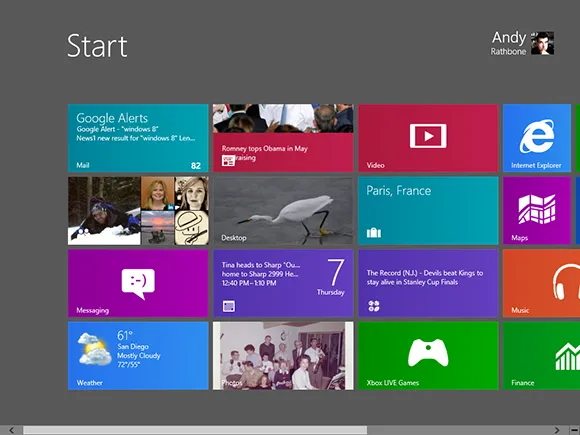
Created and sold by a company called Microsoft, Windows isn’t like your usual software that lets you calculate income taxes or send angry e-mails to mail-order companies. No, Windows is an operating system, meaning it controls the way you work with your computer. It’s been around for nearly 30 years, and the latest incarnation is called Windows 8, shown in Figure 1-1.
Figure 1-1: The newest version of Windows, Windows 8, comes preinstalled on most new PCs today.
The name Windows comes from all the little windows it places on your computer screen. Each window shows information, such as a picture, a program, or a baffling technical reprimand. You can place several windows onscreen simultaneously and jump from window to window, visiting different programs. Or, you can enlarge one window to fill the entire screen.
When you turn on your computer, Windows jumps onto the screen and begins supervising any running programs. When everything goes well, you don’t really notice Windows; you simply see your programs or your work. When things don’t go well, though, Windows often leaves you scratching your head over a perplexing error message.
In addition to controlling your computer and bossing around your programs, Windows 8 comes with a bunch of free programs and apps — mini-programs. These programs and apps let you do different things, such as write and print letters, browse the Internet, play music, and send your friends dimly lit photos of your latest meal.
And why are you using Windows 8? Well, you probably didn’t have much choice. Nearly every computer sold since October 2012 comes with Windows 8 preinstalled. A few people escaped Windows by buying Apple computers (those nicer-looking computers that cost a lot more). But chances are good that you, your neighbors, your boss, and millions of other people around the world are using Windows.