Storage Networks Explained
Basics and Application of Fibre Channel SAN, NAS, iSCSI, InfiniBand and FCoE
- English
- ePUB (mobile friendly)
- Available on iOS & Android
Storage Networks Explained
Basics and Application of Fibre Channel SAN, NAS, iSCSI, InfiniBand and FCoE
About this book
All you need to know about Storage Area Networks
The amount of data of an average company doubles every year. Thus, companies who own 1TB of data today will own 32TB in five years. Storage networks help to tame such data quantities and to manage this data growth efficiently. Since stored data and information are the biggest asset of any company, anyone who is involved in the planning or the operation of IT systems requires a basic knowledge of the principle and the use of storage networks.
Storage Networks Explained covers the fundaments, techniques and functions of storage networks such as disk subsystems, Fibre Channel SAN, Internet SCSI (iSCSI), Fibre Channel over Ethernet (FCoE), Network Attached Storage (NAS), file systems, and storage virtualization. Furthermore the authors describe the use of these techniques and how they are designed to achieve high-availability, flexibility, and scalability of data and applications. Additional attention is given to network backup and the management of storage networks. Written by leading experts in the field, this book on storage area networks is updated and fully revised.
Key features:
- Presents the basic concepts of storage networks, such as I/O techniques, disk subsystems, virtualization, NAS and SAN file systems
- Covers the design of storage networks which provide flexible, highly-available, and scaleable IT systems
- Explains the use of storage networks for data sharing, data protection, and digital archiving
- Discusses management of storage networks using SNMP, SMI-S, and IEEE 1244
This book provides system administrators and system architects, as well as students and decision makers, with the tools needed for optimal selection and cost-effective use of storage networks.
The Linux Journal awarded the first edition with the "Editor's Choice Award 2005" in the category "System Administration Book."
Frequently asked questions
- Essential is ideal for learners and professionals who enjoy exploring a wide range of subjects. Access the Essential Library with 800,000+ trusted titles and best-sellers across business, personal growth, and the humanities. Includes unlimited reading time and Standard Read Aloud voice.
- Complete: Perfect for advanced learners and researchers needing full, unrestricted access. Unlock 1.4M+ books across hundreds of subjects, including academic and specialized titles. The Complete Plan also includes advanced features like Premium Read Aloud and Research Assistant.
Please note we cannot support devices running on iOS 13 and Android 7 or earlier. Learn more about using the app.
Information
1
Introduction
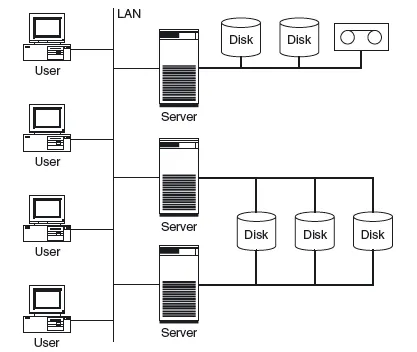
1.1 SERVER-CENTRIC IT ARCHITECTURE AND ITS LIMITATIONS


1.2 STORAGE-CENTRIC IT ARCHITECTURE AND ITS ADVANTAGES

1.3 CASE STUDY: REPLACING A SERVER WITH STORAGE NETWORKS
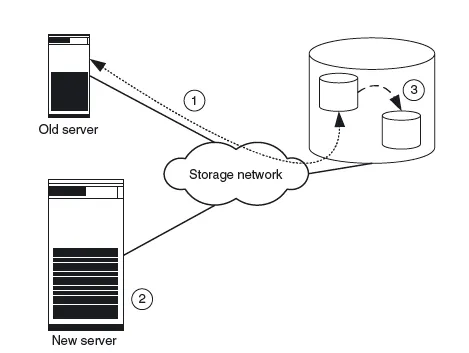
- Before the exchange, the old computer is connected to a storage device via the storage network, which it uses partially (Figure 1.4 shows stages 1, 2 and 3).
- First, the necessary application software is installed on the new computer. The new computer is then set up at the location at which it will ultimately stand. With storage networks it is possible to set up the computer and storage device several kilometres apart.
Figure 1.4 The old server is connected to a storage device via a storage network (1). The new server is assembled and connected to the storage network (2). To generate test data the production data is copied within the storage device (3).
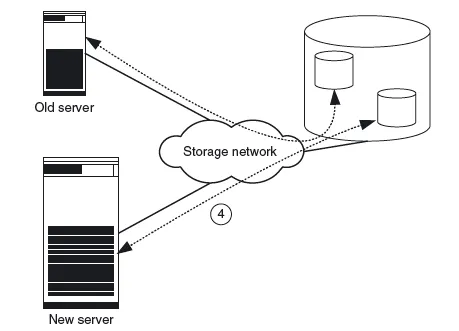
Figure 1.5 Old server and new server share the storage system. The new server is intensively tested using the copied production data (4). - Next, the production data for generating test data within the disk subsystem is copied. Modern storage systems can (practically) copy even terabyte-sized data files within seconds. This function is called instant copy and is explained in more detail in Chapter 2. To copy data it is often necessary to shut down the applications, so that the copied data is in a consistent state. Consistency is necessary to permit the application to resume operation with the data. Some applications are also capable of keeping a consistent state on the disk during operation (online backup mode of database systems, snapshots of file systems).
- Then the copied data is assigned to the new computer and the new computer is tested intensively (Figure 1.5). If the storage system is placed under such an extreme load by the tests that its performance is no longer sufficient for the actual application, the data must first be transferred to a second storage system by means of remote mirroring. Remote mirroring is also explained in more detail in Chapter 2.
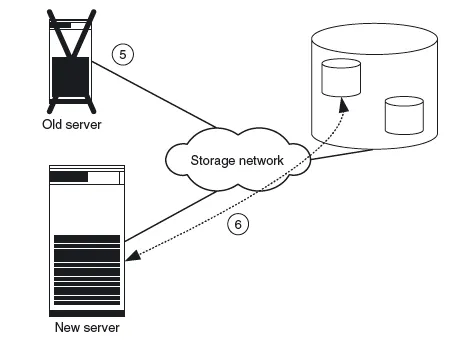
- After successful testing, both computers are shut down and the production data assigned to the new server. The assignment of the production data to the new server also takes just a few seconds (Figure 1.6 shows steps 5 and 6).
- Finally, the new server is restarted with the production data.

1.4 THE STRUCTURE OF THE BOOK
Table of contents
- Cover
- Table of Contents
- Title
- Copyright
- Dedication
- About the Authors
- Foreword to the Second Edition by Hermann Strass
- Preface by the authors
- List of Figures and Tables
- 1 Introduction
- Part I: Technologies for Storage Networks
- Part II: Application and Management of Storage Networks
- Glossary
- Annotated Bibliography
- Appendix A: Proof of Calculation of the Parity Block of RAID 4 and 5
- Appendix B: Checklist for the Management of Storage Networks
- Index
- End User License Agreement