![]()
Chapter 1 Introducing ActionScript 3.0
Chapter 2 ActionScript 3.0 Language Basics
Chapter 3 Functions and Methods
Chapter 4 Object-Oriented Programming
Chapter 5 Validating Your Program
![]()
Chapter 1
Introducing ActionScript 3.0
In this chapter you'll look at what ActionScript is, where you can use it, and what you can do with it. You'll learn where ActionScript fits in the grand scheme of the Flash Platform, and you'll take a complete tour of the tools and technologies involved therein.
What Is ActionScript 3.0?
You may well already know the answer to this question, because you had enough interest in it to buy this book! ActionScript 3.0 is the language used to program interactive Flash content. Where this content goes and how you can build it is the subject of the following section.
ActionScript 3.0 is a well-organized, mature language that shares much of its syntax and methodologies with other object oriented, strongly typed languages, so an experienced programmer can readily pick it up. Don't fear, though, for this book introduces ActionScript from the bottom up and starts gently.
If you've used Flash before but never ActionScript, you might know that you can build content for Flash Player without ActionScript—but without ActionScript, Flash is just an animation tool (though, admittedly, a good one). ActionScript is necessary when you want to create Flash content that is highly dynamic, responsive, reusable, and customizable. Here's just a short list of the many things you can accomplish using ActionScript:
- Loading images
- Playing audio and video
- Drawing programmatically
- Loading data such as XML files
- Responding to user events such as mouse clicks
To get the most out of the Flash Platform, you're gonna need ActionScript 3.0. And as you learn what it can do, you'll be amazed at its power. But let's look at how ActionScript fits into the Flash universe.
Exploring the Flash Platform
The wild world of Flash is by no means small, and wrapping your head around ActionScript and all the technologies related to it is challenging. Even if you don't know all the latest technologies in the peripheries, it's essential that you know major parts of the Flash Platform and how they work together. Defining that term and what it encompasses will be the goal of this section.
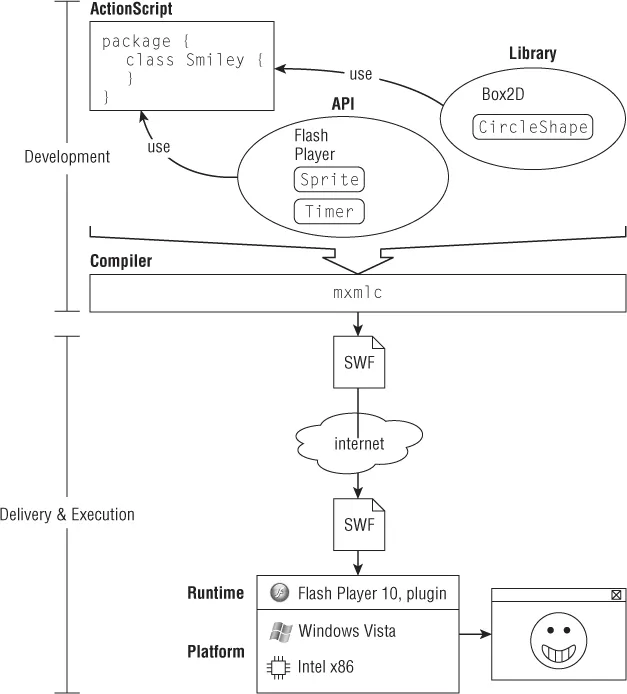
You'll examine the different parts of the Flash Platform from the perspectives of you building content and the user getting and running content. I'll define and discuss the tools, languages, platforms, and runtimes involved in the process. Figure 1.1 shows a bird's-eye view of the Flash Platform.
You, the programmer, write in a computer programming language, ActionScript 3.0. You use tools, like Flash Builder, and specifically a compiler, to convert your code into an executable, in this case a SWF. The SWF is delivered to the end user on her platform and executes inside a runtime, usually Flash Player, of which there are many versions. Let's break this down.
A Programmer's Perspective
For all the ways that the Flash Platform is unique, it shares the same basic steps as most programming environments. You write code in a language using some kind of editor, tool, or integrated development environment, and you use a compiler to convert that code into a file that can be run on the target environment.
Language
A computer programming language defines the grammar and lexicon that you'll be working in to create beautiful code. ActionScript 3.0, Python, Java, Lua, and C# are different languages. They all look different and have different rules for what you type where, what words are reserved, how to loop and how to write comments, and even where you can and can't put spaces. ActionScript 3.0 is not the same language as ActionScript 2.0, and neither is ActionScript 1.0.
ActionScript 3.0 has some features in common with modern JavaScript, because both are designed to adhere to specifications of a family of languages called ECMAScript. At the time of writing, this fact is little more than a curiosity, because most JavaScript in use is written to a baseline standard far behind the kind of JavaScript that starts to look like ActionScript 3.0. Furthermore, adherence to ECMAScript standards has provided little visible benefit, and progress marches on. In general, ActionScript 3.0 looks most like Java or C#. Coming to ActionScript 3.0 from either of these languages, or ActionScript 2.0, should be a fairly smooth ride. In this second edition, I've removed any emphasis put on transitioning from ActionScript 2.0 to ActionScript 3.0.
I'll describe some features of the language here. This might help some of you who have several languages under your belts already and can benefit from a description of ActionScript 3.0. If you don't understand any of these terms, please don't fret! The rest of this Part exists to investigate these qualities of the language in depth.
ActionScript 3.0 can use both dynamic and strong typing, but the compiler, the language, this book, and most of the world want you to use it with strong typing. If you want to live in a dynamic world, you can do so by turning off strict mode in your compiler or development environment. ActionScript 3.0 is an object oriented language that makes heavy use of namespaces. It has facilities for reflection. It embodies some elements of functional programming.
Maybe it goes without saying, but ActionScript 3.0 is the primary language used in the Flash universe. However, it's not the only one.
Depending on the platform and runtime you're targeting—that is to say, where, on what device, and on what software you want your content to run—you might use another language that this book is not about. I'll get into this more once you look at the platforms and runtimes that exist in the Flash universe. But rest assured that ActionScript 3.0 is the way to go for the Flash Platform right now. Most other options are for older technology.
There's another language that's a big part of the Flash Platform, and that's MXML. MXML is a declarative XML language used to program Flex. The interesting thing is that MXML compiles into ActionScript 3.0 during building. It's also used interchangeably with ActionScript 3.0. I won't discuss MXML or Flex in this book, but because Flex is a superset of Flash, this book provides an excellent, maybe prerequisite, background for any Flex developer.
Mixed into ActionScript 3.0 are several microlanguages, tailor-made for solving specific kinds of problems more efficiently than the grammar of ActionScript 3.0 would allow. Technically, the...