The book begins with an overview of radiographic technique, darkroom maintenance, digital and film-screen imaging, then offers a section on small animal positioning, including some exotic species positioning techniques, with the final section presenting information on contrast media and special contrast enhanced procedures. A companion website provides the images from the book in PowerPoint and study questions and answers at www.wiley.com/go/ayers. Highly illustrated, Small Animal Radiographic Techniques and Positioning is a complete resource for any veterinary technician or student to quickly find imaging information and improve the clarity of small animal radiographs.

- English
- ePUB (mobile friendly)
- Available on iOS & Android
eBook - ePub
Small Animal Radiographic Techniques and Positioning
About this book
Small Animal Radiographic Techniques and Positioning is a practical, clinically applicable manual designed to aid veterinary technicians and nurses in correcting common artifacts in both film and digital radiography and in positioning the small animal patient for clear and consistent radiographs. Detailed positioning techniques are provided for each commonly radiographed body segment, including positioning aids, alternative restraint methods, and examples of the corresponding correct or incorrect radiographs. Species covered include dogs, cats, birds, and common exotics.
Information
Topic
MedicineSubtopic
Veterinary MedicineSection 1: Theory and Equipment
1
Introduction to Digital Imaging
Small animal radiography has changed dramatically in the past decade with the appearance of digital radiography in veterinary medicine. Many small animal practices that were hand developing x-ray film have taken the next step to automatic x-ray film processing due to the availability of affordable used and new tabletop x-ray film processors and faster x-ray film-screen cassette combinations. Switching to 400 speed rare earth film-screen combinations has decreased radiation exposure to technical staff and the patient, as well as improved the quality of the images due to shorter x-ray exposure times.
As digital radiography (DR) has become more affordable, an increasing number of small animal practices have switched from film-screen imaging to digital radiography. The list of vendors marketing veterinary digital radiographic systems is growing, so a variety of options are available from an economic perspective. Some vendors have products utilizing older digital technology; therefore it is important for small animal practitioners and their technical staff to have a basic understanding of digital radiography to assist in choosing the right digital radiographic system for their practices and also to have the needed knowledge to improve the quality of the digital radiographic images being taken.6
Definition and Principles of Digital Imaging
Digital imaging is simply an imaging acquisition process that generates an electronic image to be viewed and manipulated on a computer. All types of medical images are produced in a digital format including computed tomography (CT), ultrasound, magnetic resonance imaging (MRI), nuclear medicine, digital fluoroscopy, computed radiography (CR), and digital radiography direct and indirect capture.4,5
Digital Radiography
Digital radiography is a term used to reference the two main systems used in both human and veterinary medicine, computed radiography and digital (direct capture or indirect capture) radiography.1,4,5 Digital radiography is constantly changing as improvements to this technology are being made through both software and hardware.
Digital Imaging Communications in Medicine
Digital imaging communications in medicine (DICOM) is the image file format that standardizes medical digital images from all imaging modalities and picture archiving and communication systems from different manufacturers. If different vendors used proprietary formats, images could not be sent to other facilities using different software to view the images. When purchasing a digital radiographic system, it is important to make sure the system comes with a DICOM conformance statement.1,5,8 A DICOM conformance statement describes exactly how the software or device conforms to the DICOM standard. The statement follows a standard format to allow a user or vendor to determine if two devices will communicate and are compatible by comparing conformance statements.
Picture Archiving and Communication System
A picture archiving and communication system (PACS) provides image capture, display, annotation, archival, and communication functions allowing the images to be viewed at multiple computer workstations in a practice. Long-term storage of digital images is important because the data is part of the patient’s medical record. Veterinary practices can purchase affordable small PACS to permit viewing in exams rooms and surgery. Since the image format is DICOM, there will be no problem sending the images to another practitioner or a referral facility.
There is a rather wide selection of storage device options to choose from, each differing in data access, storage capacity, and cost for both onsite and off-site storage.7 For onsite storage, some practices just choose to use hard disk drives with a backup and invest in a web-based PACS service. Using a web-based PACS provides the small animal practitioner with the capability to permit a referral practice to view the DICOM images taken on a patient from anywhere in the world. An email can be sent to the specialty veterinary practice with the link to download the DICOM images for review, thereby allowing the specialist quick access to DICOM images. It should be noted it may take up to 24 hours before images are available for viewing on some web-based PACS services. This isn’t a common problem in recent years, but it is an important question to ask when planning to purchase a contract with a web-based PACS service. Emailing images is not recommended if it is necessary to convert the DICOM image to a jpeg or tiff due to loss of detail in the image. Sending DICOM images via CD or DVD is the secondary preferred method when it is necessary to send images to a specialty practice that is not set up to accept emailed DICOM links.
Workstation Monitors
To adequately review images taken, it has been recommended to have a medical grade grayscale monitor as part of the primary display workstation, particularly in a specialty practice. This thought has been changing over the past 5 years because the newer high-end consumer grade color monitors are just as bright as their medical grade counterparts and they also have an acceptable resolution. At the 2006 Radiological Society of North America (RSNA) conference, Dr. David Hirshorn MD stated in a presentation that the differences in interpretation between a properly calibrated high-end consumer grade display and a medical grade grayscale display were not statistically significant.19 Top-quality color monitors are brighter than the normal grade consumer monitor and have a brightness greater than 400–500 cd/m2 and a contrast ratio of at least 800:1–1000:1.19 The advantage of the medical grade grayscale monitor over the consumer grade high-quality display monitor is greater monitor stability. Thus a consumer grade monitor may be sufficient for the basic small animal practice. The choice depends upon the type of practice and the financial investment the practice can afford.
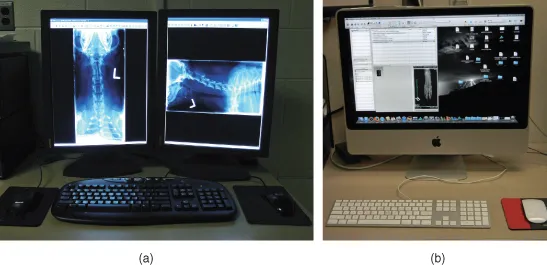
For a practitioner to visualize a digital image of similar quality to a film image necessitates the display monitor to have high spatial resolution (recorded detail).3 For the primary display workstation utilizing a medical grade monitor, the small animal practitioner should ideally use a 2K (2MP) resolution portrait monitor. The common screen resolutions for medical display monitors are 1280 × 1024 (1K/1MP), 1600 × 1200 (2K/2MP), 2048 × 1536 (3K/3MP), and 2048 × 2560 (5K/5MP).1,3 CR and DR images are generally best viewed on at least a 2K/2MP monitor, whereas cross-sectional images can be viewed on a 1K/1MP monitor. Radiologists generally use at least a 3K/3MP or above for reading digital images. Viewing on a 3MP monitor eliminates the need to zoom or pan the images to review all of the details in the image (Figs. 1.1a and 1.1b).
Figure 1.1 a. DR workstation with medical grade monitors. b. Mac workstation.
There are some basic terms that need to be defined to allow a better understanding of how these monitors work. A basic picture element is called a pixel. Each pixel is a set of dot triads. A dot triad is a grouping of one red dot, one green dot, and one blue dot. Bit depth is used to describe the number of bits used to store information about each pixel of an image.19 The bit depth of an image will determine how many levels of gray or color can be generated. For example, a digital camera generally has 24- to 32-bit color. Digital radiographic systems have only 10–16 bits of grayscale. So a 24-bit color system will have one-third of that for each color or 8 bits (256 shades) of each color that can be combined to produce millions of colors. To produce a shade of gray the intensity of each of the three colors must be exactly equal, which means a 24-bit color camera can only produce 256 shades (8 bits) of gray.19 Pixels are arranged in a matrix, a rectangular or square table of numbers that represents the pixel intensity to be displayed on the monitor.1 Examples are 2048 × 1536 and 2048 × 2560, the most common matrices for image viewing by a veterinary radiologist. Dot pitch is the measurement of how close the dots are located to one another within a pixel. The number of pixels on a monitor’s display is known as its resolution. As the dot pitch of a display becomes smaller, resolution improves.1 The greater the number of pixels in an image, the higher the resolution, which means more information can be displayed. Brightness or luminance refers to how bright the image appears on a display.19 The brighter the display, the greater dynamic range produced in the imag...
Table of contents
- Cover
- Companion website
- Title page
- Copyright page
- Dedication
- Foreword
- Preface
- Acknowledgments
- Section 1: Theory and Equipment
- Section 2: Radiographic Positioning
- Section 3: Contrast Media and Special Procedures
- References
- Webliography
- Index
Trusted by 375,005 students
Access to over 1.5 million titles for a fair monthly price.
Study more efficiently using our study tools.
Frequently asked questions
Yes, you can cancel anytime from the Subscription tab in your account settings on the Perlego website. Your subscription will stay active until the end of your current billing period. Learn how to cancel your subscription
No, books cannot be downloaded as external files, such as PDFs, for use outside of Perlego. However, you can download books within the Perlego app for offline reading on mobile or tablet. Learn how to download books offline
Perlego offers two plans: Essential and Complete
- Essential is ideal for learners and professionals who enjoy exploring a wide range of subjects. Access the Essential Library with 800,000+ trusted titles and best-sellers across business, personal growth, and the humanities. Includes unlimited reading time and Standard Read Aloud voice.
- Complete: Perfect for advanced learners and researchers needing full, unrestricted access. Unlock 1.5M+ books across hundreds of subjects, including academic and specialized titles. The Complete Plan also includes advanced features like Premium Read Aloud and Research Assistant.
We are an online textbook subscription service, where you can get access to an entire online library for less than the price of a single book per month. With over 1.5 million books across 990+ topics, we’ve got you covered! Learn about our mission
Look out for the read-aloud symbol on your next book to see if you can listen to it. The read-aloud tool reads text aloud for you, highlighting the text as it is being read. You can pause it, speed it up and slow it down. Learn more about Read Aloud
Yes! You can use the Perlego app on both iOS and Android devices to read anytime, anywhere — even offline. Perfect for commutes or when you’re on the go.
Please note we cannot support devices running on iOS 13 and Android 7 or earlier. Learn more about using the app
Please note we cannot support devices running on iOS 13 and Android 7 or earlier. Learn more about using the app
Yes, you can access Small Animal Radiographic Techniques and Positioning by Susie Ayers in PDF and/or ePUB format, as well as other popular books in Medicine & Veterinary Medicine. We have over 1.5 million books available in our catalogue for you to explore.