Customize your trading plan for greater profits using the mostpopular charting software
The majority of professional and individual traders use somekind of trading software on which to base their strategies. Withover 100,000 users, the most popular trading software today isTradeStation, published by TradeStation Technologies. While thissoftware is favored by many, TradeStation's computer language canbe confusing, especially for the novice.
TradeStation Made Easy! is the first and only book to explainexactly how to use the unique computer language behind thisbestselling software program. It is not meant as a replacement forthe TradeStation manuals, instead it will cover the essence ofprogramming in EasyLanguage and focus on a consistent set of dataand an elementary system throughout.
* An easily understood guide to TradeStation that also providestips for the user in designing a personalized trading system
* Endorsed by the software provider TradeStationTechnologies
* Written in a straightforward manner, that is accessible evenfor those with little computer experience
TradeStation Made Easy! fills a much-needed gap in thisarea and puts the basics of EasyLanguage in perspective. With it,you'll be able to write simple and intermediate programs that willaccurately express your theories and ideas about whatever marketinterests you.
eBook - ePub
TradeStation Made Easy!
Using EasyLanguage to Build Profits with the World's Most Popular Trading Software
- English
- ePUB (mobile friendly)
- Available on iOS & Android
eBook - ePub
TradeStation Made Easy!
Using EasyLanguage to Build Profits with the World's Most Popular Trading Software
Chapter 1
Introduction to EasyLanguage
INTRODUCTION
EasyLanguage is TradeStation’s proprietary command language that lets you specify your trading ideas in plain English and test them before you trade. EasyLanguage allows you to write your own trading systems for TradeStation, OptionStation, and ProSuite without having to know complicated computer programming languages.
EasyLanguage is one of the most powerful and useful features of TradeStation and with some practice, you can become an expert, even if your background in computers is limited.
That said (it’s from the splash screen introduction to TradeStation software), all software comes with stumbling blocks. I have yet to open a software box and install and use the product with no problems along the way. Furthermore, TradeStation’s EasyLanguage is more than just software; it’s a programming language. And with the advent of the new Object-Oriented EasyLanguage with TradeStation version 9.0, it is more like C++ than any easy language. Albeit the easiest to use of the complex trading tools, it is still so full of features that it can’t help but be difficult in spots. As I work with EasyLanguage I hum the old song by The Essex from 1963: ``Easier Said Than Done.’’
The working title for the ideas presented in this book was “EasyLanguage Ain’t.” Neither Bill Cruz, prior co-CEO of TradeStation, nor my editor, Pamela van Giessen, liked that title. Nevertheless, the viewing public seemed to appreciate the reality of the working title. Each time I mentioned the project in a lecture I got nods of recognition from non-programming TradeStation, SuperCharts, and OptionStation users.
“EasyLanguage Ain’t” was never meant to be disparaging to TradeStation, but rather a reflection of the simple truth that programming a computer, no matter how friendly the programming language, is never easy. Becoming a good coder takes study, sometimes years of study. It is the intent of this book to walk the reader through that learning process in small and simple steps that will make the process comfortable. I have recently noticed the tendency of some of my competitors to use the paraphrase “EasyLanguage Isn’t,” and I herewith forgive them their lack of imagination.
Computer manuals aren’t meant to be read cover to cover. The TradeStation Users’ Manual is no exception. TradeStation Made Easy! however, is intended to be read from cover to cover, with pauses along the way to try the examples. Hopefully it will be an informative and enjoyable experience for you. After reading this book, you will be more prepared to go back and use the TradeStation manuals with ease and as reference.
In Trading 101—How to Trade Like a Pro, I wanted to introduce the basic concepts of trading to the general public. In Trading 102—Getting Down to Business my hope was to introduce the concepts of system design and testing. TradeStation Made Easy! is intended as a procedural guide to getting comfortable with programming Trade-Station’s EasyLanguage.
At the same time I am writing this book I am also researching one more: Grading the Gurus. You will probably be interested in Gurus as well, since it is all about using TradeStation (and other popular software) to test the theories, strategies and technical analysis of some of the famous systems designers. The intent of the Gurus book is to discover both the advantages and downfalls of following other people’s systems. After that I want to write a book exploring all the commonly available systems and strategies from nongurus, strategies you find published in books, their benefits and pitfalls, and maybe call it “Breaking the Rules.”
We, the trading public, owe a debt of gratitude to Bill and Ralph Cruz and their crew, whose dedication to an initially narrow market has expanded that market and created tools we can all use to profitable ends. Thanks, guys; you have a great product.
During late January of 1999 I took a little trip to the Bahamas and then to Miami, where I had the pleasure of spending several days with TradeStation personnel. The purpose of my visit was to get an advance look at the impending, latest release of TradeStation, called 2000i, as part of the research for this book. For their generosity, hospitality, and help I would like to thank Loren Costantino, Gaston Sanchez, Kevin Feuerlicht, Amy Solt, Janette Perez, Bill and Ralph Cruz and the rest of the TradeStation staff. You’re the greatest!
WHAT THIS BOOK IS NOT
TradeStation Made Easy is not meant as a replacement for the TradeStation manuals. This programming guide is not meant to help you learn the mechanics of setting up Trade-Station or your computer, or to help you with the trials and tribulations of getting data into your computer.
This book is also not meant to teach you systems, or to give you systems that are necessarily profitable, though we may discover some along the way. We will cover the essence of programming in EasyLanguage and stick with a consistent set of data and a consistent elementary system throughout. We will not fill the book with a variety of working systems with which you can experiment; there are other books for that.
In particular, if you are looking for fancy EasyLanguage programming ideas I would suggest these sources:
- Cynthia Kase
Kase and Company, Inc.
PO Box 226 Cheyenne, WY 82003
(505) 237-1600
www.kaseco.com - Joe Krutsinger
PO Box 4223
Kansas City, KS 66104
(800) 927-1035
www.joekrut.com - Using Easy Language by Arthur G. Putt
available from Ruggiero Press - Murray Ruggiero
Ruggiero Press
18 Oregon Ave., East Haven, CT 06512
1-203-564-1956 - TS Express by Bill Brower
Inside Edge Systems, Inc.
10 Fresenius Rd., Westport, CT 06880
1-203-454-2754 - Ask Mr. EasyLanguage by Sam Tennis
129 Staff Drive, NE
Fort Walton Beach, FL 32548
1-850-243-5105
http://www.vista-research.com
WHAT THIS BOOK IS
This book is a guide to understanding the basics and beginning to use EasyLanguage. I offer this service because it fills a gap—no one else has dedicated their writings to the beginners. The more advanced tasks to becoming a TradeStation expert are between you and TradeStation, and perhaps a consultant to help you along the way. Bill Brower is an excellent resource for advanced techniques, but his efforts at teaching beginners are still too advanced for most novices.
By the end of this book you will be able to write simple and intermediate programs using EasyLanguage. Hopefully your programs will accurately reflect the theories you have, discover, or read about the markets.
By the end of this book you will have the confidence to open TradeStation’s PowerEditor to a blank page and begin writing.
As I began this book, I put in examples for all the existing versions of TradeStation at that time. Now, many years later, I’m pruning it all down to the current version only. All references to ProSuite, 2000i, and earlier versions of TradeStation are being removed. If you need help with a previous version of TradeStation, give me a call and we’ll talk about it.
A CHART IS A CHART IS A CHART
This book is not about learning to trade; it is about learning to program.
Nevertheless, throughout the book we will be reviewing and using trading concepts as examples while learning to program. In learning programming concepts, it really does not matter what our underlying data is. What we will cover in this book is how to express your theories and ideas about whatever market interests you, independent of any particular market.
A chart, is a chart, is a chart. They all go up, or down, or sideways, or all three. If you were not told what instrument (stock, bond, mutual fund, commodity) was used to produce the chart in Figure 1.1, you would not be able to guess it. No, it is not the Dow. I have not given you a reference axis for time frame (X-axis), nor is there a reference axis for price (Y-axis). In spite of that absence of information, you could tell me some things about the chart. You could tell me that the second half of the chart is less volatile than the first half. You could tell me that in the beginning, price moves downward. You could tell me that after the beginning downward move, there is a period of nearly upward movement followed by downward movement. You could not tell me that in general the bias is to the upside. You could also tell me there is a mild correction (downward movement) in the last third of the chart.
(In fact, I will give a crisp new $20 bill to the first person who calls me and correctly identifies the chart in Figure 1.1.)
FIGURE 1.1 An Anonymous Chart
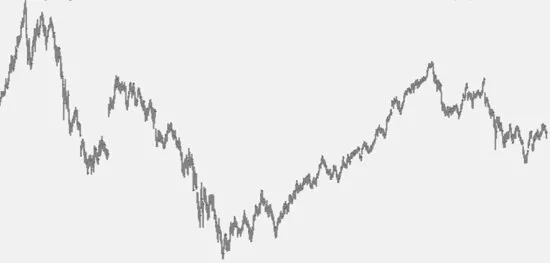
This sort of analysis is what I call “What is?” or “What is true?” I begin every investigation by repeatedly asking myself ``What is true of the chart at which I am looking?’’ It’s the “what is” that leads to rich brainstorming sessions and possibilities for analysis.
What you could not tell me is whether this is a chart of a commodity, stock, or mutual fund. You could not tell me if it is a chart of 1-minute, 5-minute, 60-minute, or daily data. And you could not tell me whether this price action happened in 1927, 1987, or 2010.
In fact, this is an example of what they mean when they say the markets are fractal. Each subset, or smaller time frame, looks like any other time frame. They all go up, they all go down, and they all go sideways. It’s just another way of saying “a chart is a chart is a chart.”
For the purpose of this book, the particulars of the chart do not matter; what matters is that the chart has movement and that we can describe it in programming language.
The best way I know to make this book easy to use and comprehend is to build on a simple concept from beginning to end. To this end, I will introduce a single set of data that we will use throughout. That data is available for you on my Web site: www.moneymentor.com/TSME.html. If you’d like to receive a CD of the data, just contact my office in California at 1-760-444-4174 Skype or my cell at 1-760-908-3070. I ask only that you observe Pacific Standard Time.
We will use the same chart and the same data throughout this book. We will take different perspectives, sometimes viewing daily data, sometimes weekly, sometimes intraday, but it will all be of the same vehicle. I have always wondered why authors choose a different chart to illustrate every new concept. I’ve wondered whether the concepts are only applicable to certain subsets of charts. As I tackle this book, I guess I am about to find out.
I will also start early in this book with a simple program to analyze the data and build on that program as we progress. That way you will be learning about the structure of EasyLanguage, not struggling with a new program every few pages. You will become intimately familiar with one set of data and one small program. We will analyze this single set of data at increasing depth, and will alter and enhance our initial program until it becomes sophisticated.
After you finish this book you can easily branch off and apply your new language to very complex concepts. You will be able to understand many of the sophisticated techniques presented in Omega magazine, TradeStation’s manuals, Technical Analysis of Stocks & Commodities magazine, Futures magazine, Traders’ Catalog & Resource Guide, and the various other sources and books mentioned herein.
FONTS, SYMBOLS, AND CONVENTIONS
I’ve used a few symbols in the book and some typefaces to separate code from text. All programming code herein is designated by using the typeface OCRA. All computer commands are shown in the typeface Helvetica. An arrow (→) means to pull down the m...
Table of contents
- Cover
- Series
- Title Page
- Copyright
- Dedication
- Epigraph
- Foreword
- Preface
- Acknowledgments
- Author’s Note
- Chapter 1: Introduction to EasyLanguage
- Chapter 2: Quick Start
- Chapter 3: Understanding the Process
- Chapter 4: Basic Use of TradeStation
- Chapter 5: Basic Math
- Chapter 6: Basic EasyLanguage
- Chapter 7: Programming Conventions
- Chapter 8: Statements
- Chapter 9: Ifs, Ands, and Buts
- Chapter 10: Begin and End (Block Statements)
- Chapter 11: Loops
- Chapter 12: Analysis Techniques
- Chapter 13: Buying and Selling
- Chapter 14: Functions
- Chapter 15: Tricky Math
- Chapter 16: TradeStation Tricks
- Chapter 17: Optimization
- Chapter 18: System Performance
- Chapter 19: Conclusion
- Appendix A: Styles
- Appendix B: Reserved Words
- Appendix C: Formulas
- Appendix D: Full Code for the Systems and Studies in This Book
- Appendix E: Baskets
- Appendix F: Where’s the Command?
- Appendix G.1: Built-in Functions and Indicators (Alphabetical Listing)
- Appendix G.2: Built-in Functions and Indicators (Functional Listing)
- Appendix H: TradeStation Add-on Products and Services
- Appendix I: TradeStation User Groups
- Appendix J: Error Messages
- Appendix K: What’s Wrong with This Code?
- Bibliography
- Index
Trusted by 375,005 students
Access to over 1.5 million titles for a fair monthly price.
Study more efficiently using our study tools.
Frequently asked questions
Yes, you can cancel anytime from the Subscription tab in your account settings on the Perlego website. Your subscription will stay active until the end of your current billing period. Learn how to cancel your subscription
No, books cannot be downloaded as external files, such as PDFs, for use outside of Perlego. However, you can download books within the Perlego app for offline reading on mobile or tablet. Learn how to download books offline
Perlego offers two plans: Essential and Complete
- Essential is ideal for learners and professionals who enjoy exploring a wide range of subjects. Access the Essential Library with 800,000+ trusted titles and best-sellers across business, personal growth, and the humanities. Includes unlimited reading time and Standard Read Aloud voice.
- Complete: Perfect for advanced learners and researchers needing full, unrestricted access. Unlock 1.5M+ books across hundreds of subjects, including academic and specialized titles. The Complete Plan also includes advanced features like Premium Read Aloud and Research Assistant.
We are an online textbook subscription service, where you can get access to an entire online library for less than the price of a single book per month. With over 1.5 million books across 990+ topics, we’ve got you covered! Learn about our mission
Look out for the read-aloud symbol on your next book to see if you can listen to it. The read-aloud tool reads text aloud for you, highlighting the text as it is being read. You can pause it, speed it up and slow it down. Learn more about Read Aloud
Yes! You can use the Perlego app on both iOS and Android devices to read anytime, anywhere — even offline. Perfect for commutes or when you’re on the go.
Please note we cannot support devices running on iOS 13 and Android 7 or earlier. Learn more about using the app
Please note we cannot support devices running on iOS 13 and Android 7 or earlier. Learn more about using the app
Yes, you can access TradeStation Made Easy! by Sunny J. Harris in PDF and/or ePUB format, as well as other popular books in Business & Investments & Securities. We have over 1.5 million books available in our catalogue for you to explore.