- English
- ePUB (mobile friendly)
- Available on iOS & Android
eBook - ePub
Mastering Autodesk Revit Architecture 2013
About this book
Learn BIM the Revit Way
Revit is Autodesk's industry-leading Building Information Modeling (BIM) software, and this Autodesk Official Training Guide thoroughly covers core Revit topics such as modeling, massing, sustainability, and more. It also brings you up to speed on advanced techniques such as using Revit in the cloud and how to go direct to fabrication.
Organized by real-world workflows, this book covers the interface, templates, worksharing, modeling and massing, visualization techniques for different industries, sustainability, roofs and floors, stairs and railings, documentation, and much more.
- This Autodesk Official Training Guide teaches you how to use the leading BIM software and also serves as a study aid for Autodesk's Certified Associate and Certified Professional exams
- Organized according to actual workflows, the book begins with an explanation of key BIM concepts, familiarizes you with the interface, and then moves into actual application
- Covers modeling and massing, the Family Editor, visualization techniques for various industries, documentation, annotation and detailing, and how to work with complex walls, roofs, floors, stairs, and railings
- Companion website features before-and-after tutorial files, so readers can jump in at any point
Mastering Autodesk Revit Architecture helps you learn Revit in a context that makes real-world sense.
Frequently asked questions
Yes, you can cancel anytime from the Subscription tab in your account settings on the Perlego website. Your subscription will stay active until the end of your current billing period. Learn how to cancel your subscription.
No, books cannot be downloaded as external files, such as PDFs, for use outside of Perlego. However, you can download books within the Perlego app for offline reading on mobile or tablet. Learn more here.
Perlego offers two plans: Essential and Complete
- Essential is ideal for learners and professionals who enjoy exploring a wide range of subjects. Access the Essential Library with 800,000+ trusted titles and best-sellers across business, personal growth, and the humanities. Includes unlimited reading time and Standard Read Aloud voice.
- Complete: Perfect for advanced learners and researchers needing full, unrestricted access. Unlock 1.4M+ books across hundreds of subjects, including academic and specialized titles. The Complete Plan also includes advanced features like Premium Read Aloud and Research Assistant.
We are an online textbook subscription service, where you can get access to an entire online library for less than the price of a single book per month. With over 1 million books across 1000+ topics, weāve got you covered! Learn more here.
Look out for the read-aloud symbol on your next book to see if you can listen to it. The read-aloud tool reads text aloud for you, highlighting the text as it is being read. You can pause it, speed it up and slow it down. Learn more here.
Yes! You can use the Perlego app on both iOS or Android devices to read anytime, anywhere ā even offline. Perfect for commutes or when youāre on the go.
Please note we cannot support devices running on iOS 13 and Android 7 or earlier. Learn more about using the app.
Yes, you can access Mastering Autodesk Revit Architecture 2013 by Phil Read,James Vandezande,Eddy Krygiel in PDF and/or ePUB format, as well as other popular books in Computer Science & Digital Media. We have over one million books available in our catalogue for you to explore.
Information
Part 1
Fundamentals
Although this book is focused on helping you master AutodeskĀ® RevitĀ® Architecture software, we recognize that not everyone will know how to find every tool or have a complete understanding of the workflow. The chapters in Part 1 will help you build a foundation of essential knowledge and may even give the veteran Revit user some additional insight into the basic tools and concepts of building information modeling (BIM).
- Chapter 1: Introduction: The Basics of BIM
- Chapter 2: Principles: UI and Project Organization
- Chapter 3: The Basics of the Toolbox
Chapter 1
Introduction: The Basics of BIM
In this chapter, we cover principles of a successful building information modeling (BIM) approach within your office environment and summarize some of the many tactics possible using BIM in today's design workflow. We explain the fundamental characteristics of maximizing your investment in BIM and moving beyond documentation with an information-rich model.
In this chapter, you'll learn to:
- Leverage the model
- Know how BIM affects firm culture
- Focus your investment in BIM
Leveraging the Model

www.nibs.org), a building information model (BIM) is defined as āa digital representation of physical and functional characteristics of a facilityā that serves as a āshared knowledge resource for information about a facility forming a reliable basis for decisions during its life cycle from inception onward.ā While this is the definition of the noun used to represent the electronic data, the verb form of building information modeling is equally important. BIM is both a tool and a process, and one cannot realistically exist without the other. This book will help you to learn one BIM toolāRevit Architectureābut we hope that it will also teach you about the BIM process.Building information modeling implies an increased attention to more informed design and enhanced collaboration. Simply installing an application like Revit and using it to replicate your current processes will yield limited success. In fact, it may even be more cumbersome than using traditional CAD tools.
What is Revit? It is a BIM application that utilizes a single, parametric, 3D model to generate plans, sections, elevations, perspectives, details, and schedulesāall of the necessary instruments to document the design of a building. Drawings created using Revit are not a collection of 2D lines and shapes that are interpreted to represent a building; they are live views extracted from what is essentially a virtual building model. This model consists of a compilation of intelligent components that contain not only physical attributes but also functional behavior familiar in architectural design, engineering, and construction.
Elements in Revit are managed and manipulated through a hierarchy of parameters that we will discuss in greater detail throughout this book. These elements share a level of bidirectional associativityāif the elements are changed in one place within the model, those changes are visible in all the other views. If you move a door in plan, that door is moved in all of the elevations, sections, perspectives, and so on in which it is visible. In addition, all of the properties and information about each element are stored within the elements themselves, which means that most annotation is merely applied to any view and is transient in nature. When contrasted with traditional CAD tools that store element information only in the annotation, Revit gives you the opportunity to more easily extract, report, and organize your project data for collaboration with others.
Planning for BIM
As architects or designers, we have accepted the challenge of changing our methodology to adapt to the nuances of documentation through modeling rather than drafting. We are now confronted with identifying the next step. Some firms look to create even better documents, whereas others are leveraging BIM in building analysis. As we continue to be successful in visualization and documentation, industry leaders are looking to move BIM to the next plateau. As BIM did a decade ago, many of these new possibilities represent new workflows and potential changes in our culture or habits, which require you to ask a critical question:
What kind of firm do you want, and how do you plan to use BIM?
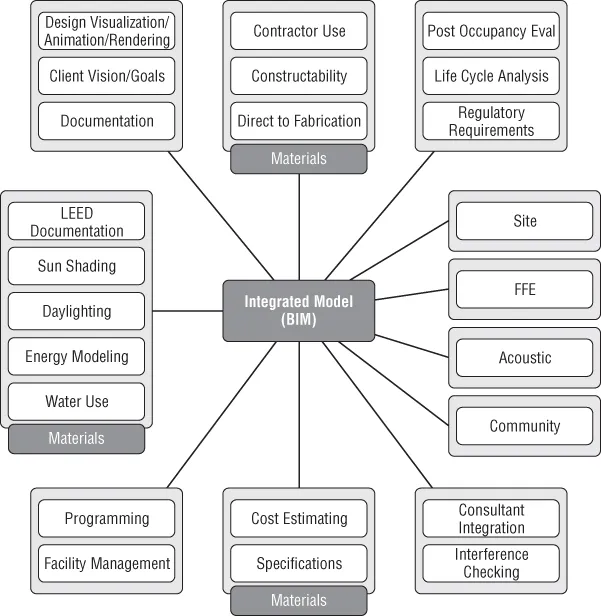
As the technology behind BIM continues to grow, so does the potential. A host of things are now possible using a building information model; in fact, that list continues to expand year after year. Figure 1.1 shows some of the potential opportunities.

Figure 1.1 Design opportunities supported by BIM
When moving to the next step with BIMābe that better documentation, sustainable analysis, or facility managementāit's important to...
Table of contents
- Cover
- Tabl of Contents
- Title Page
- Copyright
- Publisher's Note
- Dedication
- Acknowledgments
- About the Authors
- Foreword
- Introduction
- Part 1: Fundamentals
- Part 2: Understanding the Workflow
- Part 3: Modeling and Massing for Design
- Part 4: Extended Modeling Techniques
- Part 5: Documentation
- Part 6: Construction and Beyond
- Appendices
- Index