- English
- ePUB (mobile friendly)
- Available on iOS & Android
eBook - ePub
Still Image and Video Compression with MATLAB
About this book
This book describes the principles of image and video compression techniques and introduces current and popular compression standards, such as the MPEG series. Derivations of relevant compression algorithms are developed in an easy-to-follow fashion. Numerous examples are provided in each chapter to illustrate the concepts.
Information
CHAPTER 1
INTRODUCTION
This book is all about image and video compression. Chapter 1 simply introduces the overall ideas behind data compression by way of pictorial and graphical examples to motivate the readers. Detailed discussions on various compression schemes appear in subsequent chapters. One of the goals of this book is to present the basic principles behind image and video compression in a clear and concise manner and develop the necessary mathematical equations for a better understanding of the ideas. A further goal is to introduce the popular video compression standards such as Joint Photographic Experts Group (JPEG) and Moving Picture Experts Group (MPEG) and explain the compression tools used by these standards. Discussions on semantics and data transportation aspects of the standards will be kept to a minimum. Although the readers are expected to have an introductory knowledge in college-level mathematics and systems theory, clear explanations of the mathematical equations will be given where necessary for easy understanding. At the end of each chapter, problems are given in an increasing order of difficulty to make the understanding firm and lasting.
In order for the readers of this book to benefit further, MATLAB codes for several examples are included. To run the M-files on your computers, you should install MATLAB software. Although there are other software tools such as C++ and Python to use, MATLAB appears to be more readily usable because it has a lot of built-in functions in various areas such as signal processing, image and video processing, wavelet transform, and so on, as well as simulation tools such as MATLAB Simulink. Moreover, the main purpose of this book is to motivate the readers to learn and get hands on experience in video compression techniques with easy-to-use software tools, which does not require a whole lot of programming skills. In the remainder of the chapter, we will briefly describe various compression techniques with some examples.
1.1 WHAT IS SOURCE CODING?
Images and videos are moved around the World Wide Web by millions of users almost in a nonstop fashion, and then, there is television (TV) transmission round the clock. Analog TV has been phased out since February 2009 and digital TV has taken over. Now we have the cell phone era. As the proverb a picture is worth a thousand words goes, the transmission of these visual media in digital form alone will require far more bandwidth than what is available for the Internet, TV, or wireless networks. Therefore, one must find ways to format the visual media data in such a way that it can be transmitted over the bandwidth-limited TV, Internet, and wireless channels in real time. This process of reducing the image and video data so that it fits into the available limited bandwidth or storage space is termed data compression. It is also called source coding in the communications field. When compressed audio/video data is actually transmitted through a transmission channel, extra bits are added to it to counter the effect of noise in the channel so that errors in the received data, if present, could be detected and/or corrected. This process of adding additional data bits to the compressed data stream before transmission is called channel coding. Observe that the effect of reducing the original source data in source coding is offset to a small extent by the channel coding, which adds data rather than reducing it. However, the added bits by the channel coder are very small compared with the amount of data removed by source coding. Thus, there is a clear advantage of compressing data.
We illustrate the processes of compressing and transmitting or storing a video source to a destination in Figure 1.1. The source of raw video may come from a video camera or from a previously stored video data. The source encoder compresses the raw data to a desired amount, which depends on the type of compression scheme chosen. There are essentially two categories of compression—lossless and lossy. In a lossless compression scheme, the original image or video data can be recovered exactly. In a lossy compression, there is always a loss of some information about the original data and so the recovered image or video data suffers from some form of distortion, which may or may not be noticeable depending on the type of compression used. After source encoding, the quantized data is encoded losslessly for transmission or storage. If the compressed data is to be transmitted, then channel encoder is used to add redundant or extra data bits and fed to the digital modulator. The digital modulator converts the input data into an RF signal suitable for transmission through a communications channel.
Figure 1.1 Source coding/decoding of video data for storage or transmission.
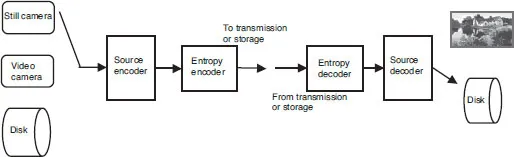
The communications receiver performs the operations of demodulation and channel decoding. The channel decoded data is fed to the entropy decoder followed by source decoder and is finally delivered to the sink or stored. If no transmission is used, then the stored compressed data is entropy decoded followed by source decoding as shown on the right-hand side of Figure 1.1.
1.2 WHY IS COMPRESSION NECESSARY?
An image or still image to be precise is represented in a computer as an array of numbers, integers to be more specific. An image stored in a computer is called a digital image. However, we will use the term image to mean a digital image. The image array is usually two dimensional (2D) if it is black and white (BW) and three dimensional (3D) if it is a color image. Each number in the array represents an intensity value at a particular location in the image and is called a picture element or pixel, for short. The pixel values are usually positive integers and can range between 0 and 255. This means that each pixel of a BW image occupies 1 byte in a computer memory. In other words, we say that the image has a grayscale resolution of 8 bits per pixel (bpp). On the other hand, a color image has a triplet of values for each pixel: one each for the red, green, and blue primary colors. Hence, it will need 3 bytes of storage space for each pixel. The captured images are rectangular in shape. The ratio of width to height of an image is called the aspect ratio. In standard-definition television (SDTV) the aspect ratio is 4:3, while it is 16:9 in a high-definition television (HDTV). The two aspect ratios are illustrated in Figure 1.2, where Figure 1.2a corresponds to an aspect ratio of 4:3 while Figure 1.2b corresponds to the same picture with an aspect ratio of 16:9. In both pictures, the height in inches remains the same, which means that the number of rows remains the same. So, if an image has 480 rows, then the number of pixels in each row will be 480 × 4/3 = 640 for an aspect ratio of 4:3. For HDTV, there are 1080 rows and so the number of pixels in each row will be 1080 × 16/9 = 1920. Thus, a single SD color image with 24 bpp will require 640 × 480 × 3 = 921,600 bytes of memory space, while an HD color image with the same pixel depth will require 1920 × 1080 × 3 = 6,220,800 bytes. A video source may produce 30 or more frames per second, in which case the raw data rate will be 221,184,000 bits per second for SDTV and 1,492,992,000 bits per second for HDTV. If this raw data has to be transmitted in real time through an ideal communications channel, which will require 1 Hz of bandwidth for every 2 bits of data, then the re...
Table of contents
- Cover
- Half Title Page
- Title Page
- Copyright Page
- Dedication
- Preface
- Chapter 1: Introduction
- Chapter 2: Image Acquisition
- Chapter 3: Image Transform
- Chapter 4: Discrete Wavelet Transform
- Chapter 5: Lossless Coding
- Chapter 6: Predictive Coding
- Chapter 7: Image Compression in the Transform Domain
- Chapter 8: Image Compression in the Wavelet Domain
- Chapter 9: Basics of Video Compression
- Chapter 10: Video Compression Standards
- Index
Trusted by 375,005 students
Access to over 1.5 million titles for a fair monthly price.
Study more efficiently using our study tools.
Frequently asked questions
Yes, you can cancel anytime from the Subscription tab in your account settings on the Perlego website. Your subscription will stay active until the end of your current billing period. Learn how to cancel your subscription
No, books cannot be downloaded as external files, such as PDFs, for use outside of Perlego. However, you can download books within the Perlego app for offline reading on mobile or tablet. Learn how to download books offline
Perlego offers two plans: Essential and Complete
- Essential is ideal for learners and professionals who enjoy exploring a wide range of subjects. Access the Essential Library with 800,000+ trusted titles and best-sellers across business, personal growth, and the humanities. Includes unlimited reading time and Standard Read Aloud voice.
- Complete: Perfect for advanced learners and researchers needing full, unrestricted access. Unlock 1.5M+ books across hundreds of subjects, including academic and specialized titles. The Complete Plan also includes advanced features like Premium Read Aloud and Research Assistant.
We are an online textbook subscription service, where you can get access to an entire online library for less than the price of a single book per month. With over 1.5 million books across 990+ topics, we’ve got you covered! Learn about our mission
Look out for the read-aloud symbol on your next book to see if you can listen to it. The read-aloud tool reads text aloud for you, highlighting the text as it is being read. You can pause it, speed it up and slow it down. Learn more about Read Aloud
Yes! You can use the Perlego app on both iOS and Android devices to read anytime, anywhere — even offline. Perfect for commutes or when you’re on the go.
Please note we cannot support devices running on iOS 13 and Android 7 or earlier. Learn more about using the app
Please note we cannot support devices running on iOS 13 and Android 7 or earlier. Learn more about using the app
Yes, you can access Still Image and Video Compression with MATLAB by K. S. Thyagarajan in PDF and/or ePUB format, as well as other popular books in Technology & Engineering & Electrical Engineering & Telecommunications. We have over 1.5 million books available in our catalogue for you to explore.