Part I
Getting Started with Your SMART Board Interactive Whiteboard
In this part . . .
Here you find out about all the capabilities and possibilities available with your SMART Board interactive whiteboard. Chapter 1 gives you an overview of the interactive whiteboard, briefly explaining its conventions, terminology, and tools. Chapter 2 fills you in on the hardware and how to identify what product versions you have; I also walk you through setting up the interactive whiteboard if you’re in charge of this task for your organization. Chapter 3 shows you how to configure your interactive whiteboard so that it performs exactly how you need it to. Finally, in Chapter 4, I cover the nuts-and-bolts information that gets you started using the interactive whiteboard and designing your first project.
Chapter 1
Unveiling the SMART Board Interactive Whiteboard
In This Chapter
Discovering what the SMART Board interactive whiteboard can do
Getting acquainted with your interactive whiteboard system
Identifying and comparing the different series
Familiarizing yourself with the the tools and menus
Congratulations! You’ve decided to get serious about using that great big interactive whiteboard standing proudly in your classroom or meeting room. You’ve seen others use it. You’ve heard students talking about how cool one of your colleagues is because he does the wildest things with it. You’ve heard your boss praise one of your co-workers, saying how well she was able to explain the new workflow using the interactive whiteboard. You want a piece of that action!
In this chapter, I introduce you to all the capabilities of the SMART Board interactive whiteboard. I explain how it works, what you can do with it, and the tools you’ll be using to get the job done.
Exploring the Interactive Whiteboard: The Big Picture
You may be thinking, “I’ve seen one of these interactive whiteboards, but what exactly is it and how does it work?” Well, you’re about to find out. The SMART Board interactive whiteboard is a digital whiteboard that gives you all the capabilities of your computer on a whiteboard. Plus, you can use your finger to write on the screen in digital ink. Then you can save, print, or distribute your notes at the touch of a button; access multimedia files; collaborate on activities by allowing two or more people to write on the screen at the same time; access the Internet; and teleconference.
Some teachers have held lessons with classrooms of students spread across the world. How cool is it to be able to write on the screen in the United States and have students in Canada or England seeing what you’ve written and participating in your class?
How it works
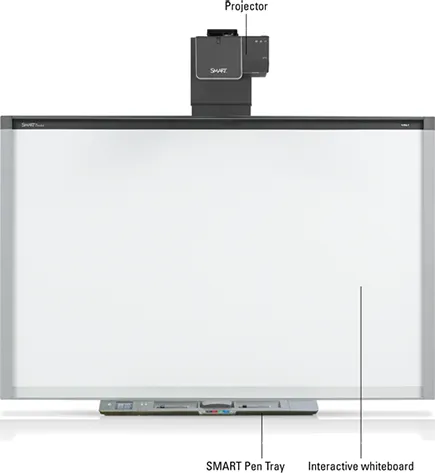
The interactive whiteboard (see Figure 1-1) connects to your computer and a projector. Your computer desktop is projected on the interactive whiteboard surface. You control the desktop by touching the screen with your finger, a pen, or an eraser, or you can use a keyboard and mouse. The display is touch sensitive, allowing your finger to become the mouse to control writing on the display and control your computer.
Figure 1-1: A SMART Board interactive whiteboard system and components.
Originally developed in 19...