Part I
Pictures Worth Keeping
Very simply, this part gets you up and running.
It explains all the buttons, bells, and whistles on your A65/A77. See how to set up the camera, navigate the menus, select shooting modes, choose functions, and decide on photo quality and size. Read all about the basic shooting modes so you can start taking amazing photos right off the bat. See how to use scenes, how to Sweep Shoot your way to panoramas, and how to use the super-fast photo-taking mode. The last chapter in this part covers how to shoot movies in full HD.
Chapter 1
Meeting the A65 and A77
In This Chapter
Using batteries and memory cards
Dialing in the viewfinder
Figuring out the displays
The A65 and A77 are complicated cameras. They have lots of buttons, displays, dials, and knobs. You must know how to attach and remove lenses, insert and remove the battery and memory card, and work the menus and shooting functions. Whether you’re upgrading from a simpler digital SLR/SLT or replacing a sophisticated but older camera, this chapter has the information you need to start making full use of your machine.
Comparing Super and Duper
Despite being similar, the two cameras have several key differences. I note them here and explain them more fully where appropriate.
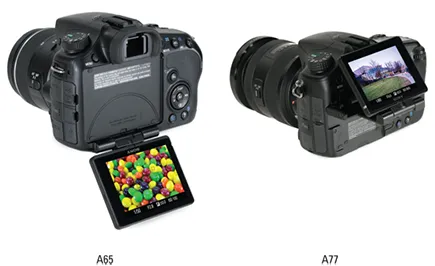
LCD monitor: The A65 sports a fancy tilt/swivel monitor, shown in Figure 1-1. The A77 sports an even fancier three-way tilt/swivel LCD screen, also shown in Figure 1-1. I cover both later in this chapter. After that, it’s up to you to tilt, swivel, and turn your monitor when you need to.
Figure 1-1: These LCD monitors can twist and shout in their own unique ways.
Buttons and dials: The A65 and the A77 have physical similarities. Their differences are most obvious in the type, number, and layout of their buttons and dials. The A77 has more buttons on top, as well as a second control dial and a multi-selector instead of a control button. In addition, some buttons that share primary functions, like the AEL and Smart Teleconverter buttons, have different alternate and tertiary roles. All these differences, and the similarities, are covered in detail in this chapter.
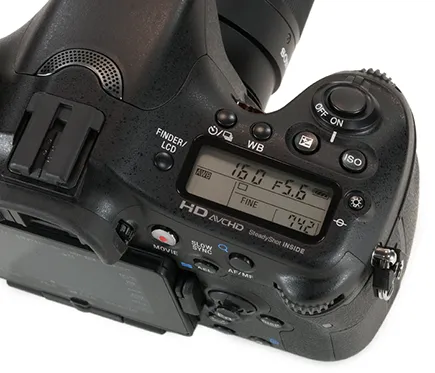
Information display: The A77 has a cool-looking pro-style information display on the top of the camera, as shown in Figure 1-2. It displays important shooting information and is helpful when you’re looking down on the camera.
Figure 1-2: Pro-style accoutrements set the A77 apart.
Pro-level features: The A65 has a number of pro-level features, but the A77 has more. You can store your shooting settings in memory (covered in Chapter 11), have fun with more creative styles (see Chapter 8), take advantage of more AF areas (see Chapter 8), compensate for lens characteristics like peripheral shading and distortion (see Chapter 11), and automatically shoot three exposures with different D-range optimizer settings (see Chapter 2), to mention a few. The A77 also has a flash sync cord terminal to connect external flashes or studio strobes.
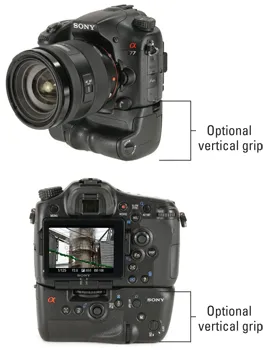
The A77 also has an optional vertical grip, shown attached from the front and rear in Figure 1-3, that doubles the battery capacity of the camera and lets you hold the A77 normally while you rotate it to shoot in portrait orientation. It’s sure to impress your family, friends, and the general public. It’s downright awesome. I call it the “I’m not foolin’ around” add-on. Although there are no plans to manufacture the grip for the A65, industrious photographers are looking to overcome this.
Figure 1-3: Reach the pinnacle of awesomeness with pro-style accessories.
Pro-level performance: The A65 provides pro-level performance in terms of frame rate (up to 10 frames per second), video (1080 Full H...