An expert guide for IT administrators needing to create and manage a public cloud and virtual network using Microsoft Azure
With Microsoft Azure challenging Amazon Web Services (AWS) for market share, there has been no better time for IT professionals to broaden and expand their knowledge of Microsoft's flagship virtualization and cloud computing service. Microsoft Azure Infrastructure Services for Architects: Designing Cloud Solutions helps readers develop the skills required to understand the capabilities of Microsoft Azure for Infrastructure Services and implement a public cloud to achieve full virtualization of data, both on and off premise. Microsoft Azure provides granular control in choosing core infrastructure components, enabling IT administrators to deploy new Windows Server and Linux virtual machines, adjust usage as requirements change, and scale to meet the infrastructure needs of their entire organization.
This accurate, authoritative book covers topics including IaaS cost and options, customizing VM storage, enabling external connectivity to Azure virtual machines, extending Azure Active Directory, replicating and backing up to Azure, disaster recovery, and much more. New users and experienced professionals alike will:
Get expert guidance on understanding, evaluating, deploying, and maintaining Microsoft Azure environments from Microsoft MVP and technical specialist John Savill
Develop the skills to set up cloud-based virtual machines, deploy web servers, configure hosted data stores, and use other key Azure technologies
Understand how to design and implement serverless and hybrid solutions
Learn to use enterprise security guidelines for Azure deployment
Offering the most up to date information and practical advice, Microsoft Azure Infrastructure Services for Architects: Designing Cloud Solutions is an essential resource for IT administrators, consultants and engineers responsible for learning, designing, implementing, managing, and maintaining Microsoft virtualization and cloud technologies.
Chapter 1 The Cloud and Microsoft Azure Fundamentals
This chapter focuses on changes that are impacting every organization’s thinking regarding infrastructure, datacenters, and ways to offer services. “As a Service” offerings—both on premises and hosted by partners, and accessed over the Internet in the form of the public cloud—present new opportunities for organizations.
Microsoft’s solution for many public cloud services is its Azure service, which offers hundreds of capabilities that are constantly being updated. This chapter will provide an overview of the Microsoft Azure solution stack before examining various types of Infrastructure as a Service (IaaS) and how Azure services can be procured.
In this chapter, you will learn to:
Articulate the different types of “as a Service.”
Identify key scenarios where the public cloud provides the most optimal service.
Understand how to get started consuming Microsoft Azure services.
The Evolution of the Datacenter
When I talk to people about Azure or even the public cloud in general, where possible, I start the conversation by talking about their on-premises deployments and the requirements that drove the existing architecture. For most companies, needs have changed radically over recent years to meet both customer and employee requirements. Employees expect to be able to work anywhere, from anything, using a large number of cloud-based services. Customers are similar, wanting engaging digital experiences across devices that use existing social identities where practical. Organizations are looking to digitally transform and focus on creating only what helps differentiate themselves in the market through accelerated innovation. For organizations, this means more agility and the capability to Elastically scale, potentially globally. Additionally, these drivers often mean getting out of the datacenter business in favor of cloud service utilization, which enables a greater focus on the application and optimized IT spend, all while dealing with new security implications. As organizations embrace cloud services, a complete rethinking is required, as the network can no longer be a trusted boundary since many services will live outside the corporate network. Instead of thinking of the corporate network as this completely trusted area that is impenetrable at the network edge, the focus shifts to identity as the new security perimeter, while a zero-trust model is increasingly common for the network. But I am getting ahead of myself, and I like to start off with an interesting use case of the cloud that pre-cloud would have been very difficult.
Video gaming is a hugely popular industry. Many games today host massive, multiplayer environments that need additional resources, such as storage and compute, to deliver the best experience. These resources will have huge spikes in demand that vary around the world, and to enhance rather than degrade the user experience, they need to be close to the player to reduce latency. A great example of this is Halo, which I’ve been playing since its first version on the original Xbox. Gaming resource requirements are opposite to many other industries. Most services start out and grow over time, requiring more resources (that the cloud is great for); however, games are the opposite. When a game releases, it tends to require huge amounts of resources for the first few weeks and then sees a significant ramp down. Before the cloud, game services would have to build huge datacenters with a lot of resources that would sit largely idle after the first few weeks. With the cloud, 1000s of cores can be used for services then scale down to 100s. Halo game services use Azure for several services, including statistics, which are a huge part of gaming that track every activity the player performs, providing end of game summaries and overall player history. The elasticity of the cloud enables Halo to access the resources as required to provide an amazing player and community experience while optimizing their costs to only pay for what they need, when they need it.
Introducing the Cloud
Every organization has some kind of IT infrastructure. It could be a server sitting under someone’s desk, geographically distributed datacenters the size of multiple football fields, or something in between. Within that infrastructure are a number of key fabric (physical infrastructure) elements:
Compute Capacity Compute capacity can be thought of in terms of the various servers in the datacenter, which consist of processors, memory, storage controllers, network adapters, and other hardware (such as the motherboard, power supply, and so on). These resources provide a server with a finite amount of resources, which includes computation, memory capacity, network bandwidth, and storage throughput (in addition to other characteristics). I will use the term compute throughout this book when referring to server capacity.
Storage A persistent method of storage for data—from the operating system (OS) and applications to pure data, such as files and databases—must be provided. Storage can exist within a server or in external devices, such as a storage area network (SAN). SANs provide enterprise-level performance and capabilities, although newer storage architectures that leverage local storage, known as hyper-converged, which in turn replicate data, are becoming more prevalent in datacenters. Additionally, non-persistent, aka ephemeral, storage is available for most resources.
Network These components connect the various elements of the datacenter and enable client devices to communicate with hosted services. Connectivity to other datacenters may also be part of the network design. Options such as dedicated fiber connections, Multiprotocol Label Switching (MPLS), and Internet connectivity via a DMZ are typical. Other types of resources, such as firewalls, load balancers, and gateways, are likely used in addition to technologies to segment and isolate parts of the network—for example, VLANs.
Datacenter Infrastructure An often overlooked but critical component of datacenters is the supporting infrastructure. Items such as uninterruptable power supplies (UPSs), air conditioning, the physical building, and even generators all have to be considered. Each consumes energy and impacts the efficiency of the datacenter as well as its power usage effectiveness (PUE), which provides a measure of how much energy a datacenter uses for computer equipment compared to the other aspects. The lower the PUE, the more efficient the datacenter—or at least the more power going to the actual computing, reducing overall power consumption. An interesting point is that although power efficiency is important, there are other metrics starting to be discussed, such as water efficiency, which start to become more important when considering all the types of resources impacted by datacenters.
Once you have the physical infrastructure in place, you then add the actual software elements (the OS, applications, and services), and finally the management infrastructure, which enables deployment, patching, backup, automation, and monitoring. The IT team for an organization is responsible for all of these datacenter elements. The rise in the size and complexity of IT infrastructure is a huge challenge for nearly every organization. Despite the fact that most IT departments see budget cuts year after year, they are expected to deliver more and more as IT becomes increasingly critical. With digital transformation, the business expects more agility for IT resources, enabling new offerings to be created and deployed quickly with potentially highly elastic compute needs throughout the world.
Not only is the amount of IT infrastructure increasing but that infrastructure needs to be resilient. This typically means implementing disaster recovery (DR) solutions to provide protection from a complete site failure, such as one caused by a large-scale natural disaster. If you ignore the public cloud, your organization will need to lease space from a co-location facility or set up a new datacenter. When I talk to CIOs, one of the things at the top of the don’t-want-to-do list is write out more checks for datacenters—in fact, write out any checks for datacenters is on that list.
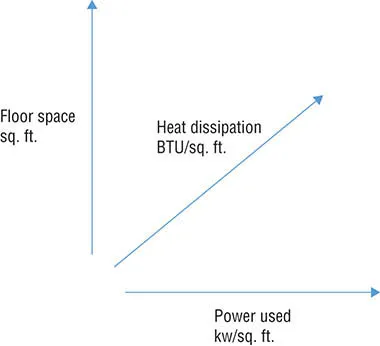
In the face of increased cost pressure and the desire to be more energy and water responsible (green), datacenter design becomes ever more complex, especially in a world with virtualization. If the three critical axes of a datacenter (shown in Figure 1.1) are not properly thought out, your organization’s datacenters will never be efficient. You must consider the square footage of the actual datacenter, the kilowatts that can be consumed per square foot, and the amount of heat that can be dissipated, expressed in BTU per hour.
Figure 1.1 The three axes of datacenter planning
If you get any of these calculations wrong, you end up with a datacenter you cannot fully use because you can’t get enough power to it, can’t keep it cool enough, or simply can’t fit enough equipment in it. As the compute resources become denser and consume mo...
Table of contents
Cover
Title Page
Copyright
Dedication
Acknowledgments
About the Author
Introduction
Chapter 1 The Cloud and Microsoft Azure Fundamentals
Chapter 2 Governance
Chapter 3 Identity
Chapter 4 Identity Security and Extended Identity Services
Chapter 5 Networking
Chapter 6 Storage
Chapter 7 Azure Compute
Chapter 8 Azure Stack
Chapter 9 Backup, High Availability, Disaster Recovery, and Migration
Chapter 10 Monitoring and Security
Chapter 11 Managing Azure
Chapter 12 What to Do Next
Index
End User License Agreement
Trusted by 375,005 students
Access to over 1.5 million titles for a fair monthly price.
Study more efficiently using our study tools.
Frequently asked questions
Yes, you can cancel anytime from the Subscription tab in your account settings on the Perlego website. Your subscription will stay active until the end of your current billing period. Learn how to cancel your subscription
No, books cannot be downloaded as external files, such as PDFs, for use outside of Perlego. However, you can download books within the Perlego app for offline reading on mobile or tablet. Learn how to download books offline
Perlego offers two plans: Essential and Complete
Essential is ideal for learners and professionals who enjoy exploring a wide range of subjects. Access the Essential Library with 800,000+ trusted titles and best-sellers across business, personal growth, and the humanities. Includes unlimited reading time and Standard Read Aloud voice.
Complete: Perfect for advanced learners and researchers needing full, unrestricted access. Unlock 1.5M+ books across hundreds of subjects, including academic and specialized titles. The Complete Plan also includes advanced features like Premium Read Aloud and Research Assistant.
Both plans are available with monthly, semester, or annual billing cycles.
We are an online textbook subscription service, where you can get access to an entire online library for less than the price of a single book per month. With over 1.5 million books across 990+ topics, we’ve got you covered! Learn about our mission
Look out for the read-aloud symbol on your next book to see if you can listen to it. The read-aloud tool reads text aloud for you, highlighting the text as it is being read. You can pause it, speed it up and slow it down. Learn more about Read Aloud
Yes! You can use the Perlego app on both iOS and Android devices to read anytime, anywhere — even offline. Perfect for commutes or when you’re on the go. Please note we cannot support devices running on iOS 13 and Android 7 or earlier. Learn more about using the app
Yes, you can access Microsoft Azure Infrastructure Services for Architects by John Savill in PDF and/or ePUB format, as well as other popular books in Computer Science & Computer Networking. We have over 1.5 million books available in our catalogue for you to explore.