IN THIS CHAPTER
Figuring out your buying and selling options Researching items to buy or sell Knowing how eBay is protecting you Using features and fun stuff eBay emerged as the marketplace of the 21st century. Way back in 2003, Wired magazine predicted that eBay’s promise was that “retailing will become the national pastime.” Promise fulfilled: In 2018, worldwide online e-commerce sales topped $2.86 trillion. The founder had a pretty great idea back in 1995 (read about some eBay history in the “eBay’s humble beginnings” sidebar, later in this chapter), and the world has taken to shopping and selling online. eBay is a safe and fun place to shop for everything from collectibles to brand-new clothing and tech gadgets, all from the comfort of your home.
Once referred to as an “online garage sale,” eBay is now also a marketplace for new merchandise. It’s no longer just the destination for locating unusual collectibles and hard-to-find china patterns. These days major brands have signed up; you can purchase new and useful items, such as alarm systems, tablets, lightbulbs, clothing, cars, homes — just about anything you can think of.
Take a look around your house. Nice shoes (that you never wore). Spiffy artwork (that you’re bored with). Great-looking clock (souvenir that doesn’t match your décor). Not to mention all the other cool stuff you own. All these great fashions, household appliances, and collectibles are fabulous to own, but when was the last time your clock turned a profit? When you connect to eBay, your PC or mobile device can magically turn into a money machine. Just visit eBay and marvel at all the items that are just a few mouse clicks away from being bought and sold.
In this chapter, I tell you what eBay is and how it works. eBay is today’s gas-free alternative to driving and spending hours wandering through boutiques, big-box stores, or outlet malls looking for the perfect bargain or tchotchke. The site can also be your personal shopper for gifts and day-to-day items.
Not only can you buy and sell stuff in the privacy of your home, but through your connections on eBay, you can also meet people who share your interests. Those who use the eBay site are a friendly bunch, and soon you’ll be buying, selling, swapping stories, and trading advice with your newfound friends via various social media outlets.
To get to eBay, you need to access the Internet. To access the Internet, you need a Windows PC, a Mac, a tablet with the eBay Mobile app, or simply a smartphone. (Inexpensive brand name Chromebooks can be found for under $200.)
What Is eBay, and How Does It Work?
The Internet spawned all kinds of online retail marketplaces (known as e-commerce sites to Wall Street types), and eBay is the superstar as the people’s marketplace. The reason it remains a leader is simple: It’s where buyers look to do business with both big brands and small homespun family businesses. It’s also where a quick look at the listings can give you a ballpark figure on how much an item is “going for” these days.
eBay itself
doesn’t sell a thing. Instead, the site is a platform for selling and does what all good markets do: It creates a safe environment that brings together buyers and sellers. You can think of eBay as the person who set you up on your last blind date — except the results are often a lot better. Your matchmaking friend doesn’t perform a marriage ceremony but does get you in the same room with your potential soulmate. eBay puts buyers and sellers in an e-commerce environment and lets them conduct their business within the rules that eBay has established.
All you need to do to join eBay is fill out a few forms online and click. Congratulations — you’re a member, with no fees or secret handshakes needed (you don’t pay a fee until you sell something). After you register, you can buy and sell anything that falls within the eBay rules and regulations. (Chapter 2 eases you through the registration process.)
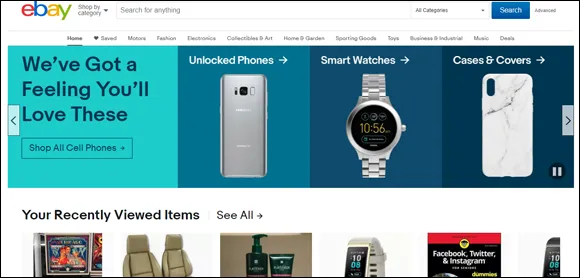
The eBay home page, shown in Figure 1-1, is your first step to finding all the kickass stuff you can see and do on eBay. You can conduct searches, learn about current promotions, and get an instant link to the My eBay page, which helps you keep track of every item you have up for sale or have a bid on. You can read more about the eBay home page in Chapter 3 and find out more about My eBay in Chapter 4.
Yikes! What happened? The eBay home page on your computer looks nothing like the one in Figure 1-1? Don’t rub your eyes — even squinting hard won’t help; eBay has a different version of the home page for those who have never registered on eBay — and customizes the page even if you’re not signed in. If you have never registered on eBay, someone else who uses the computer may have done so already. Know that whatever version of the eBay home page you view, it has the same basic elements.