IN THIS PART …
Discover which camera features make it easier to take different types of photos. If you're ready for a new camera, get the information you need to find just the right model.
Get the scoop on essential (and sometimes confusing) camera settings, including the shooting mode, shutter-release mode, resolution, and file type (JPEG or Raw).
Find out how to get the best results when you rely on your camera's fully automatic shooting mode. Also take a look at scene modes, which automatically select settings considered best for specific categories of pictures, such as portraits and action shots.
Explore settings related to video-recording features and get help shooting your first movies.
IN THIS CHAPTER
Finding the best camera for your photography style Understanding critical camera specs Deciding what camera features you really need Considering convenient extras You've probably heard the saying “It's a poor carpenter who blames his tools.” Well, the same is true for photography: A knowledgeable photographer can produce a masterful image from even the most basic camera. That said, certain camera features make photographing some subjects easier. A fast autofocusing system improves your odds of snapping a sharp shot of a lacrosse game, for example, and a lens that can capture subjects from a distance enables you to photograph a wild cougar without getting dangerously close.
This chapter helps you figure out whether your current camera offers the features you need for the type of photography you want to do, and, if not, guides you toward more suitable gear. At the end of the chapter, I provide some tips for getting the biggest bang for your buck if you go camera or lens shopping.
Choosing the Right Level of Camera
Digital cameras come in a variety of sizes, styles, and even colors. Later sections in this chapter provide details to help you narrow your shopping list to a few contenders. But first, it helps to consider whether you’re best suited to a basic, intermediate, or advanced camera. Here’s how I define these categories:
Basic models: I use this term to describe entry-level cameras that offer few (or no) controls over exposure, focus, and so on. Smartphone and tablet cameras also fall into this category.
A basic model is perfect if you're a casual photographer. That is, you enjoy taking selfies, shooting pictures of the gang at special occasions, and sharing photos of your kids or pets online. Or perhaps your work requires photographic documentation of some sort. For example, an insurance adjuster needs to include pictures of hail damage in order to process a claim. Either way, you want your pictures to be as good as possible, but you aren't interested in taking classes or otherwise learning advanced photography techniques.
- Intermediate models: By intermediate, I mean a camera that offers both automatic and manual picture-taking controls. Go this route if you want to explore photography but don't know much about the topic yet. That way, you can rely on automatic shooting modes while you're learning, and gradually step up to manual options. You can find a wide range of models in this category, some of which provide only a handful of advanced options and others that offer nearly pro-level controls.
Advanced models: Cameras in this category are designed for photographers who want more sophisticated controls than intermediate cameras provide. For example, with some high-end cameras, you can use the built-in flash to trigger off-camera flash units, providing lighting flexibility that's often required for professional portrait photography. You also get substantially more ways to customize your camera, from tweaking autofocus performance to changing the function of camera buttons.
Often
not included on cameras in this category are automatic shooting modes or other make-it-easy features that you find on basic and intermediate cameras. Some models don’t even offer a built-in flash, requiring you to buy a separate flash unit. This leads me to offer the following caution: No matter how much the camera salesperson (or your professional photographer friend) tries to convince you to “start at the top,” don't buy an advanced camera until you master an intermediate model. The added complexity will likely overwhelm you, not to mention make a larger dent in your bank account. Step up to this level only if you start doing projects that require features not found on your intermediate-level model.
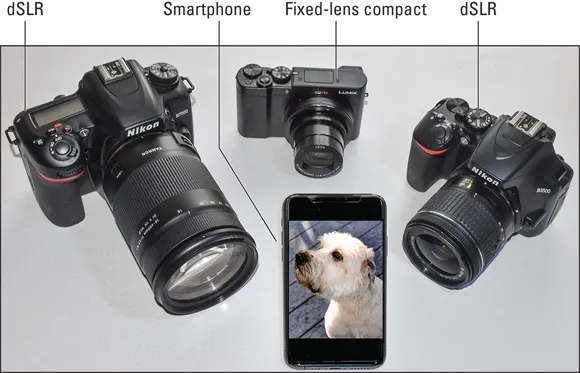
Of course, you may have multiple-photography personality, as I do, and need more than one option at your disposal. For example, for wildlife and travel photography, I lug around the large, advanced body and telephoto lens shown on the far left of Figure 1-1. (This type of camera is called a dSLR, which stands for digital Single Lens Reflex; see the section “Interchangeable-lens cameras,” later in this chapter, for details.) I get awesome shots with this setup, but it’s too large to carry all the time. For casual shots on the go, I use my smartphone — it's great for snapping scenes that catch my eye while I'm walking the dog, for example. As a point of reference, the phone in the figure measures about 5½ inches tall and about 3 inches wide.
Then there are times when I don’t need all the bells and whistles of my “big rig” but want more features than my phone provides – a zoom lens, for example, or, if I’m shooting outdoors, a viewfinder that makes framing my shots easier than relying on the phone’s screen, which can wash out in the sun. For those outings, I pick up one of the two smaller models in the figure, both of which sport intermediate-level controls. The one in the middle of the picture is a fixed-lens model (meaning you can’t swap out lenses), but it has a pretty long-range zoom lens and fits easily into my purse. The other dSLR model (the far-right camera) isn’t really purse material, but it works with the same lenses and flash I can attach to my advanced model, and the body is considerably smaller and lighter than my other dSLR.
All of which is to say that it's okay to put more than one camera on your next birthday wish list. In fact, I highly recommend it. But you still need to make sure that each model you buy suits the type of photography you want to do.
To get you started down that path, the next sections pose questions that I ask anyone who comes to me for buying advice. Your answers will guide you closer to the perfect camera(s) for you.
How much control do you want?
Unless you’ve taken photography classes, you may not be aware of how much creative input a photographer can have over a picture, so Figures 1-2 through 1-4 offer a few examples.
Each figure shows two variations of the same scene, both shot with an intermediate-level camera. The first image in each pair shows the result of shooting in the camera’s fully automatic shooting mode. In Auto mode, the camera makes all the decisions for you, determining characteristics such as the brightness of the scene, whether moving objects appear sharp or blurry, and how much of the scene appears in focus. The second example in each figure shows a variation that I created by switching out of Auto mode and adjusting camera settings that modify these aspects of a photo.
Here’s a brief explanation of which camera controls enabled me to produce the variations:
Controlling exposure (picture brightness): In Figure 1-2, the Auto mode version of the image is okay, but what I had in mind was the darker, more dramatic shot on the right. To get that result, I used exposure ...