CCNA Certification Study Guide
eBook - ePub

CCNA Certification Study Guide

Volume 2 Exam 200-301

  1. English
  2. ePUB (mobile friendly)
  3. Available on iOS & Android
eBook - ePub

CCNA Certification Study Guide

Volume 2 Exam 200-301

About this book

Cisco expert Todd Lammle prepares you for the NEW Cisco CCNA certification exam!

Cisco, the world leader in network technologies, has released the new Cisco Certified Network Associate (CCNA) exam. This consolidated certification exam tests a candidate's ability to implement and administer a wide range of modern IT networking technologies. The CCNA Certification Study Guide: Volume 2 Exam 200-301 covers every exam objective, including network components, IP connectivity and routing, network security, virtual networking, and much more. Clear and accurate chapters provide you with real-world examples, hands-on activities, in-depth explanations, and numerous review questions to ensure that you're fully prepared on exam day.

Written by the leading expert on Cisco technologies and certifications, this comprehensive exam guide includes access to the acclaimed Sybex online learning system—an interactive environment featuring practice exams, electronic flashcards, a searchable glossary, a self-assessment test, and video tutorials on critical Cisco networking concepts and technologies.

  • Covers 100% of all CCNA Exam 200-301 objectives
  • Provides accurate and up-to-date information on core network fundamentals
  • Explains a broad range of Cisco networking and IT infrastructure
  • Features learning objectives, chapter summaries, 'Exam Essentials' and figures, tables, and illustrations

The CCNA Certification Study Guide: Volume 2 Exam 200-301 is the ideal resource for those preparing for the new CCNA certification, as well as IT professionals looking to learn more about Cisco networking concepts and technologies.


Frequently asked questions

Yes, you can cancel anytime from the Subscription tab in your account settings on the Perlego website. Your subscription will stay active until the end of your current billing period. Learn how to cancel your subscription.
No, books cannot be downloaded as external files, such as PDFs, for use outside of Perlego. However, you can download books within the Perlego app for offline reading on mobile or tablet. Learn more here.
Perlego offers two plans: Essential and Complete
  • Essential is ideal for learners and professionals who enjoy exploring a wide range of subjects. Access the Essential Library with 800,000+ trusted titles and best-sellers across business, personal growth, and the humanities. Includes unlimited reading time and Standard Read Aloud voice.
  • Complete: Perfect for advanced learners and researchers needing full, unrestricted access. Unlock 1.4M+ books across hundreds of subjects, including academic and specialized titles. The Complete Plan also includes advanced features like Premium Read Aloud and Research Assistant.
Both plans are available with monthly, semester, or annual billing cycles.
We are an online textbook subscription service, where you can get access to an entire online library for less than the price of a single book per month. With over 1 million books across 1000+ topics, we’ve got you covered! Learn more here.
Look out for the read-aloud symbol on your next book to see if you can listen to it. The read-aloud tool reads text aloud for you, highlighting the text as it is being read. You can pause it, speed it up and slow it down. Learn more here.
Yes! You can use the Perlego app on both iOS or Android devices to read anytime, anywhere — even offline. Perfect for commutes or when you’re on the go.
Please note we cannot support devices running on iOS 13 and Android 7 or earlier. Learn more about using the app.
Yes, you can access CCNA Certification Study Guide by Todd Lammle in PDF and/or ePUB format, as well as other popular books in Computer Science & Certification Guides in Computer Science. We have over one million books available in our catalogue for you to explore.

CHAPTER 1
Network Fundamentals

We’ll cover the following CCNA exam topics in this chapter:
1.0 Network Fundamentals
  • images
    1.1 Explain the role and function of network components
    • 1.1.a Routers
    • 1.1.b L2 and L3 switches
    • 1.1.c Next-generation firewalls and IPS
  • images
    1.2 Describe characteristics of network topology architectures
    • 1.2.a 2 tier
    • 1.2.b 3 tier
    • 1.2.c Spine-leaf
    • 1.2.d WAN
    • 1.2.e Small office/home office (SOHO)
  • images
    1.3 Compare physical interface and cabling types
    • 1.3.a Single-mode fiber, multimode fiber, copper
    • 1.3.b Connections (Ethernet shared media and point-to-point)
    • 1.3.c Concepts of PoE
images
This chapter is really an internetworking review, focusing on how to connect networks together using Cisco routers and switches. As a heads up, I’ve written it with the assumption that you have a bit of basic networking knowledge and/or have read the first chapter in the CCNA Part 1: Understanding Cisco Networking Technologies study guide.
That said, there isn’t a whole lot of new material here, but even if you’re a seasoned network professional, you should still read through all chapters to make sure you get how the objectives are currently covered.
Let’s start by defining exactly what an internetwork is: You create an internetwork when you connect two or more networks via a router and configure a logical network addressing scheme with protocols like IP or IPv6.
We’ll move on to covering network components like routers and switches and defining what exactly creates a Small Office Home Office Network (SOHO). After that, we’ll touch on Next Generation Firewalls (NGFWs) and network architect models, and then I’ll guide you through an overview of Ethernet and the wiring used in Local Area Networks (LANs) and Wide Area Networks (WANs).
images
To find your included bonus material, as well as Todd Lammle videos, practice questions & hands-on labs, please see www.lammle.com/ccna

Network Components

So why is it so important to learn Cisco internetworking anyway?
Networks and networking have grown exponentially over the past 20 years, and understandably so. They’ve had to evolve at light speed just to keep up with huge increases in basic, mission-critical user needs from simply sharing data and printers to bigger burdens like multimedia remote presentations, conferencing, and the like. Unless everyone who needs to share network resources is located in the same office space, the challenge is to connect relevant networks so all users can share the wealth of whatever services and resources they need, on site or remotely.
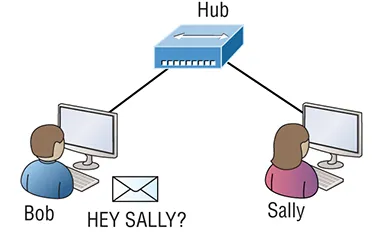
Figure 1.1 shows a basic local area network (LAN) connected via a hub, which is basically an antiquated device, which connects wires together and is typically used in SOHO networks.
Keep in mind that a simple SOHO network like this one would be considered one collision domain and one broadcast domain.
The figure shows a basic local area network (LAN) connected via a hub.
Figure 1.1 A very basic SOHO network
Things really can’t get much simpler than this. And yes, though you can still find this configuration in some home networks, even many of those as well as the smallest business networks are more complicated today.

Routers, Switches, and Oh So SOHO!

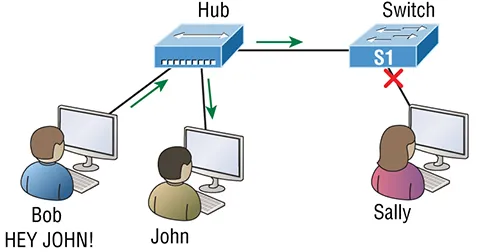
Figure 1.2 shows a network that’s been segmented with a switch, making each network segment that connects to the switch its own separate collision domain. Doing this results in a lot less chaos!
The figure illustrates how a switch can break up collision domains.
Figure 1.2 A switch can break up collision domains.
So, this is a great start, but I really want you to note that this network is still just one, single broadcast domain. This means we’ve really only reduced our PC’s chaos—not eliminated it.
For example, if there’s some sort of vital announcement that everyone in our network neighborhood needs to hear about, it will definitely still get loud! You can see that the hub used in Figure 1.2 just extended the one collision domain from the switch port. The result is that John received the data from Bob but, happily, Sally did not, which is good because Bob intended to talk with John directly. If he had needed to send a broadcast instead, everyone, including Sally, would have received it, causing unnecessary congestion.
Here’s a list of some of the things that commonly cause LAN traffic congestion:
  • Too many hosts in a collision or broadcast domain
  • Broadcast storms
  • Too much multicast traffic
  • Low bandwidth
  • Adding hubs for connectivity to the network
  • A bunch of ARP broadcasts
Take another look at Figure 1.2 and make sure you see that I extended the main hub from Figure 1.1 to a switch in Figure 1.2. I did that because hubs don’t segment a network; they just connect network segments. Basically, it’s an inexpensive way to connect a couple of PCs, which can work for really simple home use and troubleshooting, but that’s about it!
As our community grows, we’ll need to add more streets along with traffic control and even some basic security. We’ll get this done by adding routers because these convenient devices are used to connect networks and route packets of data from one network...

Table of contents

  1. Cover
  2. Title Page
  3. Copyright
  4. Acknowledgments
  5. About the Author
  6. Introduction
  7. Assessment Test
  8. Answers to Assessment Test
  9. Chapter 1 Network Fundamentals
  10. Chapter 2 TCP/IP
  11. Chapter 3 Easy Subnetting
  12. Chapter 4 Troubleshooting IP Addressing
  13. Chapter 5 IP Routing
  14. Chapter 6 Open Shortest Path First (OSPF)
  15. Chapter 7 Layer 2 Switching
  16. Chapter 8 VLANs and Inter-VLAN Routing
  17. Chapter 9 Enhanced Switched Technologies
  18. Chapter 10 Access Lists
  19. Chapter 11 Network Address Translation (NAT)
  20. Chapter 12 IP Services
  21. Chapter 13 Security
  22. Chapter 14 First Hop Redundancy Protocol (HSRP)
  23. Chapter 15 Virtual Private Networks (VPNs)
  24. Chapter 16 Quality of Service (QoS)
  25. Chapter 17 Internet Protocol Version 6 (IPv6)
  26. Chapter 18 Troubleshooting IP, IPv6, and VLANs
  27. Chapter 19 Wireless Technologies
  28. Chapter 20 Configuring Wireless Technologies
  29. Chapter 21 Virtualization, Automation, and Programmability
  30. Chapter 22 SDN Controllers
  31. Chapter 23 Configuration Management
  32. Appendix Answers to Review Questions
  33. Index
  34. End User License Agreement