- 456 pages
- English
- ePUB (mobile friendly)
- Available on iOS & Android
eBook - ePub
About this book
With the new developments in computer architecture, fairly recent publications can quickly become outdated. Computer Architecture: Software Aspects, Coding, and Hardware takes a modern approach. This comprehensive, practical text provides that critical understanding of a central processor by clearly detailing fundamentals, and cutting edge design features. With its balanced software/hardware perspective and its description of Pentium processors, the book allows readers to acquire practical PC software experience. The text presents a foundation-level set of ideas, design concepts, and applications that fully meet the requirements of computer organization and architecture courses.
The book features a "bottom up" computer design approach, based upon the author's thirty years experience in both academe and industry. By combining computer engineering with electrical engineering, the author describes how logic circuits are designed in a CPU. The extensive coverage of a micprogrammed CPU and new processor design features gives the insight of current computer development.
Computer Architecture: Software Aspects, Coding, and Hardware presents a comprehensive review of the subject, from beginner to advanced levels. Topics include:
o Two's complement numbers o Integer overflow
o Exponent overflow and underflow o Looping
o Addressing modes o Indexing
o Subroutine linking o I/O structures
o Memory mapped I/O o Cycle stealing
o Interrupts o Multitasking
o Microprogrammed CPU o Multiplication tree
o Instruction queue o Multimedia instructions
o Instruction cache o Virtual memory
o Data cache o Alpha chip
o Interprocessor communications o Branch prediction
o Speculative loading o Register stack
o JAVA virtual machine o Stack machine principles
Information
Chapter 1
Introduction to Computers
1.1 Prologue
A computer is an electronic machine for the purpose of computation. As far as design is concerned, there are analog computers and digital computers. An analog signal may vary continuously, while a digital signal is represented by many digits. For example, the slide rule is an analog computing device while the Chinese abacus is a digital computing device.46 Both are mechanical devices for computing, but there is a fundamental difference in concept. A slide rule has three rulerbars made of bamboo or plastic as shown in Figure 1.1a.
The upper and lower bars are fixed in position but the middle one can slide both ways. Decimal numbers are carved on all the bars. To add 1.2 to 1.1, we slide the middle bar to the right and align its reference point 0 to 1.1 on the upper bar. From the 1.2 mark on the middle bar, its aligned position on the upper bar indicates 2.3 as the result. That is, by adding the distance of 1.1 and 1.2, we obtain the sum of 2.3 on an analog scale. The distance is an analog signal that is linearly proportional to the real numeric number.
In contrast, an abacus is used to perform decimal arithmetic with many fixed columns and movable beads divided into two partitions. Each bead in the upper partition carries a weight of five and each bead in the lower partition carries a weight of one. Therefore, as shown in Figure 1.1b, the abacus displays 123,456,789. The number has nine decimal digits: the left-most digit is one and the right-most digit is nine. Adding 1.2 to 1.1 means adding beads on each of the two columns. Therefore, the result is 2.3 on a digital scale.
Modern computers are designed for computation as well as information retrieval. The term computer architecture means the structural level design of a computer that includes the layout of instructions and registers as seen by the software developer. A computer architect defines the instruction set and the register set of a computer. After the instruction set is defined, a computer may be built with different hardware components so that its speed varies. Nevertheless, all the instructions execute the same way on a functional basis if machines share the same architecture. We say that hardware components are designed to execute software, or, software is written to drive hardware. In that regard, the design issues of hardware and software are closely related. To begin, we introduce digital signals, the history of computers, hardware components, software components, and system software tools. PDL (program design language) is used to describe the logical flow of software or hardware.
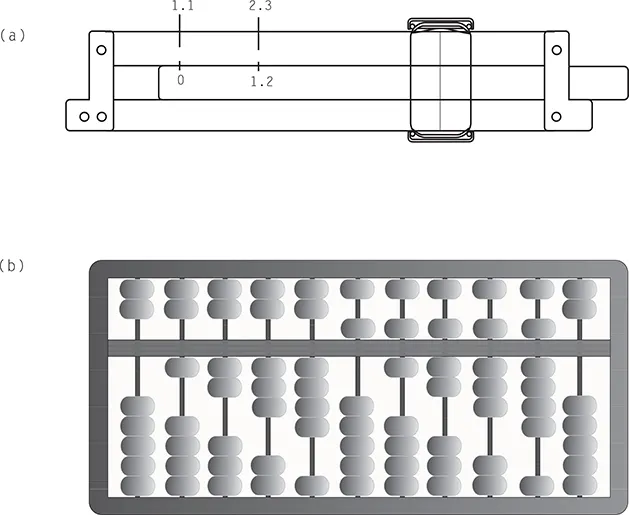
Figure 1.1
Mechanical computing devices: (a) slide rule and (b) abacus.
1.1.1 Analog vs. Digital
An analog electric signal is a voltage that may vary with time on a continuous basis as shown in Figure 1.2a. The vertical axis is the coordinate of voltage, and the horizontal axis is the coordinate of time. The voltage waveform in the box is amplified in Figure 1.2b.
Adding a sample signal of 1.2 v (volts) to another sample signal of 1.1 v, we obtain a sum of 2.3 v in an analog computer. Because the voltage is proportional to its amplitude value, it is an analog signal. But in a digital computer, both 1.2 and 1.1 are represented by a group of ones and zeros and the two bit strings are not the same. Adding 1.2 to 1.1, we obtain 2.3 as the sum, which is comprised of a different combination of ones and zeros. That is to say, the number is always represented in bits (binary digits), and each bit can be one or zero. This book covers the design issues of digital computers.
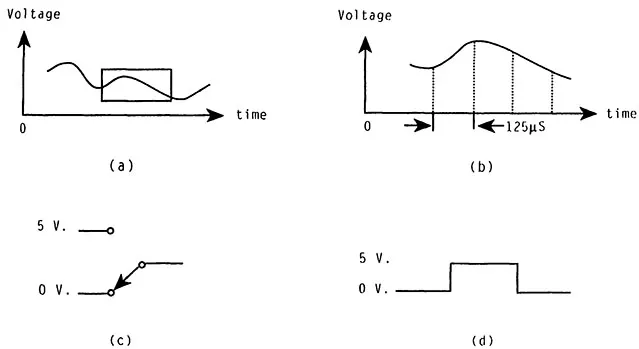
Figure 1.2
Signal waveforms and switch: (a) analog signal, (b) amplified amplitude, (c) binary switch, and (d) digital signal.
1.1.2 Digitizing
Voice is an analog signal which may be converted to the form of an electric voltage. A voice can be digitized so that it can be transmitted and processed by a digital computer. To begin, we take the sample amplitude of a voice signal at fixed time intervals. As shown in Figure 1.2b, 8000 samples are taken per second, and the time period between two consecutive samples is computed below:
Via electronic circuits, we can convert the amplitude of each voice sample into a string of binary digits, in other words, analog to digital (A–D) conversion or digitizing. If we transmit the binary digits to another station fast enough before the time interval expires, the receiving station can restore the signal from digital to analog (D–A) at the same fixed time intervals. That is, after the voice is digitized, a computer can do message handling such as send, receive, record, transfer, etc. Another example is the digital camera. After a picture is taken, it is digitized and processed by a computer process known as image processing. The future trend is to digitize all information so it may be processed by a computer.
A binary digit or bit has two states, one or zero. A bit string is a sequence of ones and zeros. Based on the bit patterns and the ways to define them, we obtain different information. A bit may be stored on disk or in an electronic circuit. If we use two voltage levels, 5 v for 1 and 0 v for zero, a binary switch is a bistable device to store one bit as depicted in Figure 1.2c. If the switch position is down, its output is 0 v; if the switch is in the up position, its output is 5 v. If we hold down the switch for a while and then flip the switch up for a while and down, its output is a combination of a low voltage, followed by a high voltage and a low voltage as depicted in Figure 1.2d. Inside the computer, the waveforms look just like this except the switching speed is much faster.
A computer has three major hardware components: a CPU (central processing unit), internal memory, and input/output (I/O) devices. The CPU is a hardware device to process data. The terms internal memory, central memory, or memory are all synonymous. The memory interacts with the CPU as it provides a temporary storage for the CPU during computation. As a matter of fact, the memory contains millions or billions of binary switches. All the instructions and data look alike as bit strings in memory. Based on physical appearance there is no difference between the two. An instruction tells the CPU what to do, for example, find data and perform an operation on it. If instructions and data are arranged correctly in memory, the instructions execute correctly on the CPU as expected. Generally speaking, an instruction is active as it tells the CPU what to do. In contrast, data are passive because they are the result of executing an instruction. By grouping instructions and data together, we obtain a computer program, otherwise known as software. Writing software means writing computer programs; the person who writes programs is called a programmer or coder.
1.2 HISTORY OF COMPUTERS
Computer architecture means the design of a computer system at the structural level that generally includes hardware and software. The computer development effort has gone through five generations. Each generation was characterized by some sort of hardware break-through along with some architectural improvements. Consequently, each generation has produced some changes, such as smaller size, lower cost, and substantial performance increase. Some of the major events in computing are briefly introduced in Table 1.1.73
1.2.1 First Generation Computers
The first generation computers were made of vacuum tubes. For example, the ENIAC was built between 1943 and 1946 by the Moore School of the University of Pennsylvania. The machine weighed 30 tons with more than 19,000 vacuum tubes, 1500 relays, etc. as shown in Figure 1.3.
Even though ENIAC had only 20 words of internal memory and required manual operations for setting up a program on a hardwired plugboard, it was the first electronic digital computer in history. The instruction sets of first generation computers were small, 16 or less. A computer program contains instructions and data, called machine executable code or code for short. Therefore, machine instructions, executable code, and machine code are all synonymous. Preparing computer instructions means programming or coding, and there is great demand for good coders.
Table 1.1 Major Events in Computing
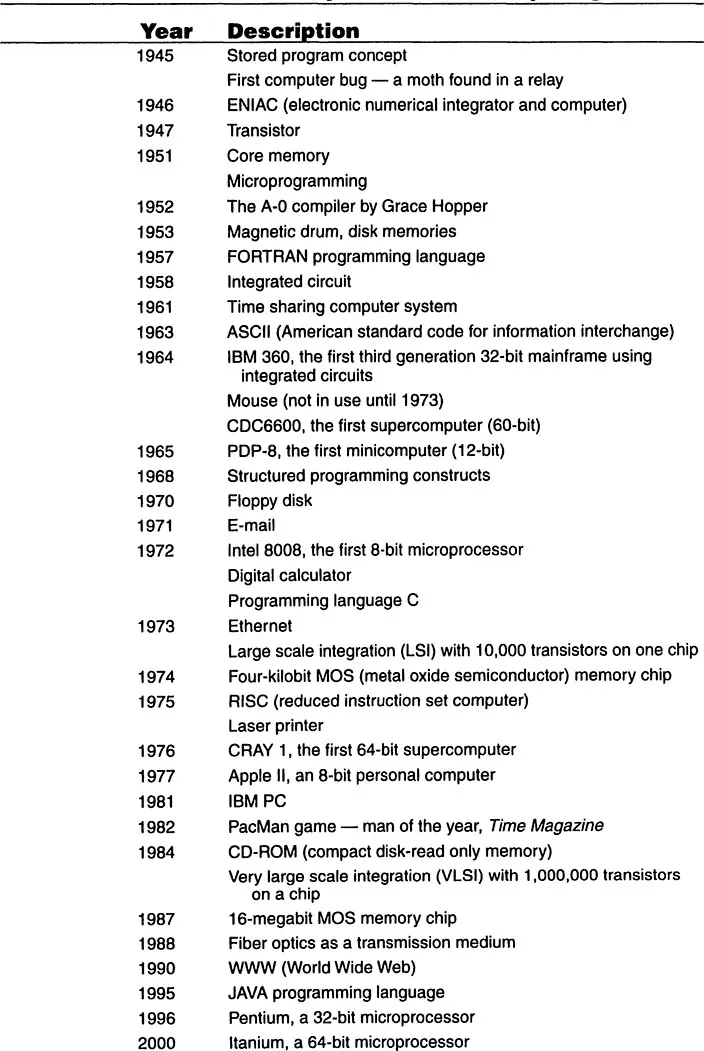
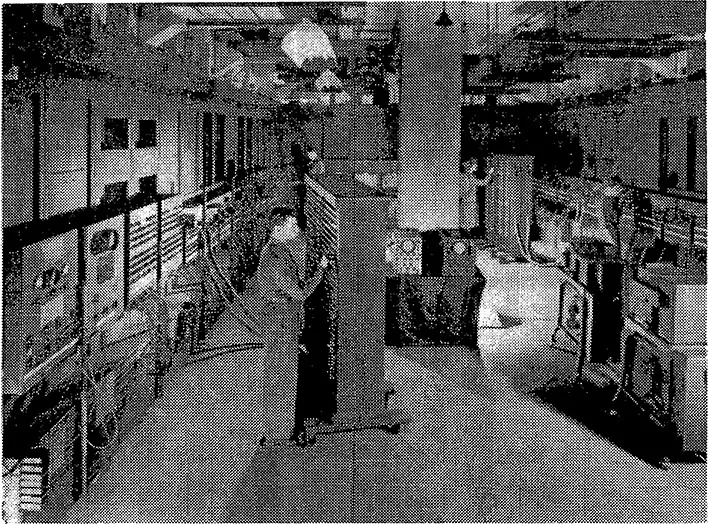
Figure 1.3
ENIAC (courtesy of Charles Babbage Institute, University of Minnesota).
In first generation computers, there were no programming tools and a programmer had to prepare the instructions by toggling switches on a hardware panel. Subsequently, UNIVAC I and IBM 704 were developed in the early 1950s, and eventually evolved into second generation computers.
1.2.2 Second Generation Computers
Starting in the late 1950’s, second generation computers emerged. These machines commonly used discrete transistors and magnetic core memories. Their processors had powerful instruction sets along with many architectural features. At the same time, progress was being made in system software development. For example, the operating system (OS) was developed as a set of control programs running alongside a user application program in the computer. In addition, high-level programming language compilers, such as COBOL and FORTRAN, were developed to make programming much easier. A compiler is a software tool that translates a program into some form of machine code. The popular second generation machines included the IBM 7000 series and the CDC 6000 series. It is interesting that CDC 6600 and 7600 were the fastest computers in their era, but are now out-ranked by the performance of personal computers (PC).
1.2.3 Third Generation Computers
In 1964, while every competitor still dwelled on the second generation development, IBM made a monumental decision to abandon its old 7000 product line and push its 360 product line, a family of third generation computers. The IBM 360 systems, which later became 370, mainly used integrated circuits (ICs) in the system and magnetic cores as central memory. An IC chip contains many transistors, so the size of a circuit board is smaller. Some are f...
Table of contents
- Cover Page
- Title Page
- Copyright Page
- Preface
- About the Author
- Acronyms and Abbreviations
- Table of Contents
- Chapter 1 Introduction to Computers
- Chapter 2 Number Systems
- Chapter 3 Basic Computer Principles
- Chapter 4 Assembly Language Principles
- Chapter 5 Computer Architecture - General Features
- Chapter 6 Microprogrammed CPU Design
- Chapter 7 Superscalar Machine Principles
- Chapter 8 Vector and Multiple-Processor Machines
- Chapter 9 Processor Design Case Studies
- Chapter 10 Stack Machine Principles
- References
Trusted by 375,005 students
Access to over 1.5 million titles for a fair monthly price.
Study more efficiently using our study tools.
Frequently asked questions
Yes, you can cancel anytime from the Subscription tab in your account settings on the Perlego website. Your subscription will stay active until the end of your current billing period. Learn how to cancel your subscription
No, books cannot be downloaded as external files, such as PDFs, for use outside of Perlego. However, you can download books within the Perlego app for offline reading on mobile or tablet. Learn how to download books offline
Perlego offers two plans: Essential and Complete
- Essential is ideal for learners and professionals who enjoy exploring a wide range of subjects. Access the Essential Library with 800,000+ trusted titles and best-sellers across business, personal growth, and the humanities. Includes unlimited reading time and Standard Read Aloud voice.
- Complete: Perfect for advanced learners and researchers needing full, unrestricted access. Unlock 1.5M+ books across hundreds of subjects, including academic and specialized titles. The Complete Plan also includes advanced features like Premium Read Aloud and Research Assistant.
We are an online textbook subscription service, where you can get access to an entire online library for less than the price of a single book per month. With over 1.5 million books across 990+ topics, we’ve got you covered! Learn about our mission
Look out for the read-aloud symbol on your next book to see if you can listen to it. The read-aloud tool reads text aloud for you, highlighting the text as it is being read. You can pause it, speed it up and slow it down. Learn more about Read Aloud
Yes! You can use the Perlego app on both iOS and Android devices to read anytime, anywhere — even offline. Perfect for commutes or when you’re on the go.
Please note we cannot support devices running on iOS 13 and Android 7 or earlier. Learn more about using the app
Please note we cannot support devices running on iOS 13 and Android 7 or earlier. Learn more about using the app
Yes, you can access Computer Architecture by John Y. Hsu in PDF and/or ePUB format, as well as other popular books in Ciencia de la computación & Ingeniería computacional. We have over 1.5 million books available in our catalogue for you to explore.